





Thursday, 22 October 2026 · 11 Jumada I 1448 AH Sun – Thu · 9:00 – 18:00
+971 56 914 9477 العربية
WhatsApp

MTouch Plus-MB

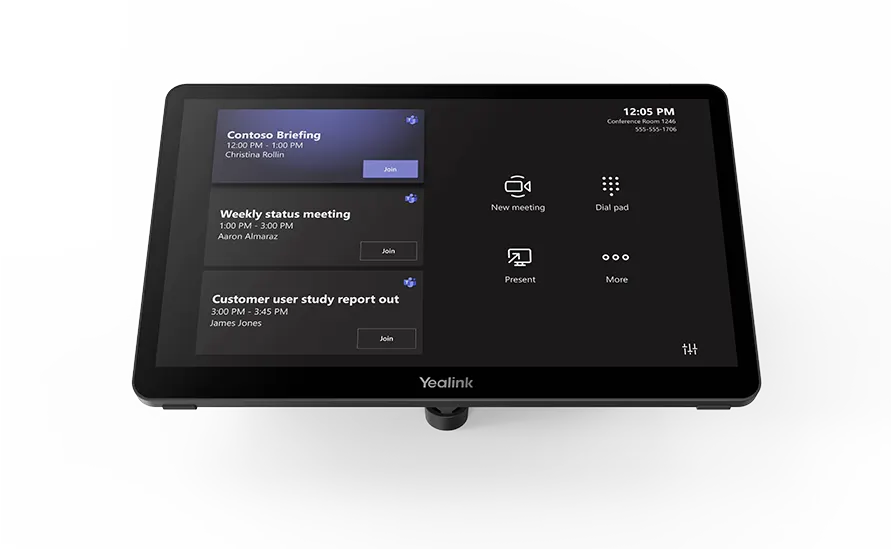
Yealink MTouch Plus-MB 11.6-inch Universal Touch Console

WhatsApp
Priceon request
QuotationWithin 1 working day
DeliveryConfirmed with your quote, based on stock
PDFDownload datasheet (Yealink MTouch Plus-MB Datasheet.pdf)
Overview

The Yealink MTouch Plus-MB is an 11.6-inch touch console for Yealink MTRoW meeting rooms. Its anti-fingerprint, anti-glare IPS screen runs at 1920 × 1080 with 10-point multi-touch, and it shares content via AirPlay and Miracast. A USB-C PD port keeps a laptop charged during meetings. It suits IT and facilities teams in Doha, Lusail and Education City fitting out MeetingBoard rooms. Request a quote from SmartRooms Qatar.

What the MTouch Plus-MB does in an MTRoW room

The Yealink MTouch Plus-MB is a touch console for Yealink MeetingBoard and MeetingBoard Pro rooms that run the MTRoW solution. It is the control point of the room: the person leading a meeting uses it to manage the session, join the meeting and share content from a laptop or phone. Because it is listed as compatible with all MTRoW boards, it fits rooms built around any board in that range.

Screen, touch and wireless sharing

The screen is an 11.6-inch IPS panel with a 1920 × 1080 resolution. Its anti-fingerprint and anti-glare coating reduces smudges from frequent touching and reflections from room lighting, and it supports 10-point multi-touch for quick gestures. Screen brightness is rated at 290 cd/m² with a contrast ratio of 1000:1.

Content sharing works over AirPlay and Miracast, so presenters can share a screen without a cable. The console supports Wi-Fi to IEEE 802.11 a/b/g/n/ac/ax and Bluetooth 5.2.

Ports, power and what is in the box

The ports are one MCore Pro (VCH) port, one USB 2.0 Type-C port, one USB 2.0 Type-C PD port, one 3.5 mm headset port and two USB 2.0 Type-A ports. The PD port is the connection that charges a laptop during a session.

Supported OPS modules are the MCore-OPS-T and MCore-OPS-G2T. The carton contains the touch panel, a mounting bracket, a USB Type-C cable with HDMI adapter and a 7.5 m Ethernet cable. Part number 1306072.

Where it fits in Qatar

  • A West Bay boardroom: the console is set on the desk using the desktop option, so the chair can start and manage the meeting without leaving their seat.
  • A ministry meeting room in Msheireb: a wall-mounted console beside the door gives staff one control point, and with RoomSensor the system can wake as people walk in.
  • A university discussion room in Education City: a presenter connects a laptop with the USB-C cable, charges it through the PD port and shares content over AirPlay or Miracast.

Planning the installation and ordering

Three deployment methods are supported: wall, desk and flat. Before fixing anything to a wall in a Lusail or Doha building, request a free site survey from SmartRooms Qatar to check the fixing point, the cable route and the presenter's sightline.

Plan cable routes around the 7.5 m Ethernet cable and the USB Type-C cable length. The carton weighs 5.7 kg net and 6.2 kg gross and measures 327 × 105 × 220 mm, so two people should handle it during unpacking and wall fixing. The source data does not give an operating temperature range for this console, so install it in an air-conditioned room away from direct sun through glass, and confirm the environment with the SmartRooms Qatar team before installing near a window.

SmartRooms Qatar supplies the MTouch Plus-MB with delivery to all 8 municipalities of Qatar and professional installation. Quotations are usually issued within one working day. Orders can be placed by LPO or through government tenders, including Monaqasat, and paid by bank transfer, cheque or purchase order. To request a quote, send the part number 1306072, the number of consoles and the board model planned for the room.

Highlights

  • 11.6-inch anti-glare IPS touch screen with 1920 × 1080 resolution
  • 10-point multi-touch control for meeting room operation
  • AirPlay and Miracast content sharing without cables
  • USB-C PD port charges a connected laptop during meetings
  • Wall, desk or flat placement with included mounting bracket
  • Supports MCore-OPS-T and MCore-OPS-G2T modules

Estimated timeline

Quotation within 1 working day · delivery timing depends on stock availability, and we confirm it with your quotation.

Specifications

10 specifications · Source: manufacturer · checked Oct 2026
Display2
Screen Contrast
1000 : 1
Details
Screen Brightness 290 cd/m²
Port3
WiFi
IEEE 802.11 a/b/g/n/ac/ax.
Bluetooth
BT 5.2
Details
1 MCore Pro Port (VCH Port) 1 USB 2.0 Type-C Port 1 USB 2.0 Type-C PD Port 1 3.5 mm Headset Port 2 * USB 2.0 Type-A Port
Package Content1
Details
MTouch Plus-MB Touch Panel Mounting Bracket USB Type-C Cable (with HDMI Adapter) 7.5m Ethernet Cable
Logistic Information3
N.W/CTN
5.7 kg
G.W/CTN
6.2 kg
Giftbox
327 × 105 × 220 mm
Supported OPS Model1
Details
MCore-OPS-T MCore-OPS-G2T

Downloads

12 files from the manufacturer
PDF Datasheets Yealink MTouch Plus-MB Datasheet.pdf 246 KB Yealink MTouch Plus-MB datasheets (PDF, 246 KB) PDF Manuals & guides Yealink MTouch Plus-MB Quick Start Guide (EN,DE,ES,FR,NE) V1.0.pdf 6.5 MB Yealink MTouch Plus-MB manuals & guides (PDF, 6.5 MB) URL Manuals & guides · Opens on manufacturer site Connect to Third-Party MTRoW Board Yealink MTouch Plus-MB manuals & guides (URL) URL Manuals & guides · Opens on manufacturer site MTouch Plus-MB Initial Setup and Configuration Yealink MTouch Plus-MB manuals & guides (URL) DXF Drawings & CAD · Opens on manufacturer site MTouch Plus-MB CAD Drawings.dxf Yealink MTouch Plus-MB drawings & cad (DXF) STP Drawings & CAD · Opens on manufacturer site MTouch Plus-MB CAD Drawings.stp Yealink MTouch Plus-MB drawings & cad (STP) DXF Drawings & CAD · Opens on manufacturer site MTouch Plus-MB Mounting Bracket CAD Drawings.dxf Yealink MTouch Plus-MB drawings & cad (DXF) 40 - Software & firmware · Opens on manufacturer site MTouch Plus (MTouch E2, MShare E2) 282.435.0.40 - Firmware & Release Note Yealink MTouch Plus-MB software & firmware (40 - FIRMWARE & RELEASE NOTE) PDF Other documents Mounts Bracket Compatibility Lists.pdf 65 KB Yealink MTouch Plus-MB other documents (PDF, 65 KB) PDF Other documents Yealink Regulatory Notice V1.2.pdf 1.0 MB Yealink MTouch Plus-MB other documents (PDF, 1.0 MB) URL Other documents · Opens on manufacturer site Rooms Accessories Compatibility Lists Yealink MTouch Plus-MB other documents (URL) URL Other documents · Opens on manufacturer site Rooms Product Family Yealink MTouch Plus-MB other documents (URL)

Questions about MTouch Plus-MB

What is the Yealink MTouch Plus-MB used for?
It is a touch console that lets whoever runs a meeting control a Yealink MeetingBoard or MeetingBoard Pro room from one 11.6-inch screen. It is built for the MTRoW solution and is compatible with all MTRoW boards. It suits IT managers and facilities teams in Doha who want to standardise meeting rooms on Yealink hardware, with one control point in each room.
Which boards is it compatible with?
The MTouch Plus-MB is compatible with all MTRoW boards, meaning the MeetingBoard and MeetingBoard Pro systems that use the MTRoW solution. Before ordering, confirm which board is installed or planned for the room. A free site survey from SmartRooms Qatar can check the existing setup so the console is matched to the right system.
Does it support MCore OPS modules?
Yes. The specifications list two supported OPS models: MCore-OPS-T and MCore-OPS-G2T. The console has one MCore Pro (VCH) port. If your room uses a different OPS model, ask the SmartRooms Qatar team to confirm compatibility before you request a quote, so the order lists the correct modules and avoids a mismatch on site.
How does AirPlay and Miracast sharing work with this console?
Presenters can share their screen wirelessly using AirPlay or Miracast, so no cable is needed for content sharing. Consider a private school in Al Wakrah setting up a staff meeting room: a teacher can present lesson plans or reports from a personal device without searching for cables. Confirm that your devices support these protocols before the room goes live.
Can it charge a laptop during meetings?
Yes. The USB 2.0 Type-C PD port charges connected devices through the PD power supply, and the USB Type-C cable in the box can keep a laptop powered while it shares content. The source data does not state the charging wattage, so check your laptop's power requirement with SmartRooms Qatar before ordering. This suits long board meetings in Doha offices.
What mounting options are included?
The console supports three deployment methods: wall, desk and flat placement. The package includes a mounting bracket designed to make those positions possible. Before fixing anything to a wall in a West Bay or Lusail office, book a free site survey so the fixing point, cable route and the presenter's sightline are checked against the room layout.
What ports and wireless options does it have?
The ports are one MCore Pro (VCH), one USB 2.0 Type-C, one USB 2.0 Type-C PD, one 3.5 mm headset port and two USB 2.0 Type-A. Wireless support covers IEEE 802.11 a/b/g/n/ac/ax Wi-Fi and Bluetooth 5.2. The box includes a 7.5 m Ethernet cable for a wired network connection, so plan the console position relative to your network point before installation.
What does the carton contain and how much does it weigh?
The carton includes the MTouch Plus-MB touch panel, a mounting bracket, a USB Type-C cable with HDMI adapter and a 7.5 m Ethernet cable. It weighs 5.7 kg net and 6.2 kg gross, with packaging dimensions of 327 × 105 × 220 mm, which helps facilities teams plan storage and carrying inside the building. The part number is 1306072.
Is it suitable for a boardroom in West Bay?
Yes, provided the room runs on a Yealink MTRoW system. Desk placement lets the chair start and manage the meeting from the table, and the anti-glare coating helps reduce reflections from overhead lighting. The 11.6-inch screen is a control surface, so a larger display for shared content must be planned separately in the room.
Can it be installed near a window where summer temperatures exceed 45°C?
The source data for this console does not give an operating temperature range, so its performance in extreme heat cannot be confirmed from the specifications. Choose an air-conditioned room away from direct sunlight through windows, and confirm the installation environment with the SmartRooms Qatar team before fixing it. This matters for rooms with glass walls in Doha.
Does it wake the room automatically when people walk in?
The product information states that the console works with RoomSensor to detect participants entering the room and wake the whole system automatically. This suits offices in Lusail or Msheireb where staff walk into meetings often. RoomSensor is not listed in the package contents, so ask SmartRooms Qatar to confirm whether it is needed and include it in your quotation.
Can a government office order it through an LPO or tender?
Yes. SmartRooms Qatar accepts purchase orders (LPOs) and government tenders, including those published on Monaqasat, and accepts payment by bank transfer, cheque or purchase order. When equipping several meeting rooms in a ministry or authority, list the part number 1306072, the number of consoles and the MTRoW board type for each room so the quotation matches the tender specification. Quotations are usually issued within one working day.

Similar models

Clevertouch CleverCam Clevertouch CleverCam 4K ePTZ Camera for Video Conferencing
Main Stream: 3840×2160 @30fps
Clevertouch CleverInk Clevertouch CleverInk Writing Technology for Interactive Displays
Accessories
Clevertouch Intelligent Sensor Module Clevertouch Intelligent Sensor Module for Interactive Flat Panels
Accessories
Clevertouch LUX Mini Clevertouch LUX Mini Android 13 OPS Upgrade Module
8GB 64GB
Email Call




