Thursday, 22 October 2026 · 11 Jumada I 1448 AH Sun – Thu · 9:00 – 18:00
+971 56 914 9477 العربية
WhatsApp

Capture System V3

MAXHUB Capture System V3 Lecture Capture and Audio Kit

WhatsApp
Priceon request
QuotationWithin 1 working day
DeliveryConfirmed with your quote, based on stock
Overview

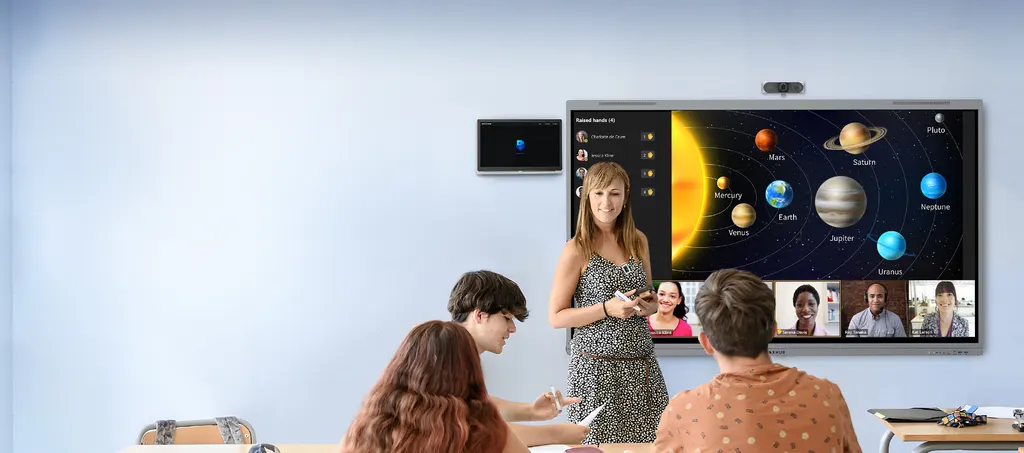
The MAXHUB Capture System V3 is a lecture capture package for teaching rooms. It pairs a PTZ camera offering 4K end-to-end recording and 40X zoom with a dual-lens student camera, a wireless teacher microphone, a ceiling microphone and a touch-operated capture host. AI tracking and noise reduction keep the presenter in frame and the voice clear, and the system works with Teams, Zoom and Google Meet. It suits schools, universities and training centres in Doha and beyond that run hybrid lessons.

What the Capture System V3 does inside the classroom

The MAXHUB Capture System V3 is a complete package for recording lessons in teaching rooms. Instead of a single camera aimed at the board, it brings together a PTZ camera, a student camera, a wireless teacher microphone, a ceiling microphone and a touch-operated capture host, so a lesson can be recorded and streamed with little manual effort. It is designed for hybrid teaching, where some students sit in the room while others join from elsewhere, and for building a library of course material that staff can reuse.

Camera and audio facts that matter

The main PTZ camera records in 4K from end to end and offers 40X zoom for long-distance shooting, which helps when the presenter stands at the far end of a large room. AI intelligent tracking follows the presenter, so the operator does not have to steer the camera during the lesson. The student camera is a dual-lens micro PTZ that captures panoramic views of the class as well as close-up shots, and its AI student detection switches scenes automatically as the action moves.

On the audio side, the teacher wears a wireless microphone designed for lectures. It connects automatically as soon as it is removed and offers several wearing options, so a teacher can move between the board, the lab benches and the door. The ceiling microphone uses a 5A audio algorithm and AI-powered noise reduction to keep the teacher's voice clear in the recorded video.

Capturing and reusing course material

Six-channel image capture records several video sources at the same time, and the high-definition course video is stored for later use. The touch capture host shows the recording in real time, so the operator can see exactly what is being captured. Its broadcast-style output reduces the editing time needed after each lesson, which matters for staff who already have full timetables.

Where it fits in Qatar

  • A private school in Al Wakrah fitting out new classrooms for hybrid lessons, with families or students joining from abroad.
  • A university lecture theatre in Education City where recorded sessions are archived for students who study remotely.
  • A training centre in the Industrial Area running technical courses, with staff at other sites joining over Teams or Zoom.

What to plan before ordering

Confirm which conferencing platform your school or department uses, since the system is compatible with Teams, Zoom and Google Meet. Plan the camera positions and the ceiling microphone location with your IT team, and use the free site survey from SmartRooms Qatar to check the room layout before installation. Confirm the environmental conditions of each room with the SmartRooms Qatar team as well. Supply and delivery to all eight municipalities of Qatar, with professional installation, are available, and organisations can order through a purchase order (LPO) or a government tender.

Send your room layout and platform requirements to SmartRooms Qatar and request a quote. Quotations are usually returned within one working day.

Highlights

  • 4K end-to-end recording from the PTZ camera
  • 40X zoom for long-distance shooting in large rooms
  • Dual-lens student camera with automatic scene switching
  • Wireless teacher microphone connects automatically when removed
  • Six-channel image capture for reusable course video
  • Compatible with Teams, Zoom and Google Meet

Room fit

Tell us the room size and platform (Teams, Zoom or BYOD) and we confirm the right combination with your quotation.

Estimated timeline

Quotation within 1 working day · delivery timing depends on stock availability, and we confirm it with your quotation.
Specifications

Source: manufacturer · checked Oct 2026
The full specification and datasheet for this model are available on request; we send them with your quotation.

Downloads

0 files from the manufacturer
No downloadable files are listed for this model yet. Ask us and we will send the datasheet.

Questions about Capture System V3

What is the MAXHUB Capture System V3 used for?
It records classroom lessons automatically so schools and universities can run hybrid teaching and build a library of course resources. The package combines a PTZ camera, a student camera, a teacher microphone, a ceiling microphone and a touch capture host. It suits organisations where students join from home or where recorded lessons must be kept for later review and revision.
Which rooms suit this system best?
Mid-sized classrooms, seminar rooms and lecture theatres where the teacher moves around the front of the room suit it best. The 40X zoom reaches presenters at the far end of a long room, while the student camera covers the seating area. A training centre in the Industrial Area with several teaching rooms could start with the rooms used most often for remote participants.
How does the PTZ camera follow a lecture?
The PTZ camera records in 4K end to end and uses AI intelligent tracking to follow the presenter, so the operator does not need to steer it during class. Its 40X zoom gives long-distance shots from the back of the room. Ask for camera positions to be checked during the free site survey so the presenter stays in frame at the board and in the main teaching area.
What does the student camera add to the recording?
The student camera is a dual-lens micro PTZ. It captures panoramic views of the class and close-up shots, and its AI student detection switches scenes automatically. This helps in a discussion-based class at a university in Education City, where questions come from different seats and remote students need to see who is speaking.
Is it compatible with Microsoft Teams, Zoom and Google Meet?
Yes. The system is compatible with mainstream conferencing platforms including Teams, Zoom and Google Meet, so a remote group can join a live lesson from another site or from home. Confirm which platform your school or department uses before ordering, so account settings and network requirements can be planned with your IT team.
How does the wireless microphone work for teachers?
The wireless microphone is designed specifically for teachers. It connects automatically when removed and offers several wearing options, which suits a presenter who walks between the board, the lab benches and the door. Its clear pickup supports lecture audio over a long session in a school or training centre, without the teacher being tied to a fixed desk.
Can a private school in Al Wakrah use it to fit out new classrooms?
Yes. A private school fitting out new classrooms in Al Wakrah can plan one capture package per teaching room, starting with rooms used for hybrid lessons. Each room needs its own layout check, camera placement and ceiling microphone position. SmartRooms Qatar offers a free site survey, and a single purchase order (LPO) can cover several rooms.
How does the ceiling microphone help the recording?
The ceiling microphone uses a 5A audio algorithm and AI-powered noise reduction to keep the teacher's voice clear in the recorded video. This matters in a busy classroom where chairs move and students talk over each other. Plan the ceiling microphone position during the site survey, because it affects how well sound is picked up across the room.
What is six-channel image capture for?
Six-channel image capture records six video channels at the same time, so one lesson can be saved from several viewpoints. The high-definition course video is captured and kept for reuse. This suits a university course in Education City that wants recorded lessons for revision, or a training centre that keeps material for staff who join the course later.
Can staff run the capture host without technical training?
The capture host is touch-operated and shows the recording in real time, so staff can see what is being captured while the lesson runs. Its broadcast-style output reduces editing after class. Ask SmartRooms Qatar to confirm the controls against your own lesson format before you place an order, so the set-up matches how your staff teach.
How can school leaders use the remote observation feature?
The product data describes a remote observation function through MAXHUB Caster, which lets educators, administrators and researchers review teaching practice, student engagement and instructional effectiveness. Confirm with SmartRooms Qatar how Caster is supplied with this model before you plan observation workflows, so the school's requirements are matched to the quotation.
What should we plan before ordering?
Plan the camera and ceiling microphone positions, the conferencing platform, and the network each room will use. SmartRooms Qatar offers a free site survey and professional installation, and delivery covers all eight municipalities of Qatar. Confirm the environmental conditions of each room with the team before installation. Quotations are usually returned within one working day.

Similar models

Biamp Tesira AMP-450BP Biamp Tesira AMP-450BP 4-Channel PoE+ Conferencing Amplifier
(20Hz-20kHz BW): > 90dB TAA Compliant
Biamp Tesira AMP-450P Biamp Tesira AMP-450P 4-Channel PoE+ Conferencing Amplifier
(20Hz-20kHz BW): > 90dB TAA Compliant
Biamp Tesira AMP-A460H Biamp Tesira AMP-A460H 4-Channel 60W Conferencing Amplifier
(20Hz - 20kHz TAA Compliant
Biamp Tesira TB-1 Biamp Tesira TB-1 Ceiling Tile Bridge for Plenum Boxes
TAA Compliant
Biamp TesiraCONNECT PEX Biamp TesiraCONNECT PEX 15m (50-foot) Power Extension Cable
Audio & DSP
Email Call