Thursday, 22 October 2026 · 11 Jumada I 1448 AH Sun – Thu · 9:00 – 18:00
+971 56 914 9477 العربية
WhatsApp

NearHub Decode ND10

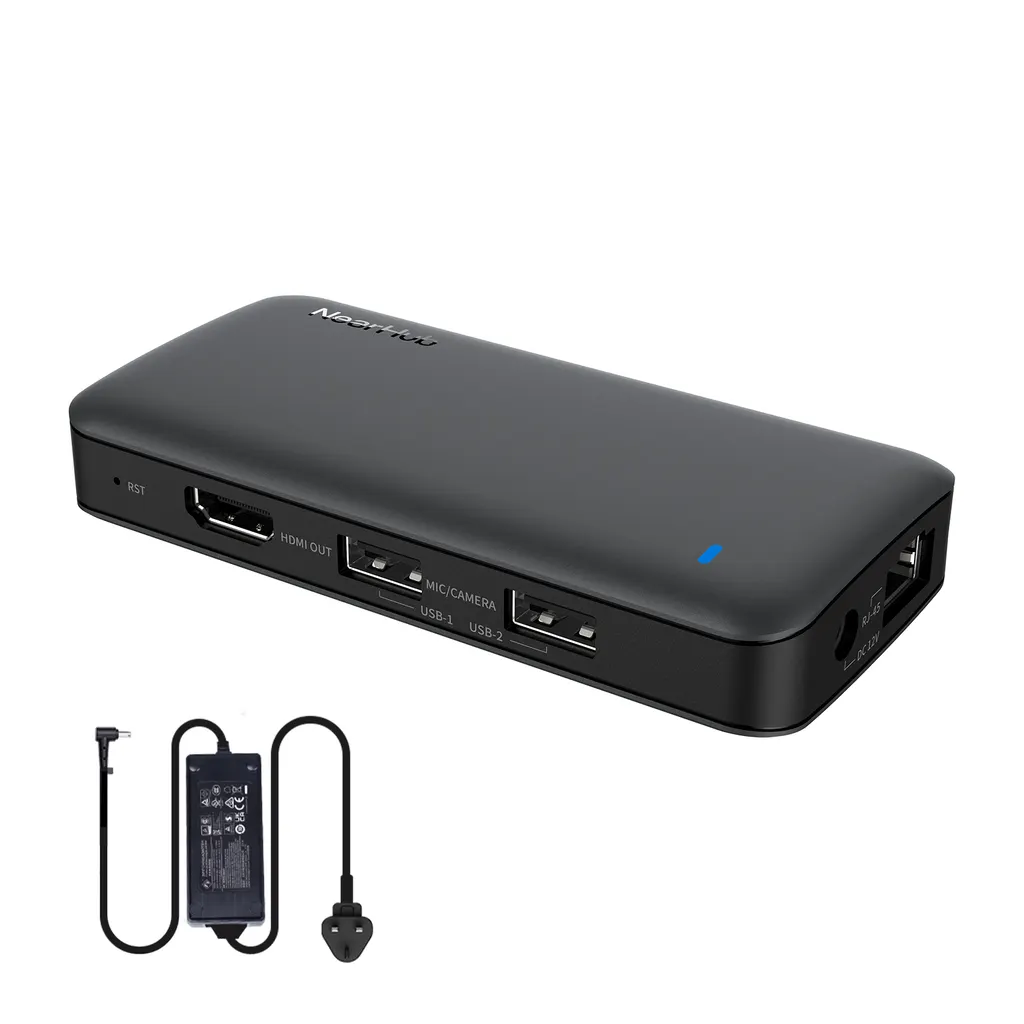
Nearity NearHub Decode ND10 Network AV Decoder for NearHub Rooms

WhatsApp
Priceon request
QuotationWithin 1 working day
DeliveryConfirmed with your quote, based on stock
Overview

The Nearity NearHub Decode ND10 receives conference audio and video over the network and outputs it through HDMI at up to 4K and 30fps. It can show the same content on several displays or different content on each one, and it carries keyboard and mouse signals for KVM over IP. It suits universities and ministries running networked meeting rooms in Doha. Request a quote from SmartRooms Qatar.

What the NearHub Decode ND10 does in a NearHub Rooms installation

The Nearity NearHub Decode ND10 is the decoding unit in the NearHub Rooms solution. It receives audio and video conference signals over the network and passes them to a display through HDMI, so a screen does not need its own direct cable from the source equipment. Because the signal travels across the network, the decoder can sit close to the display while the source equipment is installed elsewhere in the building.

Within NearHub Rooms, the ND10 can show the same conference content on several screens, or send different content to different displays. Those displays may sit in one room or in separate conference rooms. That flexibility suits organisations that want one meeting to appear in a boardroom and an overflow room at the same time.

Video output, KVM and what they mean for your room

The HDMI output supports resolutions up to 4K at 30 frames per second. That is well suited to documents, slides and shared applications on large screens in meeting rooms and lecture halls. Buyers with a requirement for higher frame rates should confirm it with the SmartRooms Qatar team before asking for a quotation.

KVM over IP allows an operator at one location to control a computer at another location across the network. The ND10 carries the mouse and keyboard control signals along with audio and video, which gives IT staff remote management and maintenance access without a visit to each room.

Where it fits in Qatar

  • Universities: a training centre in Education City or Lusail that runs lectures across several rooms can show one session on a main hall screen and a second room display at the same time.
  • Government ministries: a ministry in Msheireb with boardrooms on different floors can present the same meeting in each room, while the IT team maintains the room computers from a central desk.
  • Companies in West Bay: teams in Doha and abroad join one call, and the meeting feed is distributed to separate rooms inside the office.

What to plan before you order

Start with a list of rooms and displays. The ND10 is suited to setups where screens must show shared or separate content, so count each endpoint and note which room it serves. Next, check the network path between the source equipment and every decoder, because the unit relies on the network to carry audio, video and control signals.

The manufacturer data for the ND10 does not give a power input or an operating temperature range. Ask SmartRooms Qatar to confirm power and environmental conditions for the intended location, especially if the unit will sit in a hot equipment cabinet during summer, when temperatures in Qatar can exceed 45°C. Nearity offers a 1-year warranty on its products covering quality-related issues.

SmartRooms Qatar can include supply, delivery to all eight municipalities and professional installation in your quotation. A free site survey can confirm display positions and cable routes before you commit. Payment is accepted by bank transfer, cheque or purchase order, and government buyers can order against an LPO.

Request a quote from SmartRooms Qatar with your room count, display numbers and network details, and the team will return a quotation usually within one working day.

Highlights

  • HDMI output up to 4K resolution at 30fps
  • Distributes conference audio and video over the network
  • Same or different content across multiple displays
  • KVM over IP carries keyboard and mouse signals
  • Part of the NearHub Rooms solution
  • Manufacturer warranty of 1 year for quality issues

Room fit

Tell us the room size and platform (Teams, Zoom or BYOD) and we confirm the right combination with your quotation.

Estimated timeline

Quotation within 1 working day · delivery timing depends on stock availability, and we confirm it with your quotation.
Specifications

Source: manufacturer · checked Oct 2026
The full specification and datasheet for this model are available on request; we send them with your quotation.

Downloads

0 files from the manufacturer
No downloadable files are listed for this model yet. Ask us and we will send the datasheet.

Questions about NearHub Decode ND10

What is the Nearity NearHub Decode ND10 used for?
It is the decoding unit in the NearHub Rooms solution. It receives audio and video conference signals over the network and outputs them through HDMI to a display, so a screen does not need a direct cable from the source equipment. It also carries mouse and keyboard signals for remote management. It suits organisations running networked meeting rooms in Doha and beyond.
What is the maximum HDMI output resolution?
The ND10 supports HDMI output up to 4K at 30 frames per second. That is suitable for showing documents, slides and shared content clearly on a large display in a boardroom or lecture hall. If your content needs a higher frame rate, confirm that requirement with the SmartRooms Qatar team before requesting a quotation.
Can one decoder show the same content on several screens?
Yes. Depending on how many displays are in the room or in other rooms, the ND10 can show the same conference content on several screens or send different content to different ones. A school in Al Rayyan with a main hall screen and an overflow classroom screen could show one session on both at the same time.
Can it send content to screens in different meeting rooms?
Yes, the manufacturer describes display on screens in different conference rooms. A company with boardrooms in West Bay and a meeting room in Lusail could distribute one meeting to screens at both sites, as long as the network links the locations. Confirm the network arrangement during the site survey.
What is KVM over IP and why does it matter?
KVM over IP lets someone at one location control a computer at another location across the network, using the keyboard and mouse connected at the first point. The ND10 transmits those control signals alongside audio and video. For an IT team looking after rooms in several Doha buildings, maintenance can be carried out from a central desk without visiting each room.
Is the ND10 suitable for a government ministry?
It suits ministries and authorities that run networked AV rooms and need central IT control. Government buyers can order against an LPO or through a Monaqasat tender, and SmartRooms Qatar can prepare a quotation for the number of endpoints you specify. Share your tender requirements so the team can match the quotation to them.
How many ND10 units will my room need?
It depends on how many displays need the conference feed and whether each one shows the same or different content. Count every screen and note which room it sits in. SmartRooms Qatar offers a free site survey that can confirm display positions and network routes before the quotation is issued, usually within one working day of your request.
What power and temperature details are available for the ND10?
The manufacturer data provided for the ND10 does not list a power input or operating temperature range. Before ordering, ask SmartRooms Qatar to confirm the installation environment. This matters if the unit will sit in an equipment cabinet during summer, when temperatures in Qatar can exceed 45°C.
What warranty does the ND10 carry?
Nearity offers a 1-year warranty on its products, which covers quality-related issues. SmartRooms Qatar supplies the unit under that manufacturer warranty. Ask the team to confirm the full warranty conditions in your quotation, so you know exactly what is covered before you approve the purchase order.
Does SmartRooms Qatar install the ND10?
Professional installation can be included in your quotation, and delivery covers all eight municipalities of Qatar. Installers can check the network connection and the HDMI path to each display before the room is handed over, which helps avoid problems at commissioning.
Does the ND10 need other NearHub Rooms equipment?
The manufacturer positions the ND10 as a key part of the NearHub Rooms solution, which handles conference audio and video distribution across the network. Confirm with SmartRooms Qatar how it will connect to your existing equipment before ordering, so the quotation covers every required part.
How do I request a quote for the ND10?
Send the number of rooms, the number of displays in each room and whether each screen needs the same or different content. Add your network details if known. SmartRooms Qatar usually returns a quotation within one working day. Payment can be made by bank transfer, cheque or purchase order.

Similar models

Biamp Tesira AMP-450BP Biamp Tesira AMP-450BP 4-Channel PoE+ Conferencing Amplifier
(20Hz-20kHz BW): > 90dB TAA Compliant
Biamp Tesira AMP-450P Biamp Tesira AMP-450P 4-Channel PoE+ Conferencing Amplifier
(20Hz-20kHz BW): > 90dB TAA Compliant
Biamp Tesira AMP-A460H Biamp Tesira AMP-A460H 4-Channel 60W Conferencing Amplifier
(20Hz - 20kHz TAA Compliant
Biamp Tesira TB-1 Biamp Tesira TB-1 Ceiling Tile Bridge for Plenum Boxes
TAA Compliant
Biamp TesiraCONNECT PEX Biamp TesiraCONNECT PEX 15m (50-foot) Power Extension Cable
Audio & DSP
Email Call