Thursday, 22 October 2026 · 11 Jumada I 1448 AH Sun – Thu · 9:00 – 18:00
+971 56 914 9477 العربية
WhatsApp
Dahua Video Walls Current

NKB1000-E

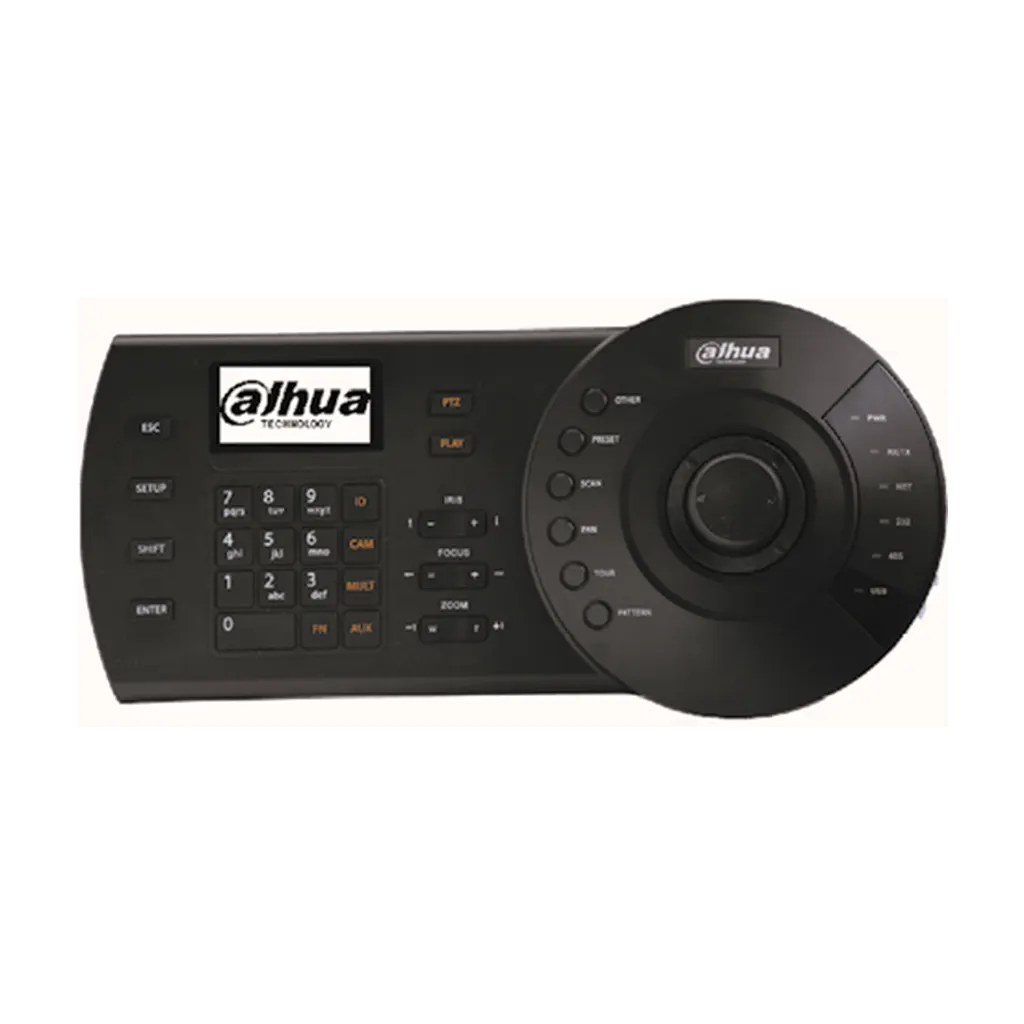
Dahua NKB1000-E Network Keyboard for Video Wall Control

WhatsApp
Priceon request
QuotationWithin 1 working day
DeliveryConfirmed with your quote, based on stock
PDFDownload datasheet (NKB1000-E_Datasheet.pdf)
Overview

The Dahua NKB1000-E is a hardware keyboard with a 3-axis joystick and LCD display, built to operate PTZ cameras, DVR recorders and video wall systems over a network or serial connection. It provides RJ-45 LAN, RS232, RS485, RS422 (reserved) and USB connectors, supports up to 64 users, and runs on a 12V DC adapter with 100V to 240V input. It suits security control rooms and monitoring centres in Doha and Lusail. Request a quote from SmartRooms Qatar.

What the NKB1000-E does on a control desk

The Dahua NKB1000-E is a network keyboard for operators who need to steer pan-tilt-zoom cameras, DVR recorders and video wall displays from a fixed desk rather than a mouse. Its 3-axis joystick uses vector solving and a twisting action, which gives precise control over camera movement and zoom. The keys are electromechanical, and a 75.2mm x 33.85mm LCD panel sits on the unit.

Connection options that match existing equipment

The keyboard works in two modes. Direct mode connects through one RS232 port and two RS485 interfaces, with DVR protocol DH-2 and dome protocols DH-SD1, PELCO-D and PELCO-P listed in the specification. Network mode connects over an RJ-45 LAN port, where each DVR or network dome is set up by IP address, port and protocol. Before ordering, check which mode and protocol your current cameras and recorders use.

Capacity for multiple operators and large camera estates

  • Up to 64 users, including the admin account
  • 256 RS485 addresses available to each user
  • Up to 2,048 network PTZ cameras added to each user
  • Preset positions, auto scan, auto pan, auto tour and pattern functions

These limits matter when several shift operators share one console or when a site has many cameras spread across buildings.

Where it fits in Qatar

A government authority running a monitoring room in Doha could place the keyboard at an operator desk beside a wall of displays, using network mode to reach cameras across several sites. A university media room in Education City could use it to select feeds for a video wall used in lectures and events. A security office in West Bay could use it to choose cameras shown on a large wall. These are typically air-conditioned rooms, and the rated working range of -10°C to +55°C leaves margin above the summer heat above 45°C that is common in Qatar.

What to plan before ordering

Confirm the interface and protocol of every camera, dome and recorder before you order, and confirm that the video wall controller accepts the keyboard's commands. The keyboard measures 330mm wide, 139mm deep and 53mm high, rising to 103mm with the joystick fitted, and weighs 1.3kg including packaging. Allow desk depth for the joystick and for cable runs to the network switch or control PC. The 12V DC adapter accepts 100V to 240V at 50Hz or 60Hz. A free site survey from SmartRooms Qatar can confirm desk space and cable routes. Request a quote with your camera list and we will confirm the right setup.

Highlights

  • 3-axis vector-solving joystick with twisting action
  • RJ-45 LAN plus RS232, RS485, RS422 (reserved) and USB
  • Direct and network modes for DVR, dome and PTZ control
  • Up to 64 users and 2,048 network PTZ cameras per user
  • Rated working range of -10°C to +55°C
  • 12V DC/2A adapter with 100V to 240V, 50/60Hz input

Estimated timeline

Quotation within 1 working day · delivery timing depends on stock availability, and we confirm it with your quotation.

Specifications

18 specifications · Source: manufacturer · checked Oct 2026
Model1
Model
NKB1000-E
General10
Keyboard Key panel
Electromechanical
Joystick
3-axis, vector-solving, with twisting, return to-center head
Keyboard Connector
RJ-45, RS232, RS485, RS422 (reserved), USB
Keyboard Communication
Direct Mode, Network Mode
Direct Mode
Interface: 1 RS232/2 RS485 DVR Protocol: DH-2 Dome Protocol: DH-SD1/PELCO-D/PELCO-P, etc
Network Mode
Interface: RJ45 DVR/Network Dome: IP Address/Port/Protocol
Display
LCD, 75.2mm×33.85mm
Maximum Number of Users
64 (including "admin")
Max RS485 Addresses (Each User)
256
Max Number of PTZ (IPC) That Can be Added over Network (Each User)
2048
Environmental7
Power Supply
Power adapter, input 100V~240V 50Hz/60Hz, output DC12V/2A
Power Consumption
5W
Working Temperature
-10 ℃ ~+55 ℃
Working Humidity
10% ~ 90%
Atmosphere Pressure
86kpa~106kpa
Dimension
330mm×139mm×53mm (W×D×H)(height: 103mm including joystick)
Weight
1.3kg (Including package)

Downloads

4 files from the manufacturer

Questions about NKB1000-E

What is the Dahua NKB1000-E used for?
The NKB1000-E is a hardware keyboard for operators who control PTZ cameras, DVR recorders and video wall displays from a desk. Its 3-axis joystick and electromechanical keys give direct control over camera movement, with preset positions, auto scan, auto pan, auto tour and pattern functions. It suits monitoring rooms and security control centres where operators switch between many feeds throughout the working day.
Which connection options does the keyboard offer?
The keyboard has an RJ-45 LAN port, an RS232 port, RS485 and RS422 (reserved) connectors, and a USB port. In direct mode it connects through one RS232 and two RS485 interfaces. In network mode it connects by RJ-45 and is configured with the IP address, port and protocol of each DVR or network dome. Choose the mode that matches how your existing cameras and recorders are wired before you request a quote.
Which protocols does it support?
Direct mode is listed with DVR protocol DH-2 and dome protocols DH-SD1, PELCO-D and PELCO-P, and the manufacturer data includes further protocols beyond these examples. Check the exact protocol used by each camera and recorder on your site. This matters most for older dome cameras in a school, plant or campus, where the protocol may differ from newer equipment. SmartRooms Qatar can check your device list against the supported protocols during quotation.
How many users and cameras can one keyboard handle?
The keyboard supports up to 64 users, including the admin account. Each user can address up to 256 RS485 addresses and add up to 2,048 network PTZ cameras. This suits a monitoring room with several shift operators, each with their own user account, and a large camera estate spread across a site such as an industrial area or a multi-building campus.
Is it suitable for the heat in Qatar?
Its rated working temperature is -10°C to +55°C, with working humidity of 10% to 90%. That range sits above the 45°C summer temperatures common in Qatar, but the keyboard is a desk device and should still sit in an air-conditioned control room. If the desk is close to a window or an unshaded area, confirm the installation environment with the SmartRooms Qatar team before ordering.
Can it run on Qatar's mains power?
The power adapter accepts 100V to 240V input at 50Hz or 60Hz and outputs 12V DC at 2A. Qatar's mains supply of 240V at 50Hz falls within that input range. Power consumption is rated at 5W, which keeps the load on an operator desk light. Confirm the plug type on the supplied adapter with the SmartRooms Qatar team when you request a quote.
How much desk space does the keyboard need?
The keyboard measures 330mm wide, 139mm deep and 53mm high, with a height of 103mm including the joystick. It weighs 1.3kg including packaging. Measure your desk depth and allow room for the joystick to move and for cable runs to the network switch or control PC. A free site survey from SmartRooms Qatar can check layout and cable routes before installation.
Can it control a video wall in a university media room in Education City?
A university media room in Education City might use the keyboard to select camera feeds and sources for a video wall used in lectures and events. The manufacturer describes it for PTZ, DVR and DSS platform video wall control, but wall processors differ. Confirm that your wall controller accepts the keyboard's serial or network commands before you order, so the setup works on the first day of use.
What camera functions can an operator use from the joystick and keys?
The keyboard lists preset positions, auto scan, auto pan, auto tour and pattern functions, along with auxiliary functions. A logistics operator at a warehouse in the Industrial Area could set an auto tour across loading bay cameras, so the operator can watch for alerts and take manual control with the joystick when a vehicle needs closer inspection. Confirm which functions your specific camera model supports.
Is the NKB1000-E a current model?
Yes, the NKB1000-E is listed as a current model in Dahua's Keyboard Series. Request a quote from SmartRooms Qatar with the make and model of your cameras, recorders and wall controller, and we will confirm compatibility before you commit. Quotations are usually issued within one working day.
Can a government body or school buy this keyboard through an LPO or tender?
Yes. SmartRooms Qatar accepts purchase orders (LPOs) and government tenders, including Monaqasat, and accepts payment by bank transfer, cheque or purchase order. A ministry or public school ordering keyboards for several control rooms can list the model in one purchase order and request a single quotation covering all units and installation planning.

Similar models

Barco TransForm NSD-220 Barco TransForm NSD-220 Video Wall Controller
Controllers & processors
Dahua DSCON2100-0410H Dahua DSCON2100-0410H 1.5U Embedded Multi-Screen Video Wall Controller
Controllers & processors
Dahua DSCON2100-0416H Dahua DSCON2100-0416H 1.5U Embedded Multi-Screen Video Wall Controller
Controllers & processors
Dahua DSCON8000-S13 Dahua DSCON8000-S13 5U Splicing Controller for Video Walls
Supports video decoding at 32 MP
Dahua DSMS0105UHI-4K Dahua DSMS0105UHI-4K Distributed Ultra HD AVoIP Encoder
Controllers & processors
Email Call