Thursday, 22 October 2026 · 11 Jumada I 1448 AH Sun – Thu · 9:00 – 18:00
+971 56 914 9477 العربية
WhatsApp

AMS (Account Management System)

BenQ AMS Account Management System for BenQ Boards

WhatsApp
Priceon request
QuotationWithin 1 working day
DeliveryConfirmed with your quote, based on stock
PDFDownload datasheet (AMS_AR_190408145118.pdf)
Overview

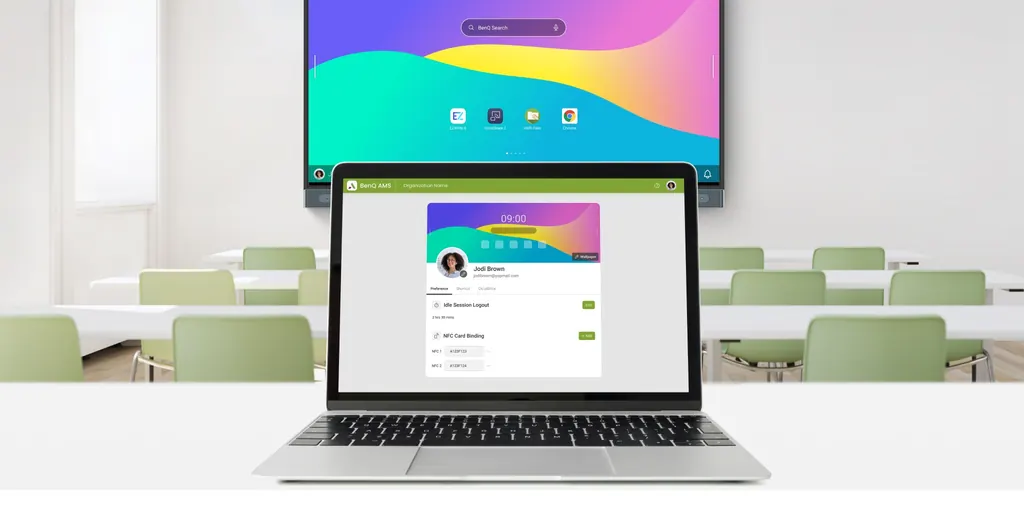
BenQ AMS (Account Management System) is software for BenQ interactive boards, smart signage and smart projectors. Teachers and staff sign in with an NFC card or QR code, and their personal apps, wallpaper and cloud storage load on that board. It also supports single sign-on through school directory services. Schools with shared boards in Qatar can request a quote.

What BenQ AMS does on a shared board

BenQ AMS (Account Management System) is account software for BenQ interactive whiteboards, smart signage and smart projectors. Instead of every user working from the same generic desktop, AMS loads each person's own apps, wallpaper, bookmarks and cloud storage when they sign in. When they sign out, those settings leave the board with them, so the next user starts from a clean space.

The software suits schools, universities and offices where one board serves several people across the day. A lecturer in the morning, a science teacher at lunchtime and a head of department after school can each reach their own workspace without rebuilding it.

Login options and what they protect

Sign-in happens at the board itself. A user with an NFC card places it on the sensor and is logged in straight away. Anyone without a card can scan a QR code with a mobile device and sign in from the phone, so the password never has to be typed in front of the whole class.

When a school account is used, the username and password go directly to the authentication server and are not stored on the board. Separate user accounts keep each person's files and app data visible only to that person, which lowers the risk of credential theft from a device many people use.

Cloud storage and single sign-on for IT teams

After login, AMS connects to the cloud accounts a user has linked, including Google Drive, Dropbox, OneDrive, Box and Nextcloud. Files can be opened and saved on the board during a lesson, and the connected storage is visible only while that user is signed in.

The biggest gain for IT departments is single sign-on. Once a school's directory services are synced with AMS, users reach BenQ devices and services with their familiar school credentials. That cuts the manual account setup on each board and reduces the number of passwords staff must manage.

Where it fits in Qatar

  • Secondary schools in Al Rayyan or Al Sadd where teachers rotate between classrooms with shared boards and need their materials to follow them.
  • Universities and training centres in Education City or Lusail where lecturers move between lecture rooms and open course files from their cloud drives.
  • Government training rooms in Doha where staff from different departments share one smart display and need secure, separate workspaces.

What to plan before rollout

Confirm which BenQ models you have. The manufacturer lists interactive whiteboards, smart signage and smart projectors and describes sign-in on Pro Series boards, so check your exact models before ordering.

Plan the network next. Boards need to be managed on the same network for users to log in to them across classrooms. Decide whether staff will use NFC cards, QR codes or both, and whether your directory services will be synced for single sign-on. The SmartRooms Qatar team can help you map these choices to your site.

Because AMS is software, nothing needs to be wall-mounted for it. Where it runs alongside new displays, SmartRooms Qatar offers free site surveys and professional installation, and quotations are usually provided within one working day.

Ready to set up personal logins on your BenQ boards? Request a quote from SmartRooms Qatar and tell us your board models, number of classrooms and preferred login method.

Highlights

  • Sign in with a single tap of an NFC card
  • QR code login keeps passwords off the classroom screen
  • Works with BenQ interactive boards, smart signage and projectors
  • Access Google Drive, Dropbox, OneDrive, Box and Nextcloud
  • Single sign-on through school directory services
  • Credentials sent to the authentication server, not stored locally
  • CASA Tier 2 verified for cloud data security

Estimated timeline

Quotation within 1 working day · delivery timing depends on stock availability, and we confirm it with your quotation.


Specifications

Source: manufacturer · checked Oct 2026
The full specification and datasheet for this model are available on request; we send them with your quotation.

Downloads

3 files from the manufacturer

Questions about AMS (Account Management System)

What is BenQ AMS and who is it for?
BenQ AMS, short for Account Management System, is software that lets each person sign into a BenQ interactive whiteboard, smart signage display or smart projector and load their own apps, wallpaper, bookmarks and cloud storage. It suits schools, universities and offices where one board is shared by several people during the day. Request a quote to match it to your boards.
Do users need an NFC card to log in?
No. Users with an NFC card place it on the board's sensor for an immediate login. Anyone without a card can scan a QR code with a mobile device and sign in from the phone, which keeps the password out of sight of the class. Confirm with the SmartRooms Qatar team which option suits your staff before rollout.
Can teachers open Google Drive and OneDrive files on the board?
Yes. Once a teacher logs in, AMS connects to the cloud accounts linked to that user, including Google Drive, Dropbox, OneDrive, Box and Nextcloud. Files can be opened and saved on the board during a lesson, and the connected storage is visible only while that user is signed in.
What happens when a teacher logs in to a board in another classroom?
As long as the board is managed on the same network, the teacher can log in with their BenQ account credentials and get the same experience as on their usual board. AMS loads their personal settings and gives secure access to their cloud storage, so a teacher moving between classrooms in a secondary school in Al Rayyan keeps their materials with them.
Are passwords stored on the board?
The manufacturer states that when a school account is used, the username and password are sent directly to the authentication server and are not stored locally on the board. This reduces exposure to credential theft from a shared device. Review the login flow with your IT department before rollout.
How does single sign-on work with our school directory?
After your school's directory services are synced with AMS, users can access BenQ devices and services with single sign-on using their existing school credentials. For an IT team at a private school in Lusail managing many shared boards, this reduces the manual account work on each device. Confirm your directory setup first.
Which BenQ devices does AMS work with?
The manufacturer describes AMS for BenQ interactive whiteboards, smart signage and smart projectors, and mentions sign-in on Pro Series boards. Before ordering, confirm your exact models with the SmartRooms Qatar team so you know which screens in your school or office will support it.
Is each user's data kept separate?
Yes. Separate user accounts keep each person's documents and app data visible only to them on the board. When they log out, their personal space logs out with them, which matters in a government training room in Doha where several departments use the same smart display.
What does CASA Tier 2 verification mean for AMS?
The manufacturer says AMS is CASA Tier 2 verified, a rigorous cloud security standard that it cites for end-to-end protection of user data across every part of AMS. For procurement teams reviewing cloud tools, it is a documented security point to raise when comparing options.
Could a university in Education City use AMS for lecturers who share lecture rooms?
Yes, this is a suitable scenario. Lecturers can log in at any board on the same managed network, open lecture materials from their cloud storage and keep their own wallpaper and bookmarks. Because a board is used for several sessions a day, sign-out matters: personal materials leave the board with the lecturer.
Does AMS need mounting or site planning?
AMS is software, so no wall mounting is involved. Planning focuses on the network, the boards it will run on and the login method. SmartRooms Qatar offers a free site survey before any new displays are wall-mounted, and professional installation can be arranged for any hardware that accompanies the project.
Can a government department order AMS with an LPO or tender?
Yes. SmartRooms Qatar accepts purchase orders (LPOs) and government tenders, including Monaqasat, and quotations are usually provided within one working day. Include your board models and number of users in your request so the quotation reflects your deployment.

Similar models

Clevertouch CleverLive Suite Clevertouch CleverLive Suite Digital Signage Software
Software
Clevertouch CleverMDM Clevertouch CleverMDM Mobile Device Management Software
Yes
Clevertouch Clevershare Clevertouch Clevershare Screen Sharing Software for Interactive Displays
Software
Clevertouch CleverStore Clevertouch CleverStore Educational App Store Software
Software
Clevertouch LYNX Screen Recorder Clevertouch LYNX Screen Recorder Lesson Capture Software
Software
Email Call