CleverMDM
Clevertouch CleverMDM Mobile Device Management Software
- System
- Yes
CleverMDM is the mobile device management platform for Clevertouch interactive displays, letting IT teams view and control screens remotely, lock down kiosk mode, push messages and install apps from one cloud console. It links a whole fleet to a single account and needs only Wi-Fi connectivity. Well suited to Qatari schools, universities and government offices running many panels across several floors or campuses. Request a quote.
What CleverMDM does for a Clevertouch fleet
CleverMDM is the mobile device management software Clevertouch offers for its interactive displays. Mobile device management means administering many devices from one console rather than visiting each screen. Clevertouch worked with Radix Technologies, a specialist MDM provider, to bring every display in an organisation into a single management system. Once your panels are linked to your Remote Management MDM account, IT staff can check status, change settings and resolve faults from their own office.
Remote control and diagnostics without a site visit
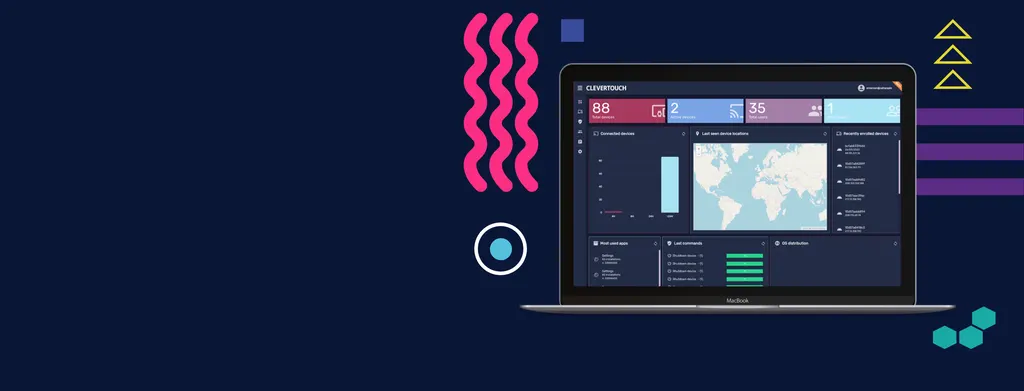
Live 1:1 remote screen view and control lets technicians see a display as its user sees it, edit settings and run diagnostics on one screen or many at once. Device information includes recently enrolled device history, IP addresses and software versions, so problems can be traced before anyone travels to the room. At the end of the day, all screens can be shut down with a single click, and a lost unit can be switched off or wiped remotely.
- Live 1:1 remote view and control of individual or multiple displays
- Device history, IP addresses and software versions in one view
- Remote restart, power management and single-click fleet shutdown
- Time, Wi-Fi and geofencing triggers for automated actions
Locking displays to approved content and apps
Kiosk mode enforces a policy so a display stays on the content and applications you approve. This suits reception screens, wayfinding displays and classroom panels that should not be changed by users. Administrators can apply app and website whitelists or blacklists, install .apk files on some or all displays, and deploy one set of apps and settings to a group of screens, such as every panel used by one department. The dark theme helps reduce eye strain in dimly lit rooms.
Where CleverMDM fits in Qatar
Picture a private school in Al Wakrah fitting out new classrooms. It can give every teacher the same approved apps and settings through department groups, keep panels in kiosk mode during assessments, and use TeacherView, an optional distance learning module, when lessons move online. A government office in Msheireb with panels across several floors can push a security notice to every screen at once, and lock or reset a unit that leaves the building. A hotel in West Bay can keep lobby screens on approved content and check them from the back office before guests arrive.
Planning a rollout and what to confirm
Before rollout, confirm that each display is a supported model. CleverMDM is compatible with IMPACT Max, IMPACT Plus, UX Pro 2 and CM Series. Because the solution is cloud-based and requires only Wi-Fi, review network coverage in each room where a panel will be mounted. Single sign-on works with Google or Microsoft-managed accounts, and two-factor authentication can be enabled with Google Authenticator or LastPass Authenticator. Managing laptops, tablets, smartphones and desktops is optional and can run from the same console. Our free site survey can help you review mounting positions and the Wi-Fi available in each room.
Send us your panel models, room count and locations and request a quote. The SmartRooms Qatar team will confirm compatibility and the right configuration for your fleet. Quotations are usually issued within one working day, and we accept purchase orders (LPOs) and government tenders, including Monaqasat.
Highlights
- Live 1:1 remote screen view and control for individual or multiple displays
- Kiosk mode with app and website whitelists and blacklists
- Cloud-based, requires only a Wi-Fi connection
- Anti-theft lock, unlock and reset for lost or stolen displays
- Single sign-on with Google or Microsoft accounts, plus 2FA
- Compatible with IMPACT Max, IMPACT Plus, UX Pro 2 and CM Series
Estimated timeline
Quotation within 1 working day · delivery timing depends on stock availability, and we confirm it with your quotation.
Specifications
Clevertouch Solution MDM features21
- Remote screen control – LIVE 1:1
- Yes
- Remote screen view – LIVE 1:1
- Yes
- Policy enforcement (Kiosk mode)
- Yes
- App installation and management
- Yes
- App and Web white/black list
- Yes
- Device settings (hardware/OS)
- Yes
- Power management
- Yes
- Advanced messaging *
- Yes
- Messaging
- Yes
- File distribution
- Yes
- Triggers and alerts
- Yes
- Device location
- Yes
- Antitheft
- Yes
- Remote commands
- Yes
- Device info
- Yes
- Grouping
- Yes
- Reports
- Yes
- Geofencing
- Yes
- Workflow *
- Yes
- TeacherView – Distance Learning Platform**
- Yes
- Android for work (Google EMM) *
- Yes
Management Tools21
- SaaS infrastructure. Hosted server array on the Amazon cloud
- Yes
- Grouping and filtering
- Yes
- Device info
- Yes
- Device location, including location history
- Yes
- Power management, turn off, restart etc.
- Yes
- User management
- Yes
- Triggers (Geo-fencing, time, Wi-Fi)
- Yes
- Tasks
- Yes
- Software distribution, updates and silent installation
- Yes
- File distribution
- Yes
- Policies, whitelist and blacklist websites and apps
- Yes
- Kiosk mode
- Yes
- Secured browser
- Yes
- Device settings
- Yes
- Messaging
- Yes
- Workflow
- Yes
- Usage reports
- Yes
- Apple DEP/VPP
- Yes
- Google EMM enrollment
- Yes
- Remote screen control
- Yes
- Advanced messaging module
- Yes