Thursday, 22 October 2026 · 11 Jumada I 1448 AH Sun – Thu · 9:00 – 18:00
+971 56 914 9477 العربية
WhatsApp

Clevershare

Clevertouch Clevershare Screen Sharing Software for Interactive Displays

WhatsApp
Priceon request
QuotationWithin 1 working day
DeliveryConfirmed with your quote, based on stock
PDFDownload datasheet (15244 CleverShare Flyer_A4_ENGLISH_14.pdf)
Overview

Clevershare is the screen sharing software for Clevertouch interactive displays. The app costs nothing to download and runs on Android, Windows, macOS, iOS and Chrome OS devices. Up to 50 devices can connect to one screen, up to 9 screens can show at the same time, and presenters keep two-way control to navigate and annotate. It suits classrooms and meeting rooms across Qatar. Request a quote.

What Clevershare does on a Clevertouch screen

Clevershare is sharing software that lets people send their own content to a Clevertouch display from the devices they already carry. The app costs nothing to download and runs on Android, Windows, macOS, iOS and Chrome OS devices, so a lecturer, a board member or a visiting consultant can join a session without new hardware. Once connected, participants can show images, videos and audio on the large screen, turning a passive display into a shared workspace.

Connection, capacity and multi-screen display

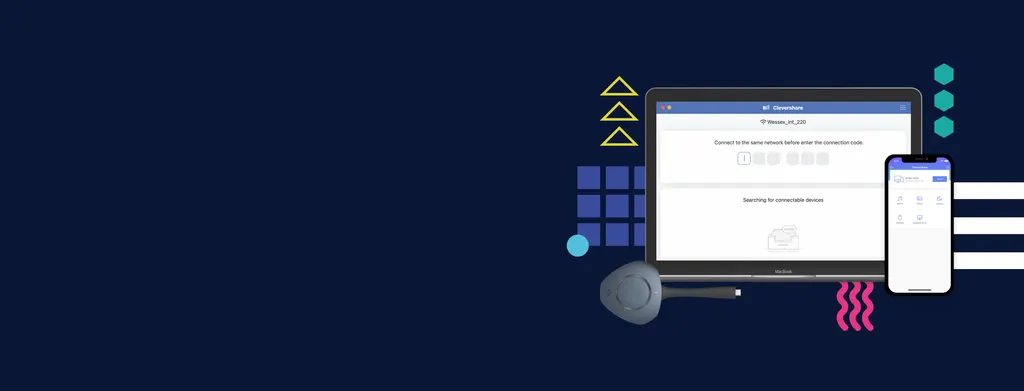
One Clevertouch screen can accept connections from up to 50 devices. To join, a participant opens the app and types the code shown on the Clevertouch screen, provided the device is on the same network as the display. If that network cannot be used, a Hotspot option is available. Clevershare can also show up to 9 shared screens at the same time, which suits a seminar where a group compares several sources within one session.

Control and security for every session

  • Two-way control: presenters navigate shared content and annotate in real time while keeping hold of the session.
  • Mastering Mode: the host accepts or rejects connection requests directly on the Clevertouch screen.
  • Advanced Mode: adds encryption and supports dual sub-networks.
  • Chromecast and AirPlay: an optional setting lets compatible devices connect natively, without adapters.

The product carries CE, FCC, UL, Energy Star and EEC regulatory certifications, which procurement teams can check against their own requirements.

Where Clevershare fits across Qatar

In a boardroom in West Bay, a visiting delegation can share slides from their own laptops while the chair decides which devices are approved. In a private school in Al Wakrah, students can send work from tablets to the classroom display while the teacher keeps control of what the class sees. At a government workshop in Doha with several dozen participants, one screen can serve the whole session because up to 50 devices can join, and the host approves each request.

What to plan before you order

Start with the network. Clevershare needs devices on the same network as the display, so confirm which Wi-Fi networks staff and guests use and whether guest access must be kept separate. The dual sub-network support in Advanced Mode helps with that separation. A free site survey from the SmartRooms Qatar team can check where the Clevertouch display will sit relative to the network before installation, which helps avoid rework once the panel is mounted. For rooms with weak Wi-Fi, CleverCast is a separate pairing option that connects over USB-C and does not depend on the network.

Request a quote from SmartRooms Qatar with your room size, the number of devices you expect and your network details. The team usually returns a quotation within one working day.

Highlights

  • Free app for Android, Windows, macOS, iOS and Chrome OS devices
  • Connects up to 50 devices to one Clevertouch screen
  • Shows up to 9 screens at the same time
  • Two-way control lets presenters navigate and annotate
  • Mastering Mode accepts or rejects connection requests on screen
  • Optional Chromecast and AirPlay connection from display settings

Estimated timeline

Quotation within 1 working day · delivery timing depends on stock availability, and we confirm it with your quotation.

Specifications

4 specifications · Source: manufacturer · checked Oct 2026
CleverShare Specifications3
Connection
Free
Compatability
Compatible with
Screen sharing
Connect
Compliance & Certification1
Regulatory Certification
CE, FCC, UL, Energy Star & EEC

Downloads

8 files from the manufacturer

Questions about Clevershare

What is Clevershare, and who is it for?
Clevershare is screen sharing software for Clevertouch displays. It suits schools, universities and businesses in Qatar that want several people to show content on one room screen without swapping cables. Lecturers, meeting hosts and training leaders are the usual users, and because the app costs nothing to download, participants need only a phone, tablet or laptop to take part.
Do attendees need to install anything?
Attendees install the Clevershare app on Android, Windows, macOS, iOS or Chrome OS devices. They then type the code shown on the Clevertouch screen into the app to join. For the standard connection the device must be on the same network as the display, so staff laptops and personal phones work as long as they can reach that network.
How many devices can connect to one screen?
Up to 50 devices can connect to a single Clevertouch screen. That capacity suits a training day in a Doha hotel conference room, where the facilitator wants every participant to share a case study from their own laptop or tablet. Mastering Mode lets the host decide who joins, so a large group does not turn into an open session without controls.
Can several shared screens appear at once?
Yes. Clevershare can display up to 9 screens at the same time on the Clevertouch display. At a university seminar in Education City, a research group can compare a spreadsheet, a slide deck and a live design file within one session, switching focus as the discussion moves on.
Does the screen need to be on the same network as my devices?
For the standard connection, yes. Devices must be on the same network as the Clevertouch display. If that network cannot be used, a Hotspot option is available. Advanced Mode adds encryption and supports dual sub-networks, which suits organisations that keep staff and guest traffic apart. Guest and multi-network support is included in the app.
How does Mastering Mode protect a government meeting?
Mastering Mode lets the host accept or reject each connection request directly on the Clevertouch screen. In a government meeting in Doha where papers are confidential, only approved attendees can put content on the display. Combined with Advanced Mode encryption, it gives the room owner an extra layer of control over who shares during collaborative sessions.
Can the presenter keep control while others share?
Yes. Two-way control, enabled by touch-back capabilities, lets the presenter navigate shared content and annotate in real time while keeping control of the session. In a private school in Al Wakrah, a teacher can keep the class on one lesson even when several students are sending work to the classroom display.
Does Clevershare work with 4K touch displays?
The product data lists support for 4K UHD and touch displays. The app shares at up to 1080p, while CleverCast is listed at up to 4K. For a boardroom with a large 4K touch panel, plan sharing quality around the app's 1080p limit, and confirm the display model with the SmartRooms Qatar team before ordering.
What is CleverCast, and when should I choose it?
CleverCast is a separate pairing option that works with the Clevertouch meeting room display. It mirrors content with the touch of a button and connects over USB-C. The data lists it at up to 4K and as not dependent on the network, which suits a meeting room in Lusail where Wi-Fi is unreliable.
Can teams use Chromecast or AirPlay without the app?
Clevertouch offers Chromecast and AirPlay integration as an optional setting that is enabled from the screen's settings. Once enabled, a compatible device connects natively without extra adapters or complex setup. This helps a team working from an iPhone or a Chromebook that does not want to install anything before a meeting starts.
What should we check before ordering?
Confirm which Wi-Fi networks staff and guests use, how many devices will connect at once, and whether Chromecast or AirPlay is needed. A free site survey from SmartRooms Qatar can check the display position against the network before installation. Settling these points first helps the quotation match the room, whether it is a classroom in Al Wakrah or a boardroom in Doha.
Can SmartRooms Qatar quote and install this in Qatar?
Yes. SmartRooms Qatar can quote for the Clevertouch display this app works with, deliver to all 8 municipalities of Qatar and arrange professional installation. Quotations are usually issued within one working day. Purchase orders (LPOs), government tenders including Monaqasat, and payment by bank transfer, cheque or purchase order are all accepted.

Similar models

Clevertouch CleverLive Suite Clevertouch CleverLive Suite Digital Signage Software
Software
Clevertouch CleverMDM Clevertouch CleverMDM Mobile Device Management Software
Yes
Clevertouch CleverStore Clevertouch CleverStore Educational App Store Software
Software
Clevertouch LYNX Screen Recorder Clevertouch LYNX Screen Recorder Lesson Capture Software
Software
Email Call