





Thursday, 22 October 2026 · 11 Jumada I 1448 AH Sun – Thu · 9:00 – 18:00
+971 56 914 9477 العربية
WhatsApp

EZWrite 6

BenQ EZWrite 6 Interactive Whiteboard Software

WhatsApp
Priceon request
QuotationWithin 1 working day
DeliveryConfirmed with your quote, based on stock
PDFDownload datasheet (EZWrite-6_EZ_AR_211115090224.pdf)
Overview

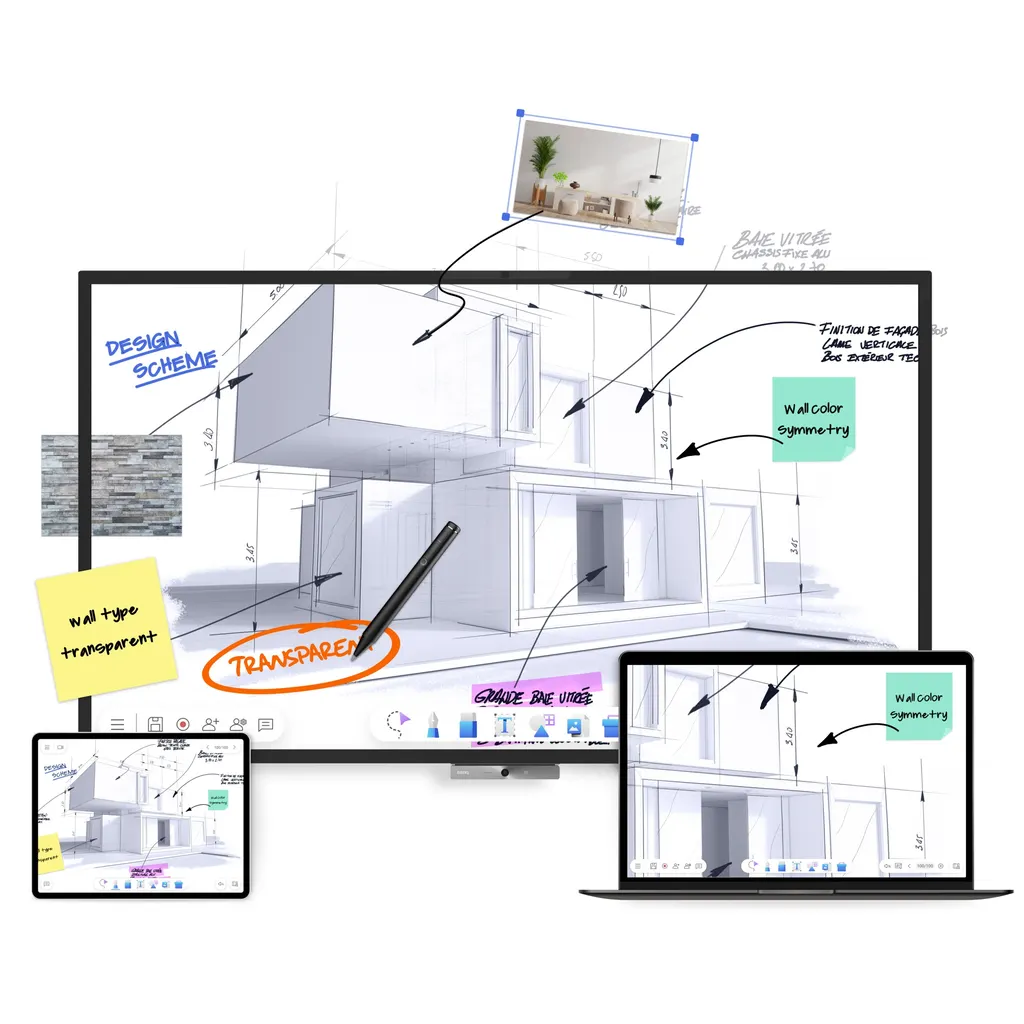
BenQ EZWrite 6 is interactive whiteboard software that runs on Windows, macOS, Chromebook, iPad, web browsers and the BenQ Board. Teachers can import PowerPoint, Word, Excel and PDF files, use AI handwriting and shape recognition, and let students write on a shared cloud canvas from their seats. Lessons export as PDF or image files for review. Request a quote to confirm the right setup for your school in Qatar.

What EZWrite 6 does inside a lesson

EZWrite 6 is whiteboard software from BenQ, so a lesson can run on a BenQ Board, a laptop, a tablet or a web browser without changing how it is taught. It is available for Windows, macOS, Chromebook, iPad, most web browsers and the BenQ Board, and any version can join the same cloud whiteboard. A school with a mix of devices can therefore share one canvas across different rooms.

The canvas is infinite and scalable. Teachers can zoom in on a small diagram, zoom out to see the full page and add pages as the lesson grows, while each participant navigates at their own pace.

Preparing and reviewing lessons in one place

Before class, teachers can import PowerPoint, Word and Excel files, PDFs, slides and images, and embed videos and URLs. Existing SMART Notebook and IWB files open in EZWrite for editing, so older lesson plans can be updated rather than rebuilt. Scans from books can be converted to editable text using AI, and material saved in a cloud storage account can be opened to load lesson content prepared in advance.

After class, sessions can be exported as PDF or image files, recorded, or livestreamed with YouTube Live, so students can review the content at their own pace.

Teaching tools that keep students involved

Pens and highlighters come in several colours and sizes, and content can be erased by hand, struck through or cleared from a whole page. Handwriting is converted to text, and hand-drawn circles, triangles and squares are straightened into clean shapes. Mathematics lessons can use the calculator, Microsoft Math Solver and geometry tools, while the timer, scoreboard, random draw and spinner help turn a lesson into an activity.

Split screen places Google Chrome, Maps or Drive beside the canvas, and drag and drop brings images, text and links onto the board. Floating Notes lets a teacher annotate over split-screen content or an HDMI input source while still working on the canvas. A document camera can share textbook pages or experiments, with live annotation and screenshots.

Where it fits in Qatar

  • A private school in Al Wakrah with iPads and Chromebooks in primary classes, where pupils write from their seats on one shared canvas and the scoreboard runs a team competition.
  • A university training centre in Education City where a lecturer teaches a group on campus and invites remote students to join the board in real time through video conferencing.
  • A corporate training room in Msheireb where a trainer loads prepared PDFs and presentations from cloud storage, then exports the session notes for participants after the session.

What to plan before you request a quote

EZWrite 6 is software, so planning starts with the devices and displays your lessons will use. List the platforms in each room, confirm whether teachers need tap-to-open, which relies on NFC support, and decide whether lessons will be stored in the cloud or on local devices. Remote lessons also need a video conferencing tool, so check which one your school already uses.

SmartRooms Qatar supplies to all eight municipalities, offers free site surveys, and usually provides quotations within one working day. Schools and government bodies can order on a local purchase order or through a tender, and pay by bank transfer, cheque or purchase order.

Request a quote from SmartRooms Qatar and tell us your device mix, the number of teaching rooms and whether you run remote classes, so we can confirm the right set-up for your school.

Highlights

  • Runs on Windows, macOS, Chromebook, iPad, browsers and BenQ Board
  • Imports PowerPoint, Word, Excel, PDF, SMART Notebook and IWB files
  • AI handwriting-to-text and shape recognition for live lessons
  • Cloud whiteboard where students write from personal devices
  • Exports sessions as PDF or image files for student review
  • Document camera, split screen and YouTube Live support

Estimated timeline

Quotation within 1 working day · delivery timing depends on stock availability, and we confirm it with your quotation.


Specifications

Source: manufacturer · checked Oct 2026
The full specification and datasheet for this model are available on request; we send them with your quotation.

Downloads

5 files from the manufacturer

Questions about EZWrite 6

What is BenQ EZWrite 6 and who is it for?
BenQ EZWrite 6 is interactive whiteboard software that gives teachers and trainers a digital canvas for lessons and class activities. It suits schools, universities and training centres in Qatar that want one whiteboard across several devices. For example, a secondary school in Doha could run maths and science lessons from classroom laptops and tablets while students contribute from their seats. Because it is software, the hardware choice stays with your school.
Which devices and platforms does EZWrite 6 support?
EZWrite 6 is available on Windows, macOS, Chromebook, iPad, most web browsers and the BenQ Board. Any version of EZWrite can join the same cloud whiteboard, so a teacher on a Windows laptop and a pupil on an iPad can work on one canvas. Before you request a quote, list the devices in each room so SmartRooms Qatar can confirm the setup you need.
Can students join a lesson from their own devices?
Yes. Cloud whiteboarding lets students join the session from their seats and write on the canvas at the same time using their personal devices. A primary school in Al Wakrah, for example, could split pupils into teams and use the built-in scoreboard and timer for a quick competition, with every team working on the same board. Every participant can navigate the board independently.
Can I bring my existing lesson files into EZWrite 6?
Yes. You can import PowerPoint, Word and Excel files, PDFs, documents and slides, and add audio and video files or YouTube videos directly to the whiteboard. SMART Notebook and IWB files can also be opened and edited in EZWrite. A trainer at a centre in Msheireb, for example, can load a prepared PDF from cloud storage before the session starts so the material is ready from the first slide.
How do students review a lesson after class?
EZWrite 6 exports sessions as PDF or image files, so students can review the content at their own pace after class. You can also record whiteboard sessions or livestream them with YouTube Live, and save the work as editable whiteboard files to continue in the next class. This helps a school in Lusail that wants revision notes available to families before exam week.
How does the AI handwriting recognition work?
EZWrite 6 uses AI to convert handwriting into text that can be read easily and translated. It also converts hand-drawn shapes into clean circles, triangles and squares. This helps a maths teacher in Education City who writes worked examples by hand but needs readable notes for students. Scanned book pages can also be converted to editable text using optical character recognition.
Can EZWrite read text aloud or translate it for students?
Yes. EZWrite 6 includes AI-powered text-to-speech, so written text can be read aloud to the whole class, and multilingual translation, so resources can be translated into other languages. A language teacher at a bilingual school in Al Rayyan could translate a reading passage and have it read aloud during a listening activity. Tell SmartRooms Qatar which languages you need when you request a quote.
Can EZWrite 6 teach students who are not in the room?
Yes. You can take EZWrite lessons online through video conferencing and invite remote learners to join the board in real time. A university team in Education City could run a tutorial for students on campus while inviting others from outside the country to join the same board. Check which video conferencing platform your institution uses before planning remote sessions.
Can I show textbooks or science experiments on the board?
Yes, if you connect a document camera. EZWrite 6 can share textbook pages, student work, science experiments and other physical material, with a live feed you can annotate, freeze and capture as screenshots. A science teacher at a school in Al Khor could freeze a lab reading and annotate it so the whole class sees the same detail. Name the camera you plan to use when you request a quote.
Can I work with other apps and HDMI sources at the same time?
Yes. Split-screen mode lets you place Google Chrome, Maps or Drive beside the canvas, and you can drag and drop images, text and links onto the board. Floating Notes allows annotation over split-screen content or an HDMI input source while you keep working on the canvas. In a training room in West Bay, a trainer could show a live laptop feed and annotate it without leaving the lesson.
Do I need a site survey before rolling out EZWrite 6?
EZWrite 6 is software, so there are no wall brackets or mounting measurements to plan for the software itself. A site survey is still useful for a school in Lusail rolling out the software across many classrooms, because it helps map which devices, displays and rooms will run EZWrite 6 and which will host remote lessons. SmartRooms Qatar offers free site surveys, and professional installation is available for the display hardware in your plan.
How do I order EZWrite 6 for my school or government body?
Request a quote from SmartRooms Qatar with your device list, the number of teaching rooms and any remote-lesson requirements. Quotations are usually provided within one working day. Schools and government bodies can order on a local purchase order (LPO) or through a tender, including Monaqasat, and pay by bank transfer, cheque or purchase order.

Similar models

Clevertouch CleverLive Suite Clevertouch CleverLive Suite Digital Signage Software
Software
Clevertouch CleverMDM Clevertouch CleverMDM Mobile Device Management Software
Yes
Clevertouch Clevershare Clevertouch Clevershare Screen Sharing Software for Interactive Displays
Software
Clevertouch CleverStore Clevertouch CleverStore Educational App Store Software
Software
Email Call


