





Thursday, 22 October 2026 · 11 Jumada I 1448 AH Sun – Thu · 9:00 – 18:00
+971 56 914 9477 العربية
WhatsApp

IAM (Identity and Access Management)

BenQ IAM (Identity and Access Management) Software

WhatsApp
Priceon request
QuotationWithin 1 working day
DeliveryConfirmed with your quote, based on stock
Overview

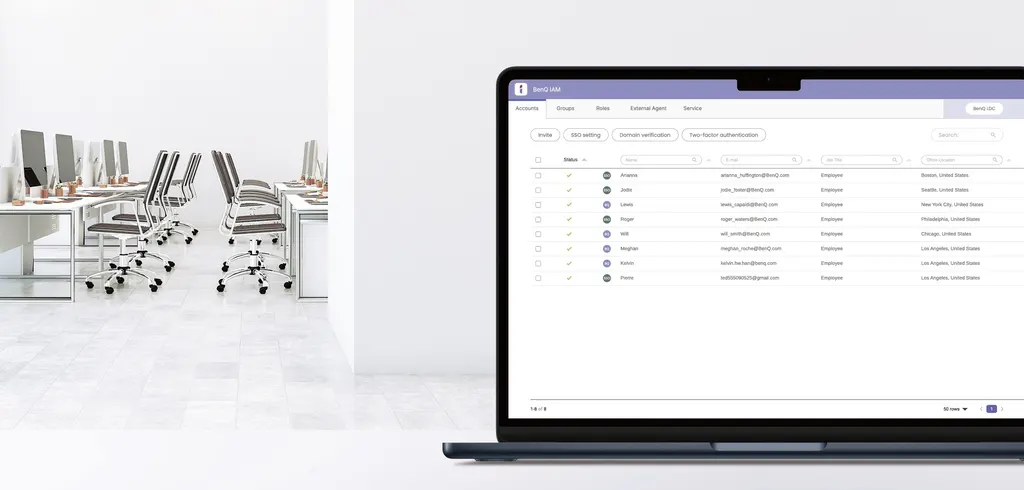
BenQ IAM is identity and access management software that gives school staff one login for BenQ displays and services. IT teams manage accounts and access levels from a browser-based console, with directory sync and MFA. It suits IT managers in Qatar's schools and organisations running several BenQ panels.

What BenQ IAM does for school and office accounts

BenQ IAM is identity and access management software built around two jobs: a central portal where IT staff create and maintain user accounts, and single sign-on, so each person uses one set of credentials across BenQ displays and services. For a school or organisation in Qatar running several interactive panels, the practical benefit is fewer repeated logins and far less manual account work each term.

Administrators reach the console from a web browser, which keeps everyday tasks such as adding a teacher, changing a permission or removing a leaver in one place rather than inside each display. The software also works alongside other devices and applications that rely on directory services, extending the same school login beyond the panels.

Directory sync, imports and access levels

IAM connects to Azure Active Directory. Changes made in Azure, whether a new account, a deactivation or an edit, are applied to IAM in real time, which helps avoid out-of-date records. Users can also be imported from ClassLink, Google Workspace, an LDAP directory or another SAML-based identity provider, with the database updated in a single click.

Access is not all-or-nothing. IAM lets you assign different levels of access to different staff, so a head of department and a classroom teacher can hold different rights across services such as AMS, DMS, X-Sign and X-Sign Broadcast. That flexibility helps organisations where the IT team, facilities staff and academic staff each need a different view of the system.

Security: single sign-on with a second factor

Single sign-on is convenient, but it concentrates risk on one login. IAM supports multi-factor authentication, with one-time passwords among the methods you can switch on. The manufacturer states that adding MFA to single sign-on can reduce identity theft and strengthen data protection, which matters for government offices and other organisations that handle sensitive records.

Where it fits in Qatar

  • Private schools in Al Sadd or Al Rayyan where teachers move between classrooms and a small central IT team manages accounts.
  • A government authority in Doha where staff joining and leaving must be reflected quickly and access must match each role.
  • Multi-site organisations in Lusail and Al Khor that want one admin console for staff accounts across all locations.

What to plan before you order

Start by confirming where your staff records live. If the directory is Azure Active Directory, ClassLink, Google Workspace or an LDAP server, the import and sync route differs, so write it down before the project starts. Then list the BenQ services and displays each group uses, and decide which access level and which MFA method you will enable. Both steps reduce surprises during rollout.

SmartRooms Qatar offers a free site survey to check the rooms and offices where your BenQ displays will sit, which helps when planning wall mounting or large panels. Quotations are usually provided within one working day. We accept purchase orders (LPOs), government tenders including Monaqasat, and payment by bank transfer, cheque or purchase order. Products are covered by the manufacturer's warranty.

To request a quote for BenQ IAM, tell the SmartRooms Qatar team how many staff accounts you manage, which identity provider you use and which BenQ displays and services you run. Request a quote today and we will prepare the next steps with you.

Highlights

  • Single sign-on for all BenQ displays and services
  • Real-time sync with Azure Active Directory accounts
  • Imports from ClassLink, Google Workspace, LDAP and SAML
  • Multi-factor authentication with one-time passwords
  • Different access levels for each staff member
  • Browser-based admin console for IT teams

Estimated timeline

Quotation within 1 working day · delivery timing depends on stock availability, and we confirm it with your quotation.


Specifications

Source: manufacturer · checked Oct 2026
The full specification and datasheet for this model are available on request; we send them with your quotation.

Downloads

0 files from the manufacturer
No downloadable files are listed for this model yet. Ask us and we will send the datasheet.

Questions about IAM (Identity and Access Management)

What is BenQ IAM and who is it for?
BenQ IAM is identity and access management software. It provides a centralised portal for creating user accounts and single sign-on, so staff log in once to reach BenQ displays and services. It suits IT managers and administrators at schools and organisations in Qatar who manage accounts for several BenQ devices and want less repetitive manual work.
Which BenQ services can IAM manage?
The manufacturer data lists AMS, DMS, X-Sign and X-Sign Broadcast as services whose staff access IAM manages centrally. Single sign-on also covers all BenQ interactive displays. Each user can be given a different access level, so a school decides which staff reach each service. Ask the SmartRooms Qatar team to confirm your exact service list before requesting a quote.
Which identity providers can IAM import users from?
IAM can import users from ClassLink, Azure AD, Google Workspace, an LDAP server or other SAML-based identity providers. Imports update the IAM database with a single click, so you do not enter accounts one by one. If your staff records sit in a different system, ask SmartRooms Qatar to confirm it is SAML-based before you place an order.
Does IAM sync with Azure Active Directory in real time?
Yes. According to the manufacturer data, IAM connects to Azure Active Directory. When an account is created, deactivated or modified in Azure, the change is applied to IAM in real time. For a school that updates staff records at the start and end of each term, this removes the need to repeat the same change manually in BenQ tools.
How would access levels work for a school in Al Khor?
Imagine a school in Al Khor with teachers, heads of department and two IT staff. IAM lets you assign different access levels to each group, so IT staff manage permissions while teachers sign in only to the displays and services they use. Because the admin console runs in a browser, the IT team can adjust levels without visiting each classroom.
Does IAM add multi-factor authentication to single sign-on?
Yes. The data states that IAM strengthens data protection with MFA, and one-time passwords are one method you can enable. The manufacturer says adding this second layer to single sign-on can reduce identity theft. For a finance or administration team in a government office, this extra step is worth discussing with your IT team before rollout.
Can a two-person IT team in the Industrial Area manage IAM?
The admin console is accessed from a browser, and the software is designed to reduce IT workload by managing accounts and permissions from one place. A two-person team at a company training centre in the Industrial Area can handle new joiners and leavers without a separate tool for each BenQ service. Confirm your account numbers and services with SmartRooms Qatar when requesting a quote.
How does onboarding work when a school in Al Wakrah starts a new term?
New teachers are created or imported from your directory, assigned an access level, and then sign in once to BenQ displays and services with one set of credentials. Because the rules are central, you do not configure each panel separately for every teacher. Plan the import before term starts, and request a quote early enough to finish your rollout on schedule.
What happens when a staff member leaves a government authority in Doha?
When the account is deactivated in Azure Active Directory, the change is applied to IAM in real time. The leaver's account is updated without waiting for a manual edit inside IAM. This shortens the period in which an outdated account stays active, which is a key concern for ministries and authorities handling official records.
Does IAM work with devices and software beyond BenQ displays?
The data says the school login can extend to other devices and software that use directory services, such as cloud storage and communication systems. Whether a specific system in your estate qualifies depends on its directory integration. List the systems you use and confirm them with the SmartRooms Qatar team before defining the project scope.
How do we buy BenQ IAM through an LPO or government tender?
Send your number of staff accounts, your identity provider and the BenQ displays and services you use. SmartRooms Qatar will usually prepare a quotation within one working day. We accept purchase orders (LPOs) and government tenders, including Monaqasat, with payment by bank transfer, cheque or purchase order. Products are covered by the manufacturer's warranty.
How could a multi-site organisation in Lusail and Al Rayyan use IAM?
A school group or company with sites in Lusail and Al Rayyan can manage staff accounts from one admin console instead of separately at each site. Because IAM centralises user management for BenQ services, IT can grant access by role and remove it when people move. A free site survey can check the rooms where the displays will be installed.

Similar models

Clevertouch CleverLive Suite Clevertouch CleverLive Suite Digital Signage Software
Software
Clevertouch CleverMDM Clevertouch CleverMDM Mobile Device Management Software
Yes
Clevertouch Clevershare Clevertouch Clevershare Screen Sharing Software for Interactive Displays
Software
Clevertouch CleverStore Clevertouch CleverStore Educational App Store Software
Software
Email Call


