





Thursday, 22 October 2026 · 11 Jumada I 1448 AH Sun – Thu · 9:00 – 18:00
+971 56 914 9477 العربية
WhatsApp

QTouch

BenQ QTouch Annotation Software for Windows Lesson Preparation

WhatsApp
Priceon request
QuotationWithin 1 working day
DeliveryConfirmed with your quote, based on stock
Overview

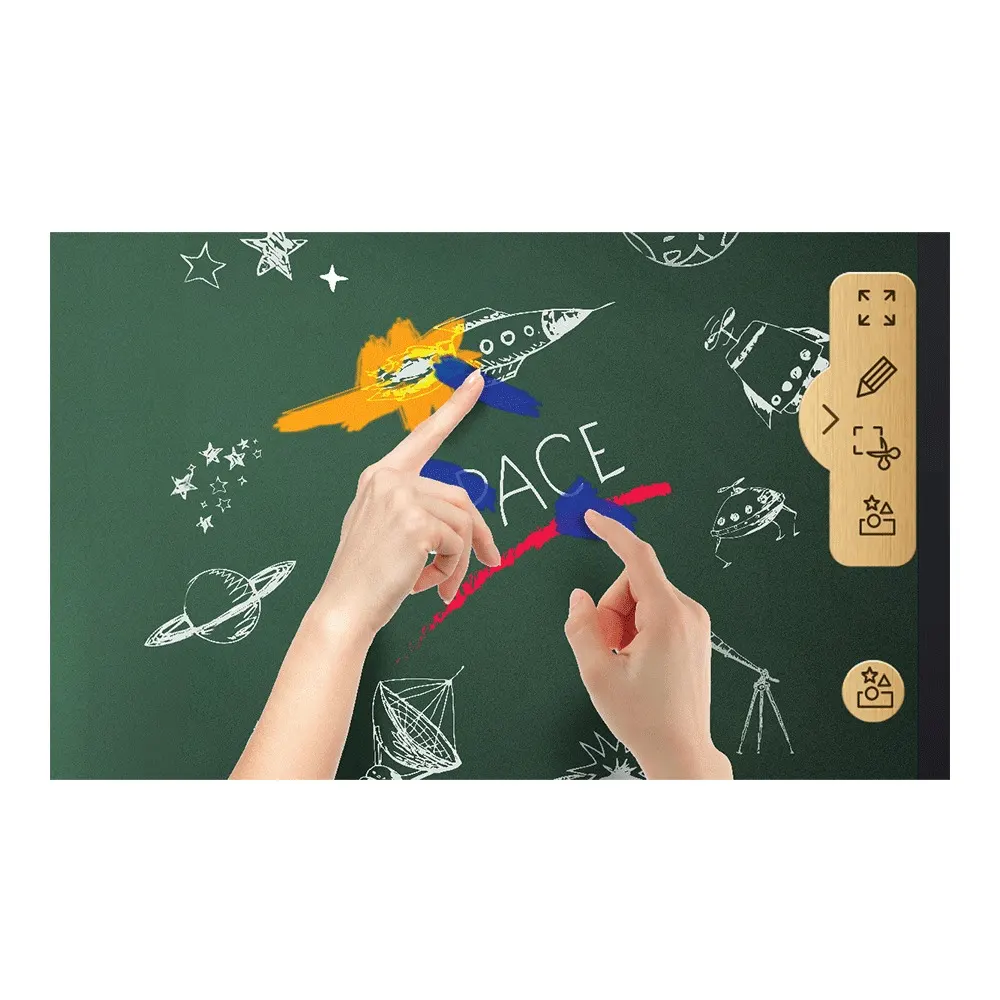
BenQ QTouch is annotation and lesson-preparation software for Windows PCs, built to pair with BenQ RP Series interactive panels. Teachers can build lesson materials on their computer, choose from free teaching templates across subjects, mark up files with multi-touch tools and record annotations. It suits schools and training centres in Qatar preparing lessons ahead of class. Request a quote to pair it with your panels.

What BenQ QTouch does in the classroom

BenQ QTouch is annotation software for Windows PCs, designed to work with BenQ RP Series interactive panels. Its main value is in preparation. A teacher can build lesson material on a computer at any time, so the work at the panel becomes teaching rather than setting up slides and notes while the class waits. Once the lesson is ready, the PC is connected to the panel and the prepared material is shown and marked up in front of the class.

Templates, annotation and multi-touch tools

QTouch includes teaching templates for a range of subjects, and the manufacturer makes them available at no cost. They give a starting layout for different lesson types, which reduces the time spent designing each page from scratch. When a file is open on the PC, annotation mode lets the presenter write notes over it with a set of tools. The annotation tools support multi-touch, so a class can co-create a document on screen with students rather than only watching the presenter work.

Annotation recording adds a second use. Notes made during a session can be recorded and shared, which gives students something to review after the lesson and gives teachers a way to revisit an explanation without rebuilding it.

Where QTouch fits in Qatar

  • A private school in Al Wakrah fitting out new science classrooms, where teachers prepare practical lessons at home in the evening and open the files on the panel the next morning.
  • A university training centre in Education City running short courses, where recorded annotations let trainees who missed a demonstration review the explanation later.
  • A government office in Doha that runs staff briefings and training sessions, where a presenter marks up shared documents on a panel during the meeting.

What to plan before you order

Start with the computers. QTouch is Windows software, so confirm that the presenters' PCs run Windows before you order. Next, confirm the panel. QTouch is built to connect the PC to BenQ RP Series panels, and the exact panel model determines the physical installation, so list the panels you have or plan to buy.

Then plan the recording workflow. Decide where recorded annotations will be saved, who can access them, and how long they are kept, particularly if a school or training centre has its own storage rules. If you are also mounting panels, a free site survey from SmartRooms Qatar helps confirm the panel position, the PC location and the network access in each room.

Licence and activation details are not part of the product data we hold, so they are confirmed with your quotation. Tell the SmartRooms Qatar team how many rooms and presenters you are equipping, and we will prepare a quotation, usually within one working day. We supply on purchase orders (LPOs) and government tenders, including Monaqasat, and accept payment by bank transfer, cheque or purchase order. Request a quote and we will send you the next steps.

Highlights

  • Runs on Windows PCs for lesson design
  • No-cost teaching templates for varied lesson types
  • Annotation mode writes notes over open files
  • Multi-touch tools for building documents with students
  • Annotation recording for sharing and later review
  • Connects your PC to BenQ RP Series panels

Estimated timeline

Quotation within 1 working day · delivery timing depends on stock availability, and we confirm it with your quotation.


Specifications

Source: manufacturer · checked Oct 2026
The full specification and datasheet for this model are available on request; we send them with your quotation.

Downloads

0 files from the manufacturer
No downloadable files are listed for this model yet. Ask us and we will send the datasheet.

Questions about QTouch

What is BenQ QTouch used for?
BenQ QTouch is annotation and lesson-preparation software for Windows PCs. Teachers and presenters design material on their computer, then show it on a compatible BenQ RP Series panel and mark it up during the session. Most of the work happens before the lesson, so class time goes to teaching rather than setup. It suits schools, universities and training centres that prepare content in advance.
Which operating system does QTouch run on?
QTouch is Windows software, and its teaching templates are built for Windows PCs. If your teachers prepare lessons on Macs or Chromebooks, confirm the setup with the SmartRooms Qatar team before ordering, because the product data does not describe support for those systems. Checking the presenters' machines first avoids surprises once the software is ordered.
Does QTouch work with panels from other brands?
QTouch is designed to connect a Windows PC to BenQ RP Series interactive panels, which is the pairing described for it. The product data does not confirm compatibility with other manufacturers' panels, so we do not claim it. If you already own a different panel, request a quote and our team will explain the options that are confirmed for your hardware.
Are the teaching templates free?
Yes. The manufacturer provides free teaching templates for a range of teaching scenarios. A teacher can start from a template suited to the subject instead of laying out each page from nothing, which saves preparation time when several lessons are due in the same week. Ask us which templates are included in the version you receive when you request a quote.
Can teachers prepare lessons away from the classroom?
Yes. The manufacturer describes designing teaching material on the PC at any time. A teacher at a school in The Pearl can prepare a week of lessons at home in the evening, save the files, and open them on the panel the next morning. Agree a file-transfer method with your IT team so that prepared lessons reach the classroom PC reliably.
How does annotation mode work?
Annotation mode lets the presenter write notes with a set of tools over files open on the PC, so a document, slide or image can be marked up during the lesson. The product data does not list every tool individually, so ask the SmartRooms Qatar team to confirm the tool set in your quotation before comparing it with other annotation software.
Does QTouch support multi-touch?
Yes. Its annotation tools include multi-touch support, so a class can co-create documents with students on screen rather than only watching the presenter. Multi-touch also depends on the touch capability of the display, so confirm the exact RP Series model you plan to use before ordering.
Can lessons be recorded and shared?
Yes. QTouch includes annotation recording, which captures the notes made during a session for sharing and later review. At a training centre in Education City, a trainee who missed a demonstration can revisit the annotated explanation afterwards. Decide where recordings will be stored and who can access them before rollout.
How many licences do we need?
The product data does not state licence counts, activation method or how seats are allocated, so we do not give a number here. Make a list of the teachers and presenters who prepare lessons and the PCs they use, then request a quote. Licensing terms are confirmed with the quotation so the count matches your rooms.
Is QTouch suitable for a boardroom or meeting room?
It is built for presenting and annotating content, so a presenter in a meeting room can mark up a shared file on a compatible panel. The product data, however, focuses on lesson preparation and classroom teaching. Before choosing it for a government ministry boardroom or a corporate meeting room, confirm that its tools suit your meeting workflow.
Can we order QTouch through a government tender?
Yes. SmartRooms Qatar supplies on purchase orders (LPOs) and government tenders, including Monaqasat, and accepts payment by bank transfer, cheque or purchase order. Listing QTouch with the RP Series panels in one quotation keeps the software and the hardware clearly linked in the tender file, which helps a school procurement team review the package.
Do we need a site survey before installing?
QTouch is software, so it needs no physical mounting. The panels it pairs with do. Before a private school in Al Wakrah fits out new classrooms, a free site survey from SmartRooms Qatar helps confirm each panel's position, the PC location and access to power and network points. Ask for the survey when you request your quotation so the plan is ready when the software is set up.

Similar models

Clevertouch CleverLive Suite Clevertouch CleverLive Suite Digital Signage Software
Software
Clevertouch CleverMDM Clevertouch CleverMDM Mobile Device Management Software
Yes
Clevertouch Clevershare Clevertouch Clevershare Screen Sharing Software for Interactive Displays
Software
Clevertouch CleverStore Clevertouch CleverStore Educational App Store Software
Software
Email Call


