





Thursday, 22 October 2026 · 11 Jumada I 1448 AH Sun – Thu · 9:00 – 18:00
+971 56 914 9477 العربية
WhatsApp

Uni UI

BenQ Uni UI Teaching User Interface Software

WhatsApp
Priceon request
QuotationWithin 1 working day
DeliveryConfirmed with your quote, based on stock
Overview

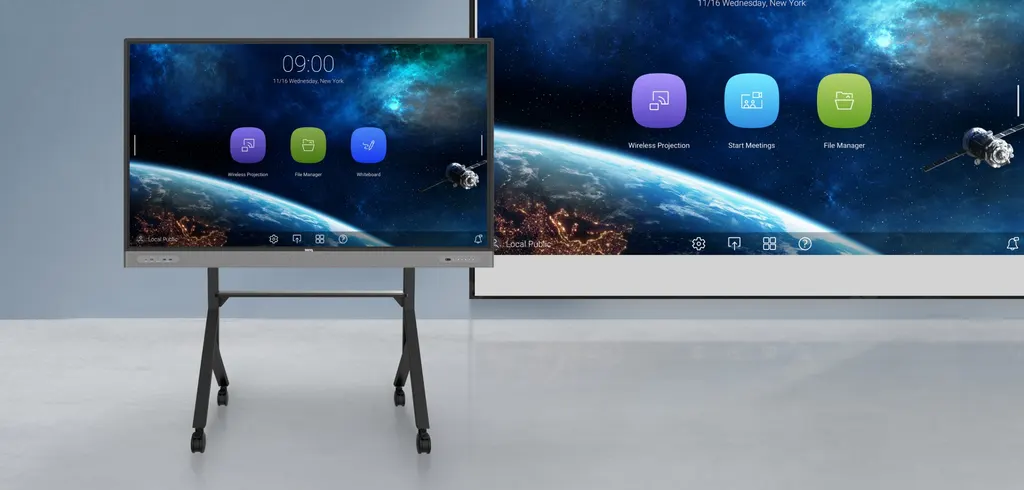
Uni UI is BenQ's teaching home screen for BenQ Boards, smart displays and projectors. Teachers pin favourite apps, add widgets and switch input sources from one screen. Schools with several BenQ devices get the same layout in every room. Request a quote from SmartRooms Qatar for schools across Doha, Al Wakrah and Lusail.

What Uni UI changes at the front of the room

Uni UI is BenQ's teaching user interface for BenQ Boards, smart displays and projectors. Instead of opening separate menus at the start of each lesson, the teacher lands on a home screen built around classroom work, with apps, files, whiteboarding and input switching within a tap or two. Because the same layout runs across BenQ models, a teacher who moves between rooms finds the same arrangement wherever they stand.

Lesson tools and widgets

Teachers can pin their most-used apps and set custom shortcuts, then load as many apps as a lesson needs and switch between them at any time. Widgets can show the time, date, humidity, temperature and a pinned message board for announcements. On BenQ Pro Series devices, CO₂, PM₂.₅ and formaldehyde readings appear in real time so staff can decide when to adjust airflow. Some features depend on the device and release timing, so confirm the feature list for your model before ordering.

Side-by-side work and annotation across devices

Duo Windows places the EZWrite whiteboard on one side of the screen and supporting web content on the other, which helps students follow a worked example step by step. Floating Tool lets teachers write over any app, website, document or image, and annotate content from connected Windows, Mac, iOS, iPadOS, Android or Chrome OS devices. Duo OS goes further by running a Windows or macOS laptop screen in a movable, resizable window while the teacher whiteboards.

Where it fits in Qatar

A private school in Al Wakrah fitting out several classrooms with BenQ Boards can give every teacher the same home screen, so staff who share rooms do not have to relearn the setup. A training centre in the Industrial Area where instructors rotate between rooms benefits from one layout and quick switching between laptops and the display. Lecturers in Education City who teach from a BenQ projector can use the same tools available on a board, depending on what their model supports.

What to plan before you order

List the BenQ models in each room, because feature availability varies by device and the air quality readings only appear on Pro Series units. Decide whether teachers need school account sign-in, cloud storage connections and bookmarks in every room, and whether Windows or macOS laptops will be used with Duo OS and Floating Tool. If the school follows the Arabic curriculum, confirm the interface language options with the SmartRooms Qatar team before ordering, as the product data does not state them.

Send SmartRooms Qatar your BenQ model list and the number of rooms, and request a quote. Quotations are usually issued within one working day, and we accept purchase orders (LPOs), government tenders and payment by bank transfer, cheque or purchase order.

Highlights

  • Home screen with pinned apps, shortcuts and widgets
  • Consistent experience across all BenQ device models
  • Duo Windows puts whiteboard and web content side by side
  • Floating Tool annotates over any app, website or document
  • Duo OS runs Windows or macOS apps in a resizable window
  • Pro Series shows CO₂, PM₂.₅ and formaldehyde levels in real time

Estimated timeline

Quotation within 1 working day · delivery timing depends on stock availability, and we confirm it with your quotation.


Specifications

Source: manufacturer · checked Oct 2026
The full specification and datasheet for this model are available on request; we send them with your quotation.

Downloads

0 files from the manufacturer
No downloadable files are listed for this model yet. Ask us and we will send the datasheet.

Questions about Uni UI

What is BenQ Uni UI?
BenQ Uni UI is a teaching user interface for BenQ Boards, smart displays and projectors. It places apps, files, whiteboarding and input switching on one home screen, instead of requiring teachers to move through several menus. For a school in Doha, that means lessons start faster and the setup stays familiar from room to room.
Which BenQ devices does Uni UI work on?
The product data names BenQ Boards, smart displays and projectors as the devices Uni UI is built for, and describes a consistent experience across all models of BenQ devices. Feature availability can vary by device, so send your exact model numbers when you request a quote and we can check which features apply to each room.
Is the layout the same across different BenQ models?
Yes, according to the manufacturer's data, Uni UI gives a consistent user experience across all models of BenQ devices. This matters for a school whose classrooms have different boards or projectors, because a teacher moving between rooms sees the same home screen, shortcuts and widgets. Some model-specific features may still differ, so check them before ordering.
Can teachers load their own settings with a school account?
Yes. Teachers can log into any BenQ device with their school account to load personal settings, connect cloud storage accounts and open website bookmarks. At a private school in Al Wakrah where teachers share rooms, each teacher finds their own files and bookmarks on whichever board they use that day, without copying material onto USB drives.
How do two apps run side by side on the display?
Duo Windows splits the screen so the EZWrite whiteboard sits on one side and supporting content from the internet sits on the other. A maths or science teacher can write a working solution beside a web page or diagram without switching screens. Availability of certain features may vary by BenQ device, so check your model before planning lesson layouts.
Can teachers write over other apps and documents?
Yes. The Floating Tool lets teachers write on top of any app, website, document or image. It works with content displayed from connected Windows, Mac, iOS, iPadOS, Android and Chrome OS devices, so a teacher in a Lusail classroom can annotate a document from a tablet or a web page from a Chromebook during the same lesson.
Can instructors use Windows or macOS apps while whiteboarding?
Yes. Duo OS lets teachers use Windows or macOS apps while whiteboarding, showing the laptop screen inside a movable, resizable window on the display. This suits a training centre in the Industrial Area where instructors bring their own laptops and need a spreadsheet or software demonstration visible while they annotate. Confirm Duo OS availability for your model before ordering.
What air quality information can the display show?
On BenQ Pro Series devices, the software shows CO₂, PM₂.₅ and formaldehyde levels in the classroom in real time, so staff can decide when to adjust airflow. Widgets can also show time, date, humidity and temperature. In a Doha classroom that stays air-conditioned through the summer, these live readings help staff judge conditions. Confirm which readings your specific model supports.
Does Uni UI offer Arabic menus for an Arabic-curriculum school?
The product data provided does not state which interface languages Uni UI supports, so we cannot confirm Arabic menus from it. Before ordering for an Arabic-curriculum school in Al Rayyan, ask the SmartRooms Qatar team to confirm the language options on the BenQ model you plan to use, so teachers know this before the devices go into classrooms.
Is Uni UI suitable for a university lecture hall with a projector?
The product data lists projectors among the BenQ devices Uni UI supports. A lecture hall in Education City using a BenQ projector could therefore use the home screen, widgets, Floating Tool and Duo Windows options, depending on the features your model supports. The software is described for teaching, so check that it matches the hall's needs before ordering.
Is Uni UI suitable for a ministry boardroom in West Bay?
The manufacturer describes Uni UI as a teaching interface, so it fits classrooms and lecture spaces better than meeting rooms. Before anyone installs it in a ministry boardroom in West Bay, check whether the home screen, widgets and Floating Tool suit meetings rather than lessons. Send the room details and BenQ model with your request, and the SmartRooms Qatar team will advise on the best fit.
How do I request a quote and how do purchases work?
Send your BenQ model numbers, the number of rooms and the school or organisation name when you request a quote. SmartRooms Qatar usually issues quotations within one working day. We accept purchase orders (LPOs), government tenders including Monaqasat, and payment by bank transfer, cheque or purchase order. List every room that needs Uni UI so the quotation covers each device.

Similar models

Clevertouch CleverLive Suite Clevertouch CleverLive Suite Digital Signage Software
Software
Clevertouch CleverMDM Clevertouch CleverMDM Mobile Device Management Software
Yes
Clevertouch Clevershare Clevertouch Clevershare Screen Sharing Software for Interactive Displays
Software
Clevertouch CleverStore Clevertouch CleverStore Educational App Store Software
Software
Email Call


