Clevertouch
Clevertouch Edge 65"
Clevertouch Edge 65" 4K Interactive Display with Camera and Speakers
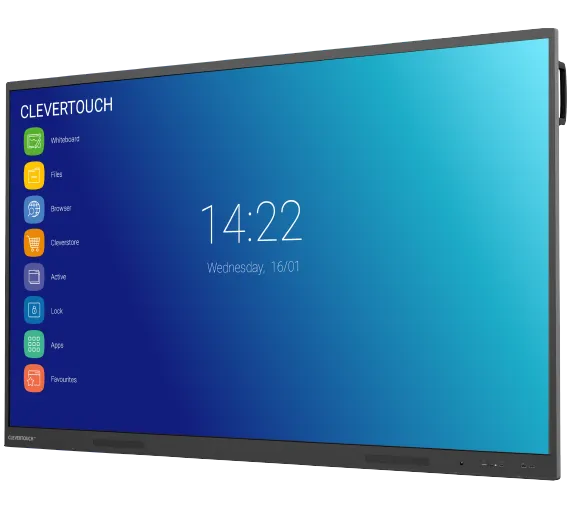
IMPACT Plus 2
Clevertouch IMPACT Plus 2 Interactive Display (Discontinued)
Priceon request
QuotationWithin 1 working day
DeliveryConfirmed with your quote, based on stock
Overview
Clevertouch IMPACT Plus 2 is a 4K interactive display sized from 55 to 86 inches, suited to classrooms and meeting rooms. Its patented touch system separates palm, finger and stylus input, and a built-in line array microphone is included. It connects up to 50 devices. The manufacturer has discontinued this model, so schools and offices seeking a replacement should request a quote for a current equivalent.
What the Clevertouch IMPACT Plus 2 is
The Clevertouch IMPACT Plus 2 is a large-format interactive display with 4K resolution, offered in 55-inch, 65-inch, 75-inch and 86-inch sizes. It replaces the traditional whiteboard and projector setup, so one panel handles writing, annotation, video and wireless sharing from connected devices.
The manufacturer has discontinued this model. This page serves organisations that already run one, buyers comparing it with newer panels, and anyone who needs a replacement. SmartRooms Qatar can quote a current equivalent or a compatible replacement for your room.
Touch, writing and sharing features that matter day to day
The touch system is usually the first thing teachers notice. Clevertouch's patented Super Glide Touch technology tells apart palm erasing, finger touch and stylus writing, so users do not switch modes in the middle of a lesson. The infinite whiteboard canvas removes the limit of a fixed writing area, and handwriting-to-text recognition and numeracy tools support working through problems on the board.
- Screen mirroring supports up to 50 devices from teachers and students.
- Nine connected devices can appear on the display simultaneously.
- Saved, printed or shared pages can go straight to student devices.
Audio, ports and power management
A built-in line array microphone picks up the room, and the speakers are rated at 45W maximum power, a level aimed at filling a classroom or meeting room with sound. The latest-generation USB-C port gives fast access to laptops and storage devices and supports device switching. Proximity sensors power the panel off when nobody is detected in the room, which reduces idle running time. Cloud account sync lets staff pick up their files from another location.
Where it fits in Qatar
A private school in Al Wakrah fitting out a 65-inch classroom could use the panel as the main teaching surface, with students' tablets mirrored onto it during group work. A university seminar room in Education City could use an 86-inch unit, where the larger screen helps students at the back read the board. A company in West Bay or Lusail might choose a 75-inch panel for a boardroom where presentations are shown to colleagues at other sites.
Qatar's summer heat and dust need planning. The source data does not give an operating temperature range for this model, so the room should be air-conditioned and kept away from direct sun, and the SmartRooms Qatar team should confirm the environment before installation.
What to plan for before you order
- Choose the size by room: 55 to 65 inches for smaller rooms, 75 to 86 inches for larger halls.
- Book a free site survey to check wall or floor space and viewing distance.
- Plan for the optional intelligent sensor module, which fits the bottom of IMPACT Plus 2.0 or UX Pro 2.0 panels.
- Expect no subscription charges for LYNX Whiteboard, CleverLive or Cleverstore.
Schools, ministries and companies can buy through a purchase order (LPO) or a government tender, with payment by bank transfer, cheque or purchase order. Request a quote from SmartRooms Qatar and we will confirm the best current equivalent or compatible replacement for your room.
Highlights
- 4K resolution in 55, 65, 75 and 86-inch sizes
- Patented Super Glide Touch tells palm, finger and stylus apart
- Built-in line array microphone and 45W maximum speaker power
- Screen mirroring for up to 50 devices, nine shown at once
- Latest-generation USB-C port with device switching
- Proximity sensors power off when the room is empty
Estimated timeline
Quotation within 1 working day · delivery timing depends on stock availability, and we confirm it with your quotation.
Specifications
Source: manufacturer · checked Oct 2026
The full specification and datasheet for this model are available on request; we send them with your quotation.
Downloads
1 file from the manufacturerQuestions about IMPACT Plus 2
Is the Clevertouch IMPACT Plus 2 still manufactured?
No. The manufacturer has discontinued the IMPACT Plus 2, so ordering this exact model may not be possible. If you need a display for a classroom or meeting room, SmartRooms Qatar can quote a current equivalent or a compatible replacement matched to your room size and software needs. If you already own one, check the existing wall or stand fittings against any replacement panel before ordering.
Which screen sizes did the IMPACT Plus 2 come in, and which suits a Qatar classroom?
The IMPACT Plus 2 was offered in 4K sizes of 55, 65, 75 and 86 inches. A 65-inch panel is a practical choice for a standard classroom in a building in Al Sadd or Msheireb, while 75 or 86 inches suit seminar rooms, lecture halls and boardrooms where people sit further back. Measure the distance from the farthest seat before choosing a size.
How does the touch system handle palm contact and stylus writing?
The panel uses Clevertouch's patented Super Glide Touch technology, which distinguishes palm erasing, finger touch and stylus writing. Teachers do not need to change settings mid-lesson. This helps in a secondary school in Doha where a teacher switches quickly between writing on the board, erasing with the palm and annotating with a stylus during the same lesson.
How many devices can connect for screen mirroring in a classroom?
Yes, up to 50 devices from students or teachers can connect, and nine of them can appear on the display at once. In group work at an international school, this lets the teacher review several students' screens without crowding the board. Check the wireless network in the room with your IT team before installation, because the source data does not describe network requirements for mirroring.
Does the IMPACT Plus 2 have a microphone and speakers for a large lecture hall?
Yes, it has a built-in line array microphone and speakers rated at 45W maximum power. For a lecture hall in Education City or a training centre in Doha, the 86-inch size is the one to consider for a larger audience. The data does not give speaker coverage or microphone pickup distance, so state the room size in your quote request and the team can advise whether an external sound system is needed.
What security controls does the panel offer for a government office?
The panel can run on or off the network, and its settings, apps and Android system can all be disabled. Data can be wiped at the end of a session, and the screen can be locked with a secure passcode. For a ministry or authority in Doha that needs locked-down shared displays, these controls keep the panel to its intended use. Your IT department should set the network policy before installation.
Do LYNX Whiteboard and Cleverstore require a subscription?
No. The source data states there are no subscription charges for LYNX Whiteboard, CleverLive or Cleverstore. Cleverstore offers hundreds of free teaching apps, and LYNX lets teachers build multi-page lessons with embedded media, used with a connected computer or in the LYNX app. A private school in Lusail planning its lesson software budget can therefore avoid recurring subscription charges for these tools.
What ports does the IMPACT Plus 2 have?
The source data lists a latest-generation USB-C port that supports device switching for delivering content. It also describes front-mounted USB-C and USB-A ports and a power button on the updated Gen 2 build. The data does not give a full port list for every unit, so confirm the exact connections on your model against the quotation before planning cable routes. Front access helps when staff plug in laptops during meetings.
Does the panel switch itself off when a room is empty?
Yes. Proximity sensors power the display off when nobody is detected in the room. In a school in Al Sadd where classrooms are used in blocks, this reduces running time between lessons and helps facilities teams manage energy use. Ask the SmartRooms Qatar team to confirm how the sensor behaves in your layout during the free site survey, since detection depends on the room.
Can I add an environmental sensor to the IMPACT Plus 2?
Yes, the intelligent sensor module slots onto the bottom of IMPACT Plus 2.0 or UX Pro 2.0 displays. It tracks air quality, light, temperature and humidity. For a clinic or hospital meeting room in Doha, or a school that wants to monitor classroom air, the module gives facilities teams environmental readings from the panel's location. Confirm compatibility with SmartRooms Qatar when requesting a quote.
Can the IMPACT Plus 2 be placed near a window during a Doha summer?
The source data does not give an operating temperature range for this model, so this cannot be confirmed from the data. Avoid direct sunlight, keep the room air-conditioned, and take particular care in summer when outdoor temperatures exceed 45 degrees Celsius. In lobbies exposed to dust storms, ask the SmartRooms Qatar team to confirm the environment in writing with your quotation before installation.
Can a school or ministry buy this panel through an LPO or tender?
Yes. SmartRooms Qatar supplies organisations that buy through purchase orders (LPOs) and government tenders, including Monaqasat. If you need several panels, such as one for each classroom in a new block, state the sizes and quantity in your request so the quotation covers the full order. Payment is by bank transfer, cheque or purchase order.