





Thursday, 22 October 2026 · 11 Jumada I 1448 AH Sun – Thu · 9:00 – 18:00
+971 56 914 9477 العربية
WhatsApp

LYNX Whiteboard

Clevertouch LYNX Whiteboard Classroom Lesson Software

System
Android 8 or higher ARM v7
WhatsApp
Priceon request
QuotationWithin 1 working day
DeliveryConfirmed with your quote, based on stock
PDFDownload datasheet (15276 LYNX Whiteboard 8 Flyer_A4_ENGLISH_10.pdf)
Overview

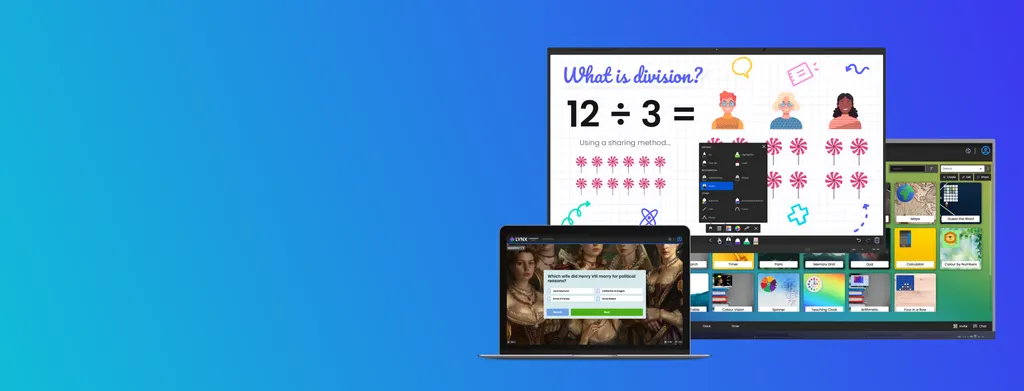
LYNX Whiteboard is Clevertouch's classroom software for building and delivering lessons on interactive displays and personal devices. It combines a collaborative whiteboard, more than 80 activities and games, AI-assisted quiz generation and file conversion from other brands. A free version is available, with Pro and Organisation tiers for premium features. It suits Qatari schools wanting one lesson tool across classrooms, laptops and tablets. Request a quote to plan licences.

What LYNX Whiteboard does in a lesson

LYNX Whiteboard is Clevertouch's lesson software. Teachers prepare a lesson, present it on a display and bring students up to the board to write, drag and solve problems. The whiteboard app itself is free to use. It provides ink tools, shapes, a content area for storing items you want to reuse, and a maths pen that converts handwritten symbols and works out basic equations, including division.

Existing material does not have to be rebuilt. The online file converter brings in files from other brands, and the software can import Word, PowerPoint, Google Docs, SMART Notebook and Promethean flipchart files, depending on the route you use. Images, videos, webpages and PDFs can be added directly into lesson pages.

Activities, AI tools and classroom features

The library includes more than 80 activities and games, plus customisable quizzes, polls and randomisers for the whole class. Two AI features stand out for teachers short on preparation time. The quiz generator can build questions and answer options from a topic keyword or from the content of a webpage URL. The image generator, which the manufacturer lists under LYNX Pro, creates classroom visuals from a text description.

Several tools are built for group work. Dual-screen mode lets several students take part at once, and split-screen use gives a direct link to the browser so a teacher can search for content without leaving the lesson. Differential recognition separates pen, palm and finger input, so a student can write with a stylus while the teacher moves objects or erases with a hand.

Platforms and the display question

LYNX Whiteboard runs on Android 8 or higher, Windows 10 21H2 (1809 or later), the last three macOS and iOS releases from Apple, and the Linux distributions Redhat 8.4, OpenSUSE 15.4 and Ubuntu 20.04. Clevertouch screens, iPads, iPhones, Android devices, Windows PCs and Macs are all listed as supported hardware.

Check the display before you order. Clevertouch provides technical support, warranty and compatibility assurance for LYNX Whiteboard when it is used on genuine Clevertouch interactive touch screens. For third-party interactive panels above 21 inches, the software falls outside that support and may have limited functionality. A SmartRooms Qatar team member can confirm the display type for your rooms when you request a quote.

Where it fits in Qatar

  • A primary school in Al Wakrah fitting out new classrooms, where one lesson format carries across each room and onto the tablets used at small-group tables.
  • A secondary maths department in Doha using the maths pen and the free PhET STEM activities, with more than 85 listed, for homework and practice.
  • A training centre in Education City or Lusail sharing course material between trainers through a school cloud account that links Dropbox, OneDrive, Google Drive and LYNX Cloud.

What to plan before a rollout

  • Confirm the display brand in each room, because support applies to genuine Clevertouch screens.
  • Decide which staff need a free account and which need Pro or an Organisation account for premium features and extra storage.
  • Check that teachers' laptops and tablets meet the minimum operating system versions listed above.
  • Confirm the interface language you need. The datasheet lists 41 interface languages, so verify Arabic availability before ordering.

Storage works per account: the free plan includes 1 GB, Pro adds 10 GB, and an Organisation account includes 100+ GB. Schools buying for several teachers can pay by purchase order (LPO), and government buyers can follow the tender route, including Monaqasat. Request a quote from SmartRooms Qatar and we will confirm how the software is supplied with your displays and devices.

Highlights

  • Free-to-use LYNX Whiteboard app for building lessons
  • More than 80 activities and games, plus quizzes and polls
  • AI quiz generator builds questions from keywords or webpage URLs
  • Over 85 free PhET STEM activities listed by the manufacturer
  • Runs on Windows, macOS, iOS, Android and Linux
  • Cloud links to Dropbox, OneDrive, Google Drive and LYNX Cloud

Estimated timeline

Quotation within 1 working day · delivery timing depends on stock availability, and we confirm it with your quotation.

Specifications

14 specifications · Source: manufacturer · checked Oct 2026
General6
Pens
Video Frame Grab Animated Rainbow Pen
Import Options
Shape Recognition Pen Import Google Documents (via online)
Insert Options
Import Word (via online) Insert Clock
Saving Functionality
Insert Videos Save As PDF
Cloud Drives
Save Page As Image Cloud Drives - Dropbox
Search
Cloud Drives - OneDrive Clipart - Pixabay
LYNX Cloud & Activities Features3
Features
Link multiple drives at once
Authentication
Organisation Shared Drive Google
Activities
UCS Server Image Search for use in activities
LYNX Whiteboard Platforms5
Android
Android 8 or higher ARM v7, ARM64-v8
Windows
Windows 10 21H2 (1809 or later) x86_64
macOS
Apple’s last three releases x86_64, ARM64
iOS
Apple’s last three releases armv8 (ARM64)
Linux
Redhat 8.4, OpenSUSE 15.4, Ubuntu 20.04 x86_64

Downloads

13 files from the manufacturer
PDF Datasheets 15276 LYNX Whiteboard 8 Flyer_A4_ENGLISH_10.pdf 1.2 MB Clevertouch LYNX Whiteboard datasheets (PDF, 1.2 MB) URL Other documents · Opens on manufacturer site 4KTeH0INr_k Clevertouch LYNX Whiteboard other documents (URL) URL Other documents · Opens on manufacturer site EzWx7JLIhRc Clevertouch LYNX Whiteboard other documents (URL) URL Other documents · Opens on manufacturer site N2k9opuF1y0 Clevertouch LYNX Whiteboard other documents (URL) URL Other documents · Opens on manufacturer site NsZwRPUadSg Clevertouch LYNX Whiteboard other documents (URL) URL Other documents · Opens on manufacturer site SYYNupYl1wo Clevertouch LYNX Whiteboard other documents (URL) URL Other documents · Opens on manufacturer site _VDG85dNDcQ Clevertouch LYNX Whiteboard other documents (URL) URL Other documents · Opens on manufacturer site cOQSh_MK3OU Clevertouch LYNX Whiteboard other documents (URL) URL Other documents · Opens on manufacturer site nHeBD9kD4z8 Clevertouch LYNX Whiteboard other documents (URL) URL Other documents · Opens on manufacturer site oJAusY2XmOE Clevertouch LYNX Whiteboard other documents (URL) URL Other documents · Opens on manufacturer site oPJA0GOeN1c Clevertouch LYNX Whiteboard other documents (URL) URL Other documents · Opens on manufacturer site oVbYgwCW2q4 Clevertouch LYNX Whiteboard other documents (URL) URL Other documents · Opens on manufacturer site rE55hgdMrxw Clevertouch LYNX Whiteboard other documents (URL)

Questions about LYNX Whiteboard

What is the Clevertouch LYNX Whiteboard?
LYNX Whiteboard is Clevertouch's lesson software, used on interactive displays and personal devices. It provides a collaborative whiteboard, more than 80 activities and games, customisable quizzes and polls, AI-assisted quiz creation and an online file converter for bringing in material from other brands. It is aimed at teachers and school staff who want one lesson tool that works across classrooms, laptops and tablets.
Is LYNX Whiteboard free to use?
The LYNX Whiteboard app is free to use, and the manufacturer states that standard features need no credit card. The free plan includes 1 GB of storage. Pro adds 10 GB on top of that and unlocks premium features. An Organisation account includes 100+ GB and lets multiple users access premium features under one account. Request a quote to confirm which tier suits your school.
Which devices and operating systems does LYNX Whiteboard support?
LYNX Whiteboard runs on Android 8 or higher, Windows 10 21H2 (1809 or later), the last three macOS and iOS releases from Apple, and Redhat 8.4, OpenSUSE 15.4 or Ubuntu 20.04 on Linux. Clevertouch screens, iPads, iPhones, Android devices, Windows PCs and Macs are listed as supported. Check your staff laptops and tablets against these versions before ordering.
Will LYNX Whiteboard work on a non-Clevertouch interactive display?
Clevertouch provides support, warranty and compatibility assurance for LYNX Whiteboard when it runs on genuine Clevertouch interactive touch screens. For third-party interactive panels of 21 inches and above, the software is outside Clevertouch's supported solutions and may have limited functionality. If your rooms have mixed displays, ask SmartRooms Qatar to confirm the setup in your quote request.
How does the AI quiz generator work?
The quiz generator creates questions and answer options from a topic keyword you enter, or from a webpage URL. It analyses the content of the page, extracts key information and produces questions tailored to it. This saves preparation time for a Grade-level topic, such as a reading passage or a science article your class is studying this week.
Can I convert existing lesson files from other whiteboard brands?
Yes. The online file converter brings in material from other brands, and the software can import Word, PowerPoint, Google Docs, SMART Notebook and Promethean flipchart files, depending on the import route. Images, videos, webpages and PDFs can also be added directly into lesson pages, so a school moving from older boards does not need to rebuild its resources.
Does LYNX Whiteboard suit maths and science lessons?
The maths pen converts handwritten mathematical symbols and provides answers for basic equations, including division. The software also includes dice, maths tools and science tools, and it lists over 85 free PhET STEM activities for use in class or as homework. A secondary maths department in Doha can use these for practice tasks without buying separate resources.
Can LYNX Whiteboard connect to Google Drive, OneDrive and Dropbox?
Yes. LYNX Cloud can sync with Dropbox, OneDrive, Google Drive and LYNX Cloud, so files stored there can be placed directly into lessons. A school can set up a LYNX Cloud account to share content between staff, give students their own log-ins and set homework activities. This suits a training centre in Education City where trainers work across several rooms.
Does it support dual-screen and split-screen teaching?
LYNX Whiteboard can run in dual-screen mode, which helps group work and gets several students involved in the same lesson. Its split-screen mode links directly to the browser, so a teacher can search for content from a Google search without leaving the session. This avoids interruptions when a question comes up during a primary school lesson in Al Wakrah.
Which interface languages are available?
The manufacturer's datasheet lists 41 interface languages. Schools in Qatar that work in Arabic and English side by side should confirm whether Arabic is included in the version they will use before ordering. SmartRooms Qatar can check this with Clevertouch as part of your quote, so your staff are not surprised by the interface after installation.
How do I buy LYNX Whiteboard through SmartRooms Qatar?
Request a quote through this page and we usually respond within one working day. We supply and deliver to all 8 municipalities of Qatar. Schools and offices can pay by bank transfer, cheque or purchase order, and government buyers can follow tender procedures, including Monaqasat. Tell us your rooms, display types and number of users so the quote matches your requirement.

Similar models

Clevertouch CleverLive Suite Clevertouch CleverLive Suite Digital Signage Software
Software
Clevertouch CleverMDM Clevertouch CleverMDM Mobile Device Management Software
Yes
Clevertouch Clevershare Clevertouch Clevershare Screen Sharing Software for Interactive Displays
Software
Clevertouch CleverStore Clevertouch CleverStore Educational App Store Software
Software
Email Call



