





Thursday, 22 October 2026 · 11 Jumada I 1448 AH Sun – Thu · 9:00 – 18:00
+971 56 914 9477 العربية
WhatsApp

DeepHub MDM

Dahua DeepHub MDM Remote Management Software for Displays

WhatsApp
Priceon request
QuotationWithin 1 working day
DeliveryConfirmed with your quote, based on stock
PDFDownload datasheet (Dahua Deephub Device Management System_datahsheet_20220808.pdf)
Overview

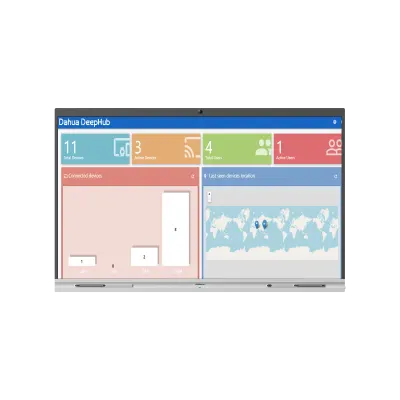
DeepHub MDM is Dahua's management software for controlling connected devices from a central point. Administrators can reach managed devices remotely, review each unit's name, operating system, last-seen time and IP address, and send instant or scheduled messages to every screen or a chosen group. Multi-user permissions and device grouping suit IT and facilities teams running several Dahua panels across Doha, Lusail or Education City. Request a quote.

What DeepHub MDM does for a fleet of displays

DeepHub MDM is Dahua's management software for keeping a group of connected devices under central control. Instead of visiting each room to check a panel, an administrator can see the status of every managed device, reach it remotely and send it instructions. It sits within Dahua's interactive flat panel range, which makes it a natural choice for organisations that run several Dahua units and want one place to look after them.

Device visibility and remote control

Each device record shows the details an IT team needs to triage a fault: its name, operating system, when it was last seen and its IP address. A last-seen time that is hours old points to a screen that is switched off or disconnected, while the IP address helps confirm the unit sits on the right network. Remote access lets staff act on these findings, including installing or removing applications without a site visit.

Messaging, grouping and permissions

Messages can be sent instantly or scheduled for later, to every device or only to chosen ones. Devices and users can be grouped so that batch operations run on a defined set of screens, such as every panel on one floor. Multi-user management with customisable permissions lets an IT manager keep full control while facilities staff manage only the buildings they are responsible for.

Key capabilities at a glance

  • Remote access to managed devices
  • Device name, OS, last-seen time and IP address
  • Instant and scheduled messaging
  • Grouping for batch operations
  • Remote app installation and removal
  • Custom usage policies, applied and enforced

Where it fits in Qatar

Three situations show where DeepHub MDM earns its place. A government ministry in Doha with panels in reception and meeting rooms can apply one usage policy across every site from a single console. A university in Education City can schedule notices, such as timetable or room changes, to lecture-room panels in several buildings at once. A private school in Lusail can manage classroom and library panels so that IT updates do not interrupt lessons.

What to plan before deployment

Plan the rollout before the software goes live. List every Dahua device, its location and its network connection, then decide how to group them by floor, building or department. Define user roles so that teachers, facilities officers and IT administrators each see only what they need, and agree on the usage policy that will be enforced. Confirm device compatibility, operating system support and network requirements with the SmartRooms Qatar team, as these details are not part of the product data we hold. A free site survey helps map rooms, cabling and network points before you commit.

SmartRooms Qatar delivers DeepHub MDM to all eight municipalities of Qatar. We usually issue quotations within one working day, and we support purchase orders (LPOs) and government tenders. Request a quote and tell us how many Dahua devices you need to manage, where they are, and which sites should share the same policies.

Highlights

  • Remote access to managed Dahua devices
  • Device name, OS, last-seen time and IP address
  • Instant or scheduled messages to all or selected devices
  • Grouping for batch operations across devices and users
  • Remote application installation and uninstallation
  • Custom usage policies applied and enforced centrally

Estimated timeline

Quotation within 1 working day · delivery timing depends on stock availability, and we confirm it with your quotation.


Specifications

Source: manufacturer · checked Oct 2026
The full specification and datasheet for this model are available on request; we send them with your quotation.

Downloads

2 files from the manufacturer

Questions about DeepHub MDM

What is DeepHub MDM used for?
DeepHub MDM is Dahua's management software for monitoring and controlling a group of connected devices from one central point. It covers remote access, device information, messaging, batch operations, multi-user management and usage policies. It suits IT and facilities teams looking after several Dahua displays who want to manage them from one place rather than handling each unit by hand.
What information can I see for each device?
Each device entry shows its name, operating system, the time it was last seen and its IP address, among other details. Checking the last-seen time quickly shows whether a panel has gone offline, and the IP address helps IT confirm which network a unit is on. Ask the SmartRooms Qatar team to confirm the full list of fields before you finalise your deployment plan.
Can administrators access devices remotely and install applications?
Yes. The product data lists remote access to managed devices, along with remote application installation and uninstallation. An administrator can work on a screen from the office without walking to the room where it is mounted. For a school or ministry with panels spread across several floors, this reduces the time spent on routine updates and minor fixes.
Can I send messages to all screens or only to some of them?
You can send an instant message or schedule one for later, and target all devices or only selected ones. A university might schedule a notice for every lecture room before the examination period starts, while a hotel could send a message only to the panels in its conference foyer. Test the message on one device first to check how it appears before sending it to a larger group.
How does grouping work for a multi-floor office in West Bay?
Grouping lets you organise devices and users into sets, then run batch operations on each set. An office tower in West Bay could group its panels by floor, so that a message for the fourth-floor meeting rooms reaches only those screens, and a policy update goes out to one wing at a time. Grouping keeps large deployments manageable as the number of screens grows.
Can different staff members have different permissions?
Yes. DeepHub MDM supports multiple users with customisable permissions. An IT manager can keep full control, while a facilities officer might be allowed to send messages only to the screens in their own building. Setting user roles before rollout prevents changes being made by people who do not manage the devices.
How would a ministry enforce one usage policy across reception and meeting rooms?
DeepHub MDM can apply custom usage policies to devices and enforce them. A ministry in Doha could set one policy for reception displays and another for meeting-room panels, then confirm that each device follows the rules set for it. Because the policy is managed centrally, staff at each site do not need to adjust settings individually.
Which Dahua devices does it support?
The product data does not list the specific models or firmware versions that DeepHub MDM supports, so we do not state them here. It is categorised as Dahua interactive flat panel software, but you should confirm device compatibility, operating system support and network requirements with the SmartRooms Qatar team before buying. Send us your panel models and we will confirm what applies to them.
How could a university in Education City use scheduled messages?
A campus in Education City could use scheduled messages to publish timetable changes, room bookings or examination notices to panels in lecture rooms across several buildings. Scheduling means the notice appears at a set time without needing staff to be on site. Grouping the panels by building lets the team target only the rooms affected by each change.
Can a private school in Lusail manage classroom panels from the office?
Yes, this is a suitable use for a private school in Lusail with panels in classrooms, the library and the administration block, since all of them can be managed from one point. Remote access and remote application installation let IT staff update software without interrupting lessons. Teachers can be given permissions that suit their role, while IT administrators keep full control. Confirm the device list with us first.
Is it useful for a clinic or hospital waiting area in Al Sadd?
It can be, where waiting-area or information displays need consistent messages. Staff could schedule health information or queue notices for all panels, or send an urgent message only to the screens in one zone. Because the software manages devices remotely, staff avoid visiting each unit. Before deployment, confirm with the SmartRooms Qatar team that the panel models and network setup suit your environment.
What should we plan before rolling out DeepHub MDM across our sites?
Start by listing every Dahua device, its location and its network connection, then decide how to group them by floor, building or department. Define user roles and agree on the usage policy. A free site survey from SmartRooms Qatar helps map rooms and network points. Quotations are usually issued within one working day, and we accept purchase orders (LPOs) and government tenders.

Similar models

Clevertouch CleverLive Suite Clevertouch CleverLive Suite Digital Signage Software
Software
Clevertouch CleverMDM Clevertouch CleverMDM Mobile Device Management Software
Yes
Clevertouch Clevershare Clevertouch Clevershare Screen Sharing Software for Interactive Displays
Software
Clevertouch CleverStore Clevertouch CleverStore Educational App Store Software
Software
Email Call


