





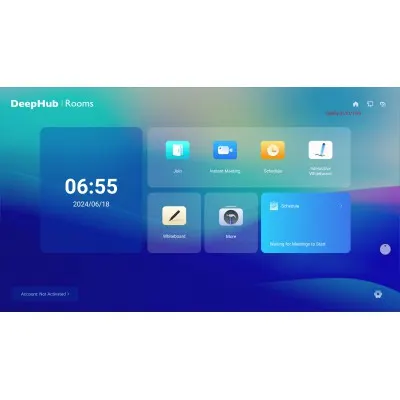
Deephub Meeting
Dahua Deephub Meeting DHI-TSW-Meeting-S Video Conferencing Software
The Dahua Deephub Meeting (DHI-TSW-Meeting-S) is video conferencing software for hosting and joining meetings from a Windows desktop, a web browser or a mobile phone. It supports up to 300 online attendees and video calls up to 720p, with cloud recording that can be protected by a PIN. Its shared whiteboard offers shapes, flowcharts and simultaneous editing, making it a fit for Qatari universities, schools and companies running hybrid meetings with partners abroad.
What Deephub Meeting is and how it runs
Deephub Meeting (DHI-TSW-Meeting-S) is software for hosting and joining video meetings from a Windows computer, a web browser or a phone. Hosts create, schedule, join and cancel meetings from the same account, and invitations and reminders are generated for each session. Because it is software rather than hardware, the deciding question is which devices your staff already use and which room will host the meeting.
Video quality, attendance and the 1080p upgrade
Calls and screen sharing run at up to 720p as standard. Camera and screen sharing resolutions can both be adjusted during a meeting, and 1080p becomes available once the activation code permission is upgraded. Up to 300 online attendees can join one meeting, so plan network capacity for the room that hosts the session, not only for the presenter.
Whiteboard, recording and AI tools in daily use
- Shared whiteboard: the home screen of the interactive whiteboard can be shared into a meeting, combining screen sharing with video.
- Drawing and text: pens, highlighters, adjustable shapes, text styling, editable flowcharts and mind maps.
- Collaboration: several users can edit the same content at the same time.
- Recording: cloud recording, with a PIN required to watch recordings online.
- AI assistant: generates images and documents, answers questions, translates text and generates code.
Where it fits in Qatar
A university in Education City can run seminars where students in Doha join with partners abroad, using the browser for guests who do not have the desktop client. A private school in Al Wakrah with an interactive display in each classroom can use the whiteboard tools in live lessons and record parent briefings to the cloud. A consultancy in West Bay can hold a Sunday-to-Thursday project review with teams working overseas, with the host deciding who may speak and removing attendees who should not be in the session.
What to plan before you deploy
Confirm which devices and browsers your attendees use. The web client requires Safari 15 or later on iOS and Chrome 101 or later on Android, so older devices should be checked before a rollout. Decide which staff need host rights, and whether you need 1080p, which requires the activation code upgrade. Confirm the cloud recording arrangements in your quotation. Organisations buying for several departments can raise a purchase order (LPO) or take part in a government tender through SmartRooms Qatar, and the team can carry out a free site survey of the meeting rooms that will use the software.
Request a quote from SmartRooms Qatar for Deephub Meeting (DHI-TSW-Meeting-S), and we will confirm the activation code options you need, usually within one working day.
Highlights
- Up to 720p video calls and presentations as standard
- Up to 300 online attendees in a single meeting
- Windows desktop client, web client and mobile access
- Cloud meeting recording with optional PIN protection
- Shared whiteboard with shapes, flowcharts and multi-user editing
- 1080p available by upgrading the activation code permission
Estimated timeline
Quotation within 1 working day · delivery timing depends on stock availability, and we confirm it with your quotation.
Specifications
General17
- Before Meeting
- Account Management
- Flexible Meetings
- Meetings can be attended from the computer through the Windows desktop client or web client, or from the mobile client on a mobile device. The WEB H5 scope of adaptation is as follow: Safari version 15 and above is supported for iOS and Chrome version 101 and above is supported for Android.
- Meeting Configuration
- Meetings can be easily created, joined, scheduled and canceled.
- During Meeting
- General Settings
- Attendee Management
- The host can control live videos, view attendee information, rename and change the identity of attendees, control their speaking permissions, and remove attendees from the meeting. The host also has the highest level of permission in the meeting.
- Screen Sharing
- The home screen of the interactive whiteboard can be shared in meetings. It not only supports screen sharing, but also combines together screen sharing with video conferencing.
- Meeting Recording
- Meetings can be recorded through cloud recording. A PIN code can also be added to the video for protection, as it would require users to enter the PIN code to view the recording online.
- Interactive and Collaborative Whiteboard
- Resource Tools
- Meeting Invitation
- Generates invitations and reminders for meetings.
- Video Layout
- Supports multiple types of video layouts including grid view, speaker view, and picture-in-picture view.
- General Settings
- The camera resolution and screen sharing resolution can both be adjusted for meetings. You can adjust the resolution up to 1080p by upgrading the activation code permission.
- Shape Tools
- A variety of shapes are available, offering flexibility to edit their color, border, transparency, and other characteristics according to your preferences.
- Text Tools
- For fonts, you can adjust the style, size, text color, background color and text alignment.
- Painting Tools
- Both a pen and highlighter are available for selection. You can freely modify the color and thickness of the stroke and set the drawing method.
- Whiteboard Tools
- Content can be searched for on the interactive whiteboard. You can also insert editable flowcharts and mind maps. Resources can also be inserted, and multiple users can edit the content at the same time.
- Activity Tools
- Meeting outlines can be edited on the interactive whiteboard. You can also access practical meeting tools such as timers.
- AI Tools
- Features an AI assistant that can generate images and documents, answer questions, translate text to different languages, generate codes, and more.




