





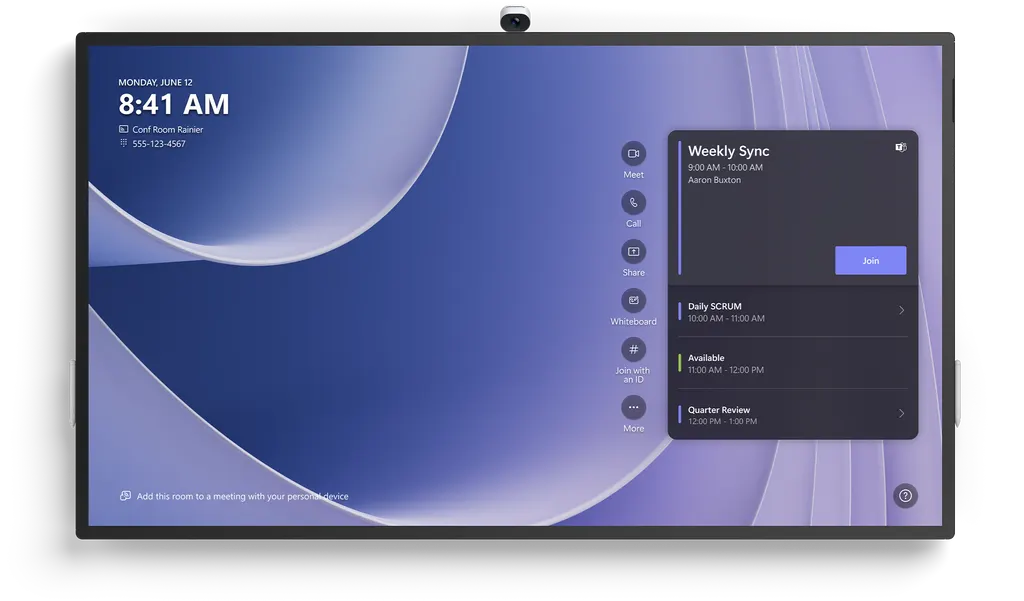
Surface Hub 3 85"
Microsoft Surface Hub 3 85" Teams Collaboration Board
- Resolution
- Surface Hub 3 50": 3840 × 2560
- Memory
- Memory: 32 GB
- Storage
- Memory: 32 GB
- Warranty
- 1-year limited hardware warranty
A 16:9 collaboration board with a 3840 x 2160 anti-glare touchscreen, 20 simultaneous touch points and two included pens. The built-in Surface Hub Smart Camera covers a 136-degree field of view, and its microphone array is certified for Microsoft Teams up to 3.5 meters away. Built for large boardrooms and lecture halls in Doha, Lusail and Education City that run hybrid meetings. Request a quote.
What the Surface Hub 3 85-inch is built for
The Microsoft Surface Hub 3 85-inch combines a large touch display, a Windows meeting computer, a 4K camera, microphones and speakers in one unit, so a room can run a Microsoft Teams meeting with its own built-in computer. Its 16:9 panel shows remote colleagues and shared content side by side, and it can serve as a writing surface during workshops. The unit weighs 84 kg and measures 1959 mm wide, so it suits boardrooms and lecture halls rather than small huddle spaces.
Display, touch and pen facts that matter
- Resolution: 3840 x 2160 on an anti-glare IPS LCD, keeping slides and drawings legible across a long room.
- Touch: 20 simultaneous touch points, so several people can write or move content at the same time.
- Pens: two Surface Hub Pens are supplied, and Surface Slim Pen models are listed as compatible.
- Colour and border: 8-bit colour with a 30.5 mm border.
Anti-glare treatment matters in rooms with window light, because reflections make a board harder to read from the far seats. Twenty touch points allow group brainstorming without queuing for the pen.
Camera, microphones and room coverage
The Surface Hub Smart Camera records in 4K with a 136-degree horizontal field of view and connects over a custom USB-C link. The full-band 8-element microphone array is certified for Microsoft Teams up to 3.5 meters away, and the three-way stereo speakers cover 100 Hz to 12 kHz. Two Doppler occupancy sensors are fitted to the unit.
Where it fits in Qatar
- A ministry boardroom in Msheireb, where directors in the room join a Teams meeting with colleagues across Doha and with teams working abroad.
- A lecture theatre or seminar room in Education City, where the lecturer writes on the board while the camera frames the room for remote students.
- A conference room in a West Bay hotel or a Lusail serviced-apartment building, hosting hybrid client presentations.
What to plan before installation
Plan the space first. At 84 kg and 1130 mm high, the unit needs either a wall mount that can carry it or a height-adjustable mobile stand, which is sold separately. SmartRooms Qatar offers a free site survey to check wall structure, power and sightlines. The unit is rated 100 V to 240 V, draws up to 665 W in operation and comes with a 4 m AC power cable; confirm the plug type for BS 1363 sockets when you request a quote. The source data gives no operating temperature range, so confirm the room environment with the SmartRooms Qatar team, especially near windows in summer. The software is Windows 11 IoT Enterprise with the Microsoft Teams Rooms on Windows experience. Configuring it to Windows 11 Pro or Enterprise needs a licence and image, sold separately. The manufacturer provides a one-year limited hardware warranty.
Ordering and availability
Microsoft has announced the end of Surface Hub production, so availability must be confirmed for every request. SmartRooms Qatar supplies units with delivery to all eight municipalities, professional installation and payment by bank transfer, cheque or purchase order. Public bodies can order against an LPO or a government tender, including Monaqasat. Request a quote and we will confirm the configuration, the installation plan and a current alternative if this model is no longer available.
Highlights
- 85-inch 16:9 anti-glare IPS display at 3840 x 2160
- 20 simultaneous touch points with two Surface Hub Pens included
- Surface Hub Smart Camera with 4K resolution and 136-degree view
- 8-element microphone array certified for Teams up to 3.5 meters
- Intel i5 processor, 32 GB memory and 512 GB storage
- Rated 100 V to 240 V, 50/60 Hz, with 4 m AC cable
Classroom fit
At 85″ the farthest student should sit within about 6.4 m (6× the screen height).
Estimated timeline
Quotation within 1 working day · delivery timing depends on stock availability, and we confirm it with your quotation.
Specifications
Tech specs (Microsoft Store UK)19
- Processor
- Intel i5
- Graphics
- iGPU
- Memory and storage
- Memory: 32 GB Storage: 512 GB
- Resolution
- Surface Hub 3 50": 3840 × 2560 Surface Hub 3 85": 3840 × 2160
- Display
- Surface Hub 3 50" PixelSense™ Display 3:2 aspect ratio 8-bit colour 15.5 mm border Anti-glare, IPS LCD In-cell Touch with 10 simultaneous touch points and two pens Surface Hub 3 85" PixelSense™ Display 16:9 aspect ratio 8-bit colour 30.5 mm border Anti-glare, IPS LCD In-cell Touch with 20 simultaneous touch points and two pens
- Size and Weight
- Surface Hub 3 50" Height: 741 mm (29.2 inch) Width: 1097 mm (43.2 inch) Depth: 76 mm (3.0 inch) Weight: 28 kg (61.6 lbs) Surface Hub 3 85" Height: 1130 mm (44.5 inch) Width: 1959 mm (77.1 inch) Depth: 85.6 mm (3.4 inch) Weight: 84 kg (185 lbs)
- Security
- Trusted Platform Module 2.0
- Cameras
- Surface Hub Smart Camera , 4K, custom USB-C connection, 136-degree HFOV
- Audio
- Surface Hub 3 50" 100 Hz-12 KHz range front-facing three-way stereo speakers, including (6) front-facing mid-range, (3) front-facing tweeter and (1) rear bass drivers 2x full band 8-element MEMS microphone arrays Smart AV optimizes audio to Portrait or Landscape Surface Hub 3 85" 100 Hz – 12 KHz range 3-way stereo speakers, including (4) front-facing mid-range, (2) front-facing tweeter and (1) rear bass drivers Full band 8-element MEMS microphone array
- Ports
- Surface Hub 3 50" (4) USB-C including two camera ports (on display) (1) USB-A™ (on display) RJ45 Gigabit Ethernet Mini-DisplayPort™ Video Output* HDMI Video Input** USB-C with Alt-Mode DisplayPort Input** Surface Hub 3 85" (3) USB-C (on display) (1) USB-A™ (on display) RJ45 Gigabit Ethernet Mini-DisplayPort™ Video Output* HDMI Video Input** USB-C with Alt-Mode DisplayPort Input** * Available when running Windows 10/11 Pro/Enterprise. ** Available in bypass only. Visit Surface Hub | Microsoft Learn for additional information on connecting devices to Surface Hub.
- Network and connectivity
- Surface Hub 3 50" Wi-Fi 5: IEEE 802.11ac (a/b/g/n/ac compatible) Bluetooth® Wireless 5.1 technology Gigabit Ethernet Microsoft Teams Cast* Surface Hub 3 85" Wi-Fi 5: IEEE 802.11ac (a/b/g/n/ac compatible) Bluetooth® Wireless 5.1 technology Gigabit Ethernet Microsoft Teams Cast* * For additional information on casting content to Microsoft Teams Rooms, visit Microsoft Support.
- Pen & accessories compatibility
- Active, dual-pen inking support Surface Hub Pen (active) Surface Slim Pen, Surface Slim Pen for Business (2nd Edition) Compatible with Microsoft Teams Rooms certified peripherals
- Software
- Windows 11 IoT Enterprise with the Microsoft Teams Rooms on Windows experience Configurable to Windows 11 Pro/Enterprise* * Software licence and image required. Sold separately. For additional information, visit Surface Hub | Migrate to Windows 10/11 Pro or Enterprise.
- Accessibility
- Compatible with height-adjustable, mobile stands* Includes Teams Accessibility Features – Learn More Accessibility Features | Microsoft Accessibility Discover more Microsoft Accessible Devices & Products – Accessible Devices & Products for PC & Gaming | Assistive Tech Accessories – Microsoft Store * Sold separately.
- Serviceability
- User-replaceable components include: Modular compute cartridge with removable SSD Surface Hub Smart Camera Surface Hub Pens
- Exterior
- Casing: Precision machined aluminium with mineral-composite resin Colour: Platinum Physical Buttons: Power, Volume, Source
- Sensors
- Surface Hub 3 50" Doppler occupancy sensor Accelerometer Gyroscope Surface Hub 3 85" (2) Doppler occupancy sensor
- What’s in the box
- Surface Hub 3 50" (1) Surface Hub 3 50” (1) Surface Hub Smart Camera (1) Surface Hub Pen 3 m AC Power Cable Quick-Start Guide Surface Hub 3 85" (1) Surface Hub 3 85” (1) Surface Hub Smart Camera (2) Surface Hub Pen 4 m AC Power Cable Quick-Start Guide
- Warranty
- 1-year limited hardware warranty
Tech specs (Microsoft Learn)20
- Processor
- Intel i5
- Graphics
- iGPU
- Memory and storage
- Memory: 32 GB Storage: 512 GB
- Resolution
- Surface Hub 3 50": 3840 x 2560 Surface Hub 3 85": 3840 x 2160
- Display
- Surface Hub 3 50" PixelSense Display 3:2 aspect ratio 8-bit color 15.5 mm border Anti-glare, IPS LCD In-cell Touch with 10 simultaneous touch points and two pens Surface Hub 3 85" PixelSense Display 16:9 aspect ratio 8-bit color 30.5-mm border Anti-glare, IPS LCD In-cell Touch with 20 simultaneous touch points and two pens
- Size and Weight
- Surface Hub 3 50" Height: 29.2 in (741 mm) Width: 43.2 in (1,097 mm) Depth: 3.0 in (76 mm) Weight: 61.6 lbs (28 kg) Surface Hub 3 85" Height: 44.5 in (1,130 mm) Width: 77.1 in (1,959 mm) Depth: 3.4 in (85.6 mm) Weight: 185 lbs (84 kg)
- Security
- Trusted Platform Module 2.0
- Cameras
- Microsoft Surface Hub Smart Camera , 4K, custom USB-C connection, 136-degree HFOV
- Audio
- Surface Hub 3 50" 100 Hz-12 kHz range front-facing three-way stereo speakers, including (6) front-facing mid-range, (3) front-facing tweeter and (1) rear bass drivers 2x full band 8-element MEMS microphone arrays certified for use with Microsoft Teams up to 2.3 meters away Smart AV optimizes audio to Portrait or Landscape Surface Hub 3 85" 100 Hz-12 kHz range three-way stereo speakers, including (4) front-facing mid-range, (2) front-facing tweeter and (1) rear bass drivers Full band 8-element MEMS microphone array certified for use with Microsoft Teams up to 3.5 meters away
- Ports
- Surface Hub 3 50" (4) USB-C including two camera ports (on display) (1) USB-A on cartridge RJ45 Gigabit Ethernet Mini-DisplayPort Video Output* HDMI Video Input** USB-C with Alt-Mode DisplayPort Input** Surface Hub 3 85" (3) USB-C (on display) (2) USB-A (1 on display; 1 on cartridge) RJ45 Gigabit Ethernet Mini-DisplayPort Video Output* HDMI Video Input** USB-C with Alt-Mode DisplayPort Input** *Available when running Windows 10/11 Pro/Enterprise. **Available via Source button on underside of Surface Hub.
- Network and connectivity
- Surface Hub 3 50" Wi-Fi 5: IEEE 802.11ac (a/b/g/n/ac compatible) Bluetooth Wireless 5.1 technology Gigabit Ethernet Microsoft Teams Cast* Surface Hub 3 85" Wi-Fi 5: IEEE 802.11ac (a/b/g/n/ac compatible) Bluetooth Wireless 5.1 technology Gigabit Ethernet Microsoft Teams Cast* *For additional information on casting content to Microsoft Teams Rooms, visit Microsoft Support.
- Pen & accessories compatibility
- Active, dual-pen inking support Microsoft Surface Hub Pen (active) Microsoft Surface Slim Pen, Microsoft Surface Slim Pen (2nd Edition) Compatible with Microsoft Teams Rooms certified peripherals
- Software
- Windows 11 IoT Enterprise with the Microsoft Teams Rooms on Windows experience Configurable to Windows 11 Pro/Enterprise* *Software license and image required. Sold separately. To learn more, see Migrate to Windows 10/11 Pro or Enterprise on Surface Hub.
- Accessibility
- Compatible with height-adjustable, mobile stands* Includes Teams Accessibility Features – Learn More Accessibility Features Discover more Microsoft Accessible Devices & Products - Accessible Devices & Products for PC & Gaming *Sold separately.
- Serviceability
- User-replaceable components include: Modular compute cartridge with removable SSD Surface Hub Smart Camera Surface Hub Pens
- Exterior
- Casing: Precision machined aluminum with mineral-composite resin Color: Platinum Physical Buttons: Power, Volume, Source
- Sensors
- Surface Hub 3 50" Doppler occupancy sensor Accelerometer Gyroscope Surface Hub 3 85" (2) Doppler occupancy sensor
- What's in the box
- Surface Hub 3 50" (1) Surface Hub 3 50" (1) Surface Hub Smart Camera (1) Surface Hub Pen 3 m AC Power Cable Quick Start Guide Surface Hub 3 85" (1) Surface Hub 3 85" (1) Surface Hub Smart Camera (2) Surface Hub Pen 4 m AC Power Cable Quick Start Guide
- Warranty
- One-year limited hardware warranty
- Power
- Surface Hub 3 50" Input Voltage: 50/60Hz 120/220V nominal, 100 V - 240 V rated Input Power, operating: 445 W (494 W Surge Load) Input Current: 5.46A max Input Power, standby: 35 W Surface Hub 3 85" Input Voltage: 50/60Hz 120/220V nominal, 100 V - 240 V rated Input Power, operating: 665 W (745 W Surge Load) Input Current: 7.8A max Input Power, standby: 35 W
Surface Hub 3 85"39
- Tech specs (Microsoft Store UK) · Processor
- Intel i5
- Tech specs (Microsoft Store UK) · Graphics
- iGPU
- Tech specs (Microsoft Store UK) · Memory and storage
- Memory: 32 GB Storage: 512 GB
- Tech specs (Microsoft Store UK) · Resolution
- 3840 × 2160
- Tech specs (Microsoft Store UK) · Display
- PixelSense™ Display 16:9 aspect ratio 8-bit colour 30.5 mm border Anti-glare, IPS LCD In-cell Touch with 20 simultaneous touch points and two pens
- Tech specs (Microsoft Store UK) · Size and Weight
- Height: 1130 mm (44.5 inch) Width: 1959 mm (77.1 inch) Depth: 85.6 mm (3.4 inch) Weight: 84 kg (185 lbs)
- Tech specs (Microsoft Store UK) · Security
- Trusted Platform Module 2.0
- Tech specs (Microsoft Store UK) · Cameras
- Surface Hub Smart Camera , 4K, custom USB-C connection, 136-degree HFOV
- Tech specs (Microsoft Store UK) · Audio
- 100 Hz – 12 KHz range 3-way stereo speakers, including (4) front-facing mid-range, (2) front-facing tweeter and (1) rear bass drivers Full band 8-element MEMS microphone array
- Tech specs (Microsoft Store UK) · Ports
- (3) USB-C (on display) (1) USB-A™ (on display) RJ45 Gigabit Ethernet Mini-DisplayPort™ Video Output* HDMI Video Input** USB-C with Alt-Mode DisplayPort Input** * Available when running Windows 10/11 Pro/Enterprise. ** Available in bypass only. Visit Surface Hub | Microsoft Learn for additional information on connecting devices to Surface Hub.
- Tech specs (Microsoft Store UK) · Network and connectivity
- Wi-Fi 5: IEEE 802.11ac (a/b/g/n/ac compatible) Bluetooth® Wireless 5.1 technology Gigabit Ethernet Microsoft Teams Cast* * For additional information on casting content to Microsoft Teams Rooms, visit Microsoft Support.
- Tech specs (Microsoft Store UK) · Pen & accessories compatibility
- Active, dual-pen inking support Surface Hub Pen (active) Surface Slim Pen, Surface Slim Pen for Business (2nd Edition) Compatible with Microsoft Teams Rooms certified peripherals
- Tech specs (Microsoft Store UK) · Software
- Windows 11 IoT Enterprise with the Microsoft Teams Rooms on Windows experience Configurable to Windows 11 Pro/Enterprise* * Software licence and image required. Sold separately. For additional information, visit Surface Hub | Migrate to Windows 10/11 Pro or Enterprise.
- Tech specs (Microsoft Store UK) · Accessibility
- Compatible with height-adjustable, mobile stands* Includes Teams Accessibility Features – Learn More Accessibility Features | Microsoft Accessibility Discover more Microsoft Accessible Devices & Products – Accessible Devices & Products for PC & Gaming | Assistive Tech Accessories – Microsoft Store * Sold separately.
- Tech specs (Microsoft Store UK) · Serviceability
- User-replaceable components include: Modular compute cartridge with removable SSD Surface Hub Smart Camera Surface Hub Pens
- Tech specs (Microsoft Store UK) · Exterior
- Casing: Precision machined aluminium with mineral-composite resin Colour: Platinum Physical Buttons: Power, Volume, Source
- Tech specs (Microsoft Store UK) · Sensors
- (2) Doppler occupancy sensor
- Tech specs (Microsoft Store UK) · What’s in the box
- (1) Surface Hub 3 85” (1) Surface Hub Smart Camera (2) Surface Hub Pen 4 m AC Power Cable Quick-Start Guide
- Tech specs (Microsoft Store UK) · Warranty
- 1-year limited hardware warranty
- Tech specs (Microsoft Learn) · Processor
- Intel i5
- Tech specs (Microsoft Learn) · Graphics
- iGPU
- Tech specs (Microsoft Learn) · Memory and storage
- Memory: 32 GB Storage: 512 GB
- Tech specs (Microsoft Learn) · Resolution
- 3840 x 2160
- Tech specs (Microsoft Learn) · Display
- PixelSense Display 16:9 aspect ratio 8-bit color 30.5-mm border Anti-glare, IPS LCD In-cell Touch with 20 simultaneous touch points and two pens
- Tech specs (Microsoft Learn) · Size and Weight
- Height: 44.5 in (1,130 mm) Width: 77.1 in (1,959 mm) Depth: 3.4 in (85.6 mm) Weight: 185 lbs (84 kg)
- Tech specs (Microsoft Learn) · Security
- Trusted Platform Module 2.0
- Tech specs (Microsoft Learn) · Cameras
- Microsoft Surface Hub Smart Camera , 4K, custom USB-C connection, 136-degree HFOV
- Tech specs (Microsoft Learn) · Audio
- 100 Hz-12 kHz range three-way stereo speakers, including (4) front-facing mid-range, (2) front-facing tweeter and (1) rear bass drivers Full band 8-element MEMS microphone array certified for use with Microsoft Teams up to 3.5 meters away
- Tech specs (Microsoft Learn) · Ports
- (3) USB-C (on display) (2) USB-A (1 on display; 1 on cartridge) RJ45 Gigabit Ethernet Mini-DisplayPort Video Output* HDMI Video Input** USB-C with Alt-Mode DisplayPort Input** *Available when running Windows 10/11 Pro/Enterprise. **Available via Source button on underside of Surface Hub.
- Tech specs (Microsoft Learn) · Network and connectivity
- Wi-Fi 5: IEEE 802.11ac (a/b/g/n/ac compatible) Bluetooth Wireless 5.1 technology Gigabit Ethernet Microsoft Teams Cast* *For additional information on casting content to Microsoft Teams Rooms, visit Microsoft Support.
- Tech specs (Microsoft Learn) · Pen & accessories compatibility
- Active, dual-pen inking support Microsoft Surface Hub Pen (active) Microsoft Surface Slim Pen, Microsoft Surface Slim Pen (2nd Edition) Compatible with Microsoft Teams Rooms certified peripherals
- Tech specs (Microsoft Learn) · Software
- Windows 11 IoT Enterprise with the Microsoft Teams Rooms on Windows experience Configurable to Windows 11 Pro/Enterprise* *Software license and image required. Sold separately. To learn more, see Migrate to Windows 10/11 Pro or Enterprise on Surface Hub.
- Tech specs (Microsoft Learn) · Accessibility
- Compatible with height-adjustable, mobile stands* Includes Teams Accessibility Features – Learn More Accessibility Features Discover more Microsoft Accessible Devices & Products - Accessible Devices & Products for PC & Gaming *Sold separately.
- Tech specs (Microsoft Learn) · Serviceability
- User-replaceable components include: Modular compute cartridge with removable SSD Surface Hub Smart Camera Surface Hub Pens
- Tech specs (Microsoft Learn) · Exterior
- Casing: Precision machined aluminum with mineral-composite resin Color: Platinum Physical Buttons: Power, Volume, Source
- Tech specs (Microsoft Learn) · Sensors
- (2) Doppler occupancy sensor
- Tech specs (Microsoft Learn) · What's in the box
- (1) Surface Hub 3 85" (1) Surface Hub Smart Camera (2) Surface Hub Pen 4 m AC Power Cable Quick Start Guide
- Tech specs (Microsoft Learn) · Warranty
- One-year limited hardware warranty
- Tech specs (Microsoft Learn) · Power
- Input Voltage: 50/60Hz 120/220V nominal, 100 V - 240 V rated Input Power, operating: 665 W (745 W Surge Load) Input Current: 7.8A max Input Power, standby: 35 W




