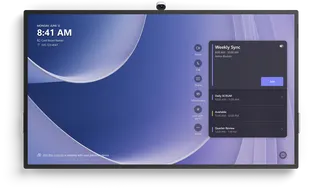
V423 TM-2
NEC MultiSync V423 TM-2 42-inch Infrared Touch Display
- Screen size
- 42 / 107
- Resolution
- 1920 x 1080 at 60 Hz
- Touch
- Infrared
- Brightness
- 450 nit
The NEC MultiSync V423 TM-2 is a 42-inch landscape and portrait touch display with infrared touch that accepts finger, gloved and stylus input and up to six simultaneous touches. Its 1920 x 1080 panel reaches 450 cd/m² and it includes an OPS slot for an optional Windows slot-in PC. NEC has discontinued this model, so SmartRooms Qatar can quote a current equivalent or compatible replacement for schools, offices and meeting rooms across Qatar.
NEC V423 TM-2: a discontinued 42-inch infrared touch display
The NEC MultiSync V423 TM-2 is a 42-inch touch display from the MultiSync V Series. NEC has discontinued this model. This page is written for organisations that already run one, for buyers comparing it with newer touch displays, and for anyone searching for a replacement. SmartRooms Qatar supplies current equivalents and compatible replacements, and quotations usually come within one working day.
Infrared touch for gloves and styluses
The V423 TM-2 uses infrared touch with an accuracy of less than 1 mm. It takes input from a finger, a gloved hand or a stylus, and it recognises up to six touches at the same time. That combination suits teaching groups who take turns at the board and site teams who need to operate a screen while wearing gloves.
- Touch methods: finger, gloves and stylus
- Multi-touch: up to six simultaneous touches
- Setup: USB 2.0 HID link with native multi-touch on Windows 7 to 11, Linux and Android
- Mac OS: operates as a default mouse
Display, glass and connections
The 42-inch S-IPS panel has a 930 x 523 mm active area and a native resolution of 1920 x 1080 at 60 Hz. It is rated at 450 cd/m² in its shipment setting, with a 270 cd/m² eco setting, and a typical contrast ratio of 1300:1. The 3 mm toughened front glass has an anti-glare coating and light transmission of 92% (±2%). Inputs include HDMI 1.3, DisplayPort, DVI-D and a D-sub 15-pin connector, plus composite video on BNC. Control options are LAN at 100 Mbit, RS232 and an infrared remote sensor.
Scenarios across Qatar
- A private school in Al Wakrah fitting out classrooms for younger pupils, where up to six touches let small groups work at the screen together.
- A training centre in Education City running workshops where facilitators write with a stylus and trainees wear gloves during lab sessions.
- A meeting room in Msheireb or West Bay used for video calls with teams abroad, with the display connected through HDMI or DisplayPort.
What to plan before ordering
Plan the room around the operating range. This model is rated for 0 to +35 °C and 20 to 80% humidity, so it belongs in an air-conditioned space rather than a hot lobby, an uncooled site office or a spot in afternoon sun from a window. The unit weighs 25 kg without its stand, measures 1,013 x 602.5 x 81.1 mm, and supports a 300 x 300 mm VESA pattern with M6 holes. Its IP40 front and IP20 back ratings suit indoor use. A free site survey from SmartRooms Qatar can confirm wall strength, mounting height and cable routes before installation.
The integrated speakers are 10 W + 10 W, and an optional 15 W + 15 W speaker set is available. The OPS slot is rated 16 V and 4 A with a maximum draw of 61 W, and it accepts a slot-in PC or digital signage player from the optional list. Typical power use is 88 W in the eco shipment setting, with an energy efficiency class B rating and an annual consumption of 129 kWh based on four operating hours a day. The manufacturer's warranty covers three years including the backlight, with optional fourth and fifth year extensions.
If you are replacing a V423 TM-2 or comparing options for a school or office, request a quote from SmartRooms Qatar with your room size, mounting method and number of units, and we will quote a current equivalent or a compatible replacement.
Highlights
- 42-inch 16:9 panel with 1920 x 1080 native resolution
- Infrared touch with up to six simultaneous touches
- Works with finger, gloved hand or stylus input
- USB 2.0 HID touch, native multi-touch on Windows, Linux, Android
- OPS slot for an optional slot-in PC
- Discontinued by NEC; quotes available for current replacements
Classroom fit
At 42″ the farthest student should sit within about 3.1 m (6× the screen height).
Estimated timeline
Quotation within 1 working day · delivery timing depends on stock availability, and we confirm it with your quotation.
Specifications
Product Information3
- Product Name
- NEC MultiSync® V423 TM-2 (Infrared Touch)
- Product Group
- LCD 42" Value Large Format Touch Display
- Order Code
- 60004198
Display11
- Panel Technology
- S-IPS with Edge LED backlights
- Active Screen Area (W x H) [mm]
- 930 x 523
- Screen Size [inch/cm]
- 42 / 107
- Aspect Ratio
- 16:9
- Brightness [cd/m²]
- 450, 270 Eco (shipment setting)
- Contrast Ratio (typ.)
- 1300:1
- Viewing Angle [°]
- 178 horizontal / 178 vertical (typ. at contrast ratio 10:1)
- Response Time (typ.) [ms]
- 12 (grey-to-grey)
- Panel Refresh Rate [Hz]
- 60
- Haze Level [%]
- 10
- Supported Orientation
- Landscape; Portrait
Touch7
- Touch Technology
- Infrared
- Number of Touches
- Real multi-touch up to 6 touches
- Touch Method
- Finger; Gloves; Stylus
- Supported Operating System
- Native Multi-Touch: Windows 7-11, Linux, Android; Default Mouse: Windows XP and Vista, Mac OS
- Data Interface
- USB 2.0 (full speed) HID; USB powered, plug & play
- Accuracy [mm]
- < 1
- Ambient Light Rejection
- Up to full sunlight (approx. 150000 lux)
Protective Glass3
- Type
- Premium toughened glass, anti-glare coating
- Thickness [mm]
- 3
- Light Transmission [%]
- 92 (+/- 2 %)
Resolution3
- Native Resolution
- 1920 x 1080 at 60 Hz
- Supported Resolutions
- 1024 x 768; 1280 x 1024; 1280 x 720; 1280 x 768; 1280 x 800; 1280 x 960; 1366 x 786; 1400 x 1050; 1600 x 1200; 1680 x 1050; 1920 x 1080; 640 x 480; 720 x 400; 720 x 576; 800 x 600
- Supported on digital inputs (Video)
- 1280 x 720p (50)16:9; 1920 x 1080i (59.94/60)16:9; 1920 x 1080p (23.97/24)16:9; 1920 x 1080p (25)16:9; 1920 x 1080p (29.97/30)16:9; 1920 x 1080p (50)16:9; 1920 x 1080p (59.94/60)16:9; 720 x 480p (59.94/60)16:9; 720 x 576p (50)16:9
Synchronisation Rate2
- Horizontal Frequency [kHz]
- 31.5 - 91.1 (analog and digital)
- Vertical Frequency [Hz]
- 25.2 - 85
Connectivity9
- Input Video Analogue
- 1 x D-sub 15 pin; Composite (BNC)
- Input Video Digital
- 1 x DisplayPort (with HDCP); 1 x DVI-D (with HDCP); 1 x HDMI 1.3 (with HDCP)
- Input Audio Analogue
- 1 x 3,5 mm jack
- Input Audio Digital
- 1 x HDMI; DisplayPort
- Input Control
- LAN 100Mbit; remote control wire (3,5mm jack); RS232
- Output Video Digital
- 1 x DVI-D (with HDCP)
- Output Audio Analogue
- 3,5mm jack
- Output Control
- RS232
- Remote Control
- LAN with SNMP; Remote Control IR (internal/external (optional) sensor); RS-232C (9-pin D-sub) Input and Output
Option Slot4
- Slot Technology
- STv2 (compatible with Intel / NEC OPS standard)
- Inrush Current [A]
- max. 10
- Power Consumption [W]
- max. 61
- Voltage / Current [V/A]
- 16/4
Electrical3
- Power Consumption [W]
- 88 Eco (shipment setting)
- Power Savings Mode [W]
- < 0.5 (ECO Standby); < 1
- Power Management
- VESA DPMS
Environmental Conditions4
- Operating Temperature [°C]
- +0 to +35
- Operating Humidity [%]
- 20 to 80
- Storage Humidity [%]
- 10 to 90
- Storage Temperature [°C]
- -20 to +60
Mechanical5
- Dimensions (W x H x D) [mm]
- Without stand: 1,013 x 602.5 x 81.1
- Weight [kg]
- Without stand: 25
- Bezel Width [mm]
- 38.8 (left/right); 38.8 (top/bottom)
- VESA Mounting [mm]
- 300 x 300 (FDMI); 4 holes; M6
- Ingress Protection
- IP40 (front); IP20 (back)
Available Options2
- Accessories
- Feet (ST-322); Speaker (SP-RM1); Trolley (PDMHM-L); Wall mount (PDW S 32-55 L and P, PD02W T M L, PD03W T M P)
- OPS Slot
- HD-SDI 1.5G; HDBaseT receiver; Intel® Atom, Celeron and Core i5/i7 Slot-in PCs; OPS Digital Signage Player; Slot-inPC (Intel® Core i5/i7 with WS7P recommended)
Regulatory1
- Safety and Ergonomics
- CE; RoHS
Green Features2
- Energy Efficiency
- Ambient Light Sensor; Annual energy consumption: 129 kWh (based on 4 operating hours per day); Carbon Savings Meter; ECOMode; Energy Efficiency Class: B
- Ecological Materials
- Manuals on CD; Optional feet
Additional Features7
- Special Characteristics
- Advanced fan control; Automatic Alarm E-Mails; Copy display settings through RS232; DICOM Simulation; Hardware colour calibration possible; Input name adjustment; Matrix memory; NaViSet Administrator 2 - free download; OSD rotation for portrait mode; PIN as theft protection; Rapid input switching; Scheduler; Screen saver functions; TileMatrix (10 x 10); User input priority definition; Various picture in picture options
- Colour Versions
- Black Front Bezel, Black Back Cabinet
- Audio
- Integrated Speakers (10 W + 10 W); Optional Speakers (15 W + 15 W)
- Plug and Play
- VESA DDC2Bi
- Shipping Content
- Display; DVI-D cable; Free LAN control software (download); Power Cable; Remote Control; USB cable
- Warranty
- 3 years warranty incl. backlight; additional services available; optional 4. + 5. year warranty extension 1
- Operating Hours
- 16/7