Clevertouch
Clevertouch Edge 65"
Clevertouch Edge 65" 4K Interactive Display with Camera and Speakers
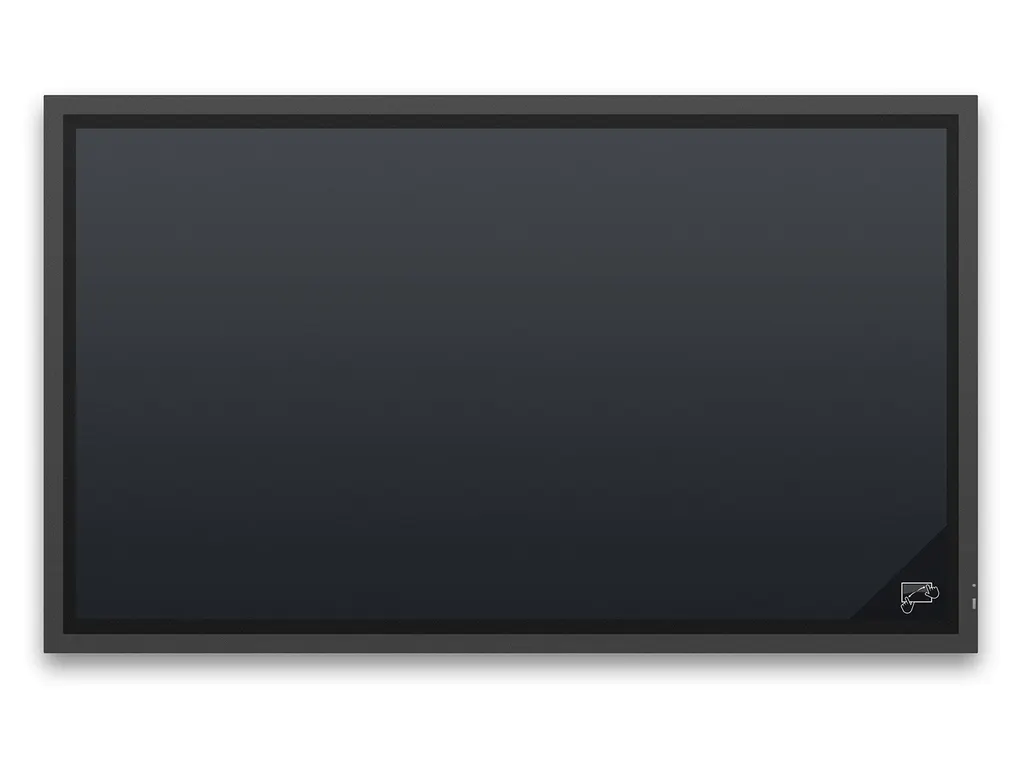
X651UHD SST
NEC X651UHD SST 65-inch ShadowSense Interactive Touch Display (Discontinued)
- Screen size
- 65 / 164
- Resolution
- 12-bit (4096 x 4096)
- Touch
- ShadowSense™
- Brightness
- 450 nit
Priceon request
QuotationWithin 1 working day
DeliveryConfirmed with your quote, based on stock
Overview
The NEC X651UHD SST is a 65-inch interactive display with ShadowSense touch that tracks up to 10 touch points, a 3840 x 2160 panel and an OPS slot for an internal PC. NEC has discontinued this model, so it suits organisations that already own one or buyers in Qatar comparing it with a current replacement. Request a quote for a compatible successor.
The NEC MultiSync X651UHD SST is a 65-inch touch-overlay display with ShadowSense touch, built for smaller meeting rooms, project spaces and design studios. NEC has discontinued this model. If your organisation already runs one, or you are comparing it with newer touch displays, SmartRooms Qatar can quote a current equivalent or a compatible replacement and review your existing mounting and accessories before you order.
Image quality and touch accuracy for detailed work
The panel uses S-IPS technology with edge LED backlighting and a native resolution of 3840 x 2160 at 60 Hz. Brightness is rated at 450 cd/m² in the standard setting and drops to 172 cd/m² in the eco mode applied at shipment. Contrast is rated at 1300:1 with viewing angles of 178 degrees horizontal and vertical, so drawings and text stay readable for people seated at the sides of the table.
ShadowSense tracks up to 10 real touch points with an accuracy below 2 mm. It responds to fingers, gloves and styluses of at least 4 mm. The front is 4 mm toughened glass with a single-sided anti-reflective coating and 92% light transmission, plus or minus 2%. The specification also lists ambient light rejection up to full sunlight, which helps for displays placed near windows.
Connectivity, control and the OPS slot
- Video: one DisplayPort, two DVI-D and four HDMI inputs, all with HDCP.
- Audio: one 3.5 mm analogue input, digital audio over HDMI or DisplayPort, and integrated 10 W + 10 W speakers.
- Control: LAN at 100Mbit with SNMP, RS-232C, infrared remote and a wired remote input, plus a LAN output.
- OPS slot: accepts an optional Slot-in-PC (Intel Core i5 or i7, with WS7P recommended), a digital signage player, an HDBaseT receiver or an HD-SDI card.
Setup is plug and play, with no drivers to install on the host PC across major operating systems. Windows Ink support covers touch gestures and pen writing in Microsoft Office applications. Native multi-touch is listed for Windows 7, Windows 8, Linux and Android, so confirm your operating system before ordering.
Where it fits in Qatar
A 65-inch panel suits rooms where a small group works around one screen rather than a large audience:
- A private school in Al Wakrah fitting out a science or project room, where pupils annotate experiments directly on the touch surface.
- A design office in Msheireb reviewing CAD drawings and large data sets at a shared table, with pen annotation.
- A boardroom in West Bay where presentations are shared with colleagues abroad during calls run from a separate device.
Planning the installation and running costs
The unit weighs 70 kg without its stand and measures 1,532 x 910 x 103 mm without the stand. The VESA pattern is 400 x 400 mm with M8 holes, and wall mounts, a trolley and feet are listed as options. A free site survey is worth arranging before wall mounting to confirm the structure can carry the weight.
Operating temperature is 0 to +35°C at 20 to 80% humidity, with IP40 front and IP20 back protection. Install it in an air-conditioned indoor room and confirm the room stays within range in summer, when outdoor temperatures in Qatar often exceed 45°C. Power consumption is 164 W in the shipment eco setting and below 0.5 W in ECO standby. The energy efficiency class is B, with 239 kWh a year based on four operating hours a day. The listed warranty is three years including the backlight, with optional fourth and fifth year extensions.
Request a quote from SmartRooms Qatar for this model or a compatible replacement. We deliver to all eight municipalities of Qatar, install professionally, and accept purchase orders, LPOs and government tenders. Tell us your room size and whether you need a current equivalent, and we will usually return a quotation within one working day.
Highlights
- 65-inch S-IPS panel with 3840 x 2160 native resolution
- ShadowSense touch with up to 10 simultaneous touch points
- Touch accuracy below 2 mm with finger, glove or stylus input
- Integrated OPS slot for an optional Windows PC or signage player
- 3-year warranty including backlight; model discontinued by NEC
Classroom fit
At 65″ the farthest student should sit within about 4.9 m (6× the screen height).
Estimated timeline
Quotation within 1 working day · delivery timing depends on stock availability, and we confirm it with your quotation.
Specifications
65 specifications · Source: manufacturer · checked Oct 2026
Product Information3
- Product Name
- NEC MultiSync® X651UHD SST (ShadowSense)
- Product Group
- LCD 65" ShadowSense™ Touch Display
- Order Code
- 60003990
Display9
- Panel Technology
- S-IPS with Edge LED backlights
- Active Screen Area (W x H) [mm]
- 1,428 x 804
- Screen Size [inch/cm]
- 65 / 164
- Brightness [cd/m²]
- 450, 172 Eco (shipment setting)
- Contrast Ratio (typ.)
- 1300:1
- Viewing Angle [°]
- 178 horizontal / 178 vertical (typ. at contrast ratio 10:1)
- Response Time (typ.) [ms]
- 8 (grey-to-grey)
- Haze Level [%]
- 10
- Supported Orientation
- Face Up 1; Landscape; Portrait
Touch9
- Touch Technology
- ShadowSense™
- Number of Touches
- Real multi-touch up to 10 touches
- Response Time [ms]
- 6 to 8
- Touch Active Area (W x H) [mm]
- 1,447.2 x 825.6
- Touch Method
- Finger; Gloves; Stylus (≥ 4 mm)
- Supported Operating System
- Native Multi-Touch: Windows 7, Windows 8, Linux, Android; Default Mouse: Windows XP, Windows Vista, Mac OS X
- Accuracy [mm]
- < 2
- Touch Resolution
- 12-bit (4096 x 4096)
- Ambient Light Rejection
- Up to full sunlight (approx. 100000 lux)
Protective Glass3
- Type
- Premium toughened glass, single sided anti-reflective coating
- Thickness [mm]
- 4
- Light Transmission [%]
- 92 (+/- 2 %)
Resolution4
- Native Resolution
- 3840 x 2160 at 60 Hz
- Supported on DisplayPort and HDMI
- 1024 x 768; 1080i; 1080p; 1280 x 1024; 1280 x 768; 1360 x 768; 1600 x 1200; 1920 x 1080; 3840 x 2160 (24/30 Hz); 480p (60 Hz); 640 x 480; 720p (50/60 Hz); 800 x 600
- Supported on DisplayPort only
- 3840 x 2160 (60 Hz)
- Supported on HDMI only
- 1360 x 768; 3840 x 2160 (25 Hz); 4096 x 2160 (24 Hz); 480i (60 Hz); 576i (50 Hz)
Synchronisation Rate2
- Horizontal Frequency [kHz]
- 31.5 - 91.1 (analog and digital)
- Vertical Frequency [Hz]
- 50 - 85
Connectivity6
- Input Video Digital
- 1 x DisplayPort (with HDCP); 2 x DVI-D (with HDCP); 4 x HDMI (with HDCP)
- Input Audio Analogue
- 1 x 3,5 mm jack
- Input Audio Digital
- 1 x HDMI; DisplayPort
- Input Control
- LAN 100Mbit; remote control wire (3,5mm jack); RS232
- Output Control
- LAN 100Mbit
- Remote Control
- LAN with SNMP; Remote Control IR (internal/external (optional) sensor); RS-232C (9-pin D-sub) Input
Open Modular Intelligence4
- OPS Slot
- Slot Technology: Open pluggable specification (NEC / Intel OPS standard)
- Inrush Current [A]
- max. 10
- Power Consumption [W]
- max. 61
- Voltage / Current [V/A]
- 16/4
Sensors4
- Ambient Light Sensor
- Integrated, triggered actions programmable
- Human Sensor
- Optional, external, 4-5m range, triggered actions programmable
- Temperature Sensor
- Integrated, 3 sensors, triggered actions programmable
- NFC Sensor
- Integrated, 2cm range, free NEC Android App required
Electrical3
- Power Consumption [W]
- 164 Eco (shipment setting)
- Power Savings Mode [W]
- < 0.5 (ECO Standby); < 2.5
- Power Management
- VESA DPMS
Environmental Conditions2
- Operating Temperature [°C]
- +0 to +35
- Operating Humidity [%]
- 20 to 80
Mechanical5
- Dimensions (W x H x D) [mm]
- Without stand: 1,532 x 910 x 103
- Weight [kg]
- Without stand: 70
- Bezel Width [mm]
- 42 (bottom/right); 42 (top/left)
- VESA Mounting [mm]
- 4 holes; 400 x 400 (FDMI); M8
- Ingress Protection
- IP40 (front); IP20 (back)
Available Options2
- Accessories
- Feet (ST-651); Speaker (SP-RM1); Trolley (PDMHA); Wall mount (PDW T XL)
- OPS Slot
- HD-SDI 1.5G,3G; HDBaseT receiver; OPS Digital Signage Player; Slot-inPC (Intel® Core i5/i7 with WS7P recommended)
Regulatory1
- Safety and Ergonomics
- CE; RoHS
Green Features2
- Energy Efficiency
- Ambient Light Sensor; Annual energy consumption: 239 kWh (based on 4 operating hours per day); Carbon Savings Meter; ECOMode; Energy Efficiency Class: B; Human Sensor
- Ecological Materials
- Manuals on CD; Optional feet
Additional Features6
- Special Characteristics
- Carbon footprint meter; DICOM Simulation; NaViSet Administrator 2 - free download
- Colour Versions
- Black Front Bezel, Black Back Cabinet
- Audio
- Integrated Speakers (10 W + 10 W); Optional Speakers (15 W + 15 W)
- Shipping Content
- CD-ROM (User Guides/Manuals); Display; DisplayPort Cable; Pen and Eraser; Power Cable; Remote Control; USB cable
- Warranty
- 3 years warranty incl. backlight; additional services available; optional 4. + 5. year warranty extension 2
- Operating Hours
- 24/7
Downloads
8 files from the manufacturer
PDF
NEC X651UHD SST datasheets (PDF, 372 KB)
PDF
NEC X651UHD SST manuals & guides (PDF, 1.6 MB)
PDF
NEC X651UHD SST manuals & guides (PDF, 732 KB)
PDF
NEC X651UHD SST manuals & guides (PDF, 7.4 MB)
PDF
NEC X651UHD SST manuals & guides (PDF, 8.0 MB)
PDF
NEC X651UHD SST brochures (PDF, 1.0 MB)
PDF
NEC X651UHD SST brochures (PDF)
PDF
NEC X651UHD SST certificates & compliance (PDF, 333 KB)
Questions about X651UHD SST
Our office already has a NEC X651UHD SST. What should we do when it needs replacing?
NEC has discontinued this 65-inch model, so SmartRooms Qatar can quote a current equivalent or a compatible replacement instead. Share your existing wall or trolley setup, cable routing and whether you run an OPS PC, so we can check what carries over. A government office with one installed unit can then compare the options against a single written quotation before deciding.
What screen size and resolution does the X651UHD SST offer?
It is a 65-inch display with an active area of 1,428 x 804 mm and a native resolution of 3840 x 2160 at 60 Hz. The S-IPS panel has a rated contrast ratio of 1300:1 and 178-degree viewing angles, which suits detailed drawings and dense documents on one screen. Its rated brightness is 450 cd/m² in the standard setting.
How many touch points does ShadowSense support, and what can be used to write on it?
ShadowSense supports real multi-touch up to 10 touches with accuracy below 2 mm. It works with fingers, gloves and styluses of at least 4 mm, and the box includes a pen and eraser. Pen and touch input work in Microsoft Office applications through Windows Ink support, so reviewers can mark up a document from any side of the table.
Is this display suitable for a school science or project room in Al Wakrah?
Yes, for a room where a small group works around one screen. Pupils can touch and annotate the 65-inch surface with a finger or a stylus, and the 3840 x 2160 resolution keeps diagrams sharp. A school fitting out several rooms can send the quantities to SmartRooms Qatar for one quotation, and we accept purchase orders (LPOs) for school procurement.
Will it work in a West Bay boardroom for presentations to colleagues abroad?
It works as a large touch display for presentations, but the product specification does not list built-in video conferencing, so calls would run from a separate device. Its four HDMI inputs, one DisplayPort and two DVI-D inputs let you connect a laptop and a conferencing source at the same time, depending on the room layout.
Does it need drivers, and which operating systems support touch?
No driver installation is needed on the host PC, and the plug and play setup covers all major operating systems. Native multi-touch is listed for Windows 7, Windows 8, Linux and Android. On Windows XP, Windows Vista and Mac OS X the display works with default mouse input instead. Confirm your current operating system with the SmartRooms Qatar team before ordering.
Can I run a PC inside the display instead of using a separate computer?
Yes, through the integrated OPS slot. NEC lists an optional Slot-in-PC based on Intel Core i5 or i7, with WS7P recommended. The same slot can take a digital signage player, an HDBaseT receiver or an HD-SDI card. Keeping the computer inside the frame reduces the external cables and devices that need to be managed in the room.
What is included in the box, and which cables do I need to buy?
The shipping content includes the display, a DisplayPort cable, a power cable, a USB cable, a remote control, a pen and eraser, and a CD-ROM with user guides. HDMI and DVI cables are not listed, so confirm the source devices you plan to connect with the team. The display offers one DisplayPort, two DVI-D and four HDMI inputs, all with HDCP.
Can the IT team control the display remotely and monitor it?
Yes. The display has LAN at 100Mbit with SNMP, RS-232C control through a 9-pin D-sub input, an infrared remote, and a LAN output. The specification also lists NaViSet Administrator 2 as a free download. IT teams managing several rooms on a campus or in a government building can use these interfaces to manage the units centrally.
How much power does it use, and what is its energy rating?
Power consumption is 164 W in the eco shipment setting, and standby is below 0.5 W in ECO standby mode. The energy efficiency class is B, and annual energy consumption is listed as 239 kWh based on four operating hours a day. The OPS slot is rated at up to 61 W when in use. Facilities managers can use these figures to estimate the electrical load for each room.
Can it go in a lobby or near a window during the Qatari summer?
The operating range is 0 to +35°C with 20 to 80% humidity, and the front is rated IP40, so it belongs in air-conditioned indoor spaces. In Qatar, where summer outdoor temperatures exceed 45°C, a glass-walled lobby should be checked for cooling capacity before installation. Ambient light rejection is listed up to full sunlight, but the temperature limit still applies.
How heavy is it, and what should we check before mounting it on a wall in Lusail?
It weighs 70 kg without the stand and measures 1,532 x 910 x 103 mm without it. It has a 400 x 400 mm VESA pattern with M8 holes, and a wall mount, trolley and feet are listed as options. Arrange a free site survey before drilling to check the wall structure, fixings and the route for moving a 70 kg panel into an office in Lusail.