





Newline Display Management Plus
Newline Display Management Plus Remote Management Software for Interactive Displays
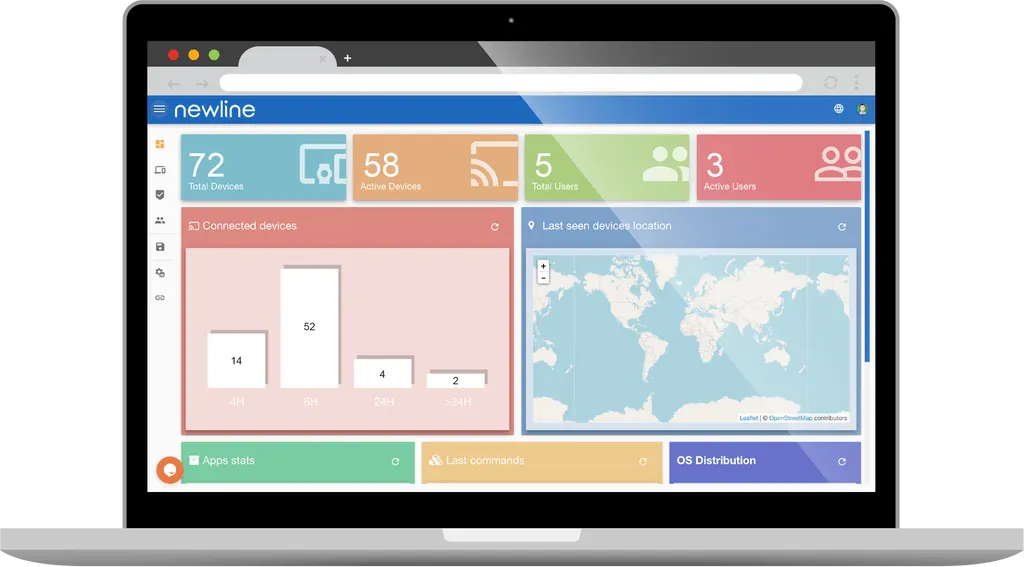
Newline Display Management Plus is remote management software for Newline interactive displays. From a web browser, IT teams can adjust brightness, contrast and volume, switch input sources, install or remove apps, and push firmware updates over the air. Mass alerts reach one panel or many at once. It suits schools, ministries and corporate offices in Qatar running several Newline panels across campuses or floors.
What Newline Display Management Plus does
Newline Display Management Plus is a remote management platform for Newline interactive displays. Administrators sign in through a web browser or cloud portal and manage one panel or a whole group without walking to each room. The software covers device settings, app control, input switching, alerts, firmware updates and remote support, which makes it a practical tool for IT teams responsible for many screens at once.
Settings, sources and apps from one console
Brightness, contrast and volume can be adjusted remotely, so a teacher or facilities team does not need to change them by hand in each room. Remote source selection lets staff switch between HDMI, VGA, PC or OPS inputs from the console. App management covers viewing installed apps, installing and uninstalling them, stopping, enabling, disabling and opening them. The datasheet also lists language and keyboard settings, screen configuration, audio settings and automatic power on and off among the standard settings.
Alerts, support and firmware updates
- Mass alerts: send messages, push notifications or siren alerts to all displays or to a selected group.
- Remote 1:1 support: take over a screen from a browser console to help a user, or work alongside them while they keep presenting.
- Over-the-air updates: push firmware and application updates with no action from the user, and build distribution packages for staged rollouts.
Policies and access control
Device policies can limit internet or application use and set allowlists and blocklists that match school or company rules. Sign-in works with email, Google or Microsoft single sign-on, and the datasheet lists password security and kiosk mode among its features. Administrators can connect from anywhere with internet access, or connect while on the premises. Any number of devices can be connected, so the same console can manage a single meeting room or a multi-site estate.
Where it fits in Qatar
A private school in Al Wakrah with classrooms spread over two buildings can use one console to update settings, send an announcement to every room during an evacuation drill, and install approved teaching apps without visiting each classroom. An energy company in Mesaieed with control rooms and meeting rooms across several floors can restrict web and app access by policy and give remote support to staff on shift. A government office in Msheireb can use remote 1:1 support to fix a display fault in a boardroom while the rest of the building keeps working through the Sunday to Thursday week.
What to plan before ordering
Confirm which Newline models you run first. The datasheet names RS(+), Atlas, Mira, NT, Lyra and Elara, and notes that not every feature is compatible with every model, so ask the SmartRooms Qatar team to check each panel against the feature list before ordering. The licence is stated as available for 3 years, with the option to extend it through the platform. Check that your network allows the portal connection, and decide which administrators need accounts and which sign-in method they will use.
Because this is software, the panel's own environmental and mounting specifications still apply. For displays in lobbies with glazed walls or other hot, dusty locations, confirm the panel specification with the SmartRooms Qatar team before installation. Send the number of displays and their models, and request a quote. SmartRooms Qatar usually returns quotations within one working day.
Highlights
- Remote control of brightness, contrast and volume settings
- Mass alerts and push messages to all or selected displays
- Remote 1:1 support with browser-based screen control
- Over-the-air firmware and application updates without user action
- Install, uninstall and manage apps remotely
- Allowlist and blocklist policies for websites and applications
Estimated timeline
Quotation within 1 working day · delivery timing depends on stock availability, and we confirm it with your quotation.
Specifications
Grouping and filtering2
- Language settings
- Language and keyboard
- App management
- Installed app list, install / uninstall, stop, enable / disable, install google play app




