





Thursday, 22 October 2026 · 11 Jumada I 1448 AH Sun – Thu · 9:00 – 18:00
+971 56 914 9477 العربية
WhatsApp

Newline Engage Desktop

Newline Engage Desktop Interactive Teaching Software

WhatsApp
Priceon request
QuotationWithin 1 working day
DeliveryConfirmed with your quote, based on stock
PDFDownload datasheet (Newline_Engage_Desktop_Specsheet_02.24_EN_Web.pdf)
Overview

Newline Engage Desktop is teaching software that runs on Windows, Mac or Linux computers, not a display. Teachers annotate lessons with more than 130 subject-specific tools and import existing IWB and SMART Notebook files without rebuilding them. It is listed with a lifetime licence and 4K inking support. Well suited to schools and universities in Doha, Al Rayyan and Lusail that run mixed laptop fleets. Request a quote.

What Newline Engage Desktop is for

Newline Engage Desktop is teaching software rather than a display. It installs on a Windows, Mac or Linux computer and gives teachers a whiteboard-style canvas where lessons can be written on, annotated and presented to a class through an interactive flat panel or projector. Its licence is listed as a lifetime licence, so there is no fixed expiry date to plan around.

Reusing the lessons your staff already have

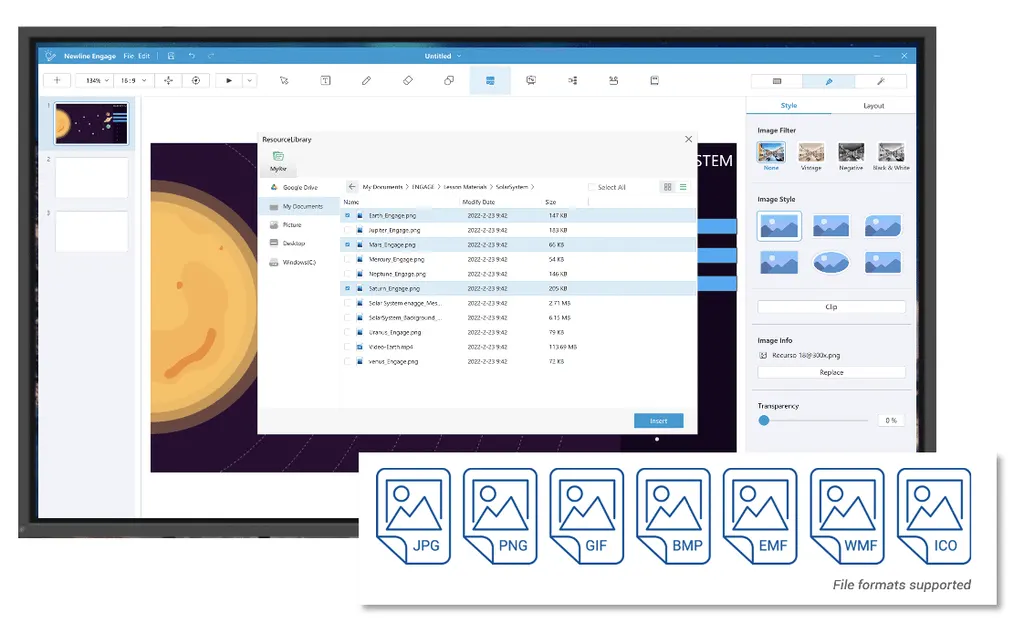
The software imports native lessons from IWB, SMART Notebook and Promethean files, so a school with years of existing material does not need to rebuild it. Images, video, PDF and PowerPoint files, text and shapes can all be brought into a lesson. For teachers starting from nothing, free templates are available, and the subject tools can be used to build a page from scratch.

Annotation tools and subject-specific features

Inking is listed with 4K support, and the toolset covers more than 130 subject-specific tools. Teachers can work with rulers, set squares, protractors and a compass, run quizzes with true/false or multiple-choice questions, and use a magnifier, spotlight, screen shade and timer during a lesson. Lessons can be exported as PNG, JPG or PDF, and screen and audio can be recorded so students can review a session later.

Connecting to Google Drive and online resources

Teachers sign in to a Google Drive account by scanning a QR code, which takes seconds, and then add files into whiteboard notes. OneDrive and Dropbox are also supported as cloud storage. Any object can be linked to a website so that the page opens directly when the object is clicked, which helps when a lesson depends on a specific video or article.

Where it fits in Qatar

Three situations suit this software well:

  • A private school in Al Wakrah with a mix of Windows and MacBook staff laptops, reusing an existing library of SMART Notebook lessons across classrooms.
  • A university teaching team in Education City running remote tutorials, using collaboration mode for up to 50 participants with breakout groups.
  • A training centre in Msheireb delivering maths and science courses, where the subject tools and quiz functions support short practice activities.

What to plan before rollout

Check each computer against the listed minimums: Windows 10 or 11 with an Intel Core i3 and at least 8 GB RAM; macOS Ventura, Monterey, Big Sur or Catalina on a late 2013 Retina MacBook Pro or later, or an M1-chip Mac with 8 GB RAM; or Ubuntu 18.04 to 20.04 on Linux. Register the product, activate the licence key, and keep the Quick Start Guide and driver available for your IT team. The published language list does not include Arabic, so confirm the interface language before using it in an Arabic-curriculum school.

Because the software runs on the computer, the display or projector in each room is a separate decision, and SmartRooms Qatar can supply both. Send the number of teacher computers, their operating systems and the lesson file types you use, and the SmartRooms Qatar team will prepare a quotation, usually within one working day. We supply and deliver across all eight municipalities of Qatar, accept LPOs and government tenders including Monaqasat, and offer professional installation. Request a quote today.

Highlights

  • Imports IWB, SMART Notebook and Promethean lessons natively
  • Lifetime licence, activated with a licence key
  • Google Drive login through a QR code scan
  • 4K inking and more than 130 subject-specific tools
  • Runs on Windows 10/11, macOS and Ubuntu 18.04-20.04
  • Remote collaboration for up to 50 participants

Estimated timeline

Quotation within 1 working day · delivery timing depends on stock availability, and we confirm it with your quotation.


Specifications

Source: manufacturer · checked Oct 2026
The full specification and datasheet for this model are available on request; we send them with your quotation.

Downloads

8 files from the manufacturer

Questions about Newline Engage Desktop

What is Newline Engage Desktop, and do I need a separate display?
Newline Engage Desktop is interactive teaching software that runs on Windows, Mac or Linux computers. It is not a display, so it needs a computer and a screen, such as an interactive flat panel or projector, to show lessons to a class. Teachers use it to write, annotate and present lessons on a whiteboard-style canvas, with more than 130 subject-specific tools available.
Can our teachers open lessons they already made in SMART Notebook or IWB?
Yes. The software imports native lessons from IWB, SMART Notebook and Promethean files, so a school with years of material does not need to rebuild it. Images, video, PDF and PowerPoint files, text and shapes can also be imported. Listed common formats include .iwb, .hhtx and .wtzx, so check your existing file types against your lesson library before you order.
Which computers and operating systems does it need?
On Windows, the listing requires Windows 10 or 11, an Intel Core i3 processor and at least 8 GB of RAM. On macOS it supports Ventura, Monterey, Big Sur and Catalina, on a late 2013 Retina MacBook Pro or later, and Macs with the M1 chip and 8 GB of RAM. Linux support is listed for Ubuntu 18.04 to 20.04. Confirm each machine against these minimums before a bulk order.
Does the licence expire?
The product is listed with a lifetime licence, and the licence key is activated after you register the product. The manufacturer also offers a free trial licence and a product registration page on its website. When you request a quote, state how many teacher computers need the software so the quotation matches your setup.
Our school in Al Wakrah has Windows and MacBook staff laptops. Will Engage Desktop work on both?
Yes. The software is listed as compatible with both PC and Mac, and it also runs on Linux. Teachers using Windows 10 or 11 and MacBook Pro machines that meet the listed requirements can open the same lesson files. Before rolling it out across a private school, check each laptop against the minimum specifications and confirm your Mac models with the SmartRooms Qatar team.
How many students can join a remote lesson run from Education City?
Collaboration mode supports up to 50 participants. Remote lesson access can be shared by email, link or QR code, and the mode includes screenshare, chat, quizzes and breakout groups formed manually or at random. This suits a lecturer in Education City running a tutorial for students joining from home or from other cities in Qatar.
How do teachers get files from Google Drive during a lesson in Doha?
A teacher scans a QR code and logs in to their Google Drive account in seconds, then adds images and files into their whiteboard notes. OneDrive and Dropbox are also supported as cloud storage. This helps a teacher in Doha who keeps worksheets in the cloud and wants them on the board during class, without switching to another device.
Can I link an object in a lesson to a website?
Yes. Any object can be linked to a website so that the page opens directly when the object is clicked. In a science lesson at a school in Al Rayyan, a teacher can attach a link to an image or shape that opens a video or article for students, keeping the whole lesson on one screen.
Which subject tools help a training centre in Msheireb teaching maths and science?
The subject tools include maths, physics, chemistry, biology, geography, currency and music tools, along with rulers, set squares, protractors and a compass. Quizzes support true/false and multiple-choice questions, and clock, timer and countdown tools help run short practice activities. These tools suit a training centre in Msheireb delivering science courses to adult learners.
Does Engage Desktop have an Arabic interface for Arabic-curriculum schools?
The published language list from the manufacturer does not include Arabic, so do not assume the interface will suit Arabic-language teaching. The listed languages include English, French, German and Spanish. Ask the SmartRooms Qatar team to confirm language support before ordering for an Arabic-curriculum school.
What should we plan before installing it across a school?
Plan the installation on every teacher machine, the licence key activation after registration, and a check of operating system versions and RAM. The Quick Start Guide and drivers are available from the manufacturer for your IT team. SmartRooms Qatar offers professional installation, and the scope of work for your site will be confirmed in the quotation.
Can a government school or ministry buy several licences on a purchase order?
Yes. SmartRooms Qatar accepts purchase orders (LPOs) and government tenders, including those on Monaqasat, and payment by bank transfer, cheque or purchase order. Send the number of machines and operating systems you use, and the team will usually send a quotation within one working day. Delivery covers all eight municipalities of Qatar.

Similar models

Clevertouch CleverLive Suite Clevertouch CleverLive Suite Digital Signage Software
Software
Clevertouch CleverMDM Clevertouch CleverMDM Mobile Device Management Software
Yes
Clevertouch Clevershare Clevertouch Clevershare Screen Sharing Software for Interactive Displays
Software
Clevertouch CleverStore Clevertouch CleverStore Educational App Store Software
Software
Email Call


