





Thursday, 22 October 2026 · 11 Jumada I 1448 AH Sun – Thu · 9:00 – 18:00
+971 56 914 9477 العربية
WhatsApp

Newline Launch Control

Newline Launch Control Meeting Room Software

WhatsApp
Priceon request
QuotationWithin 1 working day
DeliveryConfirmed with your quote, based on stock
PDFDownload datasheet (Newline-Launch-Control-flyer.pdf)
Overview

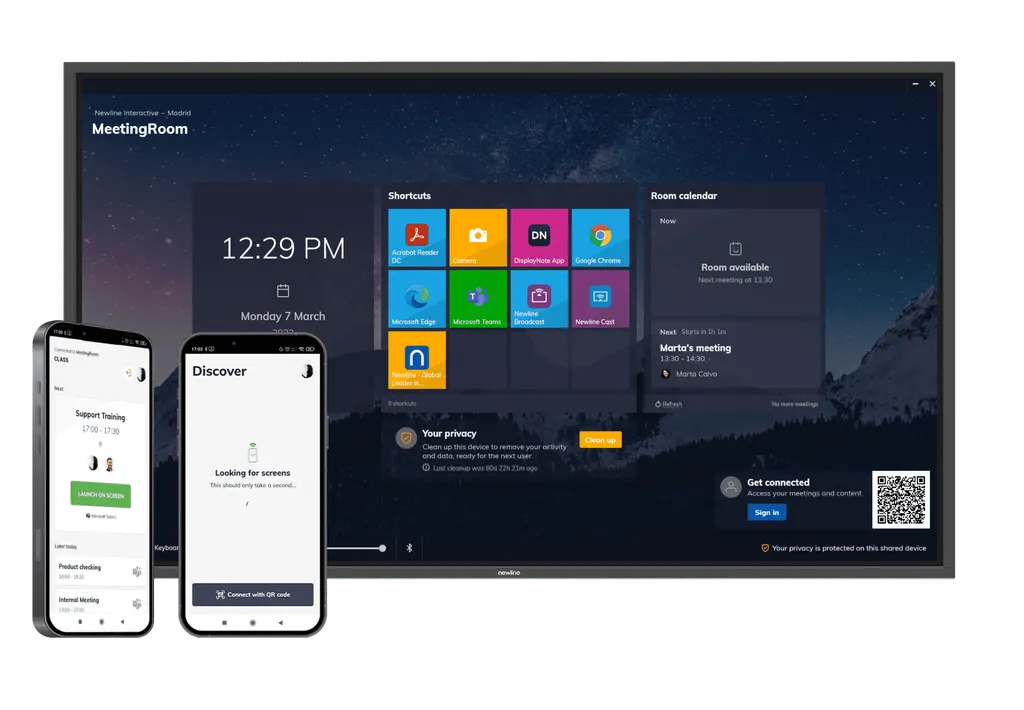
Newline Launch Control is meeting room software for Newline interactive displays. It lets staff start Microsoft Teams, Zoom or other video calls with one tap, shows the room calendar and personal Office 365 meetings on screen, and runs a kiosk mode that clears cached data after each session. It suits ministries, universities and schools in Doha and across Qatar where guests share meeting rooms.

What Launch Control does in a meeting room

Launch Control is meeting room software for Newline interactive displays. Rather than searching for a dial-in link or signing in to a video platform on a shared computer, a presenter taps the screen once, or scans a QR code with a phone, and the call opens in the video service the organisation already uses. The datasheet lists Skype and Microsoft Teams as integrated, with Zoom, GoToMeeting, Google Meet, BlueJeans, Lifesize and Cisco Webex supported as third-party video conferencing software.

Security and guest access

Kiosk Mode gives the display a controlled home screen with pre-set apps and URLs, so a visitor can join a call without roaming through the host computer's files or the wider network. Between meetings, the built-in options clear cached data, close open applications and reset the device for the next session. Pin security, optional calendar privacy and automatic or manual cache clearing give IT and facilities teams control over how each room runs.

Calendars and personal sign-in

The room calendar shows every meeting booked for that space, while the time, date and approved apps sit on the same screen. Staff can sign in with their own Office 365 or Google account to see a personal schedule and start a call with their documents already open. Calendar support covers Google and Exchange, and the datasheet describes a secure connection through the account the user signs in with.

Where it fits in Qatar

  • Government ministry in West Bay: a board room where visiting delegations join Teams or Zoom calls from the approved screen, while the internal network stays separate from guest devices.
  • Research centre in Education City: shared rooms booked by several research groups, each seeing the room calendar and signing in to their own account before a partner call.
  • Energy company in Mesaieed: a visitor room where contractors use a kiosk-style screen, with cached data cleared before the next group arrives.

What to plan before you order

  • Windows: the receiver app needs Windows 10 version 1809 at minimum, and Windows 11 (latest version) is recommended.
  • Host computer: the datasheet lists an Intel Core i3 (8th Gen) processor and 64GB of storage. Confirm memory and other needs for your chosen display model.
  • Network: Ethernet or Wi-Fi at 2Mbps or above is listed as the connection requirement.
  • Licence: the key is perpetual and covers three single activations, so confirm your room count when requesting a quote.
  • Language: the listed languages are English, Spanish, French, German, Italian and Traditional Chinese. Ask about Arabic interface needs before rollout.

SmartRooms Qatar offers free site surveys, which are a practical step here. A short check of each room's network, display and calendar accounts before installation prevents delays on installation day. For a school or ministry ordering several rooms, we can work from a purchase order (LPO) or a government tender reference, and quotations are usually returned within one working day.

Send us your list of rooms, the video services you use and the Windows versions in place, and request a quote for Newline Launch Control today.

Highlights

  • One-tap launch for Microsoft Teams, Zoom and Skype for Business
  • Room calendar and personal Office 365 sign-in on one screen
  • Kiosk Mode with pre-set apps and URLs for guest users
  • Built-in options clear cached data and close applications
  • QR-code start from iOS and Android mobile devices
  • Perpetual key covering three single activations

Estimated timeline

Quotation within 1 working day · delivery timing depends on stock availability, and we confirm it with your quotation.


Specifications

Source: manufacturer · checked Oct 2026
The full specification and datasheet for this model are available on request; we send them with your quotation.

Downloads

14 files from the manufacturer
PDF Datasheets Newline-Launch-Control-flyer.pdf 309 KB Newline Newline Launch Control datasheets (PDF, 309 KB) PDF Datasheets Newline_Launch_Control_Specsheet_10_22.pdf 929 KB Newline Newline Launch Control datasheets (PDF, 929 KB) PDF Manuals & guides Launch-Control-user-guide.pdf 3.9 MB Newline Newline Launch Control manuals & guides (PDF, 3.9 MB) PDF Manuals & guides Newline_LaunchControl_UserGuide_21.pdf 3.4 MB Newline Newline Launch Control manuals & guides (PDF, 3.4 MB) PDF Manuals & guides User-guide-Newline-Launch-Control.pdf 65 KB Newline Newline Launch Control manuals & guides (PDF, 65 KB) URL Manuals & guides · Opens on manufacturer site Launch Control Newline Newline Launch Control manuals & guides (URL) URL Manuals & guides · Opens on manufacturer site Windows Software Newline Newline Launch Control manuals & guides (URL) URL Software & firmware · Opens on manufacturer site Android App Newline Newline Launch Control software & firmware (URL) URL Software & firmware · Opens on manufacturer site Launch Control Android client Newline Newline Launch Control software & firmware (URL) URL Software & firmware · Opens on manufacturer site Launch Control iOS client Newline Newline Launch Control software & firmware (URL) URL Software & firmware · Opens on manufacturer site iOS App Newline Newline Launch Control software & firmware (URL) PDF Other documents launch-control-1.14.2.6-release-notes.pdf 548 KB Newline Newline Launch Control other documents (PDF, 548 KB) PDF Other documents launch-control-technical-whitepaper.pdf 228 KB Newline Newline Launch Control other documents (PDF, 228 KB) URL Other documents · Opens on manufacturer site Launch Control Windows receiver Newline Newline Launch Control other documents (URL)

Questions about Newline Launch Control

What is Newline Launch Control and which displays does it suit?
Newline Launch Control is meeting room software designed for Newline interactive displays. It gives each room one screen for video calls, room calendars and approved apps, which suits offices, schools and government meeting rooms that want a simple, controlled set-up. Confirm compatible display models with SmartRooms Qatar when you request a quote so the software matches your hardware.
Which video calling services can it start with one touch?
The datasheet lists Skype and Microsoft Teams as integrated, and Zoom, GoToMeeting, Google Meet, BlueJeans, Lifesize and Cisco Webex as supported third-party video conferencing software. A ministry in West Bay, for example, can open a Teams call for a visiting delegation from the approved screen without a presenter logging in to a personal account on the room computer. Check your exact platform before ordering.
Can staff start a meeting from their phone?
Yes. The datasheet describes scanning a QR code with a mobile device to start a video call on the room display. The mobile apps are listed for iOS 12.1 or above and Android 4.4 or above. A presenter in a Doha office can scan the code, tap to launch and have the call start on the main screen.
How does personal Office 365 or Google sign-in work?
Users sign in with their own Office 365 or Google account, and the datasheet states that their calendar appointments become visible on the screen. This lets a researcher at Education City start a video meeting with personal documents already at hand. The datasheet describes the connection as secure, and built-in options remove cached data once the meeting ends.
How does Kiosk Mode protect the network from guests?
Kiosk Mode gives the display a controlled desktop with pre-set apps and URLs, so visitors use only what the room needs. After each session, built-in options remove cached data, close applications and clean up the device. At an energy company in Mesaieed receiving contractors, this means one group's session data is cleared before the next group arrives.
Which Windows version and hardware does the host computer need?
The receiver app needs Windows 10 version 1809 at minimum, and Windows 11 (latest version) is recommended. The datasheet lists an Intel Core i3 (8th Gen) processor and 64GB of storage as system requirements. Memory is not stated in the datasheet, so confirm it with SmartRooms Qatar before you order several rooms.
What network connection does it need?
The datasheet lists Ethernet or Wi-Fi with a speed of 2Mbps and above. Wired Ethernet is generally more stable than Wi-Fi for live video, so it is worth checking the cable route to each display during a site survey, especially in rooms far from the access point.
How many rooms does one licence cover?
The licence is a perpetual key listed for three single activations. A school in Al Rayyan fitting out several rooms should therefore map its room count to the activations included before ordering. Send your room list with the request, and SmartRooms Qatar will confirm the licence details in the quotation.
Is Arabic supported in the interface?
The datasheet lists English, Spanish, French, German, Italian and Traditional Chinese as available languages. Arabic is not on that list, so an Arabic-speaking office in Doha should confirm the interface language before ordering. Ask the SmartRooms Qatar team to check the current language options for this version when you request a quote.
We are a school ordering several rooms. How do we buy it?
SmartRooms Qatar supplies Newline Launch Control by quotation. We accept purchase orders (LPOs), government tender references including Monaqasat, and payment by bank transfer, cheque or purchase order. Send the room list and the video services you use, and a quotation usually follows within one working day. A free site survey can check network and calendar set-up before rollout.

Similar models

Clevertouch CleverLive Suite Clevertouch CleverLive Suite Digital Signage Software
Software
Clevertouch CleverMDM Clevertouch CleverMDM Mobile Device Management Software
Yes
Clevertouch Clevershare Clevertouch Clevershare Screen Sharing Software for Interactive Displays
Software
Clevertouch CleverStore Clevertouch CleverStore Educational App Store Software
Software
Email Call


