





Thursday, 22 October 2026 · 11 Jumada I 1448 AH Sun – Thu · 9:00 – 18:00
+971 56 914 9477 العربية
WhatsApp

Newline Whiteboard

Newline Whiteboard Software - Built-in Android Whiteboard

WhatsApp
Priceon request
QuotationWithin 1 working day
DeliveryConfirmed with your quote, based on stock
Overview

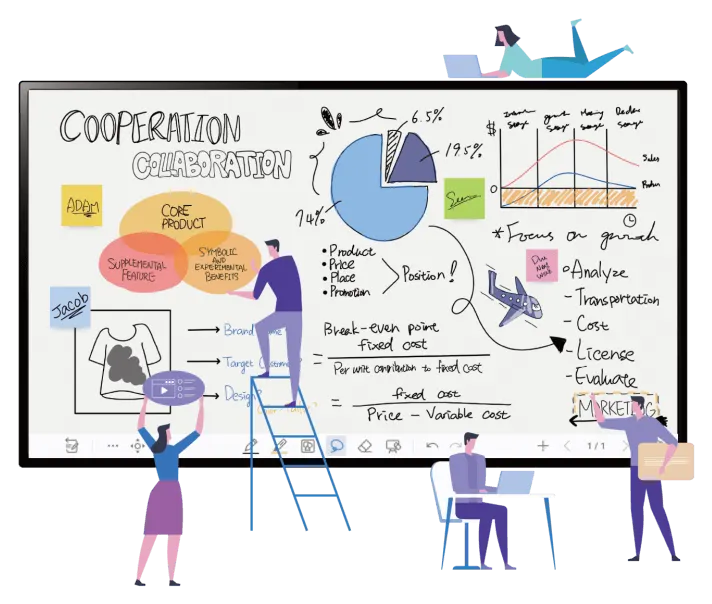
Newline Whiteboard is the built-in Android whiteboard software on Newline interactive displays, opened with a single tap. It offers an infinite paged canvas, pen and palm input where a thin pen writes and a palm erases, and annotation over any open application or document. It suits boardrooms, classrooms and project teams in Qatar who want ideas captured on the panel itself. Request a quote to confirm which panels include it.

A built-in whiteboard that opens in one click

Newline Whiteboard is whiteboard software built into the Android system of Newline interactive displays. Instead of launching a separate application or bringing a laptop into the room, a presenter taps once and a blank canvas is ready for notes, diagrams or a meeting agenda. In boardrooms in West Bay or Lusail, where rooms are booked by the hour, that saves the opening minutes of every session.

Because the tool lives on the display, every team starts from the same place when it uses the panel. That consistency helps facilities managers and IT managers keep meeting rooms working the same way.

An infinite canvas and input that depends on the touch

The canvas has no fixed boundary, so a planning session does not stop when one screen is full. Pages let you group ideas by topic, agenda item or lesson step, and you can return to any page during the session.

The system reads the type of touch. A thin pen tip writes as a pen, while fingers move the canvas, zoom in and out, and select, rotate or copy objects. A palm works as an eraser, so a large area of writing clears in one movement without switching tools. This matters in a classroom where a teacher needs to wipe a board quickly between exercises.

Editing tools, images and web research

The edit tools cover what meetings usually need. Pen types, coloured inks, sticky notes, framing designs and background colours let you produce meeting minutes, brainstorming maps and flowcharts directly on the display.

Images can be inserted from the picture folder on the display or from a USB drive, so site photographs, floor plans or diagrams can join the discussion. The built-in browser lets a presenter search the web or look for images without leaving the whiteboard, which suits a training session or a design review where a reference must appear on screen straight away.

One of the most practical features is the ability to annotate any content on the screen, including a running browser, a Windows application or an open document. Notes can then be captured and saved with screenshots.

Where it fits in Qatar

  • Boardrooms in West Bay, Msheireb or Lusail: a leadership team marks up a shared report during a strategy review, then saves the annotated pages with screenshots for the minutes.
  • Classrooms in Education City or an Arabic-curriculum school in Al Rayyan: teachers draw diagrams, sort ideas on sticky notes and reuse canvas pages from one lesson to the next.
  • Energy and industrial project rooms in Mesaieed or the Industrial Area: engineers sketch process flows and mark up drawings during site coordination meetings.

What to plan before you order

Newline Whiteboard is software, so the first decision is which Newline display models in your order include it. Confirm this with the SmartRooms Qatar team, along with the software version and the status of Newline RS+, which is listed alongside the whiteboard but is not described in detail on this page. Then choose the panel size for the room. A larger panel suits a lecture hall or a long boardroom table, while a smaller one suits a compact meeting room.

Free site surveys are available before wall mounting, which is worth doing for any large panel or any wall that has not been built to carry significant weight. Government ministries and schools buying several units can request quotations for a purchase order (LPO) or a government tender, and payment can be made by bank transfer, cheque or purchase order. SmartRooms Qatar delivers to all 8 municipalities of Qatar. Request a quote today and we will confirm the right display models for your rooms.

Highlights

  • Built-in Android whiteboard opened with a single tap
  • Infinite canvas organised into pages
  • Thin pen writes while a palm erases large areas
  • Finger gestures move, zoom, select, rotate and copy
  • Insert images from display folder or USB drive
  • Annotate browsers, Windows applications and documents

Estimated timeline

Quotation within 1 working day · delivery timing depends on stock availability, and we confirm it with your quotation.


Specifications

Source: manufacturer · checked Oct 2026
The full specification and datasheet for this model are available on request; we send them with your quotation.

Downloads

0 files from the manufacturer
No downloadable files are listed for this model yet. Ask us and we will send the datasheet.

Questions about Newline Whiteboard

What is Newline Whiteboard?
Newline Whiteboard is the built-in Android whiteboard software that comes with Newline interactive displays. It opens with one click and gives a presenter an infinite canvas organised into pages, with pen, finger and palm input. It is designed for meetings, brainstorming and teaching, and it lets people write on the screen without preparing slides first.
Who is Newline Whiteboard best suited to?
It suits organisations that run frequent working sessions on a display, such as boardrooms, project rooms, training suites and classrooms. Teams that brainstorm, draw flowcharts or mark up documents during meetings will get the most from its edit tools and annotation features. Offices and schools in Doha, Lusail and Al Wakrah can use the same workflow across several rooms.
Do I need a separate computer to use the whiteboard?
The whiteboard is built into the display's Android system, so it can be opened from the panel itself with one tap. A laptop is only needed when you want to annotate its screen or show its content. Confirm with SmartRooms Qatar which display models include the software before you plan each room.
How does the palm eraser work?
A palm placed on the screen is recognised as an eraser, so you can clear a large area of writing in one movement without switching to the eraser tool. Fingers handle canvas movement, zoom, and selecting, rotating or copying objects, while a thin pen tip writes. Presenters find this quicker than returning to a toolbar between steps of a discussion.
Can I annotate over a presentation or a web page?
Yes. Annotation works on any content on the screen, including a running browser, a Windows application and open documents. You can write over a web page or a report during a discussion, then capture the notes and save them with screenshots. This is useful when a committee needs to mark up a shared document while it is on the screen.
How are meeting notes saved?
Notes can be saved as screenshots, so your handwriting and the marked-up content stay together. Pages in the infinite canvas keep ideas grouped by topic or agenda item, and you can move between pages during the session. Ask SmartRooms Qatar how your display model stores and shares files before you set up a records process.
Can I bring images into the whiteboard?
Yes. You can insert pictures from the display's picture folder or from a USB drive. This works for floor plans, site photographs or product images. Place them on the canvas beside handwritten notes so that the discussion stays in one place, for example during a site coordination meeting in the Industrial Area.
Can I search the web from the whiteboard?
Yes. A built-in browser lets you search for information on the web or find images without leaving the whiteboard. A trainer in Education City can pull up a reference during a lesson, or a design team in Msheireb can compare images while sketching concepts. This keeps the discussion moving instead of pausing to find a separate device.
What is Newline RS+?
Newline RS+ is listed alongside the Whiteboard as a related feature. The manufacturer information available for this page does not describe what it includes, so this page does not state its functions. Ask the SmartRooms Qatar team to confirm whether it is available on the display model you are considering before you request a quote.
How should I plan a room for a Newline display running the whiteboard?
Start with the room size, viewing distance and wall construction. A larger panel suits a lecture hall, while a smaller one fits a meeting room. Free site surveys from SmartRooms Qatar before wall mounting help confirm power outlets, mounting height and the space needed for writing and touch. Plan seating so that everyone in the room can read the canvas.
Does the whiteboard suit classrooms where lessons run in Arabic and English?
The source information does not list interface language settings, so this page does not state which languages the interface supports. The canvas, image insertion and built-in browser can still support teaching materials in either language, for example a bilingual science lesson in Al Rayyan. Ask SmartRooms Qatar to confirm the interface languages for your software version.
Can a government ministry buy it through a tender or LPO?
Yes. SmartRooms Qatar supplies government ministries and authorities against purchase orders (LPOs) and government tenders, including Monaqasat. Payment can be made by bank transfer, cheque or purchase order. Send the display models, the number of rooms and the delivery municipality, and the team usually replies to a quotation request within one working day.

Similar models

Clevertouch CleverLive Suite Clevertouch CleverLive Suite Digital Signage Software
Software
Clevertouch CleverMDM Clevertouch CleverMDM Mobile Device Management Software
Yes
Clevertouch Clevershare Clevertouch Clevershare Screen Sharing Software for Interactive Displays
Software
Clevertouch CleverStore Clevertouch CleverStore Educational App Store Software
Software
Email Call


