Touchscreen T6 Education 86
OneScreen Touchscreen T6 Education 86-inch Interactive Display
- Screen size
- 86″
- Resolution
- 3840(H) × 2160 (V)
- System
- Version 8.0
- Brightness
- 400+ cd/m2
The OneScreen Touchscreen T6 Education 86 is an 86-inch 4K interactive display with a 20-point infrared touch frame, an LG panel rated at 400+ cd/m2 and an optional OPS PC slot. The manufacturer has discontinued this model. Schools, universities and government offices in Qatar that already run one, or that are comparing large touch displays, should request a quote for a current equivalent or compatible replacement.
What the OneScreen T6 Education 86 is
The OneScreen Touchscreen T6 Education 86 is an interactive display built for classrooms, lecture theatres and meeting rooms. It uses an LG panel at 3840 × 2160 resolution with a 60 Hz refresh rate and is rated at 400+ cd/m2 brightness. The manufacturer has discontinued this model, so this page is written for organisations that already own one, buyers comparing it with newer displays, and anyone who needs a current replacement.
The specifications that matter in a large room
At 86 inches the picture has to hold up for people sitting well away from the glass. The pixel pitch is 0.4935 mm, and the viewing angles are at least 178 degrees horizontally and vertically, so seats at the sides still see a clear image. The glass is anti-glare and rated 8 Mohs, which helps limit reflections from windows and ceiling lights.
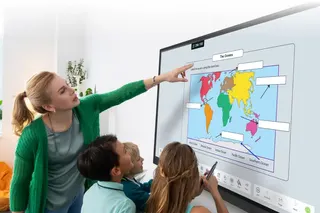
The infrared touch frame offers 20 touch points with a touch accuracy of 3 mm and palm detection. Pen and finger input are told apart, so a presenter can write while resting a hand on the surface.
- Android 8.0 with 64GB eMMC storage and 3GB DDR4 memory
- Two 15W speakers with Dolby sound, balance control and an equaliser
- Dual-band Wi-Fi with 5G hotspot mode
- Optional OPS PC slot, plus optional 1080p web and PTZ cameras
Where it fits in Qatar
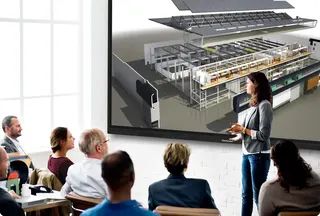
- University lecture theatre: a lecturer in Education City or Doha annotates slides in front of a full tiered room, keeping the session on one display with the touch and an optional OPS PC.
- Ministry boardroom in West Bay: a shared screen for documents and presentations, with OneScreen Hype for calls with teams abroad.
- School hall in Al Rayyan: morning assemblies and staff training, with built-in speakers and a sleep timer to manage power when the hall is empty.
What to plan before ordering
Three things need attention before installation. First, the wall: the VESA pattern is 750 x 400 and the product weighs 150 lbs, so a free site survey from SmartRooms Qatar should confirm that the wall, bracket and fixings can carry it. Second, power: the supply accepts 100-240V at 50/60 Hz with a 450W maximum and 0.5W standby, but the included cable is a US power cable, so confirm the plug for the BS 1363 sockets used in Qatar. Third, the environment: the source data gives no operating temperature range, so confirm room conditions, including any exposure to windows or lobbies in summer heat, before installation.
The data lists an advanced hardware replacement warranty, available only at the time of purchase, and unlimited free help and training by video, chat, phone or email. Because this model is discontinued, ask for a quote covering a current equivalent or compatible replacement. SmartRooms Qatar usually provides quotations within one working day and supports delivery, professional installation, purchase orders and government tenders, with payment by bank transfer, cheque or purchase order.
To request a quote for a current equivalent of the OneScreen T6 Education 86, send your room size, mounting type and connection needs to the SmartRooms Qatar team.
Highlights
- 86-inch 4K panel at 3840 × 2160 resolution
- 20-point infrared touch with 3 mm touch accuracy
- Anti-glare glass rated 8 Mohs
- Android 8.0 with 64GB storage and 3GB DDR4 memory
- Optional OPS PC slot with Intel Core i5 or i7
- Discontinued by OneScreen; request a quote for a current replacement
Classroom fit
At 86″ the farthest student should sit within about 6.4 m (6× the screen height).
Estimated timeline
Quotation within 1 working day · delivery timing depends on stock availability, and we confirm it with your quotation.
Specifications
Touchscreen T6 Education 8641
- size_inch
- 86
- datasheet
- datasheets/OneScreen-Touchscreen-Education-6-86-Sales-Sheet.pdf
- datasheet_url
- https://partnerportal.onescreensolutions.com/resources/OneScreen-Touchscreen-Education-6-86-Sales-Sheet.pdf
- specs · General · Android Processor
- Version 8.0, Cortex A73 x2, A53 x2, Mali G51MP2, 64G EMMC5.1, 3GB DDR4
- specs · Cloud-based Services* · DOLBY Sound & Speakers
- 2x 15W Built-in Left/Right Speakers with balance, automatic volume control, surround sound, fiber optic mode, the equalizer
- specs · Cloud-based Services* · Distance Learning
- OneScreen Hype video conferencing with screen sharing, recording, translation/transcription & more
- specs · Cloud-based Services* · Centralized Control
- OneScreen Central is centralized screen control, emergency notification, firmware upgrades & more
- specs · Cloud-based Services* · Surface Protection
- 8 MOHS strength, anti-glare glass
- specs · Cloud-based Services* · Input & Output
- Inputs: 3x HDMI (2.0), 1x VGA, 1x VGA Audio, 1x Microphone (3.5mm), 1x DP, 2x Touch USB, 1x TF/SD Card, 1x RJ-45 Outputs: 1x HDMI (Optional), 1x Headphone (3.5mm) Connectivity: 1x RS232, 1x RJ45, 2x USB (Front), 3x USB (Rear), 1x Wifi (2.4G/5G + 5G Hotspot) Dual-band
- specs · Cloud-based Services* · Remote Desktop Share
- OneScreen Swap for instant, easy remote desktop control & sharing
- specs · Cloud-based Services* · Lesson Plans & Resources
- ZUNI Learning provides all of the best, free, online lessons & resources in one place integrated with Google Class
- specs · Cloud-based Services* · IR Touch
- 20x Touch points, Touch accuracy 3mm, Annotation over any source, Response time ≥ 2.5 m/s, Palm Detection, Pen and touch differentiation, Compatibility (Windows 10/8/7/XP/ Linux/Mac/ Android 8.0/Chrome)
- specs · Cloud-based Services* · Class Attendance
- OneScreen Attendance if efficient and secure student atten - dance management
- specs · Applications · Interactive Whiteboard
- OneScreen Annotate is interactive whiteboard and annotation software
- specs · Applications · OPS PC (Optional)
- CPU Intel Core i5 7th Gen / i7 9th Gen , RAM 8G, SSD 256G, USB 6 (3*3.0; 3*2.0)/ (5*3.0; 1*2.0) Type A , DDR4 2400 8G/ DDR4 2666 MHz 8G, 256G SSD, 1x VGA, 1x RS232, 1x DP, Realtek 8111F, 1x HDMI2.0, 1x RJ45 0/100/1000M , Audio Realtek ALC662, 1x 3.5mm Mic, WiFi AW-CB304NF 2.4/5G, Bluetooth 4.2, OS (Linux/Win7/Win8/win10)
- specs · Applications · Screen Share & Stream
- EShare software, multi-device screen share & streaming
- specs · Applications · Annotation
- OneScreen Write software, write on any content, same, transfer via QR code or email
- specs · Applications · Tools Navigation
- OneScreen Navigate is for centralized & customizable prod- uct navigation from a home screen
- specs · Applications · Cameras (Optional)
- OneScreen Web Camera (1080p Full HD & Ultra-Wide FOV, Built-in Microphone, USB 2.0, WDR) OneScreen PTZ Camera (1080p full HD, USB Interface, 72.5° Wide-angle Lens & 12x Optical Zoom, Remote Control)
- specs · Applications · Android Applications
- Full access to Android Apps including Chorme, YouTube, Office Apps and more
- specs · Applications · Video Process and Transform
- 3D digital comb filter and 3D noise reduction, dual 3D dynamic video progressive scan etc
- specs · Applications · Google Play Store
- Full access to Google play store with multi-user login support
- specs · Applications · Power Supply
- AC 100-240V, 60/50 HZ, Power Rate ≤450W, Standby ≤0.5W
- specs · Help & Training · Free Help & Training
- Unlimited Screen Skills Guru help & training available in one click on video or by chat, phone or email
- specs · Help & Training · Other Features
- Supports auto turn-off, sleep timer, multiple user profiles, HDCP 2.2 (HDMI) and dual-mode USB (OPS and Android)
- specs · Accessories · Wall Mount
- VESA Standard 750 x 400
- specs · Accessories · Cables and Stylus
- 1x HDMI Cable, 1x US Power Cable, 1x USB Touch Cable, 2x Pens, 1x Extendable pen
- specs · Accessories · Advanced HW Replacement Warranty
- Available at time of purchase only
- specs · Accessories · Product Dimensions
- 76.9” x 46.2” x 3.9”
- specs · Accessories · Product Weight
- 150 lbs
- specs · Accessories · Shipping Dimensions
- 86.2” x 58.3” x 14”
- specs · Accessories · Shipping Weight*
- 218.2 lbs
- specs · Interactive Display · Model Sizes
- 55”, 65”, 75”, 86”, 98”
- specs · Interactive Display · Panel Size
- 86"
- specs · Interactive Display · Screen Type
- LG
- specs · Interactive Display · Resolution
- 3840(H) × 2160 (V)
- specs · Interactive Display · Refresh Rate
- 60 Hz
- specs · Interactive Display · Pixel Pitch
- 0.4935 mm x 0.4935 mm
- specs · Interactive Display · Brightness
- 400+ cd/m2
- specs · Interactive Display · Display Colors
- 1.06Billon colors
- specs · Interactive Display · Viewing Angle
- R/L 178 ° (Min.), U/D 178 ° (Min.)