Touchscreen TL6 Business 86
OneScreen Touchscreen TL6 Business 86-inch Interactive Display
- Screen size
- 86″
- Resolution
- 3840x2160
- Touch
- IR Infrared
- System
- Full access to Android Apps…
The OneScreen Touchscreen TL6 Business 86 is an 86-inch 4K interactive display with a 3840x2160 LG panel, infrared touch with 20 touch points, and 2x 15W speakers. The manufacturer has discontinued this model. Request a quote from SmartRooms Qatar for a current equivalent or compatible replacement, suited to lecture halls, boardrooms and training rooms across Qatar that need a large annotation screen.
An 86-inch touch display for large rooms
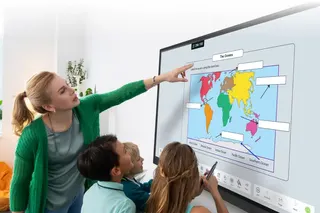
The OneScreen Touchscreen TL6 Business 86 is the largest of the three TL6 Business sizes. It combines an 86-inch 4K panel with an infrared touch frame, so teachers, presenters and staff can write, annotate and run Android apps directly on the glass. The manufacturer has discontinued this model. This page is written for organisations that already run one, buyers comparing it with newer displays, and anyone who needs a replacement with the same room footprint.
The panel and touch figures that matter
The LG-branded panel is LED backlit, with a 3840x2160 resolution, a brightness of 350 cd/m2, a typical contrast ratio of 1,200:1, a 60Hz refresh rate and 10-bit colour depth. The viewing angle is 178 degrees both horizontally and vertically, so people seated at the sides still read the same content. The infrared touch system supports 20 touch points, responds in under 8 ms and holds an accuracy of better than 2 mm, which matters when several people write on the screen at once.
Software, sharing and Android on one panel
OneScreen Annotate provides interactive whiteboard and annotation tools, while OneScreen Write lets users write over any content, save the result and send it by QR code or email. EShare handles screen sharing and streaming from several devices, with up to nine screens active together. A teacher can allow view-only or view-and-control access, require users to authenticate, and protect sessions with a password. The built-in system is Android 8.0, running on two Cortex A73 and two A53 cores at 1.5 GHz, with 3 GB of DDR3 RAM and 32 GB of storage. Chrome, YouTube, a document viewer and the Google Play Store with multi-user login are available. The OPS PC support for this size lists Windows 10 as an optional add-on. Two 15W speakers with equalizer and surround sound, plus Bluetooth 4.1 for file sharing and external devices, complete the unit.
Where an 86-inch panel fits in Qatar
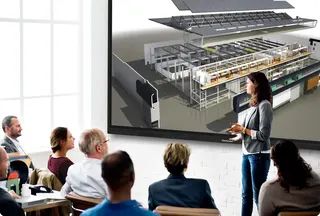
An 86-inch screen suits a lecture hall at a university in Education City, where the back row is still many metres from the board. A training room at a government authority in Msheireb can use the panel for workshops, with several groups annotating the same document. In a boardroom in West Bay, the panel gives the room a shared screen for reviewing plans while a remote team joins from abroad, with a camera handled separately. In the hottest months the room should run on air conditioning, and the rated operating range of -10°C to 50°C with humidity from 10% to 90% sets a clear limit to plan around.
What to plan before you order
- Weight: 163.2 lbs (about 74 kg) for the unit, 209.4 lbs shipping weight.
- Size and mount: 76.90 x 3.62 x 45.72 inches, with a VESA mount pattern of 800x400.
- Power: rated consumption up to 410W, standby under 1W, input 100-240VAC 50/60Hz.
Use a wall bracket rated for the weight and matching the 800x400 pattern. SmartRooms Qatar offers free site surveys to check wall structure, access routes and power points before delivery. A school or ministry buying several units can use a purchase order or LPO, or a government tender through Monaqasat. Request a quote from SmartRooms Qatar for a current equivalent or compatible replacement, and the team will usually respond within one working day.
Highlights
- 86-inch 4K panel at 3840x2160 resolution
- Infrared touch with 20 touch points and response under 8 ms
- Brightness of 350 cd/m2 with 1,200:1 typical contrast
- EShare sharing from up to nine screens at once
- Android 8.0 with Google Play Store and multi-user login
- Input 100-240VAC 50/60Hz, rated consumption up to 410W
Classroom fit
At 86″ the farthest student should sit within about 6.4 m (6× the screen height).
Estimated timeline
Quotation within 1 working day · delivery timing depends on stock availability, and we confirm it with your quotation.
Specifications
Touchscreen TL6 Business 8645
- size_inch
- 86
- datasheet
- datasheets/OneScreen-TL6-Business-86-Sales-Sheet.pdf
- datasheet_url
- https://partnerportal.onescreensolutions.com/resources/OneScreen-TL6-Business-86-Sales-Sheet.pdf
- specs · Applications · Interactive Whiteboard
- OneScreen Annotate is interactive whiteboard and annotation software
- specs · Applications · Screen Share & Stream
- EShare software, multi-device screen share & streaming
- specs · Applications · Annotation
- OneScreen Write software, write on any content, save, transfer via QR code or email
- specs · Applications · Android Applications
- Full access to Android Apps including Chrome, Youtube, Document viewer and more
- specs · Applications · Google Play Store
- Full access to Google play store with multi-user login support
- specs · Other Parameters · BlueTooth
- Bluetooth 4.1 (supports file sharing and external Bluetooth devices)
- specs · Other Parameters · OPS PC Support
- WINDOWS10 (Optional)
- specs · Other Parameters · Speakers
- 2x 15W Speakers with surround sound and equalizer
- specs · Other Functions · EShare
- Share up to 9 screens simultaneously on the OneScreen. Screen mirroring back to student devices now allows teacher to pass view only and view and control access. Authenticate users before letting them share screens. Password protection available
- specs · Other Functions · Temperature Detection Function
- Display the internal temperature of the machine on the all-in- one menu interface and automatically shut down if there is a failure or the temperature exceeds the standard
- specs · Other Functions · Gestures
- Wipe the written text and patterns on the screen by hand gestures
- specs · Help & Training · Free Help & Training
- Unlimited Screen Skills Guru help & training available in one click on video or by chat, phone or email
- specs · Product Series · Series
- TL6
- specs · Product Series · Model No
- OneScreen Touchscreen TL6-86
- specs · Product Series · Inside Bezel Dimensions
- 74.61” (W) × 41.97” (H)
- specs · Size & Weight · Product Dimensions
- 76.90" x 3.62" x 45.72"
- specs · Size & Weight · Product Weight
- 163.2 lbs
- specs · Size & Weight · Shipping Dimensions
- 84.88" x 8.86" x 52.24"
- specs · Size & Weight · Shipping Weight
- 209.4 lbs
- specs · Size & Weight · VESA Mount
- 800x400
- specs · Panel Spec · BackLight Source
- LED
- specs · Panel Spec · Refresh
- 60HZ
- specs · Panel Spec · Color Depth
- 10BIT/1.07 G
- specs · Panel Spec · Brightness
- 350cd/m2
- specs · Panel Spec · Panel Brand
- LG
- specs · Panel Spec · Contrast
- 1200 : 1 (Typ.)
- specs · Panel Spec · Resolution
- 3840x2160
- specs · Panel Spec · Viewing Angle
- 178°/ 178°
- specs · Power Supply Parameters · Rated Power Consumption
- ≤ 410W
- specs · Power Supply Parameters · Standby Power
- < 1W
- specs · Power Supply Parameters · Rated Voltage
- 100-240VAC 50/60HZ
- specs · Touch System · Touch Type
- IR Infrared
- specs · Touch System · Touch Resolution
- 32768 x 32768
- specs · Touch System · Touch Points
- 20
- specs · Environmental Requirement · Operating Temperature
- -10°C-50°C
- specs · Environmental Requirement · Operating Ambient Humidity
- 10%-90%
- specs · Environmental Requirement · Storage Temperature
- -20°C-60°C
- specs · Environmental Requirement · Storage Humidity
- 10%-90%
- specs · Drive System Parameters · CPU
- Cortex A73x2 A53x2 1.5GHz
- specs · Drive System Parameters · RAM
- 3G DDR3
- specs · Drive System Parameters · Flash
- 32GB (Standard)
- specs · Drive System Parameters · System
- Android 8.0