Clevertouch
Clevertouch Edge 65"
Clevertouch Edge 65" 4K Interactive Display with Camera and Speakers
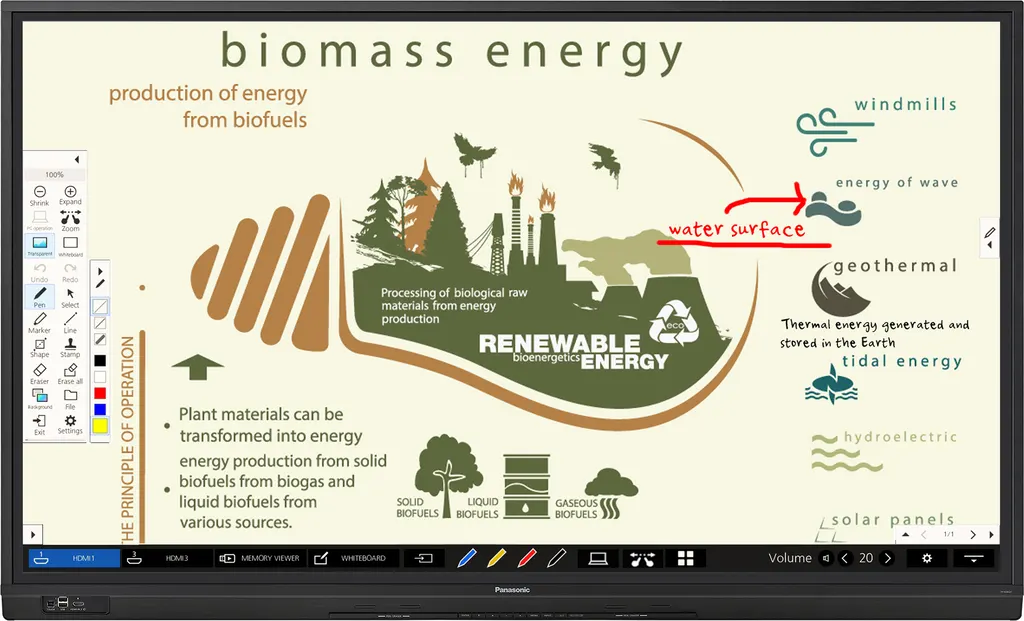
TH-65BQ1
Panasonic TH-65BQ1 65-inch Interactive Touch Display
- Screen size
- 65-inch (64.5" / 1638.9 mm)
- Resolution
- 3840 x 2160
- System
- Windows® (8.1/10)
- Brightness
- 500 cd/m²
Priceon request
QuotationWithin 1 working day
DeliveryConfirmed with your quote, based on stock
Overview
The Panasonic TH-65BQ1 is a 65-inch touch display with a 3840 x 2160 4K panel, 500 cd/m² brightness and infrared touch for up to 20 points. It suits classrooms and meeting rooms in Qatar where teachers and presenters write over lessons and switch between sources. Panasonic has discontinued this model, so SmartRooms Qatar can quote a current equivalent or compatible replacement.
What the TH-65BQ1 does in a teaching or meeting room
The Panasonic TH-65BQ1 is a 65-inch touch display from the BQ1 Series, with a 3840 x 2160 4K panel, 500 cd/m² brightness and a 1200:1 contrast ratio. Writing, annotating and switching sources happen on the glass itself, so a teacher or presenter does not need a separate whiteboard or a second screen. Panasonic has discontinued this model. If you already run one, are comparing it with other 65-inch panels, or need a replacement, SmartRooms Qatar can quote a current equivalent or compatible alternative.
Touch, annotation and comparison tools
Infrared detection tracks up to 20 touch points at once, so small groups can work on the screen together. An on-screen menu bar gives quick access to input switching and the whiteboard tool, and writing can begin soon after power-up. Annotations can be placed directly over a PC or external image without capturing it first. Up to nine captured screens can be compared side by side, and the built-in clock, timer and stopwatch functions help keep group work and tests on time. Panasonic also describes a blue light reduction mode that can cut blue light by up to 53 percent, though it notes that effects are not guaranteed; this suits long teaching days.
Inputs, outputs and control for a busy room
The display offers three HDMI inputs, a DisplayPort input, a DVI-D input and a PC input, so several sources can stay connected at once. Up to four inputs can be shown on one screen simultaneously. An HDMI digital output feeds a second display or projector in a large classroom, with annotations and zoom reflected on both. For room management, it has an RS-232C serial port and an RJ45 LAN port compatible with PJLink. Screen Transfer software can share a PC screen with up to 64 displays over wired LAN, which helps a school send one announcement to many rooms. A USB TYPE B touch connection links the panel to the computer, and Windows 8.1/10 and Mac OS X 10.10 through macOS 11.0 are listed as supported operating systems.
Where it fits in Qatar
- A private school in Al Wakrah fitting out classrooms for mixed-age groups, where teachers switch between a laptop and a second source during lessons.
- A meeting room in Msheireb used by a ministry team presenting Arabic and English material from a single PC.
- A training centre in Education City or Lusail running small group sessions across several rooms, where a central announcement can reach each display.
The 65-inch size suits classrooms and meeting rooms rather than lecture halls. Its active area of 1428.4 x 803.5 mm is a practical fit for a room where a small group sits around a table. For larger halls, a bigger screen is usually the better choice.
Heat and the Qatar climate
The listed operating range is 0 to 40 °C up to 1400 m altitude, with 20 to 80 percent humidity and no condensation. Outside temperatures in Qatar can exceed 45 °C in summer, so the display should sit in an air-conditioned room, away from direct sun through windows and from entrances that let hot air in. Ask the SmartRooms Qatar team to check the room conditions before you choose a wall position.
Planning the wall fitting and power
- Weighs 43.4 kg, with dimensions of 1495 x 908 x 105 mm including handles.
- Uses a VESA 400 x 400 mm mounting pattern and tilts up to 45 degrees backward in landscape.
- Accepts 110 to 240 V AC at 50/60 Hz, with 320 W power consumption at maximum.
- Built-in speakers rated at 20 W, plus a 30 W speaker output.
Because of its weight, a free site survey before fixing lets our team check wall structure, bracket type and cable routes. Professional installation is available, and the quotation will set out mounting and cabling needs. Schools and government buyers can order by LPO or through government tenders, including Monaqasat, and pay by bank transfer, cheque or purchase order.
To request a quote for the TH-65BQ1 or a current equivalent, send SmartRooms Qatar your room size, the number of units and the intended mounting location. Quotations are usually issued within one working day.
Highlights
- 65-inch 4K display with 3840 x 2160 resolution and 500 cd/m² brightness
- Infrared touch detection supporting up to 20-point multi-touch
- Three HDMI inputs plus DisplayPort, DVI-D and PC inputs
- Screen Transfer software compatible with up to 64 displays
- 1200:1 contrast ratio and 178-degree viewing angle
- Discontinued by manufacturer; request a quote for a current equivalent
Classroom fit
At 65″ the farthest student should sit within about 4.9 m (6× the screen height).
Estimated timeline
Quotation within 1 working day · delivery timing depends on stock availability, and we confirm it with your quotation.
Specifications
39 specifications · Source: manufacturer · checked Oct 2026
Display7
- Screen Size / Aspect Ratio
- 65-inch (64.5" / 1638.9 mm)
- Effective Display Area (W x H)
- 1428.4 x 803.5 mm (56.2" x 31.6" )
- Resolution (H x V)
- 3840 x 2160
- Brightness* 1
- 500 cd/m²
- Contrast Ratio
- 1200:1
- Response Time
- 8.0 ms (G to G)
- Viewing Angle
- 178° / 178° (CR > 10)
Touch Panel3
- Detection Method
- Infrared blocking detection method
- Touch Operation
- Up to 20-point multi-touch* 2
- OS
- Windows® (8.1/10), Mac OS X (10.10/10.11), macOS (10.12/10.13/10.14/10.15/11.0)
Connection Terminal12
- HDMI In
- Type A Connector x 3 (HDCP 2.2 supported)
- DIGITAL Out
- HDMI Type A Connector x 1
- DisplayPort In
- DisplayPort x 1 (HDCP 2.2 supported)
- DVI-D In
- DVI-D 24-pin x 1
- PC In
- Mini D-Sub 15-pin x1 (compatible with DDC2B)
- USB* 3
- USB TYPE A Connector (female) x 1 DC5 V/ 0.9 A, (USB3.0 supported.) : Back USB TYPE A Connector (female) x 2 DC5 V/ 0.5 A, (USB2.0 supported.) : Front
- USB (TOUCH)
- USB TYPE B Connector (male) x 1
- Serial In
- D-Sub 9-pin x 1 (for external control, RS-232C compliant)
- Audio In
- Stereo mini-jack (M3) x 2 (Shared with DCI-D IN and PC IN)
- Audio Out
- Stereo mini-jack (M3) x 1
- LAN
- RJ45 x 1, 10BASE-T/ 100BASE-TX/1000BASE-T, compatible with PJLink™
- SLOT
- Intel® SDM specification Corresponding size SDM-S / SDM-L, Supply power 3.3 V / 1.1 A, 12 V / 5.5 A
Audio2
- Built-in speaker
- 20 W (10 W + 10 W) 10% THD
- Speaker Out
- 30 W (15 W + 15 W) 10% THD
Electrical5
- Power Requirements
- 110-240 AC, 50 / 60 Hz
- Power Consumption
- 320 W
- On Mode Average Power Consumption* 4
- 230 W
- Power Off Condition
- Approx. 0.3 W
- Standby Condition
- Approx. 0.5 W
Mechanical5
- Dimensions (W x H x D)
- 1495 x 908 x 105 mm (58.9" x 35.8" x 4.2") (with handles)
- Bezel Width
- T/R/L 16.3 mm (0.64") B 54.3 mm (2.14") (with speaker)
- Weight
- 43.4 kg (95.7lbs.)
- Pitch for Wall-hanging
- VESA Compliant 400 x 400 mm (15.8" x 15.8")
- Protective Glass
- Anti Glare Surface / Scattering prevention film
Installation Requirement* 52
- Orientation
- Landscape / Portrait
- Tilting Angle
- Landscape: 0 degrees forward, 0-45 degrees backward, Portrait: 0 degrees forward/backward
Environment3
- Operating Environment
- Temperature: 0 °C to 40 °C (32 °F to 104 °F) [for up to 1400 m (4593') altitude] / 0 °C to 35 °C (32 °F to 95 °F) [for between 1400 m and 2800 m (4593' and 9186') altitude], Humidity: 20 % to 80 % (Non-condensation)
- Operating Time* 6
- 18 h/day
- Regional Spec Sheets
- Global: TH-65BQ1W
Downloads
5 files from the manufacturerQuestions about TH-65BQ1
Is the Panasonic TH-65BQ1 still sold by Panasonic?
No. Panasonic has discontinued the TH-65BQ1, so it is no longer in the manufacturer's current range. If your organisation already runs one, SmartRooms Qatar can recommend a current 65-inch interactive display or a compatible replacement that matches your mounts, inputs and software. Send your requirements with a quote request and the team will reply with a quotation, usually within one working day.
Who is the TH-65BQ1 designed for?
It suits teaching and meeting rooms where people write on the screen and share documents. The 3840 x 2160 panel shows fine detail in lesson material, and the on-screen menu bar lets a teacher switch inputs or open the whiteboard without a separate controller. Built-in clock, timer and stopwatch functions help teachers manage lesson time and group activities in schools and training centres across Qatar.
Is a 65-inch panel the right size for a classroom in Qatar?
The active display area of 1428.4 x 803.5 mm suits a classroom or meeting room where the furthest seat is not far from the screen. Lecture halls usually need a larger panel or a projector system. Measure the room length and the available wall space, then confirm the size during a free site survey from SmartRooms Qatar before you order several units.
How many people can write on the screen at the same time?
The touch panel uses infrared blocking detection and supports up to 20-point multi-touch, so several people can annotate or move content at once. This suits group tasks where two or three students work at the board together. Listed supported operating systems are Windows 8.1, Windows 10, and Mac OS X 10.10 through macOS 11.0.
Which computers and operating systems does it work with?
The specification lists Windows 8.1, Windows 10, Mac OS X 10.10 and macOS up to 11.0 as supported touch panel systems. A USB TYPE B touch connection links the panel to the computer, while HDMI, DisplayPort, DVI-D and PC inputs carry the picture. Check your laptop ports and whether adapters are needed, and include that detail in your quote request.
How many input sources can I connect?
The display has three HDMI inputs, one DisplayPort input, one DVI-D input and one PC input, plus two stereo audio inputs and one stereo audio output. It can show inputs from up to four sources on one screen at the same time. The HDMI and DisplayPort inputs support HDCP 2.2, which matters when playing protected content.
Can it drive a second screen or projector in a large classroom?
Yes. The HDMI digital output sends the picture to a second display or projector, and comments written on the screen and zoom changes are reflected in real time. This helps a large classroom in Al Rayyan where back-row students need the same view as the front. Check the cable length and the projector input type before ordering.
Can the display be controlled from a building or AV management system?
It has an RS-232C serial port on a D-Sub 9-pin connector and an RJ45 LAN port compatible with PJLink. These are the connections a control system would normally use. Confirm with the SmartRooms Qatar team which commands your system needs before designing the control scheme, and list your current system details in the quote request.
How does the display cope with Qatar summer heat?
The listed operating range is 0 to 40 °C up to 1400 m altitude, with 20 to 80 percent humidity and no condensation. Outdoor temperatures in Qatar can exceed 45 °C in summer, so install the display in an air-conditioned room, away from direct sun through windows and open entrances. Ask SmartRooms Qatar to review the room temperature before fixing the panel.
Does the power supply suit Qatar's mains electricity?
The specification lists an input of 110 to 240 V AC at 50 or 60 Hz, a range that includes the 240 V, 50 Hz supply used in Qatar. Power consumption is 320 W, averaging 230 W in on mode and about 0.5 W in standby. Plan the circuit for the rated draw and confirm the plug and socket arrangement with your electrician during installation planning.
How heavy is it, and what should I plan before wall mounting?
The panel weighs 43.4 kg and measures 1495 x 908 x 105 mm with handles, using a VESA 400 x 400 mm mounting pattern. Plan the wall structure, bracket and lifting equipment before installation, and book a free site survey. SmartRooms Qatar provides professional installation, and the quotation will show what is included.
Can a Doha meeting room show Arabic and English slides from one laptop?
The display shows whatever the connected source sends, so Arabic and English slides appear as long as the laptop outputs them correctly. The specification does not list on-screen menu languages, so confirm the menu language with the SmartRooms Qatar team before ordering. One HDMI input is enough for the laptop, and a second input can stay free for a backup computer in a ministry meeting room in Msheireb.