Thursday, 22 October 2026 · 11 Jumada I 1448 AH Sun – Thu · 9:00 – 18:00
+971 56 914 9477 العربية
WhatsApp
This model is discontinuedThe manufacturer no longer makes it. Request a quote and we will propose the closest current replacement.
Suggested replacements ↓

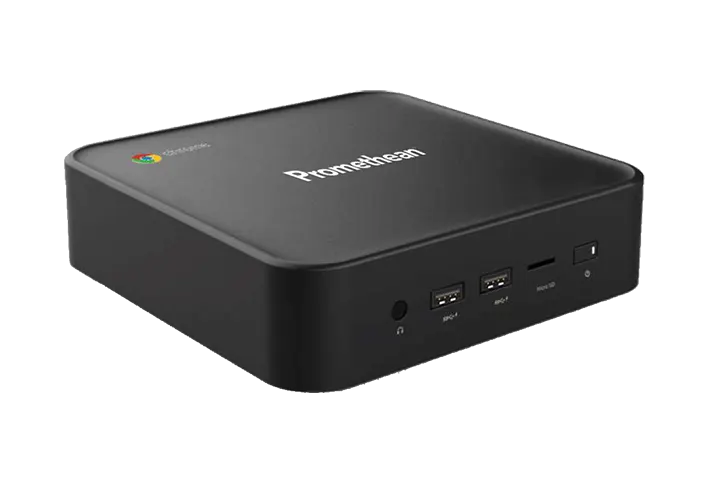
Promethean Chromebox

Promethean Chromebox Chrome OS Computer (Discontinued)

System
Chrome OS
Memory
4 GB DDR4-2666
Storage
128 GB Solid State Drive
Warranty
completed by a qualified…
WhatsApp
Priceon request
QuotationWithin 1 working day
DeliveryConfirmed with your quote, based on stock
PDFDownload datasheet (Promethean_Chromebox_2021_SS_0321v1.1_AR-XM.pdf)
Overview

The Promethean Chromebox is a 2021 Chrome OS computer that Promethean has discontinued. It runs an Intel Celeron 5205U processor at 1.9GHz with 4 GB of DDR4-2666 memory and a 128 GB solid state drive. It offers two HDMI outputs, three USB-A 3.0 ports and wired Ethernet. Schools and offices in Qatar that already own one, or need a comparable unit for a display, can request a quote for a current equivalent or compatible replacement.

What the Promethean Chromebox is

The Promethean Chromebox is a compact Chrome OS computer from Promethean's 2021 range, sold as a legacy model. Promethean has discontinued it, so this page serves organisations that already run one, buyers comparing it with newer units, and anyone who needs a replacement. Built around an Intel Celeron 5205U processor at 1.9GHz, it pairs 4 GB of DDR4-2666 memory with a 128 GB solid state drive and Intel UHD 610 graphics. The 128 GB drive is modest, so most schools and offices will keep documents in cloud storage and use the single microSD input for removable media.

Ports and connectivity for rooms with a display

The port layout suits a room where one computer feeds a screen and several accessories:

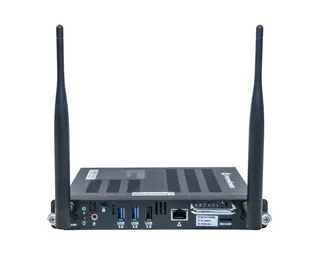
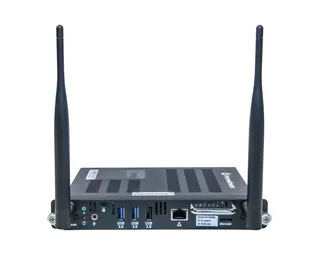
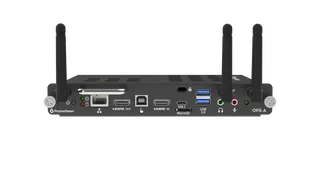
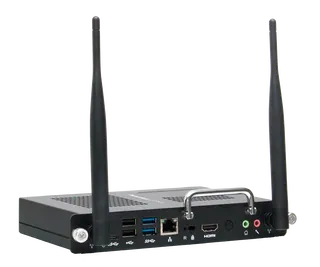
  • Two HDMI outputs for connecting displays
  • Three USB-A 3.0 ports and one USB-A 2.0 port
  • One USB-C port and one RJ45 Ethernet port
  • Wi-Fi AX201 with Bluetooth 5.0
  • One 3.5mm line out and one microSD input

Wired Ethernet is worth using in dense buildings where many devices share Wi-Fi, such as a boardroom in a high-rise, because a cabled link is steadier for video calls. An HDMI cable and a USB cable are included in the box.

Power, heat and installation planning

The unit runs on a 19 V supply and is rated at 30 W. A regional power cable is included, so confirm it matches the BS 1363 sockets used across Qatar before ordering. The rated operating range is 0 to 35°C (32 to 95°F) with 30% to 80% humidity. Qatar summers regularly pass 45°C, so the Chromebox belongs in an air-conditioned room with space for airflow, not in a sealed cabinet, a sunlit corner or an entrance exposed to heat and dust. Installation should be completed by a qualified installer, and a free site survey from SmartRooms Qatar helps confirm the mounting position before any holes are drilled.

Where it fits in Qatar

  • A private school in Al Wakrah updating a classroom where the teacher's display is fed from a Chromebox mounted behind the screen, keeping HDMI and USB access for the teacher.
  • A government office in Msheireb whose meeting room already runs Chrome OS, where a like-for-like unit with Ethernet suits a team holding frequent video calls.
  • A hotel conference room in West Bay where a small computer mounts out of sight and presenters connect laptops through the USB and HDMI ports.

Each setup depends on the display and software in use, so the quotation should list the display model and the number of units.

Ordering, warranty and next steps

Components not supplied by Promethean may affect performance, safety and warranty, so ask for the complete system to be quoted together. Warranty terms vary by region, and the product is covered by the manufacturer's warranty. SmartRooms Qatar delivers to all eight municipalities of Qatar and accepts purchase orders (LPOs), government tenders, and payment by bank transfer, cheque or purchase order. Request a quote for this model or a current equivalent, and quotations are usually issued within one working day.

Highlights

  • Discontinued by Promethean; quote for a current equivalent
  • Intel Celeron 5205U at 1.9GHz, 4 GB RAM, 128 GB SSD
  • Two HDMI outputs, three USB-A 3.0 and one USB-C
  • Wi-Fi AX201, Bluetooth 5.0 and RJ45 Ethernet
  • Rated 0 to 35°C; 30 W draw on a 19 V supply

Estimated timeline

Quotation within 1 working day · delivery timing depends on stock availability, and we confirm it with your quotation.

Specifications

27 specifications · Source: manufacturer · checked Oct 2026
Computing5
Processor
Intel Celeron 5205U (1.9GHz)
RAM
4 GB DDR4-2666
Storage
128 GB Solid State Drive
Operating System
Chrome OS
GPU
Intel Graphics UHD 610
Connectivity9
Wi-Fi ®
AX201
Bluetooth ®
Bluetooth 5.0
USB-A 3.0
x3
USB-A 2.0
x1
USB-C
x1
Micro SD Input
x1
RJ45
x1
HDMI ® Out
x2
Line Out (3.5mm)
x1
Power2
Power Consumption
30 W
Voltage
19 V
Environmental2
Operating Temperature
32-95˚F (0-35˚C)
Operating Humidity
30%-80%
Physical Specifications4
Product Dimensions
148 x 148 x 41 mm (5.8 x 5.8 x 1.6 in)
Packed Dimensions
275 x 187 x 133 mm (10.8 x 7.4 x 5.2 in)
Gross Weight:
1.5 kg (3.2 lbs)
Net Weight
0.6 kg (1.3 lbs)
Compliance & Certification1
Regulatory Certification
CE, FCC, IC, CB, cULus, RCM
Packed Contents1
What’s in the Box
(1) Promethean Chromebox (1) Regional Power Cable(s) (1) USB Cable (1) HDMI Cable (1) Panel/Wall Mount Bracket (4) Panel Mount Hardware (2) Chromebox Hanging Hardware (1) Quick Start Guide
Installation1
The installation of this product should be components not supplied by Promethean may impact performance, safety and warranty.
completed by a qualified installer. Use of or not meeting minimum specifications For more information, visit
Warranty1
Warranty term and upgrade options vary your local reseller or distributor for information
by region. Contact and visit
Support1
For all Promethean products, please visit
Support.PrometheanWorld.com. Page 1
Downloads

2 files from the manufacturer

Questions about Promethean Chromebox

Is the Promethean Chromebox still sold by Promethean?
No. Promethean has discontinued this legacy Chromebox, which dates from 2021. If you already own one, or need a unit for a display you have installed, SmartRooms Qatar can quote a current equivalent or a compatible replacement. Send us the display model and the number of units so the quotation matches your setup.
What processor, memory and storage does it have?
It runs an Intel Celeron 5205U processor at 1.9GHz with 4 GB of DDR4-2666 memory, a 128 GB solid state drive and Intel UHD 610 graphics, under Chrome OS. This suits browser-based teaching, meeting and web applications. Check the requirements of any heavier software before deploying it across many rooms.
Can a private school in Al Wakrah use it behind a classroom display?
It suits a classroom where the teacher's screen is driven from a computer mounted behind it. The three USB-A 3.0 ports and the RJ45 Ethernet port give the teacher's laptop, USB accessories and a wired network connection. Confirm the display model and mounting points when you request a quote.
Does it support two screens at once?
It has two HDMI outputs, so one unit can feed two displays. The resolution and refresh rate for each screen depend on the display itself, so send the display model with your enquiry. One HDMI cable is included in the box, so plan for any additional cables before installation.
What ports and wireless connections are included?
The unit has three USB-A 3.0 ports, one USB-A 2.0 port, one USB-C port, two HDMI outputs, one RJ45 Ethernet port, a 3.5mm line out and a microSD input. Wireless uses a Wi-Fi AX201 module with Bluetooth 5.0. Wired Ethernet is steadier than wireless for video calls, so use it where the network is busy.
Would it suit a government meeting room in Msheireb that runs video calls?
It can, if the room already uses Chrome OS and needs a compact computer behind the display. Use the RJ45 port for a wired connection to the building network, and treat the Wi-Fi AX201 link as a backup. Ask the SmartRooms Qatar team to review the network layout during a free site survey before you order.
What mounting hardware comes with it?
The box includes one panel or wall mount bracket, panel mount hardware, Chromebox hanging hardware and a quick start guide. These parts fit the Chromebox to a panel or wall rather than leaving it on a desk. Confirm the mounting arrangement for your display when you request a quote, and book a free site survey before drilling into a wall.
Can it run in Doha's summer heat near a window or entrance?
Not without air conditioning. The rated operating range is 0 to 35°C with 30% to 80% humidity, and Qatar summers can exceed 45°C. Place it in an air-conditioned room with airflow around the unit. Avoid sunlit windows, closed cabinets and entrances exposed to heat and dust, such as an office in a warehouse near the Industrial Area.
Does it come with the right power cable for Qatar?
The box includes one regional power cable, and the unit is rated at 30 W on a 19 V supply. Before ordering, confirm the cable matches the BS 1363 (Type G) sockets used in Qatar. Ask the SmartRooms Qatar team to confirm the power cable configuration within your quotation.
Can a school in Education City order several units on an LPO?
Yes. SmartRooms Qatar accepts purchase orders (LPOs), government tenders, and payment by bank transfer, cheque or purchase order. A school ordering several units should list the number of units, the display models and the delivery location for each building. Quotations are usually issued within one working day.
Would a hotel conference room in West Bay use it out of sight?
Yes. The Chromebox suits a conference room where a small computer is mounted behind the display, away from guests. Presenters can connect laptops through USB-A 3.0 or USB-C, and the 3.5mm line out can feed the room's audio system. Plan cable routes with the installer before the room is finished.
Who installs it and what does the warranty cover?
Installation should be completed by a qualified installer. Components not supplied by Promethean may affect performance, safety and warranty, so ask for the complete system to be quoted together. The product is covered by the manufacturer's warranty, terms vary by region, and the details will be confirmed in your quotation.

Suggested replacements

Promethean OPS-A-4R32S Promethean OPS-A-4R32S Android 14 OPS Computing Module
1920 x 1080 @ 60 Hz Android 14
Promethean OPS-A-8R64S Promethean OPS-A-8R64S Android 14 OPS Computing Module
1920 x 1080 @ 60 Hz Android 14
Promethean OPS-A2-8R64S Promethean OPS-A2 Android Computing Module for ActivPanel
4K UHD 3840 x 2160 @ 60 Hz Android 16
Promethean OPS-M4 N97 Promethean OPS-M4 N97 OPS Computing Module for ActivPanel
Available with Windows 11 Pro… 8 GB
Promethean OPS4-5P8R256S Promethean OPS4-5P8R256S OPS-M4 i5 Computing Module
Available with Windows 11 Pro… 8 GB

Similar models

Hisense OPS72D/72E Hisense OPS72D/72E OPS On Board Computer for Interactive Displays
8GB
Clevertouch OPS i5 Clevertouch OPS i5 PC Module with Intel Core i5 and 256GB SSD
Windows 11 - Home / Pro /… Memory: 16GB DDR4
Clevertouch OPS i7 Clevertouch OPS i7 PC Module with Intel Core i7 13620H
Windows 11 - Home / Pro /… 16GB DDR4
Hikvision DS-D5AC12G5-8S2 Hikvision DS-D5AC12G5-8S2 OPS Module for Interactive Panels
8G 256G
Hikvision DS-D5AC13G7-16S5 Hikvision DS-D5AC13G7-16S5 OPS Module with Intel Core i7-13620H
16G 512G
Email Call