Thursday, 22 October 2026 · 11 Jumada I 1448 AH Sun – Thu · 9:00 – 18:00
+971 56 914 9477 العربية
WhatsApp
This model is discontinuedThe manufacturer no longer makes it. Request a quote and we will propose the closest current replacement.
Suggested replacements ↓

MeetingBoard

Yealink MeetingBoard 65 and 86-inch All-in-One Collaboration Board

Storage
built-in 64 GB (Available: 40G)
Brightness
350 nits
WhatsApp
Priceon request
QuotationWithin 1 working day
DeliveryConfirmed with your quote, based on stock
PDFDownload datasheet (Yealink MeetingBoard Datasheet.pdf)
Overview

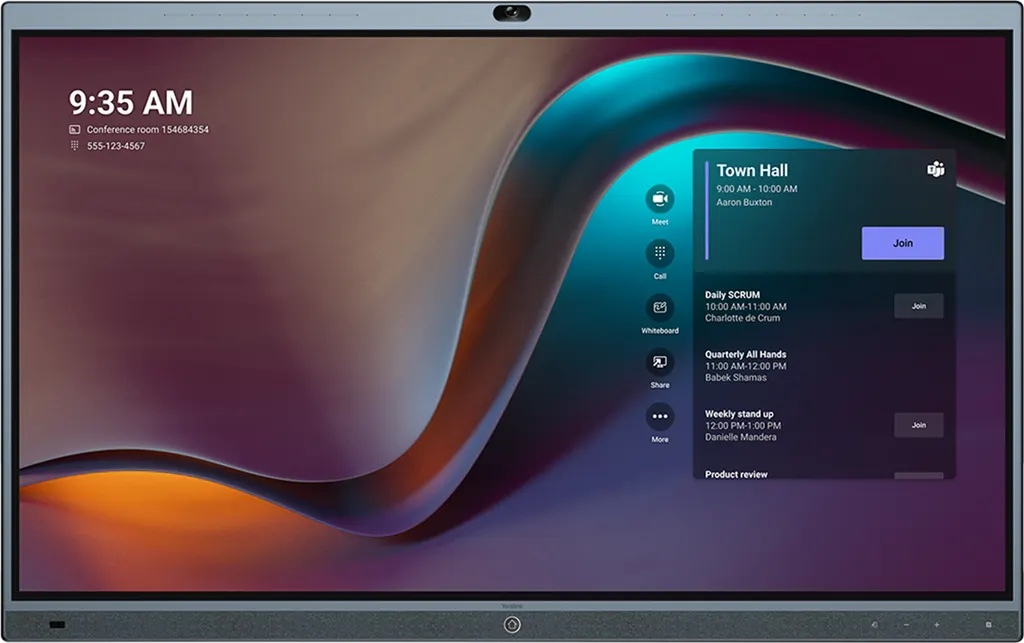
The Yealink MeetingBoard is an all-in-one collaboration board for meeting rooms, combining a 4K touchscreen, an 8MP built-in camera and a 16-microphone array. It came in 65-inch and 86-inch sizes, with Microsoft Teams and Zoom editions. Yealink has discontinued this model, so SmartRooms Qatar quotes a current equivalent or compatible replacement for offices, schools and government sites across Qatar. Request a quote.

What the discontinued MeetingBoard is

The Yealink MeetingBoard is an all-in-one conference board that combines a touchscreen display, a built-in camera, a microphone array, speakers and whiteboard software in one unit. It was sold in 65-inch and 86-inch sizes, in a Microsoft Teams Rooms edition running on Android or Windows and a Zoom Rooms Appliance edition for Zoom. Yealink has discontinued the model. Its end-of-sale notice, written for the 65-inch unit, states that new orders were not accepted after 30 June 2025, and it names the MeetingBoard Pro as the recommended replacement.

Display, camera and audio in detail

Each panel is a D-LED touch screen with 3840 x 2160 resolution, 350 nits of brightness, a typical contrast ratio of 1,200:1 and 178-degree viewing angles. It supports 20 touch points and has an anti-glare, anti-fingerprint coating. The built-in 8MP camera offers a 120-degree diagonal field of view, 4x e-PTZ and an electric privacy shutter. Sixteen MEMS microphones feed four full-range speakers and two tweeters rated at 15 W, and the manufacturer cites full-duplex calls over about 8 metres.

Connections and expansion options

  • HDMI output with CEC support and an HDMI input for a source device
  • Two USB Type A 3.0 ports, one USB Type A 2.0 port and a USB Type B touch output
  • 10/100/1000 Mbps Ethernet, Wi-Fi 6 and Bluetooth 5.0 on the unit
  • Detachable PTZ camera port for the optional MB-CAM-6X (6x optical zoom) or MB-CAM-12X (12x)
  • Windows OPS slot for the optional Windows OPS module, with 64 GB built-in storage

Where it fits in Qatar

The 65-inch model suits a meeting room in an office in Msheireb or Al Sadd, or a smaller training room at a private school in Al Wakrah, where a handful of people sit close to the screen. The 86-inch model suits a boardroom in West Bay or a lecture hall at Education City, where a larger group needs to read the whiteboard from further away.

Many meetings in Doha connect local teams with colleagues abroad. Because the whiteboard is shared inside the call, remote participants can see and add to the same notes as the room.

The unit is rated for operating temperatures of 0 to 40°C and 10 to 95% humidity. Qatar summer heat outdoors regularly exceeds 45°C, so plan for an air-conditioned room away from windows, open lobbies and dust.

What to plan before installation

  • Walls: solid brick, concrete or reinforced walls, vertical and thicker than 20 cm
  • Test each fixing with a 35 kg load (65-inch) or 45 kg load (86-inch) for one minute
  • Installation height of about 1470 mm (65-inch) or 1580 mm (86-inch)
  • Power draw of 128 W (65-inch) and 338 W (86-inch)
  • Packed weight of 65.7 kg (65-inch) and 103.7 kg (86-inch)

Yealink lists different dimensions for early V1 and later V2 hardware, identifiable from digits 7 to 9 of the serial number, so confirm the revision before planning the mount. A site survey before fixing a heavy 86-inch unit is strongly advisable, and SmartRooms Qatar offers one free of charge.

To check whether a current replacement or compatible model fits your room, request a quote from SmartRooms Qatar. Send the room size, the Teams or Zoom platform you use and the number of units, and the team usually replies with a quotation within one working day.

Highlights

  • 65-inch and 86-inch D-LED touch displays with 3840 x 2160 resolution
  • Built-in 8MP camera with 120-degree field of view and privacy shutter
  • 16 MEMS microphones and six speakers for full-duplex calls
  • Microsoft Teams Rooms on Android or Windows, or Zoom Rooms Appliance
  • Detachable PTZ camera port for MB-CAM-6X or MB-CAM-12X
  • Discontinued by Yealink; request a quote for a current replacement

Estimated timeline

Quotation within 1 working day · delivery timing depends on stock availability, and we confirm it with your quotation.

Specifications

50 specifications · Source: manufacturer · checked Oct 2026
Display6
MeetingBoard 65
65-inch D-LED touch screen
MeetingBoard 86
86-inch D-LED touch screen
Contrast ratio 1200
1(typ.)
Brightness
350 nits
Ratio 16
9
Details
Ultra HD 4K (3840 x 2160 screen resolution) Anti-glare and anti-fingerprint coating Viewing angle 178°(H) / 178°(V) Refreshing Frequency 60Hz Touch Points 20 points Location Accuracy ± 1mm(over 90% Area) Contact Height < 2mm
Camera5
- HFOV
110°
- FOV
80°; 90°
- HFOV (Rotational)
±100°; ±100°
- VFOV (Rotational)
0° /-90°; 0° /-90°
Details
Built-in Camera - 8MP Sony sensor - 120° Diagonal field of view - 4x e-PTZ - Electric privacy shutter MB-Camera-6X - 8MP Sony sensor - 6x optical zoom MB-Camera-12X - 8MP Sony sensor - 12x optical zoom Intelligence Features - Auto Framing - Speaker Tracking - Multi-focus Framing (Integrated) - PiP Mode - Smart Gallery (Zoom)
Audio9
- Frequency Response
90Hz~20kHz
- Sensitivity
95dB SPL @ 1W, 0.5 meter
- Sampling Rate
48kHz
- Rated Sound emission angle
Forward-facing、Downward-facing
- Total Harmonic Distortion (THD)
1kHz
- Rated Impedance
4 ohms
- Rated Power
15W
- Maximum Power
24W
Details
Built-in 16 MEMS Mic Array Support RCA input/output Yealink Enhanced Noise Proof Technology Acoustic Echo Cancellation Reverberation Suppression Auto Gain Control Beamforming Technology CNG/PLC/AJB/De-Rerb Speaker: - 4 full range+2 tweeter stereo speakers
Operating System1
Details
Android 13
Meeting Features1
Details
Calendar One-click join Meeting collaboration  - Content sharing    - WPP20/WPP30 Wireless Content Sharing    - VCH51 Wired Content Sharing    - AirPlay    - Miracast  - Whiteboard Meeting control - Add par ticipates - Hold/Resume - Camera On/Off - Mute/Unmute - Volume Up/Down - Hang up
Video Standard1
Video codecs
H.264 High profile, H.264 SVC, H.264
Network and Security Features3
QoS
802.1p/q, Diff-serv
Network diagnosis
Ping, Trace route
Details
IPv4 and IPv6, DHCP/static IP HTTP/HTTPS web server SRTP/TLS, AES 256-bit encryption VLAN, LLDP IEEE802.1X - EAP-MD5/EAP-TLS - PEAP-MSCHAPv2 - EAP-TTLS/EAP-MSCHAPv2 Time and date synchronization using SNTP Built-in certificate Simple Certificate Enrollment Protocol (SCEP) WiFi 6 2x2 MIMO dual-band Built-in Bluetooth 5.0 NFC supported
Connections1
Details
1 x detachable PTZ camera port 1 x HDMI output (CEC supported) 1 x HDMI input (only for source input) 2 x RCA audio input 2 x RCA audio output 1 x Yealink VCH port (RJ-45) 2 x USB Type A 3.0 interface 1 x USB Type A 2.0 interface 1 x USB Type B Touch output interface 1 x 10/100M/1000M Ethernet port 1 x Power port 1 x Windows OPS slot 1 x Security lock slot 1 x Reset slot
Buttons1
Details
LED lightstrips Home button Input source button Volume up/down button Motion sensor
Optional Accessories1
Details
MB-CAM-6X module MB-CAM-12X module VCM36-W wireless microphone Windows OPS module
Other Physical Features13
Storage
built-in 64 GB (Available: 40G)
Power Adapter
AC 100~240V input
USB Output
5V 0.5A
- MeetingBoard 65
128w
- MeetingBoard 86
338w
- V1 Hardware
1512mm x 953mm x 92mm (VESA: 600 mm x 400 mm); For the 7th to 9th digits of the serial number (SN), E01-E08 represent the old models, while E09 and onwards, as well as FXX, represent the new models.
- V2 Hardware
1490 mm x 936 mm x 96 mm (VESA: 600 mm x 400 mm); For the 7th to 9th digits of the serial number (SN), E01-E09 represent the old models, while E10 and onwards, as well as FXX, represent the new models.
MeetingBoard 86
1967 mm x 1205 mm x 96 mm (VESA: 800 mm x 600 mm); 1468mm × 905mm × 942mm
MeetingBoard 65
1154mm × 835mm × 1043mm
Operating humidity
10 - 95%
Operating temperature
0 - 40°C
Storage temperature
-30 - 70°C
Details
Power consumption Dimension (W.D.H) - Wall mount: MeetingBoard 65: - Floor stand:
Package Features5
- MeetingBoard 65
51 kg; 65.7kg; 1660 mm x 1075 mm x 280 mm
- MeetingBoard 86
84.5 kg; 103.7kg; 2090 mm x 1320 mm x 280 mm
- Floor stand (optional)-65
1225 mm x 743 mm x 148 mm
- Floor stand (optional)-86
1425 mm x 843 mm x 148 mm
Details
Package contents - MeetingBoard 65/86 endpoint - 3m Ethernet cable - 3m Power cable - 4 x Stylus pen - Mounting Bracket and Accessories - Quick Start Guide N.W/CTN G.W/CTN Carton Meas
Model1
Details
Kit Contain
MB65-A0011
Details
MeetingBoard 65 OPS
MB86-A0011
Details
MeetingBoard 86 OPS

Downloads

189 files from the manufacturer
PDF Datasheets Yealink MeetingBoard Datasheet.pdf 224 KB Yealink MeetingBoard datasheets (PDF, 224 KB) PDF Datasheets Yealink MeetingBoard Datasheet.pdf 224 KB Yealink MeetingBoard datasheets (PDF, 224 KB) URL Datasheets · Opens on manufacturer site Physical Specifications Yealink MeetingBoard datasheets (URL) URL Datasheets · Opens on manufacturer site Physical Specifications Yealink MeetingBoard datasheets (URL) URL Datasheets · Opens on manufacturer site Yealink MeetingBoard Datasheet (DE) Yealink MeetingBoard datasheets (URL) URL Datasheets · Opens on manufacturer site Yealink MeetingBoard Datasheet (ES) Yealink MeetingBoard datasheets (URL) URL Datasheets · Opens on manufacturer site Yealink MeetingBoard Datasheet (FR) Yealink MeetingBoard datasheets (URL) URL Datasheets · Opens on manufacturer site Yealink MeetingBoard Datasheet (IT) Yealink MeetingBoard datasheets (URL) URL Datasheets · Opens on manufacturer site Yealink MeetingBoard Datasheet (NL) Yealink MeetingBoard datasheets (URL) PDF Manuals & guides Yealink MeetingBoard Quick Start Guide (EN, DE, FR, ES) V1.8.pdf 3.7 MB Yealink MeetingBoard manuals & guides (PDF, 3.7 MB) URL Manuals & guides · Opens on manufacturer site About Device Yealink MeetingBoard manuals & guides (URL) URL Manuals & guides · Opens on manufacturer site Accessibility Yealink MeetingBoard manuals & guides (URL) URL Manuals & guides · Opens on manufacturer site Administrator Password Yealink MeetingBoard manuals & guides (URL) URL Manuals & guides · Opens on manufacturer site Administrator Password Yealink MeetingBoard manuals & guides (URL) URL Manuals & guides · Opens on manufacturer site Advanced Network Yealink MeetingBoard manuals & guides (URL) URL Manuals & guides · Opens on manufacturer site AirPlay Content Sharing Yealink MeetingBoard manuals & guides (URL) URL Manuals & guides · Opens on manufacturer site Annotation Yealink MeetingBoard manuals & guides (URL) URL Manuals & guides · Opens on manufacturer site Audio Settings Yealink MeetingBoard manuals & guides (URL) URL Manuals & guides · Opens on manufacturer site Auto Framing Yealink MeetingBoard manuals & guides (URL) URL Manuals & guides · Opens on manufacturer site Backup and Reset Yealink MeetingBoard manuals & guides (URL) URL Manuals & guides · Opens on manufacturer site Basic Settings Yealink MeetingBoard manuals & guides (URL) URL Manuals & guides · Opens on manufacturer site Bluetooth Yealink MeetingBoard manuals & guides (URL) URL Manuals & guides · Opens on manufacturer site CEC Yealink MeetingBoard manuals & guides (URL) URL Manuals & guides · Opens on manufacturer site Call Features Yealink MeetingBoard manuals & guides (URL) URL Manuals & guides · Opens on manufacturer site Camera Calibration Yealink MeetingBoard manuals & guides (URL) URL Manuals & guides · Opens on manufacturer site Camera Control Yealink MeetingBoard manuals & guides (URL) URL Manuals & guides · Opens on manufacturer site Camera Diagnostic Yealink MeetingBoard manuals & guides (URL) URL Manuals & guides · Opens on manufacturer site Camera Preset Yealink MeetingBoard manuals & guides (URL) URL Manuals & guides · Opens on manufacturer site Camera Settings Yealink MeetingBoard manuals & guides (URL) URL Manuals & guides · Opens on manufacturer site Canvas Yealink MeetingBoard manuals & guides (URL) URL Manuals & guides · Opens on manufacturer site Canvas Yealink MeetingBoard manuals & guides (URL) URL Manuals & guides · Opens on manufacturer site Certificate Yealink MeetingBoard manuals & guides (URL) URL Manuals & guides · Opens on manufacturer site Codec Yealink MeetingBoard manuals & guides (URL) URL Manuals & guides · Opens on manufacturer site Contact Yealink MeetingBoard manuals & guides (URL) URL Manuals & guides · Opens on manufacturer site Content Sharing Methods Yealink MeetingBoard manuals & guides (URL) URL Manuals & guides · Opens on manufacturer site Controller Quick User Guide for Zoom Yealink MeetingBoard manuals & guides (URL) URL Manuals & guides · Opens on manufacturer site Create Account Yealink MeetingBoard manuals & guides (URL) URL Manuals & guides · Opens on manufacturer site DHCP Option Yealink MeetingBoard manuals & guides (URL) URL Manuals & guides · Opens on manufacturer site Digital Signage for Zoom Yealink MeetingBoard manuals & guides (URL) URL Manuals & guides · Opens on manufacturer site Direct sharing in Zoom Rooms Yealink MeetingBoard manuals & guides (URL) URL Manuals & guides · Opens on manufacturer site Display Settings Yealink MeetingBoard manuals & guides (URL) URL Manuals & guides · Opens on manufacturer site Dual Monitors Yealink MeetingBoard manuals & guides (URL) URL Manuals & guides · Opens on manufacturer site Electric Privacy Shutter Yealink MeetingBoard manuals & guides (URL) URL Manuals & guides · Opens on manufacturer site Email Service Yealink MeetingBoard manuals & guides (URL) URL Manuals & guides · Opens on manufacturer site Eraser Yealink MeetingBoard manuals & guides (URL) URL Manuals & guides · Opens on manufacturer site Eraser Yealink MeetingBoard manuals & guides (URL) URL Manuals & guides · Opens on manufacturer site Export Whiteboard Yealink MeetingBoard manuals & guides (URL) URL Manuals & guides · Opens on manufacturer site Firmware Update Yealink MeetingBoard manuals & guides (URL) URL Manuals & guides · Opens on manufacturer site General Settings Yealink MeetingBoard manuals & guides (URL) 323 Manuals & guides · Opens on manufacturer site H.323 Yealink MeetingBoard manuals & guides (323) URL Manuals & guides · Opens on manufacturer site HDMI IN Yealink MeetingBoard manuals & guides (URL) URL Manuals & guides · Opens on manufacturer site Help Center Yealink MeetingBoard manuals & guides (URL) URL Manuals & guides · Opens on manufacturer site Ink to Shape Yealink MeetingBoard manuals & guides (URL) URL Manuals & guides · Opens on manufacturer site Insert Content Yealink MeetingBoard manuals & guides (URL) URL Manuals & guides · Opens on manufacturer site Instant Meeting Yealink MeetingBoard manuals & guides (URL) URL Manuals & guides · Opens on manufacturer site Invite Participants Yealink MeetingBoard manuals & guides (URL) URL Manuals & guides · Opens on manufacturer site Join Meeting Yealink MeetingBoard manuals & guides (URL) URL Manuals & guides · Opens on manufacturer site LDAP Yealink MeetingBoard manuals & guides (URL) URL Manuals & guides · Opens on manufacturer site Language Yealink MeetingBoard manuals & guides (URL) URL Manuals & guides · Opens on manufacturer site Lasso Yealink MeetingBoard manuals & guides (URL) URL Manuals & guides · Opens on manufacturer site Lasso Yealink MeetingBoard manuals & guides (URL) URL Manuals & guides · Opens on manufacturer site Layout Yealink MeetingBoard manuals & guides (URL) URL Manuals & guides · Opens on manufacturer site Layout Settings Yealink MeetingBoard manuals & guides (URL) URL Manuals & guides · Opens on manufacturer site License Yealink MeetingBoard manuals & guides (URL) URL Manuals & guides · Opens on manufacturer site Log In and Out Teams Account Yealink MeetingBoard manuals & guides (URL) URL Manuals & guides · Opens on manufacturer site Log In and Out Zoom Account Yealink MeetingBoard manuals & guides (URL) URL Manuals & guides · Opens on manufacturer site Manage Audio Yealink MeetingBoard manuals & guides (URL) URL Manuals & guides · Opens on manufacturer site Manage Participants for Microsoft Teams Yealink MeetingBoard manuals & guides (URL) URL Manuals & guides · Opens on manufacturer site Manage Participants for Zoom Yealink MeetingBoard manuals & guides (URL) URL Manuals & guides · Opens on manufacturer site Manage Video Yealink MeetingBoard manuals & guides (URL) URL Manuals & guides · Opens on manufacturer site Manual Controls Yealink MeetingBoard manuals & guides (URL) URL Manuals & guides · Opens on manufacturer site Meeting Control for Microsoft Teams Yealink MeetingBoard manuals & guides (URL) URL Manuals & guides · Opens on manufacturer site Meeting Control for Zoom Yealink MeetingBoard manuals & guides (URL) URL Manuals & guides · Opens on manufacturer site Meeting Layout for Microsoft Teams Yealink MeetingBoard manuals & guides (URL) URL Manuals & guides · Opens on manufacturer site Meeting Layout for Zoom Yealink MeetingBoard manuals & guides (URL) URL Manuals & guides · Opens on manufacturer site Meeting Settings Yealink MeetingBoard manuals & guides (URL) URL Manuals & guides · Opens on manufacturer site Microsoft Teams Admin Center Yealink MeetingBoard manuals & guides (URL) URL Manuals & guides · Opens on manufacturer site Miracast Content Sharing Yealink MeetingBoard manuals & guides (URL) URL Manuals & guides · Opens on manufacturer site Multi Inking Yealink MeetingBoard manuals & guides (URL) URL Manuals & guides · Opens on manufacturer site Multi-Focus Yealink MeetingBoard manuals & guides (URL) URL Manuals & guides · Opens on manufacturer site Multi-Stream (Smart Gallery) for Zoom Yealink MeetingBoard manuals & guides (URL) URL Manuals & guides · Opens on manufacturer site Network Diagnostics Yealink MeetingBoard manuals & guides (URL) URL Manuals & guides · Opens on manufacturer site Open Whiteboard Yealink MeetingBoard manuals & guides (URL) URL Manuals & guides · Opens on manufacturer site Open Whiteboard Yealink MeetingBoard manuals & guides (URL) URL Manuals & guides · Opens on manufacturer site Open Whiteboard Yealink MeetingBoard manuals & guides (URL) URL Manuals & guides · Opens on manufacturer site Pen Yealink MeetingBoard manuals & guides (URL) URL Manuals & guides · Opens on manufacturer site Pen Yealink MeetingBoard manuals & guides (URL) URL Manuals & guides · Opens on manufacturer site Picture-in-Picture (PIP) Mode Yealink MeetingBoard manuals & guides (URL) URL Manuals & guides · Opens on manufacturer site Proxy Server Yealink MeetingBoard manuals & guides (URL) URL Manuals & guides · Opens on manufacturer site Quick Call Widget Yealink MeetingBoard manuals & guides (URL) URL Manuals & guides · Opens on manufacturer site Quick User Guide for Microsoft Teams Yealink MeetingBoard manuals & guides (URL) URL Manuals & guides · Opens on manufacturer site Reboot Yealink MeetingBoard manuals & guides (URL) URL Manuals & guides · Opens on manufacturer site Reboot Device Yealink MeetingBoard manuals & guides (URL) URL Manuals & guides · Opens on manufacturer site Register Account Yealink MeetingBoard manuals & guides (URL) URL Manuals & guides · Opens on manufacturer site SIP Account Yealink MeetingBoard manuals & guides (URL) URL Manuals & guides · Opens on manufacturer site SIP IP Direct Dial Yealink MeetingBoard manuals & guides (URL) URL Manuals & guides · Opens on manufacturer site Screen Cast Yealink MeetingBoard manuals & guides (URL) URL Manuals & guides · Opens on manufacturer site Screen Lock Settings Yealink MeetingBoard manuals & guides (URL) URL Manuals & guides · Opens on manufacturer site Screenshot Yealink MeetingBoard manuals & guides (URL) URL Manuals & guides · Opens on manufacturer site Set Up a Yealink MeetingBoard Yealink MeetingBoard manuals & guides (URL) URL Manuals & guides · Opens on manufacturer site Set up a Yealink MeetingBoard Yealink MeetingBoard manuals & guides (URL) URL Manuals & guides · Opens on manufacturer site Setup Checklist Yealink MeetingBoard manuals & guides (URL) URL Manuals & guides · Opens on manufacturer site Shape Yealink MeetingBoard manuals & guides (URL) URL Manuals & guides · Opens on manufacturer site Share Content via Zoom APP Yealink MeetingBoard manuals & guides (URL) URL Manuals & guides · Opens on manufacturer site Shut Down Yealink MeetingBoard manuals & guides (URL) URL Manuals & guides · Opens on manufacturer site Speaker Tracking Yealink MeetingBoard manuals & guides (URL) URL Manuals & guides · Opens on manufacturer site Switch Account Yealink MeetingBoard manuals & guides (URL) URL Manuals & guides · Opens on manufacturer site System Diagnostic Yealink MeetingBoard manuals & guides (URL) MP4 Manuals & guides · Opens on manufacturer site Teams-Yealink MeetingBoard Quick Start V1.0.mp4 Yealink MeetingBoard manuals & guides (MP4) URL Manuals & guides · Opens on manufacturer site Text Yealink MeetingBoard manuals & guides (URL) URL Manuals & guides · Opens on manufacturer site Text Recognition Yealink MeetingBoard manuals & guides (URL) URL Manuals & guides · Opens on manufacturer site Time and Date Yealink MeetingBoard manuals & guides (URL) URL Manuals & guides · Opens on manufacturer site Touch Panel Configuration Yealink MeetingBoard manuals & guides (URL) URL Manuals & guides · Opens on manufacturer site Use Whiteboard Yealink MeetingBoard manuals & guides (URL) URL Manuals & guides · Opens on manufacturer site Video Fence Yealink MeetingBoard manuals & guides (URL) URL Manuals & guides · Opens on manufacturer site Virtual Meeting Room (VMR) Yealink MeetingBoard manuals & guides (URL) URL Manuals & guides · Opens on manufacturer site Whiteboard Page Yealink MeetingBoard manuals & guides (URL) URL Manuals & guides · Opens on manufacturer site Whiteboard Ruler Yealink MeetingBoard manuals & guides (URL) URL Manuals & guides · Opens on manufacturer site Windows Autopilot and Autologin Yealink MeetingBoard manuals & guides (URL) URL Manuals & guides · Opens on manufacturer site Wired BYOD Mode Yealink MeetingBoard manuals & guides (URL) URL Manuals & guides · Opens on manufacturer site Wired Content Sharing (VCH51) Yealink MeetingBoard manuals & guides (URL) URL Manuals & guides · Opens on manufacturer site Wired Network Yealink MeetingBoard manuals & guides (URL) URL Manuals & guides · Opens on manufacturer site Wired Reverse Control Yealink MeetingBoard manuals & guides (URL) URL Manuals & guides · Opens on manufacturer site Wireless Content Sharing Yealink MeetingBoard manuals & guides (URL) URL Manuals & guides · Opens on manufacturer site Wireless IP BYOD Yealink MeetingBoard manuals & guides (URL) URL Manuals & guides · Opens on manufacturer site Wireless Network Yealink MeetingBoard manuals & guides (URL) URL Manuals & guides · Opens on manufacturer site Wireless Reverse Control Yealink MeetingBoard manuals & guides (URL) URL Manuals & guides · Opens on manufacturer site XML Contacts Yealink MeetingBoard manuals & guides (URL) URL Manuals & guides · Opens on manufacturer site YMCS Platform Yealink MeetingBoard manuals & guides (URL) MP4 Manuals & guides · Opens on manufacturer site Yealink MP, MB, AX0 Audio Log Export Guide V1.0.mp4 Yealink MeetingBoard manuals & guides (MP4) MP4 Manuals & guides · Opens on manufacturer site Yealink MP, MB, AX0 Log Export Guide V1.0.mp4 Yealink MeetingBoard manuals & guides (MP4) MP4 Manuals & guides · Opens on manufacturer site Yealink MeetingBoard Floor-Mounted V1.0.mp4 Yealink MeetingBoard manuals & guides (MP4) PDF Manuals & guides · Opens on manufacturer site Yealink MeetingBoard Quick Start Guide (IT) V1.6.pdf Yealink MeetingBoard manuals & guides (PDF) MP4 Manuals & guides · Opens on manufacturer site Yealink MeetingBoard Wall Satnd-Mounted V1.0.mp4 Yealink MeetingBoard manuals & guides (MP4) MP4 Manuals & guides · Opens on manufacturer site Yealink MeetingBoard Wall-Mounted V1.0.mp4 Yealink MeetingBoard manuals & guides (MP4) URL Manuals & guides · Opens on manufacturer site Yealink Microsoft Teams Rooms on Android Setup Guide with Microsoft Configuration Platforms Yealink MeetingBoard manuals & guides (URL) URL Manuals & guides · Opens on manufacturer site Zoom Admin Management Yealink MeetingBoard manuals & guides (URL) DXF Drawings & CAD · Opens on manufacturer site MeetingBoard 65 CAD Drawings.dxf Yealink MeetingBoard drawings & cad (DXF) STP Drawings & CAD · Opens on manufacturer site MeetingBoard 65 CAD Drawings.stp Yealink MeetingBoard drawings & cad (STP) DXF Drawings & CAD · Opens on manufacturer site MeetingBoard 86 CAD Drawings.dxf Yealink MeetingBoard drawings & cad (DXF) STP Drawings & CAD · Opens on manufacturer site MeetingBoard 86 CAD Drawings.stp Yealink MeetingBoard drawings & cad (STP) 100 Software & firmware · Opens on manufacturer site MeetingBoard 155.15.0.100 - Firmware & Release Note Yealink MeetingBoard software & firmware (100 - FIRMWARE & RELEASE NOTE) 117 Software & firmware · Opens on manufacturer site MeetingBoard 155.15.0.117 - Firmware & Release Note Yealink MeetingBoard software & firmware (117 - FIRMWARE & RELEASE NOTE) 120 Software & firmware · Opens on manufacturer site MeetingBoard 155.15.0.120 - Firmware & Release Note Yealink MeetingBoard software & firmware (120 - FIRMWARE & RELEASE NOTE) 71 - Software & firmware · Opens on manufacturer site MeetingBoard 155.15.0.71 - Firmware & Release Note Yealink MeetingBoard software & firmware (71 - FIRMWARE & RELEASE NOTE) 80 - Software & firmware · Opens on manufacturer site MeetingBoard 155.15.0.80 - Firmware & Release Note Yealink MeetingBoard software & firmware (80 - FIRMWARE & RELEASE NOTE) 122 Software & firmware · Opens on manufacturer site MeetingBoard 155.15.1.122 - Firmware & Release Note Yealink MeetingBoard software & firmware (122 - FIRMWARE & RELEASE NOTE) URL Other documents · Opens on manufacturer site Audio Input and Output Compatibility Lists Yealink MeetingBoard other documents (URL) URL Other documents · Opens on manufacturer site Audio Input and Output Compatibility Lists Yealink MeetingBoard other documents (URL) URL Other documents · Opens on manufacturer site HTTPS API Yealink MeetingBoard other documents (URL) URL Other documents · Opens on manufacturer site HTTPS API Yealink MeetingBoard other documents (URL) URL Other documents · Opens on manufacturer site Mounts Bracket Compatibility Lists Yealink MeetingBoard other documents (URL) URL Other documents · Opens on manufacturer site Mounts Bracket Compatibility Lists Yealink MeetingBoard other documents (URL) URL Other documents · Opens on manufacturer site Required Ports Yealink MeetingBoard other documents (URL) URL Other documents · Opens on manufacturer site Rooms Accessories Compatibility Lists Yealink MeetingBoard other documents (URL) URL Other documents · Opens on manufacturer site Rooms Accessories Compatibility Lists Yealink MeetingBoard other documents (URL) URL Other documents · Opens on manufacturer site Rooms Product Family Yealink MeetingBoard other documents (URL) URL Other documents · Opens on manufacturer site Rooms Product Family Yealink MeetingBoard other documents (URL) URL Other documents · Opens on manufacturer site Rooms Supported Features List Yealink MeetingBoard other documents (URL) URL Other documents · Opens on manufacturer site Rooms Supported Features List Yealink MeetingBoard other documents (URL) URL Other documents · Opens on manufacturer site Socket API Yealink MeetingBoard other documents (URL) URL Other documents · Opens on manufacturer site Socket API Yealink MeetingBoard other documents (URL) MP4 Other documents · Opens on manufacturer site Yealink MeetingBoard Adjust Volume V1.0.mp4 Yealink MeetingBoard other documents (MP4) MP4 Other documents · Opens on manufacturer site Yealink MeetingBoard Canvas V1.0.mp4 Yealink MeetingBoard other documents (MP4) MP4 Other documents · Opens on manufacturer site Yealink MeetingBoard Enable Auto Framing V1.0.mp4 Yealink MeetingBoard other documents (MP4) MP4 Other documents · Opens on manufacturer site Yealink MeetingBoard Enable Speaker Tracking V1.0.mp4 Yealink MeetingBoard other documents (MP4) MP4 Other documents · Opens on manufacturer site Yealink MeetingBoard Exit Whiteboard V1.0.mp4 Yealink MeetingBoard other documents (MP4) MP4 Other documents · Opens on manufacturer site Yealink MeetingBoard HDMI Input V1.0.mp4 Yealink MeetingBoard other documents (MP4) MP4 Other documents · Opens on manufacturer site Yealink MeetingBoard Ink Shapes V1.0.mp4 Yealink MeetingBoard other documents (MP4) MP4 Other documents · Opens on manufacturer site Yealink MeetingBoard Instant Meeting V1.0.mp4 Yealink MeetingBoard other documents (MP4) MP4 Other documents · Opens on manufacturer site Yealink MeetingBoard Invite Participants V1.0.mp4 Yealink MeetingBoard other documents (MP4) MP4 Other documents · Opens on manufacturer site Yealink MeetingBoard Join Meeting V1.0.mp4 Yealink MeetingBoard other documents (MP4) MP4 Other documents · Opens on manufacturer site Yealink MeetingBoard Laser Pointer V1.0.mp4 Yealink MeetingBoard other documents (MP4) MP4 Other documents · Opens on manufacturer site Yealink MeetingBoard Lasso Selection V1.0.mp4 Yealink MeetingBoard other documents (MP4) MP4 Other documents · Opens on manufacturer site Yealink MeetingBoard More Meeting Controls V1.0.mp4 Yealink MeetingBoard other documents (MP4) MP4 Other documents · Opens on manufacturer site Yealink MeetingBoard Mute or Unmute Microphone V1.0.mp4 Yealink MeetingBoard other documents (MP4) MP4 Other documents · Opens on manufacturer site Yealink MeetingBoard Open Whiteboard V1.0.mp4 Yealink MeetingBoard other documents (MP4) MP4 Other documents · Opens on manufacturer site Yealink MeetingBoard Participant Management V1.0.mp4 Yealink MeetingBoard other documents (MP4) MP4 Other documents · Opens on manufacturer site Yealink MeetingBoard Pen Tool V1.0.mp4 Yealink MeetingBoard other documents (MP4) MP4 Other documents · Opens on manufacturer site Yealink MeetingBoard Reverse Control V1.0.mp4 Yealink MeetingBoard other documents (MP4) URL Other documents · Opens on manufacturer site Yealink MeetingBoard Security Whitepaper Yealink MeetingBoard other documents (URL) URL Other documents · Opens on manufacturer site Yealink MeetingBoard Security Whitepaper Yealink MeetingBoard other documents (URL) MP4 Other documents · Opens on manufacturer site Yealink MeetingBoard Shapes V1.0.mp4 Yealink MeetingBoard other documents (MP4) MP4 Other documents · Opens on manufacturer site Yealink MeetingBoard Text V1.0.mp4 Yealink MeetingBoard other documents (MP4) MP4 Other documents · Opens on manufacturer site Yealink MeetingBoard Turn Camera On or Off V1.0.mp4 Yealink MeetingBoard other documents (MP4) MP4 Other documents · Opens on manufacturer site Yealink MeetingBoard Use Eraser V1.0.mp4 Yealink MeetingBoard other documents (MP4) MP4 Other documents · Opens on manufacturer site Yealink MeetingBoard VCH51 Screen Sharing V1.0.mp4 Yealink MeetingBoard other documents (MP4) MP4 Other documents · Opens on manufacturer site Yealink MeetingBoard WPP20 Screen Sharing V1.0.mp4 Yealink MeetingBoard other documents (MP4) PDF Other documents · Opens on manufacturer site Yealink Regulatory Notice V1.2.pdf Yealink MeetingBoard other documents (PDF)

Questions about MeetingBoard

Is the Yealink MeetingBoard still sold new?
No. Yealink has discontinued the MeetingBoard, and its end-of-sale notice for the 65-inch model says new orders were not accepted after 30 June 2025. If your room needs a new board, request a quote from SmartRooms Qatar for a current equivalent or compatible replacement. Share the room size, the Teams or Zoom platform you use and the number of units, and the team usually replies with a quotation within one working day.
What support is still available for existing MeetingBoard units?
Yealink says that for the first year after end-of-sale it provides hardware and software technical support, along with existing and new bug fixes and security fixes. From the second to the fifth year it will attempt software bug fixes, but it will not add new features after end of life. Hardware spares depend on local distributors and stock. Owners planning longer-term use should request a quote for a current replacement.
What replacement does Yealink recommend?
Yealink's notice names the MeetingBoard Pro as the recommended replacement for the MeetingBoard 65, describing it as offering functionally richer technology. SmartRooms Qatar can quote the MeetingBoard Pro or another current model, so compare the display size, camera options and video platform against your room before choosing. Send your room dimensions with the quote request to get a recommendation that matches your space.
Should I choose the 65-inch or 86-inch model?
The 65-inch unit measures 1490 x 936 x 96 mm on V2 hardware and draws 128 W, which suits a meeting room or small training room where a few people sit close to the display. The 86-inch unit measures 1967 x 1205 x 96 mm and draws 338 W, suiting a boardroom in West Bay or a lecture hall where people sit further away. Measure the wall and sightlines before deciding.
What is the difference between the Teams and Zoom editions?
The Microsoft Teams edition runs Microsoft Teams Rooms on Android or Windows, while the Zoom edition is a Zoom Rooms Appliance. Smart Gallery is listed for the Zoom version only. Both editions support Auto Framing, Speaker Tracking, Multi-focus and PiP, and neither supports Presenter Tracking. Choose the edition that matches the meeting platform your organisation already uses, such as an office in Doha running Teams or branches running Zoom.
Can an 86-inch MeetingBoard be wall-mounted in an office in Al Sadd?
Yes, if the wall is vertical, thicker than 20 cm, and made of solid brick, concrete or reinforced material. Test each fixing with a 45 kg load for one minute, because the 86-inch unit weighs 84.5 kg net. Yealink gives an installation height of about 1580 mm, and a floor stand is available as an option. SmartRooms Qatar offers a free site survey to check the wall before fixing.
Can a school order several units on a purchase order?
Yes. SmartRooms Qatar accepts purchase orders (LPOs), government tenders including Monaqasat, and payment by bank transfer, cheque or purchase order. A school fitting out several classrooms or a training room should request one quote covering each unit and the size mix, then confirm any accessories against the replacement model. Because the original model is discontinued, the quotation will cover a current equivalent.
How do people share content wirelessly to the board?
The MeetingBoard supports WPP20 and WPP30 wireless presentation, VCH51 wired sharing, Miracast and AirPlay. WPP30, Miracast and AirPlay require firmware 155.15.0.37 or later, and Google Cast is not supported. Wired BYOD mode uses the VCH51 and also needs that firmware or later. Confirm the sharing method your staff use before ordering a replacement.
Can I install a third-party OPS computer module?
Not on this model. Yealink states that third-party OPS is not supported, and the board only works with the Yealink MCore OPS, which needs firmware 155.15.0.37 or later. The unit has a Windows OPS slot, and a Windows OPS module is an optional accessory. Discuss your computing plan with your IT team before ordering, and check OPS options for the replacement model when requesting a quote.
Can we save whiteboard notes after a meeting?
Whiteboard content cannot be saved directly on the MeetingBoard. To keep notes, join the meeting from the Teams PC client, then use the settings button in the upper right corner when the board shares the whiteboard and select Export. The whiteboard feature is not available in instant meetings, so schedule meetings in advance. This helps teams in Doha who need to review brainstorming notes later.
Does the power supply suit Qatar's 240 V mains?
The power adapter takes an AC input of 100 to 240 V, which covers Qatar's 240 V supply. The manufacturer data does not give the plug type, so SmartRooms Qatar should confirm the supplied power cable and socket arrangement before installation. The 65-inch unit draws 128 W and the 86-inch unit 338 W, so review the circuit with your electrician. A 3 m power cable is included in the package.
Can it be used in a hot lobby or near a window?
The unit is rated for operating temperatures of 0 to 40°C and 10 to 95% humidity, with storage between -30 and 70°C. Qatar summer temperatures outdoors often exceed 45°C, so the board should sit in an air-conditioned room, away from windows and dust. An open lobby exposed to heat, glare or dust during dust storms is not a suitable location. Confirm room conditions with SmartRooms Qatar when you request a quote.

Suggested replacements

Yealink MeetingBoard C Yealink MeetingBoard C All-in-One BYOM Interactive Whiteboard
3840 × 2160 Infrared
Yealink MeetingBoard Pro Yealink MeetingBoard Pro All-in-One Meeting Whiteboard, 65 to 86-inch
3840 × 2160 Infrared
BenQ CM7505 BenQ Board CM7505 75-inch Interactive Display
75″ UHD 3840 × 2160 pixels Ultra Precision IR
SMART SBID-6286S-V3 SMART Board 6086S-V3 86-inch Interactive Display with iQ
86″ 4K UHD (3840 × 2160) HyPr Touch with InGlass
SMART SBID-6286S-V3-P SMART Board 6086S-V3 Pro 86-inch Interactive Display with iQ
86″ 4K UHD (3840 × 2160) HyPr Touch with InGlass

Similar models

Clevertouch Clevertouch Edge 65" Clevertouch Edge 65" 4K Interactive Display with Camera and Speakers
65″ 4K UHD (3840x2160 @60Hz) Android 15
Clevertouch Clevertouch Edge 86" Clevertouch Edge 86" 4K Interactive Flat Panel
86″ 4K UHD (3840x2160 @60Hz) Android 15
Clevertouch Core by Clevertouch 75" Clevertouch Core by Clevertouch 75" 4K Interactive Display
75″ 3840(H) x 2160(V) Android 16 - EDLA Certified
Clevertouch Core by Clevertouch 86" Clevertouch Core by Clevertouch 86-inch Interactive Display
86″ 3840(H) x 2160(V) Android 16 - EDLA Certified
Clevertouch IMPACT Lux 2 65" Clevertouch IMPACT Lux 2 65-inch 4K Interactive Display
65″ 4K UHD (3840x2160) @ 60Hz 50 (Android) / 50 (Windows)
Email Call