





Thursday, 22 October 2026 · 11 Jumada I 1448 AH Sun – Thu · 9:00 – 18:00
+971 56 914 9477 العربية
WhatsApp

MeetingBoard Pro

Yealink MeetingBoard Pro All-in-One Meeting Whiteboard, 65 to 86-inch

Resolution
3840 × 2160
Touch
Infrared
System
Android 13.0
Memory
8 GB
WhatsApp
Priceon request
QuotationWithin 1 working day
DeliveryConfirmed with your quote, based on stock
PDFDownload datasheet (Yealink MeetingBoard Pro Datasheet.pdf)
Overview

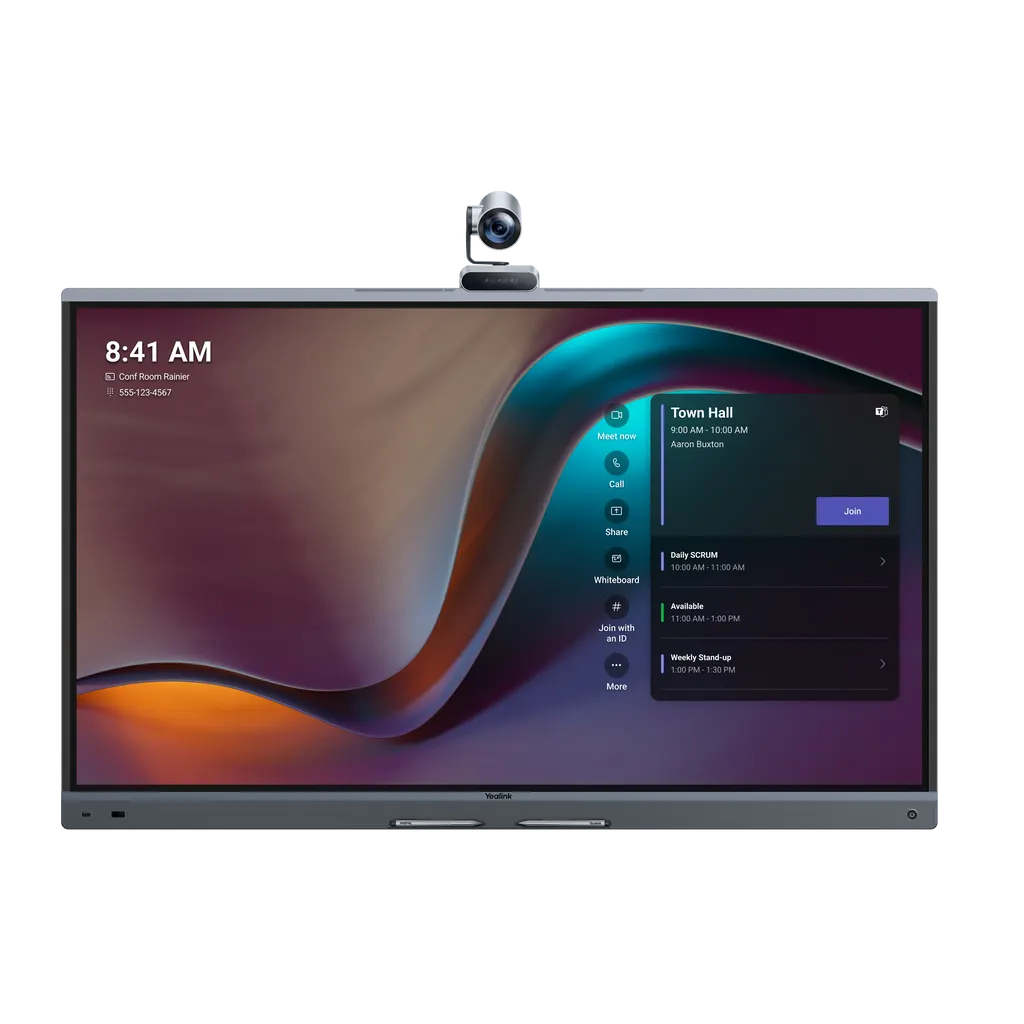
The Yealink MeetingBoard Pro combines a 4K touch display, a triple 50MP camera system, a 16-microphone array and stereo speakers in one unit, available in 65, 75 and 86 inches. Its Android or Windows options suit Microsoft Teams or Zoom rooms. It fits small to large meeting rooms across Doha, Lusail and Education City. Request a quote to match a size to your room.

One enclosure for display, camera, audio and whiteboard

The MeetingBoard Pro brings video conferencing, a touch display and a writing surface into a single unit that is wall-mounted or set on a floor stand. It comes in three panel sizes, 65-inch, 75-inch and 86-inch, all with a 3840 × 2160 display, an anti-glare panel and 400 cd/m² brightness. Choosing a size is mainly a question of room capacity: the manufacturer lists the 65-inch for 1 to 6 people, the 75-inch for 6 to 12 and the 86-inch for 12 to 20.

Two platform editions are listed separately: the Microsoft Teams Rooms edition for Microsoft Teams and the Zoom Rooms Appliances edition for Zoom. The device runs Android 13 with 8 GB of memory and 64 GB of storage. A Windows OPS slot lets you add a Windows module when a Windows system is required on the panel.

Camera and AI framing for mixed seating

The built-in camera uses three 50MP sensors, a wide-angle lens and two telephoto lenses, with an electric privacy shutter that covers the lens when it is not in use. AI features include auto framing, speaker tracking and picture-in-picture, together with IntelliFocus, which shows close-ups of recent speakers alongside a panoramic view, and Video Fence, which keeps people outside a marked area out of the remote view. For longer rooms, the MB-12X Pro module adds 12× optical zoom.

Audio, touch and writing that carry across the room

A 16-microphone MEMS array with AI processing gives full-duplex pickup up to 12 metres, and the stereo speakers are rated at 30 W with a 36 W maximum. Noise cancellation reduces keyboard, door and chair sounds, and reverberation reduction helps in rooms with glass walls. The infrared touch layer supports 20 touch points, with a four-level stylus, palm rejection and 21 ms latency measured with the Yealink whiteboard. Expansion options include the VCM35 wired microphone, the VCM36-W wireless microphone, and the CM20 ceiling microphone paired with a CS10 ceiling speaker.

Planning the install: wall, weight, power and heat

Plan the wall or floor before ordering. The VESA hole pattern is 600 × 400 mm on the 65-inch, 800 × 400 mm on the 75-inch and 800 × 600 mm on the 86-inch. Net weights are 40 kg, 52.2 kg and 65.6 kg respectively, so the 86-inch needs a structural check of the wall and a site survey. The wall mount is sold separately and is not included in the standard package. The power adapter accepts 100 to 240 V at 50/60 Hz, and typical draw is 141 W, 164 W and 199 W for the 65-inch, 75-inch and 86-inch.

Operating temperature is 0 to 40 °C with 5 to 95% humidity. Summer outdoor temperatures in Qatar can exceed 45 °C, so the unit belongs in an air-conditioned meeting room, away from direct sunlight through windows.

Where it fits in Qatar

In a government ministry or authority in West Bay, a 75-inch unit can serve a boardroom for six to twelve people who connect with colleagues in Doha or abroad. At a university in Education City, an 86-inch board suits a seminar room where a lecturer writes on screen, shares a laptop over HDMI and hosts a remote guest. A private school in Al Wakrah fitting out a senior classroom could use a 65-inch unit for small-group work.

Next step: send us your room details

Send SmartRooms Qatar your room length, seating count, wall type and preferred platform, Teams or Zoom, and we will prepare a quotation, usually within one working day. We offer free site surveys before wall mounting an 86-inch panel, delivery to all 8 municipalities of Qatar, professional installation, and payment by bank transfer, cheque or purchase order. Request a quote today.

Highlights

  • 4K touch displays in 65, 75 and 86-inch sizes
  • Triple 50MP camera with optional 12× optical zoom module
  • 16-microphone array with 12-metre full-duplex pickup
  • Android 13 with 8 GB memory and 64 GB storage
  • Wall-mount, wall-stand and floor-stand installation options
  • Operating range 0–40 °C; keep the room air-conditioned

Estimated timeline

Quotation within 1 working day · delivery timing depends on stock availability, and we confirm it with your quotation.

Specifications

111 specifications · Source: manufacturer · checked Oct 2026
System Overview6
Operating System
Android 13.0
Memory
8 GB
Flash
64 GB
CPU
4 cores at 2.2 GHz + 4 cores at 2.0 GHz
AI Computing Power
13.2T FLOPS
Details
Storage
Display12
MeetingBoard 65 Pro
65 inch
MeetingBoard 75 Pro
75 inch
MeetingBoard 86 Pro
86 inch
Resolution
3840 × 2160
Color Gamut
72% NTSC/99% sRGB
Color Depth
1.07G (10 bit)
Contrast Ratio
1200:1
Brightness
400 cd/㎡
Refresh Rate
60 Hz
Viewing Angle
178°(H)/178°(V)
System Wake-Up
Motion Sensor
Details
Size Anti-Glare Panel
Touch6
Touch Technology
Infrared
Touch Height
1.5 mm
Touch Accuracy
±1 mm
Touch Points
20 points
Touch latency
21 ms(Measured under yealink whiteboard)
Details
Four-level stylus
Camera18
Max Resolution
Built-in triple 50MP camera; 3840 × 2160
Image Sensor
Sony Sensor X3
Viewing Angle
Wide-Angle HFOV 98.2°
PTZ Type
Electronic Pan-Tilt
Zoom/Digital Zoom
8 × digital zoom
Max Frame Rate
60 Hz
Video Output Resolution
3840 × 2160
Autofocus
Supported
Wide Dynamic Range
Supported
High Dynamic Range Imaging
Supported
Exposure
Auto
White Balance
Auto/Manual/ATW
Number of Presets
9
Privacy shutter
Electric privacy shutter
Lens Angle
HFOV 90°
Horizontal Rotation
±100°
Vertical rotation
0°/-90°
Details
Swappable Optical Zoom Camera Module MB-12X Pro 8MP, Sony Image Sensor 12× Optical Zoom AI Smart Framing Auto Framing Speaker tracking Picture-in-picture (PIP) IntelliFocus Video fence
Speakers9
Speakers
Stereo Speakers
Frequency Response
90~20 KHz
Sensitivity
87±3 dB SPL @ 0.5 m, 1 W
Sampling Rate
48 KHz
Expansion Output
Supports RCA Output
THD (Total Harmonic Distortion)
at 20 W, 1 KHz, < 5%
Rated Impedance
Tweeter-4ohm,Full-Range Speaker-8ohm
Rated Power
30 W
Max Power
36 W
Microphones11
Pickup Distance
12 Meters Full-Duplex
Signal-to-Noise Ratio
70 dB @ 1 KHz
Max Sound Pressure Level
130 dB SPL
Equivalent Noise Level
24 dB SPL\
Dynamic Range
24-130 dB SPL
Sensitivity
-38 ± 1 dBV/Pa
Frequency Response
20 Hz~20 KHz
Sampling Rate
48 KHz
Bit Depth
24-bit
Expansion Input
Supports RCA Input
Details
Built-in 16 MEMS Microphone Array
Video Resolution2
Lens Resolution
supports up to 4K 30 fps
Content Sharing
supports up to 4K 60 fps (HDMI In) locally, and up to 4K 15 fps in meetings
Content Sharing1
Details
Wired Screen Sharing HDMI In VCH51 Wireless Screen Sharing AirPlay Miracast Wireless Presentation Pod (unavailable in the United States)
Audio Codec and Technology1
Details
Yealink AI Audio 2.1 Multi-Channel Echo Cancellation Processing Noise Suppression Technology Multi-Channel Reverberation Cancellation Technology Multi-Channel Acoustic Echo Cancellation Lip Sync Detection Automatic Gain Control Far-Field Full-Duplex Pickup Technology Beamforming Directional Pickup Technology CNG/PLC/AJB/De-Reverb
Video Codec and Technology1
Video Codecs
H.264 SVC, H.264 High Profile, and H.264
Network Protocols1
Details
Wi-Fi 6 2.4 G & 5 G dual-band, 802.11a/b/g/n/ac/ax 2 × 2 MIMO Bluetooth 5.1 TCP/IP (IPv4/IPv6), DHCP/Static IP HTTPS Secure Web Access
Security7
Encryption Protocols
supports H.235/TLS/signaling encryption
Encryption Algorithms
supports SRTP media stream encryption and AES-256 encryption
Security Mechanisms
supports VLAN, 802.1P/Q, DiffServ, and other QoS services
Security Protocols
supports 802.1X, LLDP-MED, and other network security protocols
Web Security
supports HTTPS web security management
Secure Connection
supports OpenVPN
Details
Other Security Mechanisms Built-in Security Encryption Certificate Protection Against Network and Protocol Attacks Meeting Password to Ensure Meeting Security Meeting Whitelist and Blacklist
Configuration Management6
Configuration Methods
Web/Device/Touch Screen
Debugging Interface
RJ45/USB 2.0
Upgrade Methods
Web/TAC/ZDM/USB
Device Management
Yealink Management Cloud Service (YMCS), Microsoft Teams Admin Center (TAC), MTR Portal Management Platform (PMP), Zoom Device Platform (ZDM)
Batch Deployment Tool
supported
SNMP Protocol
supported
Hardware Description1
Details
Power Switch (with power status indicator light) Reset Button 1 LED MUTE Light Human Motion Sensor (for automatic device wake-up)
Installation Methods1
Details
Wall-Mounted Installation Wall-Stand Installation Floor-Stand Installation
Hardware Interfaces5
Display Output Interface
1 × HDMI Output Interface (supports CEC)
Content Input Interface
1 × HDMI Input Interface
Line Input Interface
1 Pair of RCA Line Inputs
Line Output Interface
1 Pair of RCA Line Outputs
Details
3 × USB-A 2.0 Interfaces 2 × 10/100/1000 Mbps Adaptive Network Ports 2 × RJ45 VCH Custom Interfaces, for Wired Expansion Microphones/Wired Sharing Box, etc. 1 × Windows OPS Slot 1 × AC Power Interface 1 × USB-B Touch Output Interface 1 × Pluggable Camera Module Interface (on the top)
Packaging1
Details
1 × MeetingBoard Pro 1 × Cable Pack 1 × 3 m AC Power Cable 1 × 3 m CAT5E Network Cable 4 × Stylus Pens 3 × Cable Ties 1 × Quick Start Guide MB-WallMount is sold separately and is not standard.
Environmental Factors3
Operating Humidity
5~95%
Operating Temperature
0~40 °C
Storage Temperature
-20~60 °C
Power Supply5
Max
243 W; 277 W; 357 W
Typical
141 W; 164 W; 199 W
Power adapter
100-240 V~50/60 Hz
USB output
5 V~0.5 A
Details
Power Consumption MeetingBoard 65 Pro MeetingBoard 75 Pro MeetingBoard 86 Pro
Optional Accessories14
MB-WallMount-650
for 65-inch
MB-WallMount-860
for 75-inch & 86-inch
MB-WallStand-650W
for 65-inch
MB-WallStand-860W
for 75-inch & 86-inch
MB-FS-P650T
for 65-inch
MB-FS-P750T
for 75-inch
MB-FS-P860T
for 86 inch
MB-FS-Lift
for 65-inch, 75-inch & 86-inch
Wired Microphone
VCM35
Wireless Microphone
VCM36-W
Ceiling Speaker
CS10
Celling Microphone
CM20
Wired Sharing Box
VCH51&VCH51 Pro
Details
Mounting Accessories Wall Mount Wall Stand Floor Stand Audio Accessories Casting Accessories Wireless Presentation Pod (unavailable in the United States) Camera Accessories Pluggable Optical Zoom Camera Module MB-12X Pro Video Conferencing Camera UVC86 Controller Touch Panel CTP25 Remote Controller MB-Remote Windows OPS Module MCore-OPS MCore-OPS-T (Teams Certified) MCore-OPS-G2 MCore-OPS-G2T (Teams Certified)


Downloads

138 files from the manufacturer
PDF Datasheets Yealink MeetingBoard Pro Datasheet.pdf 557 KB Yealink MeetingBoard Pro datasheets (PDF, 557 KB) URL Datasheets · Opens on manufacturer site Physical Specifications Yealink MeetingBoard Pro datasheets (URL) PDF Manuals & guides Hardware Introduction.pdf 456 KB Yealink MeetingBoard Pro manuals & guides (PDF, 456 KB) PDF Manuals & guides Quick User Guide in General Mode (BYOM).pdf 4.6 MB Yealink MeetingBoard Pro manuals & guides (PDF, 4.6 MB) PDF Manuals & guides Quick User Guide in Microsoft Teams.pdf 11.9 MB Yealink MeetingBoard Pro manuals & guides (PDF, 11.9 MB) PDF Manuals & guides Quick User Guide in Zoom.pdf 3.3 MB Yealink MeetingBoard Pro manuals & guides (PDF, 3.3 MB) PDF Manuals & guides Set Up a Yealink MeetingBoard Pro.pdf 2.0 MB Yealink MeetingBoard Pro manuals & guides (PDF, 2.0 MB) PDF Manuals & guides Setup Checklist.pdf 44 KB Yealink MeetingBoard Pro manuals & guides (PDF, 44 KB) PDF Manuals & guides Uncrating Guide for Wooden Shipping Crate.pdf 1.5 MB Yealink MeetingBoard Pro manuals & guides (PDF, 1.5 MB) PDF Manuals & guides Yealink MeetingBoard Pro Quick Start Guide (EN, DE, FR, ES, NL) V1.0.pdf 3.1 MB Yealink MeetingBoard Pro manuals & guides (PDF, 3.1 MB) URL Manuals & guides · Opens on manufacturer site About Device Yealink MeetingBoard Pro manuals & guides (URL) URL Manuals & guides · Opens on manufacturer site Accessibility Yealink MeetingBoard Pro manuals & guides (URL) URL Manuals & guides · Opens on manufacturer site Administrator Password Yealink MeetingBoard Pro manuals & guides (URL) URL Manuals & guides · Opens on manufacturer site Advanced Network Yealink MeetingBoard Pro manuals & guides (URL) URL Manuals & guides · Opens on manufacturer site AirPlay Content Sharing Yealink MeetingBoard Pro manuals & guides (URL) URL Manuals & guides · Opens on manufacturer site Annotation Yealink MeetingBoard Pro manuals & guides (URL) URL Manuals & guides · Opens on manufacturer site Application Yealink MeetingBoard Pro manuals & guides (URL) URL Manuals & guides · Opens on manufacturer site Audio Settings Yealink MeetingBoard Pro manuals & guides (URL) URL Manuals & guides · Opens on manufacturer site Auto Framing Yealink MeetingBoard Pro manuals & guides (URL) URL Manuals & guides · Opens on manufacturer site Backup & Reset Yealink MeetingBoard Pro manuals & guides (URL) URL Manuals & guides · Opens on manufacturer site Basic Settings Yealink MeetingBoard Pro manuals & guides (URL) URL Manuals & guides · Opens on manufacturer site Bluetooth Yealink MeetingBoard Pro manuals & guides (URL) URL Manuals & guides · Opens on manufacturer site CEC Yealink MeetingBoard Pro manuals & guides (URL) URL Manuals & guides · Opens on manufacturer site Call Features Yealink MeetingBoard Pro manuals & guides (URL) URL Manuals & guides · Opens on manufacturer site Call Status & People Counting Yealink MeetingBoard Pro manuals & guides (URL) URL Manuals & guides · Opens on manufacturer site Camera Calibration Yealink MeetingBoard Pro manuals & guides (URL) URL Manuals & guides · Opens on manufacturer site Camera Diagnostic Yealink MeetingBoard Pro manuals & guides (URL) URL Manuals & guides · Opens on manufacturer site Camera Preset Yealink MeetingBoard Pro manuals & guides (URL) URL Manuals & guides · Opens on manufacturer site Camera Settings Yealink MeetingBoard Pro manuals & guides (URL) URL Manuals & guides · Opens on manufacturer site Certificate Yealink MeetingBoard Pro manuals & guides (URL) URL Manuals & guides · Opens on manufacturer site Codec Yealink MeetingBoard Pro manuals & guides (URL) URL Manuals & guides · Opens on manufacturer site Contact Yealink MeetingBoard Pro manuals & guides (URL) URL Manuals & guides · Opens on manufacturer site Content Sharing Methods Yealink MeetingBoard Pro manuals & guides (URL) URL Manuals & guides · Opens on manufacturer site Create Account Yealink MeetingBoard Pro manuals & guides (URL) URL Manuals & guides · Opens on manufacturer site DHCP Option Yealink MeetingBoard Pro manuals & guides (URL) URL Manuals & guides · Opens on manufacturer site Dial Yealink MeetingBoard Pro manuals & guides (URL) URL Manuals & guides · Opens on manufacturer site Digital Signage for Zoom Yealink MeetingBoard Pro manuals & guides (URL) URL Manuals & guides · Opens on manufacturer site Direct sharing in Zoom Rooms Yealink MeetingBoard Pro manuals & guides (URL) URL Manuals & guides · Opens on manufacturer site Display Mode Yealink MeetingBoard Pro manuals & guides (URL) URL Manuals & guides · Opens on manufacturer site Display Settings Yealink MeetingBoard Pro manuals & guides (URL) URL Manuals & guides · Opens on manufacturer site Dual Monitors Yealink MeetingBoard Pro manuals & guides (URL) URL Manuals & guides · Opens on manufacturer site Electric Privacy Shutter Yealink MeetingBoard Pro manuals & guides (URL) URL Manuals & guides · Opens on manufacturer site Email Service Yealink MeetingBoard Pro manuals & guides (URL) URL Manuals & guides · Opens on manufacturer site Firmware Update Yealink MeetingBoard Pro manuals & guides (URL) URL Manuals & guides · Opens on manufacturer site General Settings Yealink MeetingBoard Pro manuals & guides (URL) 323 Manuals & guides · Opens on manufacturer site H.323 Yealink MeetingBoard Pro manuals & guides (323) URL Manuals & guides · Opens on manufacturer site HDMI IN Yealink MeetingBoard Pro manuals & guides (URL) URL Manuals & guides · Opens on manufacturer site Help Center Yealink MeetingBoard Pro manuals & guides (URL) URL Manuals & guides · Opens on manufacturer site IntelliFocus Yealink MeetingBoard Pro manuals & guides (URL) URL Manuals & guides · Opens on manufacturer site Issue Feedback Yealink MeetingBoard Pro manuals & guides (URL) URL Manuals & guides · Opens on manufacturer site LDAP Yealink MeetingBoard Pro manuals & guides (URL) URL Manuals & guides · Opens on manufacturer site Language Yealink MeetingBoard Pro manuals & guides (URL) URL Manuals & guides · Opens on manufacturer site Layout Yealink MeetingBoard Pro manuals & guides (URL) URL Manuals & guides · Opens on manufacturer site Layout Settings Yealink MeetingBoard Pro manuals & guides (URL) URL Manuals & guides · Opens on manufacturer site License Yealink MeetingBoard Pro manuals & guides (URL) URL Manuals & guides · Opens on manufacturer site Log In & Out Teams Account Yealink MeetingBoard Pro manuals & guides (URL) URL Manuals & guides · Opens on manufacturer site Log In & Out Zoom Account Yealink MeetingBoard Pro manuals & guides (URL) URL Manuals & guides · Opens on manufacturer site MB-Remote Yealink MeetingBoard Pro manuals & guides (URL) URL Manuals & guides · Opens on manufacturer site Manual Controls Yealink MeetingBoard Pro manuals & guides (URL) URL Manuals & guides · Opens on manufacturer site Meeting Settings Yealink MeetingBoard Pro manuals & guides (URL) URL Manuals & guides · Opens on manufacturer site Meeting in Microsoft Teams Yealink MeetingBoard Pro manuals & guides (URL) URL Manuals & guides · Opens on manufacturer site Meeting in Zoom Yealink MeetingBoard Pro manuals & guides (URL) URL Manuals & guides · Opens on manufacturer site Microsoft Teams Admin Center Yealink MeetingBoard Pro manuals & guides (URL) URL Manuals & guides · Opens on manufacturer site Miracast Content Sharing Yealink MeetingBoard Pro manuals & guides (URL) URL Manuals & guides · Opens on manufacturer site Multi-Stream (Smart Gallery) for Zoom Yealink MeetingBoard Pro manuals & guides (URL) URL Manuals & guides · Opens on manufacturer site Network Diagnostics Yealink MeetingBoard Pro manuals & guides (URL) URL Manuals & guides · Opens on manufacturer site Notifications Yealink MeetingBoard Pro manuals & guides (URL) URL Manuals & guides · Opens on manufacturer site Peripheral Settings Yealink MeetingBoard Pro manuals & guides (URL) URL Manuals & guides · Opens on manufacturer site Picture-in-Picture (PIP) Mode Yealink MeetingBoard Pro manuals & guides (URL) URL Manuals & guides · Opens on manufacturer site Proxy Server Yealink MeetingBoard Pro manuals & guides (URL) URL Manuals & guides · Opens on manufacturer site Quick Call Widget Yealink MeetingBoard Pro manuals & guides (URL) URL Manuals & guides · Opens on manufacturer site Reboot Yealink MeetingBoard Pro manuals & guides (URL) URL Manuals & guides · Opens on manufacturer site Reboot Device Yealink MeetingBoard Pro manuals & guides (URL) URL Manuals & guides · Opens on manufacturer site Register Account Yealink MeetingBoard Pro manuals & guides (URL) URL Manuals & guides · Opens on manufacturer site SIP Account Yealink MeetingBoard Pro manuals & guides (URL) URL Manuals & guides · Opens on manufacturer site SIP IP Direct Dial Yealink MeetingBoard Pro manuals & guides (URL) URL Manuals & guides · Opens on manufacturer site Screen Cast Yealink MeetingBoard Pro manuals & guides (URL) URL Manuals & guides · Opens on manufacturer site Screen Lock Settings Yealink MeetingBoard Pro manuals & guides (URL) URL Manuals & guides · Opens on manufacturer site Screenshot Yealink MeetingBoard Pro manuals & guides (URL) URL Manuals & guides · Opens on manufacturer site Share Content via Zoom APP Yealink MeetingBoard Pro manuals & guides (URL) URL Manuals & guides · Opens on manufacturer site Shut Down Yealink MeetingBoard Pro manuals & guides (URL) URL Manuals & guides · Opens on manufacturer site Speaker Tracking Yealink MeetingBoard Pro manuals & guides (URL) URL Manuals & guides · Opens on manufacturer site Start Deployment Yealink MeetingBoard Pro manuals & guides (URL) URL Manuals & guides · Opens on manufacturer site System Diagnostic Yealink MeetingBoard Pro manuals & guides (URL) URL Manuals & guides · Opens on manufacturer site Time and Date Yealink MeetingBoard Pro manuals & guides (URL) URL Manuals & guides · Opens on manufacturer site Touch Panel Configuration Yealink MeetingBoard Pro manuals & guides (URL) URL Manuals & guides · Opens on manufacturer site Video Fence Yealink MeetingBoard Pro manuals & guides (URL) URL Manuals & guides · Opens on manufacturer site Virtual Meeting Room (VMR) Yealink MeetingBoard Pro manuals & guides (URL) URL Manuals & guides · Opens on manufacturer site Whiteboard in General Mode (BYOM) Yealink MeetingBoard Pro manuals & guides (URL) URL Manuals & guides · Opens on manufacturer site Whiteboard in Microsoft Teams Yealink MeetingBoard Pro manuals & guides (URL) URL Manuals & guides · Opens on manufacturer site Whiteboard in Zoom Yealink MeetingBoard Pro manuals & guides (URL) URL Manuals & guides · Opens on manufacturer site Wired BYOD Mode Yealink MeetingBoard Pro manuals & guides (URL) URL Manuals & guides · Opens on manufacturer site Wired Content Sharing (CTP25) Yealink MeetingBoard Pro manuals & guides (URL) URL Manuals & guides · Opens on manufacturer site Wired Content Sharing (VCH51 & VCH51 Pro) Yealink MeetingBoard Pro manuals & guides (URL) URL Manuals & guides · Opens on manufacturer site Wired Network Yealink MeetingBoard Pro manuals & guides (URL) URL Manuals & guides · Opens on manufacturer site Wired Reverse Control Yealink MeetingBoard Pro manuals & guides (URL) URL Manuals & guides · Opens on manufacturer site Wireless Content Sharing Yealink MeetingBoard Pro manuals & guides (URL) URL Manuals & guides · Opens on manufacturer site Wireless IP BYOD Yealink MeetingBoard Pro manuals & guides (URL) URL Manuals & guides · Opens on manufacturer site Wireless Network Yealink MeetingBoard Pro manuals & guides (URL) URL Manuals & guides · Opens on manufacturer site Wireless Reverse Control Yealink MeetingBoard Pro manuals & guides (URL) URL Manuals & guides · Opens on manufacturer site XML Contacts Yealink MeetingBoard Pro manuals & guides (URL) URL Manuals & guides · Opens on manufacturer site YMCS Platform Yealink MeetingBoard Pro manuals & guides (URL) MP4 Manuals & guides · Opens on manufacturer site Yealink MP, MB, AX0 Audio Log Export Guide V1.0.mp4 Yealink MeetingBoard Pro manuals & guides (MP4) MP4 Manuals & guides · Opens on manufacturer site Yealink MP, MB, AX0 Log Export Guide V1.0.mp4 Yealink MeetingBoard Pro manuals & guides (MP4) MP4 Manuals & guides · Opens on manufacturer site Yealink MeetingBoard Pro Floor Mounted V1.0.mp4 Yealink MeetingBoard Pro manuals & guides (MP4) MP4 Manuals & guides · Opens on manufacturer site Yealink MeetingBoard Pro Quick Start V1.1.mp4 Yealink MeetingBoard Pro manuals & guides (MP4) MP4 Manuals & guides · Opens on manufacturer site Yealink MeetingBoard Pro Wall-Mounted V1.0.mp4 Yealink MeetingBoard Pro manuals & guides (MP4) URL Manuals & guides · Opens on manufacturer site Yealink Microsoft Teams Rooms on Android Setup Guide with Microsoft Configuration Platforms Yealink MeetingBoard Pro manuals & guides (URL) URL Manuals & guides · Opens on manufacturer site Zoom Admin Management Yealink MeetingBoard Pro manuals & guides (URL) DXF Drawings & CAD · Opens on manufacturer site MeetingBoard 65 Pro CAD Drawings.dxf Yealink MeetingBoard Pro drawings & cad (DXF) STP Drawings & CAD · Opens on manufacturer site MeetingBoard 65 Pro CAD Drawings.stp Yealink MeetingBoard Pro drawings & cad (STP) DXF Drawings & CAD · Opens on manufacturer site MeetingBoard 75 Pro CAD Drawings.dxf Yealink MeetingBoard Pro drawings & cad (DXF) STP Drawings & CAD · Opens on manufacturer site MeetingBoard 75 Pro CAD Drawings.stp Yealink MeetingBoard Pro drawings & cad (STP) DXF Drawings & CAD · Opens on manufacturer site MeetingBoard 86 Pro CAD Drawings.dxf Yealink MeetingBoard Pro drawings & cad (DXF) STP Drawings & CAD · Opens on manufacturer site MeetingBoard 86 Pro CAD Drawings.stp Yealink MeetingBoard Pro drawings & cad (STP) 30 - Software & firmware · Opens on manufacturer site MeetingBoard Pro 331.320.0.30 - Firmware & Release Note Yealink MeetingBoard Pro software & firmware (30 - FIRMWARE & RELEASE NOTE) 55 - Software & firmware · Opens on manufacturer site MeetingBoard Pro 331.320.0.55 - Firmware & Release Note Yealink MeetingBoard Pro software & firmware (55 - FIRMWARE & RELEASE NOTE) 64 - Software & firmware · Opens on manufacturer site MeetingBoard Pro 331.320.0.64 - Firmware & Release Note Yealink MeetingBoard Pro software & firmware (64 - FIRMWARE & RELEASE NOTE) PDF Other documents Mounts Bracket Compatibility Lists.pdf 65 KB Yealink MeetingBoard Pro other documents (PDF, 65 KB) PDF Other documents Yealink Regulatory Notice V1.2.pdf 1.0 MB Yealink MeetingBoard Pro other documents (PDF, 1.0 MB) URL Other documents · Opens on manufacturer site Appendix Yealink MeetingBoard Pro other documents (URL) URL Other documents · Opens on manufacturer site Audio Input and Output Compatibility Lists Yealink MeetingBoard Pro other documents (URL) URL Other documents · Opens on manufacturer site Before You Start Yealink MeetingBoard Pro other documents (URL) URL Other documents · Opens on manufacturer site Checklist Yealink MeetingBoard Pro other documents (URL) URL Other documents · Opens on manufacturer site FAQs Yealink MeetingBoard Pro other documents (URL) MP4 Other documents · Opens on manufacturer site Getting Started with Yealink Digital Signage V1.0.mp4 Yealink MeetingBoard Pro other documents (MP4) 323/ Other documents · Opens on manufacturer site H.323/SIP API Yealink MeetingBoard Pro other documents (323/SIP API) URL Other documents · Opens on manufacturer site HTTPS API Yealink MeetingBoard Pro other documents (URL) URL Other documents · Opens on manufacturer site Required Ports Yealink MeetingBoard Pro other documents (URL) URL Other documents · Opens on manufacturer site Rooms Accessories Compatibility Lists Yealink MeetingBoard Pro other documents (URL) URL Other documents · Opens on manufacturer site Rooms Product Family Yealink MeetingBoard Pro other documents (URL) URL Other documents · Opens on manufacturer site Rooms Supported Features List Yealink MeetingBoard Pro other documents (URL) URL Other documents · Opens on manufacturer site Socket API Yealink MeetingBoard Pro other documents (URL) URL Other documents · Opens on manufacturer site Troubleshooting Yealink MeetingBoard Pro other documents (URL) URL Other documents · Opens on manufacturer site Video Conferencing Solution Yealink MeetingBoard Pro other documents (URL) URL Other documents · Opens on manufacturer site Yealink MeetingBoard Pro Security White Paper Yealink MeetingBoard Pro other documents (URL) MP4 Other documents · Opens on manufacturer site Yealink MeetingBoard Pro's Cast & Signal Mode of HDMI in V1.0.mp4 Yealink MeetingBoard Pro other documents (MP4) MP4 Other documents · Opens on manufacturer site Yealink MeetingBoard Pro's Powerful Wireless Capabilities V1.0.mp4 Yealink MeetingBoard Pro other documents (MP4)

Questions about MeetingBoard Pro

What is the Yealink MeetingBoard Pro and who is it for?
The MeetingBoard Pro is an all-in-one meeting device that combines a 4K touch display, a triple 50MP camera, a microphone array and a whiteboard in one unit. It suits small to large meeting rooms where a team needs video calls, content sharing and on-screen writing without separate cameras and speakers. In Qatar it fits government boardrooms, university seminar rooms and corporate meeting rooms.
Which size should a meeting room in Doha use: 65, 75 or 86 inches?
The manufacturer lists the 65-inch for 1 to 6 people, the 75-inch for 6 to 12 and the 86-inch for 12 to 20. Measure the room and count the seats before deciding. A compact executive office in West Bay may suit the 65-inch, while a training room in Lusail with people seated further back may need the 86-inch. SmartRooms Qatar can confirm the best fit during a free site survey.
What is the difference between the Microsoft Teams Rooms and Zoom Rooms editions?
Both listings belong to the MeetingBoard Pro family, but each is set up for a different platform. The Microsoft Teams Rooms edition is listed for Microsoft Teams, and the Zoom Rooms Appliances edition is listed for Zoom. Choose the edition that matches the meeting platform your organisation licenses. The device also supports a general mode, so confirm the required setup with SmartRooms Qatar before issuing a purchase order.
Can the MeetingBoard Pro run in Qatar's summer heat?
The rated operating temperature is 0 to 40 °C, with operating humidity of 5 to 95 percent. Outdoor summer temperatures in Qatar can pass 45 °C, so the device should be installed in an air-conditioned meeting room, away from direct sunlight through windows. Storage is rated from -20 to 60 °C. Ask the site survey team to check cooling capacity for a room with a large glass wall.
What power supply does the MeetingBoard Pro need?
The power adapter is rated 100 to 240 V at 50/60 Hz, which covers the 240 V, 50 Hz mains supply used in Qatar. Typical draw is 141 W for the 65-inch, 164 W for the 75-inch and 199 W for the 86-inch, with maximum draw of 243 W, 277 W and 357 W. The package includes a 3 m AC power cable. Plan a power outlet close to the mounting point during installation.
Do we need a site survey before wall mounting an 86-inch MeetingBoard Pro?
Yes, a survey is strongly advisable. The 86-inch unit has a net weight of 65.6 kg, a bare-device size of 1950 × 91 × 1218 mm and an 800 × 600 mm VESA pattern. The wall mount is sold separately, so the wall structure and fixings must be confirmed before ordering. SmartRooms Qatar offers free site surveys and professional installation across Qatar.
Can we add an external camera or a second display?
Yes. The MB-12X Pro is a swappable optical zoom camera module that adds 12× optical zoom. The unit also has an HDMI output supporting 4K at 60 Hz for a second screen. If that second screen is touch-enabled, connecting it by USB enables dual-screen touch. Expansion microphones and the CTP25 touch panel are also listed as optional accessories.
How do people share content with the MeetingBoard Pro?
Wired sharing uses the HDMI input or the VCH51 sharing box, while wireless sharing supports AirPlay and Miracast. Miracast is disabled by default and must be enabled in the web backend. Teams and Zoom apps also allow casting during calls. Each method has its own setup steps, so list the sharing methods your team needs in your quotation request.
What is the Windows OPS slot for?
The Windows OPS slot accepts a Windows module, so the device can be deployed on either an Android or a Windows solution. The manufacturer lists MCore-OPS, MCore-OPS-T (Teams certified) and MCore-OPS-G2 modules. Choose the module that matches your meeting platform and the device management tools your IT team uses, and confirm compatibility in the quotation.
How far can the microphones pick up voices?
The 16-microphone MEMS array supports full-duplex pickup up to 12 metres, which covers a large boardroom or a lecture room. Noise cancellation reduces typing, door and chair sounds. In a larger room, a CM20 ceiling microphone paired with a CS10 ceiling speaker can extend coverage. Ask the site survey team to confirm microphone placement before installation.
Can a government ministry or school buy the MeetingBoard Pro through an LPO?
Yes. SmartRooms Qatar accepts purchase orders (LPOs) and handles government tenders, including Monaqasat, with payment by bank transfer, cheque or purchase order. Send the room details and quantities, and quotations are usually issued within one working day. For a school ordering several units, the quotation can list each size and accessory, such as a wall mount or floor stand, as separate line items.
Does the MB-12X Pro support every AI mode?
Not yet. The manufacturer states that the MB-12X Pro supports Manual, Speaker Tracking, Auto-Framing and Picture-in-Picture modes, but IntelliFocus is not yet supported and is expected in a later version. If IntelliFocus matters for your meetings, confirm the firmware version and camera module with SmartRooms Qatar before ordering the PTZ module.

Similar models

BenQ CM7505 BenQ Board CM7505 75-inch Interactive Display
75″ UHD 3840 × 2160 pixels Ultra Precision IR
SMART SBID-6286S-V3 SMART Board 6086S-V3 86-inch Interactive Display with iQ
86″ 4K UHD (3840 × 2160) HyPr Touch with InGlass
SMART SBID-6286S-V3-P SMART Board 6086S-V3 Pro 86-inch Interactive Display with iQ
86″ 4K UHD (3840 × 2160) HyPr Touch with InGlass
Clevertouch Clevertouch Edge 65" Clevertouch Edge 65" 4K Interactive Display with Camera and Speakers
65″ 4K UHD (3840x2160 @60Hz) Android 15
Clevertouch Clevertouch Edge 86" Clevertouch Edge 86" 4K Interactive Flat Panel
86″ 4K UHD (3840x2160 @60Hz) Android 15
Email Call


