





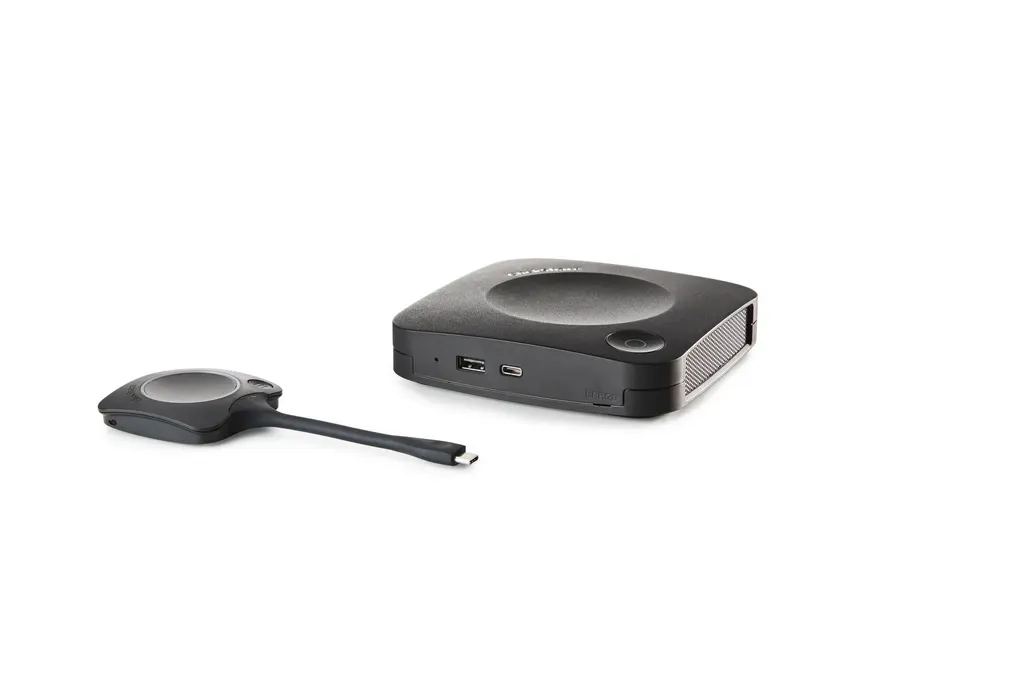
ClickShare C-10
Barco ClickShare C-10 Wireless Presentation System
- Platforms
- FCC/CE
The Barco ClickShare C-10 lets anyone in a meeting share a laptop, phone or tablet screen with one press of a ClickShare Button or a tap in the ClickShare App. It outputs 4K UHD over HDMI or USB-C DisplayPort, shows two sources at once, and supports touchback, annotation and blackboarding. It suits boardrooms and training rooms in Doha and beyond. Request a quote.
What the ClickShare C-10 does in a meeting room
The Barco ClickShare C-10 is a wireless presentation system that lets participants share content without cables on the table. A base unit connects to the display over HDMI or USB-C DisplayPort, and presenters start sharing from a ClickShare Button on Windows or Mac, or from the ClickShare App on a laptop, phone or tablet. For IT managers, the practical benefit is fewer cables and fewer requests for adaptors at the start of each meeting.
Interaction and two-source collaboration
Two sources can be displayed on screen at the same time, which helps when a team needs to compare a spreadsheet with a slide deck, or a remote participant's view with a local presentation. Touchback, annotation and blackboarding are included as interactive features, so people can mark up shared material during the discussion instead of returning to the original file afterwards. The system supports one or two ClickShare Buttons depending on configuration.
Specifications that matter for planning
- Video output: 4K UHD at 3840 x 2160 and 30Hz through HDMI 1.4b, or USB-C DisplayPort 1.2 on Gen2 hardware only.
- Wireless: IEEE 802.11 a/g/n/ac and IEEE 802.15.1 on 2.4 GHz and 5 GHz, with a maximum of 30 m (100 ft) between the ClickShare Button and the base unit.
- Network: 1x Ethernet LAN 1Gbit, with LAN and Wi-Fi network connection options, plus management and reporting.
- Security: WPA2-PSK in stand-alone mode, or WPA2-PSK and IEEE 802.1X in network integration mode.
- Physical: 34 x 135 x 135 mm, 900 g, with a Kensington lock.
- Power and noise: 5 to 10 W operational, 24 W maximum; noise up to 25 dBA at 0 to 30°C.
- Environment: operating range 0 to +40°C, storage -20 to +60°C, operating humidity 0 to 85% non-condensing.
- Warranty: 1 year standard, extended to 5 years on registration via SmartCare.
Where it fits in Qatar
A government ministry in West Bay could equip a boardroom where a department head and a project team present together at a review meeting, with two sources visible at once. A private school in Al Rayyan fitting out a staff training room could let teachers present lesson plans from their own devices without a technical set-up for every session. A hotel conference room in Msheireb or a serviced apartment meeting space can host visiting delegations who arrive with their own laptops and phones.
Heat is a planning point. The operating range tops out at 40°C, while outdoor temperatures in Doha often pass 45°C in summer. Keep the base unit inside an air-conditioned room and away from unventilated cabinets and sun-exposed windows. The SmartRooms Qatar team can confirm the exact position during the free site survey.
Planning the installation
Start with the room layout and measure the distance from the presenter position to the base unit. The 30 m reach applies between the button and the base unit, and wall construction can reduce usable range in practice. Ask your IT team whether the room will run in stand-alone mode or network integration mode, because the authentication method depends on that choice.
SmartRooms Qatar supplies the unit, delivers it to all eight municipalities of Qatar and can arrange professional installation. Site surveys are free and quotations are usually issued within one working day. Government buyers can issue a purchase order (LPO) or respond to a tender, and payment can be made by bank transfer, cheque or purchase order. The product is covered by the manufacturer's warranty.
Planning a meeting room with wireless presentation? Request a quote for the ClickShare C-10 and let the SmartRooms Qatar team confirm the button count, connections and installation for your space.
Highlights
- Sharing from a ClickShare Button or the ClickShare App
- Two sources displayed on screen at the same time
- Touchback, annotation and blackboarding included
- 4K UHD video output at 30Hz
- Operating range 0°C to +40°C; humidity 0 to 85%
- 1-year standard warranty, 5 years after SmartCare registration
Room fit
Tell us the room size and platform (Teams, Zoom or BYOD) and we confirm the right combination with your quotation.
Estimated timeline
Quotation within 1 working day · delivery timing depends on stock availability, and we confirm it with your quotation.
Specifications
General Specifications30
- Operating system
- Windows 10 and higher macOS 11 (BigSur) and higher Android v9 and higher (ClickShare App)* iOS 12 and higher (ClickShare App)*
- System requirements
- For a smooth experience with Microsoft Teams or Zoom Minimum: Intel i3 dual-core processor or AMD Ryzen 7 / 8GB RAM / OS: Windows 10 latest build or Mac OS Mojave latest build Recommended: Intel i5 4-core processor or AMD Ryzen 9 / 8GB RAM / OS: Windows 11 latest build or Mac OS latest build
- Video outputs
- 4K UHD (3840*2160) @ 30Hz. HDMI™ 1.4b or USB-C DisplayPort 1.2 (only Gen2)
- Audio output
- HDMI
- USB
- 1 X USB-A, 1 X USB-C
- ClickShare Buttons
- 1 or 2
- ClickShare App
- Desktop & Mobile
- Native protocols
- Airplay, Google Cast, Miracast*
- Maximum sources simultaneously on screen
- 2
- Noise Level
- Max. 25dBA @ 0-30°C Max. 30dBA @ 30-40°C
- Authentication protocol
- WPA2-PSK in stand alone mode WPA2-PSK or IEEE 802.1X using the ClickShare Button in network integration mode
- Wireless transmission protocol
- IEEE 802.11 a/g/n/ac and IEEE 802.15.1
- Reach
- Adjustable with signal strength modulation; max. 30m (100 ft) between ClickShare Button and ClickShare Base Unit Frequency band 2.4 GHZ and 5 GHz
- Frequency band
- 2.4 GHZ and 5 GHz (DFS channels supported in select number of countries)
- Connections
- 1x Ethernet LAN 1Gbit 1x USB-C 2.0 (front); 1x USB-A 2.0 (front) -only Gen2: 1x USB-C 3.0 (front); 1x USB-A 3.0 (front)
- Temperature range
- Operating: 0°C to +40°C (+32°F to +104°F) Max: 35°C (95°F) at 3000m Storage: -20°C to +60°C (-4°F to +140°F)
- Humidity
- Storage: 0 to 90% relative humidity, non-condensing Operation: 0 to 85% relative humidity, non-condensing
- Anti-theft system
- Kensington lock
- Certifications
- FCC/CE
- Touch screen support & Interactivity
- Yes
- Room Dock (peripheral support)
- No
- Local view
- Yes
- Network connection
- LAN & WiFi
- Management and reporting
- Yes
- Warranty
- 1 year standard. 5 years coverage upon registering via SmartCare
- *
- * depends on configuration, available in future firmware updates
- Dimensions (HxWxD)
- 34 mm x 135 mm x 135 mm
- Power consumption
- Operational: 5-10W, 24W Max
- Power supply
- Operational: 5-10W, 24W Max
- Weight
- 900 gr




