MAX Connect
Biamp MAX Connect 910-02278 Wireless Presentation System
- Platforms
- CB
The Biamp MAX Connect 910-02278 is a wireless presentation device from the Modena series. It lets meeting participants share up to six content streams through AirPlay, Google Cast, HDMI, USB-C or the Modena app, with no cables to hunt for. It supports Microsoft Teams, Zoom, Google Meet and Webex, and includes a built-in whiteboard. Suited to boardrooms and hybrid meeting rooms in Doha, it arrives with a 3-year warranty.
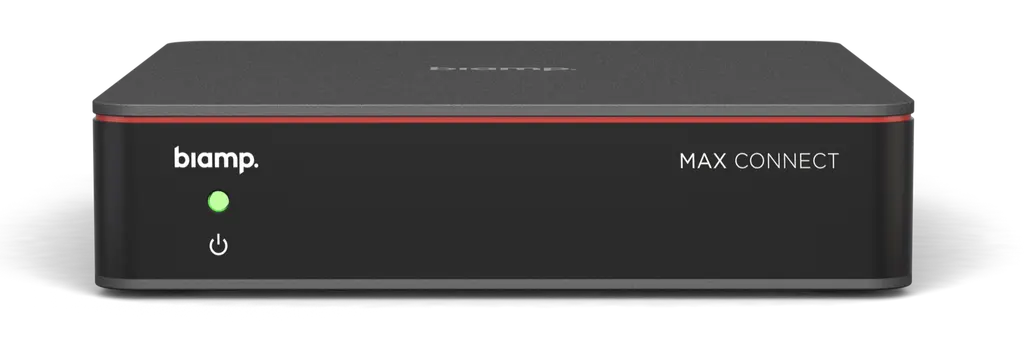
The Biamp MAX Connect 910-02278 is a wireless presentation device from the Modena series, built for meetings where participants bring their own laptops, tablets and phones. Instead of searching for the right cable or adapter, people share from their own screen and keep the discussion moving. The unit is compact, measuring 30 mm high and 132 mm wide and deep, so it can be fixed out of sight behind a display or under a table.
Six content streams from any source
The main job of the MAX Connect is sharing. Up to six content streams can run at the same time using AirPlay, Google Cast, HDMI, USB-C or the Modena app. That range covers the laptops, phones and tablets people carry into a Doha boardroom, along with wired sources such as a presenter's laptop connected by HDMI or USB-C.
- Up to six simultaneous content streams
- AirPlay and Google Cast for wireless sharing from common devices
- HDMI and USB-C inputs for wired sources
- Modena app for participants who prefer an app-based connection
Keeping remote colleagues in the discussion
Shared content can be rebroadcast to as many as 30 participant devices, so people at the back of a room or joining on their own laptops can follow the same material. The unit integrates with Microsoft Teams, Zoom, Google Meet and Webex, which suits a team in Lusail presenting to colleagues in another country. Built-in whiteboard and annotation tools let participants mark up slides and documents in real time.
Full AV peripheral support covers USB and HDMI microphones, cameras and speakers. Dual display outputs allow one presentation across two screens or two different views at once, which is useful when a remote guest needs to see a slide while the room sees a live camera feed.
Auditorium Mode for lecture halls and training rooms
The optional Auditorium Mode licence extends the MAX Connect beyond a typical meeting room. It is a one-time licence that allows content to reach up to 200 participant devices and up to 6 support displays. Consider it for a lecture hall in Education City, a corporate training room in West Bay, or a classroom where a teacher shares lesson material with many students carrying their own devices.
Planning the installation and power in Qatar
Plan the position before installation. The unit weighs 0.538 kg and comes with a mounting plate and cable retainer, which suits wall or under-table fixing. A free site survey from SmartRooms Qatar lets the team check where the unit sits relative to displays, microphones and cameras, and where cables will run.
Power comes from an external 12V, 2A DC adaptor. The unit draws 0.3W on standby and up to 7W at maximum. The adaptor ships with plug adapters, and SmartRooms Qatar will confirm the correct one for your outlets before installation.
The rated ambient operating temperature is 20 to 60°C, with humidity between 10% and 90%. Doha summers can push room temperatures well above 45°C when air conditioning is weak, so install the unit in an air-conditioned room, away from direct sunlight through windows and away from dust-heavy vents.
Control, management and what is included
Presenters can manage sessions and participants with the MAX Moderator App or the included Bluetooth handheld remote. Biamp Workplace provides cloud-based management, monitoring and updates for the device.
The box includes the Bluetooth handheld remote control, mounting plate with cable retainer, external power supply with plug adapters, EasyConnect USB-C Adapter and EasyConnect USB-C Adapter Mounting Plate. The unit is backed by a 3-year warranty. Listed certifications include CB, HDMI, BQB, CE, FCC, RCM, REACH, RoHS, WEEE, CA65, SVHC233 and TSCA.
Ready to plan a wireless meeting room around the MAX Connect? Request a quote from SmartRooms Qatar, usually answered within one working day, and we will advise on quantity, Auditorium Mode and installation. Government and school buyers can issue a purchase order (LPO) or submit against a government tender.
Highlights
- Up to six simultaneous content streams
- AirPlay, Google Cast, HDMI, USB-C and Modena app sharing
- Rebroadcast to as many as 30 participant devices
- Integrates with Teams, Zoom, Google Meet and Webex
- Optional Auditorium Mode: up to 200 participant devices
- 3-year warranty and 12V, 2A external power supply
Room fit
Tell us the room size and platform (Teams, Zoom or BYOD) and we confirm the right combination with your quotation.
Estimated timeline
Quotation within 1 working day · delivery timing depends on stock availability, and we confirm it with your quotation.
Specifications
GENERAL7
- Height
- 1 inch (30 mm)
- Width
- 5 inches (132 mm)
- Depth
- 5 inches (132 mm)
- Weight
- 1.2 lbs (0.538 kg)
- Mounting
- Mounting plate with cable retainer (included)
- Included Accessories
- Bluetooth handheld remote control Mounting plate with cable retainer External power supply with plug adapters EasyConnect USB-C Adapter EasyConnect USB-C Adapter Mounting Plate
- Kit Contents
- Bluetooth handheld remote control Mounting plate with cable retainer External power supply with plug adapters EasyConnect USB-C Adapter EasyConnect USB-C Adapter Mounting Plate
POWER2
- Power
- External power adaptor 12V, 2A DC
- Power Consumption
- Standby: 0.3W (12V/110mA) Max: 7W (12V/1700mA)
COMPLIANCE1
- Certifications
- CB, HDMI, BQB, CE, FCC, RCM, REACH, RoHS, WEEE, CA65, SVHC233, TSCA
ENVIRONMENTAL2
- Ambient Operating Temperature Range
- Temperature Range: 20° - 60° C
- Humidity
- 10% - 90%