





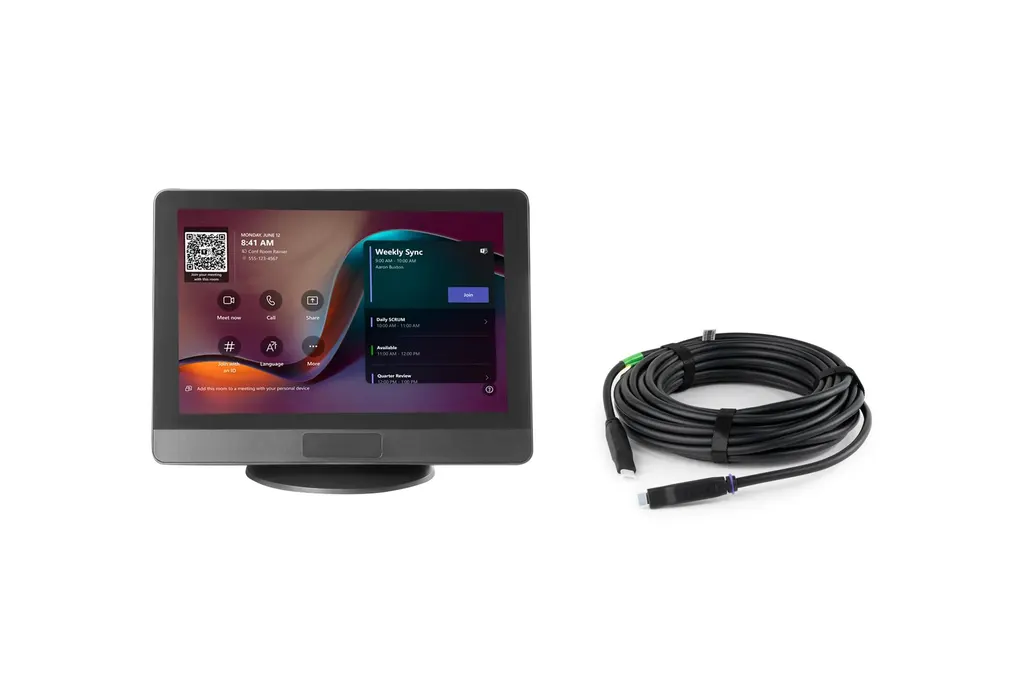
ClickShare Control Panel
Barco ClickShare Control Panel 10.1-inch Touch Controller
- Video
- 1280*800 @60Hz
- Connectivity
- USB Type-C 3.2 Gen1
The Barco ClickShare Control Panel is a 10.1-inch touch controller for the ClickShare Hub wireless room system. One tap launches a Microsoft Teams call, and the panel wakes when someone enters. It includes a 10 m USB-C cable, an anti-glare touchscreen and mounting options for flexible placement. Suited to boardrooms and meeting rooms in Doha, Lusail and Education City that run hybrid meetings. Request a quote from SmartRooms Qatar.
A one-tap start for hybrid meetings in Qatar
The Barco ClickShare Control Panel is the touch interface of the ClickShare Hub wireless video conferencing room system. Instead of searching for the right input or dialling into a call, a user taps once on the 10.1-inch screen and the Microsoft Teams video call starts. For Qatari organisations whose staff regularly meet colleagues abroad, that single step removes the small delays that often push meetings past their start time.
Features that shape daily use
- Touchscreen: a 10.1-inch projected capacitive panel with anti-fingerprint and anti-glare coatings, recognising up to 4 touch points.
- Display: 1280x800 resolution at 60Hz, 300 nits brightness, 1000:1 contrast ratio and an 80° viewing angle in every direction.
- Presence sensing: detects in-room movement within a 2-metre range and 90° field of view, waking the system when people arrive.
- Connection: USB Type-C 2.0 with DisplayPort Alt Mode and PD3.0, powered over USB from the connected Base Unit at 7.3W maximum in operation.
The panel ships with a 10 m ClickShare 20W USB-C AOC cable, 6 mm in diameter. That length lets the controller sit at a distance from the Base Unit, so the room layout rather than the cable decides where the panel goes. The cable's bend radius is 60 mm fixed and 30 mm temporarily during handling, so route it with gentle curves.
Where it fits in Qatar
In a boardroom in West Bay, the panel sits on the table near the person who chairs the meeting, and one tap starts the Teams call before the last guest has taken a seat. In a ministry meeting room in Msheireb, the same simple start is easy to hand to any attendee, whatever their role. In a seminar room in Education City, where lecturers rotate through one space, every session can begin with the same tap rather than a set of steps to remember.
Planning the mounting, cabling and environment
The box includes an L-shape mounting plate, a round base, a screw pack, a Kensington lock and a USB-C cable lock kit. The unit measures 254.5 x 187.9 x 76.9 mm and weighs 820 g. Before ordering, check the fixing surface, the mounting height and the cable route. A free site survey from SmartRooms Qatar can confirm these details room by room.
The manufacturer lists operating temperature ranges of 0°C to +40°C and -10°C to +60°C, with operating humidity of 0 to 85% non-condensing. Qatar summers can push room temperatures high, so confirm that the installation point stays within the range that applies. Keep these points in mind:
- Confirm the mounting surface and the height before drilling.
- Keep the cable route away from heat sources where possible.
- Do not use the panel in a plenum space, as it is not plenum rated.
- Add the optional CAT extender kit to the quote if you need more flexible installation.
Request a quote for your ClickShare Control Panel
Tell us the room type, the ClickShare Hub model you plan to use and whether you want the optional CAT extender kit. SmartRooms Qatar supplies the panel with delivery to all 8 municipalities of Qatar, professional installation and free site surveys. Quotations are usually issued within one working day. We accept purchase orders (LPOs), government tenders including Monaqasat, and payment by bank transfer, cheque or purchase order. Products are covered by the manufacturer's warranty. Request a quote today.
Highlights
- 10.1-inch projected capacitive touchscreen with up to 4 touch points
- 1280x800 resolution at 60Hz with 300 nits brightness
- Presence sensor wakes the system within a 2-metre range
- Single tap launches a Microsoft Teams video call
- 10 m USB-C AOC cable included, 6 mm diameter
- Kensington lock, L-shape mounting plate and round base included
Room fit
Tell us the room size and platform (Teams, Zoom or BYOD) and we confirm the right combination with your quotation.
Estimated timeline
Quotation within 1 working day · delivery timing depends on stock availability, and we confirm it with your quotation.
Specifications
General Specifications19
- Touchscreen
- 10.1-inch projected capacitive touchscreen with anti-fingerprint and anti-glare coatings, supporting up to 4 touch points for enhanced visibility and durability
- Resolution
- 1280*800 @60Hz
- Brightness
- 300 nits
- Contrast Ratio
- 1000:1
- Viewing angle
- 80° (Up/Down/Left/Right)
- Human detection sensor
- Automatically detects in-room human movement within a 2-meter range and 90° field of view to wake the system.
- Connections
- USB Type-C 2.0, DisplayPort Alt Mode, PD3.0 Recommend using the included ClickShare 10M USB-C AOC cable for optimal performance
- Temperature range
- Operating: 0°C + 40°C (+32°F to +104°F) Storage: -20°C to +60°C (-4°F to + 140°F) Operating: -10°C + 60°C (+14°F to +140°F) Storage: -20°C to +70°C (-4°F to + 158°F)
- Humidity
- Storage: 0 to 90% relative humidity, non-condensing Operation: 0 to 85% relative humidity, non-condensing Storage/Operation: 0 to 85% relative humidity, non-condensing
- Anti-theft system
- Kensington lock
- Dimensions (HxWxD)
- 254.5 x 187.9 x 76.9 (mm)
- Power consumption
- Powered over USB from connected Base Unit Operational: 7.3W (max) Standby:
- Weight
- 820gr
- Box content
- ClickShare Control Panel, ClickShare 10M 20W USB-C AOC cable, L-Shape mounting plate, Round base, Screw pack, Safety manual, Quick setup guide ClickShare 10M 20W USB-C AOC cable, USB-C cable lock kit
- ClickShare 10M 20W USB-C AOC Cable (Directional) Cable Length / Diameter
- 10M / 6mm
- Interface
- USB Type-C 3.2 Gen1, DP 1.4
- Power Delivery
- 20W
- Bend Radius
- 60mm/30mm (Fixed/Temporarily) While a minimum bend of 30mm is acceptable during handling or routing, it must not be maintained as a permanent fixture.
- Flame rated
- VW-1 (not plenum rated)




