





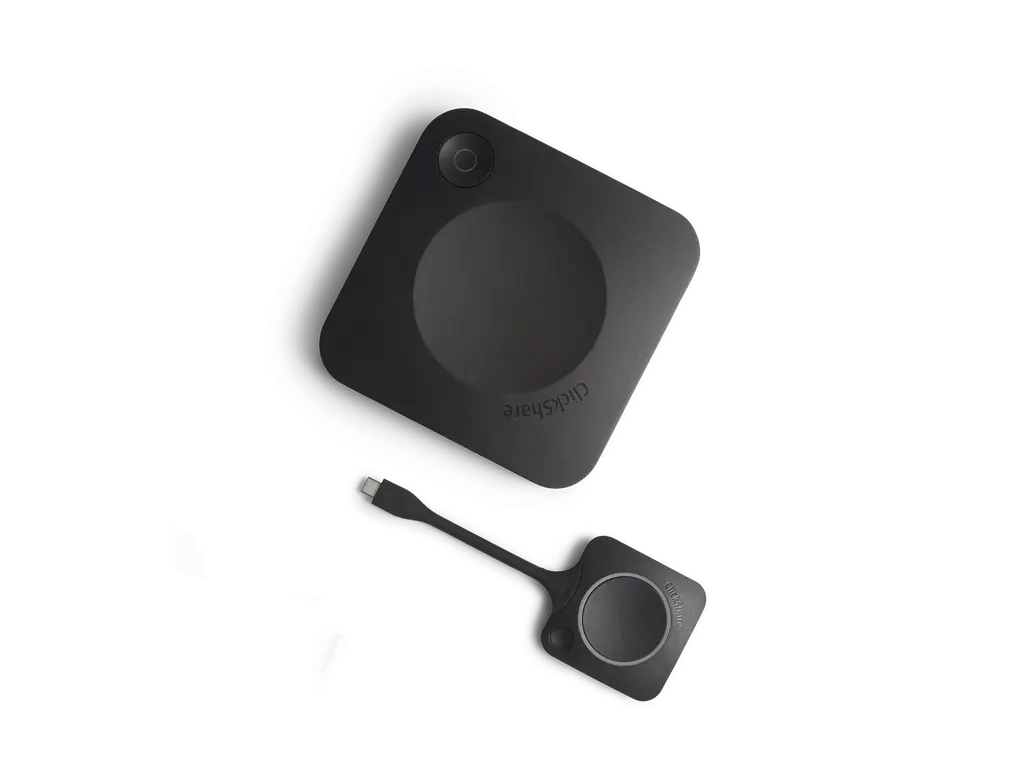
ClickShare CX-20
Barco ClickShare CX-20 Wireless Conferencing System
- Platforms
- FCC/CE
The Barco ClickShare CX-20 is a wireless conferencing system for small meeting rooms and huddle spaces. Staff and guests join with one press of the ClickShare Button or the ClickShare App, and the room connects to its camera, microphone, speakers and display. It outputs 4K UHD, works with your preferred platform including Microsoft Teams and Zoom, and is managed through the cloud. It suits Doha offices running hybrid meetings with colleagues abroad.
What the ClickShare CX-20 does in a small room
The Barco ClickShare CX-20 is an entry-level wireless conferencing system for small meeting rooms and huddle spaces where a full conferencing installation would be more than the room needs. A person who walks in presses the ClickShare Button or uses the ClickShare App, and the room connects to the cameras, microphones, speakers, sound bars and displays it already has. The meeting then runs from a laptop on whichever video platform your organisation uses.
Specifications that matter when you plan the room
Video output reaches 4K UHD (3840 x 2160) at 30 Hz through HDMI 1.4b or USB-C DisplayPort 1.2. Only one source can appear on the screen at a time, so the CX-20 suits a single presenter sharing from one laptop rather than side-by-side windows. Wireless links use IEEE 802.11 a/g/n/ac on 2.4 GHz and 5 GHz, with a maximum reach of 30 m between the ClickShare Button and the base unit. DFS channels in the 5 GHz band are supported only in select countries, so the SmartRooms Qatar team will confirm the channel plan for your site.
The unit provides a 1 Gbit Ethernet LAN port, USB-A and USB-C connections, and audio output over USB and HDMI.
Security, management and IT control
In standalone mode the system authenticates with WPA2-PSK. In network integration mode the ClickShare Button can use WPA2-PSK or IEEE 802.1X. Management and reporting are included, and the product is described as secure and cloud-managed. Connectivity runs over LAN or WiFi, and a Kensington lock point supports physical protection in shared rooms.
Where it fits in Qatar
- Consultancy office in West Bay: a huddle room where a project team joins a call with colleagues abroad, with one press of the Button bringing the meeting to the room screen.
- Ministry meeting room in Msheireb: a small room where staff present files and visitors share from their own devices without swapping HDMI cables.
- Private school in Al Wakrah: a staff room where department heads review plans, with guests joining through the ClickShare App on their phones.
Environment and power planning
The operating range is 0°C to +40°C, with a maximum of 35°C at 3000 m, and operating humidity of 0 to 85% non-condensing. Summer temperatures in Qatar regularly pass 45°C, so the base unit belongs in an air-conditioned room, away from direct sun and reflective glazing. Noise is rated at a maximum of 25 dBA up to 30°C and 30 dBA between 30°C and 40°C, which matters in quiet offices. Power draw is 5 to 10 W in operation and 24 W at maximum. The data lists a standard 110/220 V AC plug or USB-C power, so confirm the power option for your order against Qatar's 240 V, 50 Hz BS 1363 sockets before installation. The unit measures 34 mm x 135 mm x 135 mm and weighs 900 g. Wall-mount options are not in the manufacturer data we hold, so placement will be agreed during the site survey.
Ordering and next steps
Request a quote and tell us the room size, the display in use and the number of rooms. SmartRooms Qatar usually returns quotations within one working day, and a free site survey can confirm the Button position and network point before installation. Organisations ordering for several rooms can raise a single purchase order (LPO). The unit is covered by the manufacturer's warranty: one year as standard, and five years after registration via SmartCare.
Highlights
- One ClickShare Button and ClickShare App for employees and guests
- 4K UHD (3840 x 2160) output at 30 Hz
- Maximum 30 m reach between Button and base unit
- Dual-band 2.4 GHz and 5 GHz, IEEE 802.11 a/g/n/ac wireless
- Ethernet LAN 1 Gbit, WiFi, WPA2-PSK or IEEE 802.1X authentication
- Warranty: 1 year standard, 5 years after SmartCare registration
Room fit
Tell us the room size and platform (Teams, Zoom or BYOD) and we confirm the right combination with your quotation.
Estimated timeline
Quotation within 1 working day · delivery timing depends on stock availability, and we confirm it with your quotation.
Specifications
General Specifications29
- Operating system
- Windows 10 and higher macOS 11 (BigSur) and higher Android v11 and higher (ClickShare App) iOS 14 and higher (ClickShare App)
- System requirements
- For a smooth experience with Microsoft Teams or Zoom Minimum: Windows processor Intel Core i3 or AMD Ryzen 5/macOS: Intel Core i3 or Apple Silicon M1; RAM 8GB; OS version: Windows 10 20H2/macOS 11 Big Sur Recommended: Windows processor Intel Core i5/Ultra 5 or AMD Ryzen 7/macOS: Apple Silicon M3; RAM 8GB; OS version: Windows 11 latest build/macOS latest build
- Video outputs
- 4K UHD (3840*2160) @ 30Hz. HDMI™ 1.4b or USB-C DisplayPort 1.2 (only Gen2)
- Audio output
- USB, HDMI
- USB
- 1 X USB-A, 1 X USB-C
- ClickShare Buttons
- 1
- ClickShare App
- Desktop & Mobile
- Native protocols
- Airplay, Google Cast, Miracast
- Maximum sources simultaneously on screen
- 1
- Noise Level
- Max. 25dBA @ 0-30°C Max. 30dBA @ 30-40°C
- Authentication protocol
- WPA2-PSK in stand alone mode WPA2-PSK or IEEE 802.1X using the ClickShare Button in network integration mode
- Wireless transmission protocol
- IEEE 802.11 a/g/n/ac and IEEE 802.15.1
- Reach
- Max. 30m (100 ft) between ClickShare Button and ClickShare Base Unit Frequency band 2.4 GHZ and 5 GHz (DFS)
- Frequency band
- 2.4 GHZ and 5 GHz (DFS channels supported in select number of countries)
- Connections
- 1x Ethernet LAN 1Gbit 1x USB-C 2.0 (front); 1x USB-A 2.0 (front) -only Gen2: 1x USB-C 3.0 (front); 1x USB-A 3.0 (front)
- Temperature range
- Operating: 0°C to +40°C (+32°F to +104°F) Max: 35°C (95°F) at 3000m Storage: -20°C to +60°C (-4°F to +140°F)
- Humidity
- Storage: 0 to 90% relative humidity, non-condensing Operation: 0 to 85% relative humidity, non-condensing
- Anti-theft system
- Kensington lock
- Certifications
- FCC/CE
- Touch screen support & Interactivity
- /
- Wireless conferencing
- via App or Button
- Local view
- Local view of the room display only
- Network connection
- LAN & WiFi
- Management and reporting
- Yes
- Warranty
- 1 year standard. 5 years coverage upon registering via SmartCare
- Dimensions (HxWxD)
- 34 mm x 135 mm x 135 mm
- Power consumption
- Operational: 5-10W, 24W Max
- Power supply
- Standard 110/220 V AC plug or USB-C (only Gen2)
- Weight
- 900 gr




