Biamp
MAX Connect Auditorium Mode License
Biamp MAX Connect Auditorium Mode License 900-10004 Software
XMS Cloud Management Platform
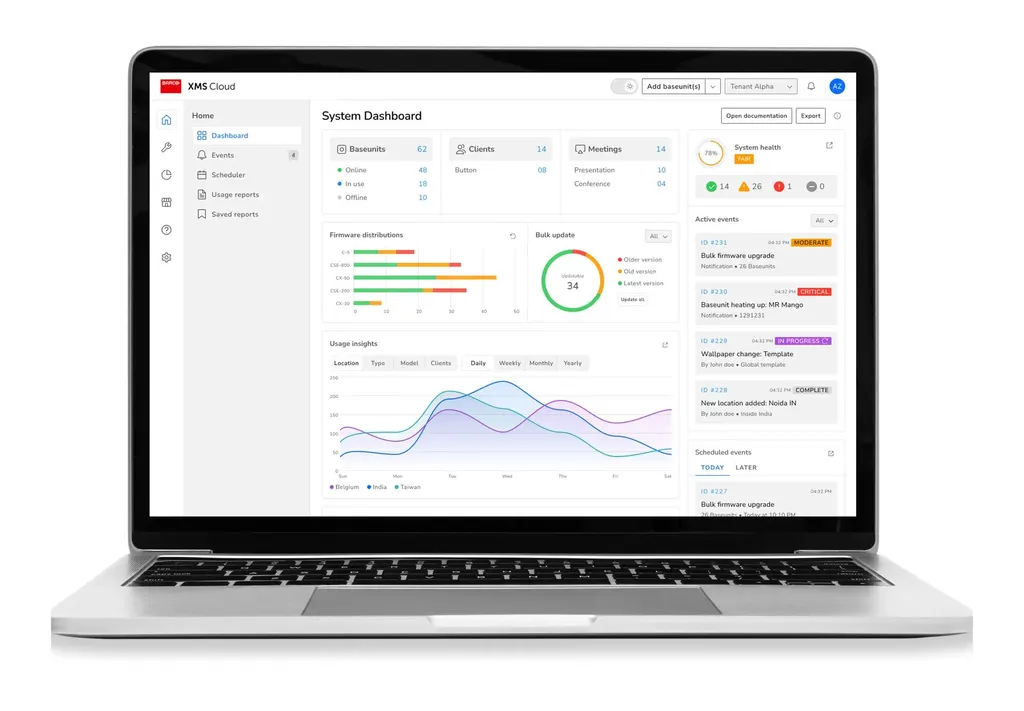
Barco XMS Cloud Management Platform for ClickShare Devices
Priceon request
QuotationWithin 1 working day
DeliveryConfirmed with your quote, based on stock
Overview
Barco XMS Cloud is a cloud platform for remotely managing Barco ClickShare wireless presentation devices. IT teams get full device control, can monitor and analyse their estate, and can step in early before a fault disrupts a meeting, without visiting each room. It suits Qatari organisations whose ClickShare units are spread across several buildings or sites, such as universities, ministries and hotel groups that need one central view of their meeting rooms. Request a quote.
Central control for ClickShare devices across your estate
XMS Cloud is Barco's cloud platform for managing ClickShare wireless presentation devices from a single location. Rather than sending a technician to each meeting room to check one unit, an IT team can view and manage its ClickShare devices remotely. That matters most where the same hardware is spread across several floors, buildings or sites, because the team can keep track of the whole estate from one place.
The platform covers three areas: full control of each device, proactive intervention before a fault affects a meeting, and a focus on maximum uptime. For a facilities or IT manager, the practical question is how quickly a problem can be spotted and resolved without disturbing the people in the room.
Why proactive intervention changes day-to-day support
A wireless presentation unit that fails at the start of a board meeting becomes a visible problem, and reactive support usually means waiting for someone to report it. Monitoring and analytics in a cloud platform let the support team see device status and act early. Over time the same information helps identify the rooms that need attention and the rooms where the hardware is performing well.
Because the platform is cloud-based, the team does not need to be physically present in every room to act. That is a practical benefit for organisations in Doha whose technical staff work from a central office while rooms are spread across the city and beyond.
Where XMS Cloud fits in Qatar
- University campus: a central IT team in Education City managing ClickShare units in lecture theatres and seminar rooms across several buildings.
- Government ministry: a ministry in Doha with meeting rooms on multiple floors, where the IT section wants to check devices without interrupting users.
- Hotel group: a hotel or serviced apartment operator in West Bay with conference rooms in more than one property.
- Private school: a school in Al Rayyan or Al Wakrah fitting out new classrooms and staff rooms, with devices managed from the administration office.
What to plan before you deploy
Start with an inventory of the ClickShare devices you already have or plan to buy, and confirm with the SmartRooms Qatar team which devices your setup involves. Because XMS Cloud is a cloud platform, review network access requirements and security policy with your IT team early, so the devices can reach the service within your firewall rules. Map out which rooms and sites will be included so that the rollout can be phased.
SmartRooms Qatar offers free site surveys, which help when you are deciding how to group rooms across several locations. Quotations usually follow within one working day, and government buyers can work through a purchase order or a tender such as Monaqasat.
To discuss your ClickShare estate and the XMS Cloud platform, request a quote from SmartRooms Qatar, and our team will confirm the details for your organisation.
Highlights
- Remote management of ClickShare devices from a cloud platform
- Full device control for IT administrators
- Proactive intervention before faults affect meetings
- Monitoring and analytics across the device estate
- Aimed at maximum uptime for meeting-room devices
- Suited to multi-site organisations across Qatar
Room fit
Tell us the room size and platform (Teams, Zoom or BYOD) and we confirm the right combination with your quotation.
Estimated timeline
Quotation within 1 working day · delivery timing depends on stock availability, and we confirm it with your quotation.
Specifications
Source: manufacturer · checked Oct 2026
The full specification and datasheet for this model are available on request; we send them with your quotation.
Downloads
1 file from the manufacturerQuestions about XMS Cloud Management Platform
What is the Barco XMS Cloud Management Platform used for?
The Barco XMS Cloud Management Platform is a cloud service for remotely managing Barco ClickShare devices. It gives IT professionals full control over each device, supports proactive intervention when attention is needed, and aims to keep meeting-room equipment available. It is software that works with the ClickShare hardware installed in rooms, not a replacement for it. Organisations with several rooms or sites use it to manage the estate from one place instead of visiting each room.
Who is XMS Cloud best suited to?
XMS Cloud suits IT teams, facilities managers and procurement teams responsible for more than one ClickShare device. A single room with one unit may not need a central platform, but an organisation with rooms across Doha, Lusail or Education City usually benefits from one view of its estate. Schools, universities, ministries and hotel groups in Qatar are typical examples where remote management reduces the number of site visits needed.
How could a university in Education City use XMS Cloud?
A campus with lecture theatres, seminar rooms and collaborative study spaces spread across several buildings can have one central IT team monitor its ClickShare units from an office. Staff can check device status and intervene when a fault is reported, rather than moving between buildings during teaching hours. The value of maximum uptime is clearest before exams and during busy lecture schedules. Request a quote covering the rooms you want included.
Can a ministry in Doha manage ClickShare devices on several floors securely?
The manufacturer describes XMS Cloud as a secure way to manage ClickShare devices, and a ministry IT section will want to check that against its own security policy. Review access and network requirements before rollout, especially if devices sit on a government network. SmartRooms Qatar can help you decide which meeting rooms and floors are included, and can then prepare a quotation based on your requirements.
What does proactive intervention mean for a meeting room?
Proactive intervention means the support team acts on a device before a user has to report a problem. In a boardroom, for example, a unit showing a fault could be addressed before the next session starts. The benefits are fewer interruptions for presenters and less time spent by technicians walking between rooms. Ask the SmartRooms Qatar team to explain how this works with your device set before you decide.
Which ClickShare devices does XMS Cloud manage?
XMS Cloud is described as the platform for remotely managing ClickShare devices, but the source data does not list every compatible model. Before ordering, list the ClickShare units you already own or plan to buy, and ask the SmartRooms Qatar team to confirm which devices your setup supports. Confirming this early avoids a mismatch between the platform and your room hardware, and keeps the quotation accurate for the number of rooms to be covered.
Does XMS Cloud need an internet connection?
XMS Cloud is a cloud platform, so managed devices must be able to reach it over the network. Check internet access, firewall rules and any restrictions at each site before rollout, and review them with your IT team during planning with SmartRooms Qatar. Sites with restricted networks, such as some government or industrial locations, may need extra review, which can be identified during a free site survey.
Is XMS Cloud a hardware product?
No. XMS Cloud is a software platform within the ClickShare series, not a standalone screen or unit in a meeting room. It works with ClickShare devices installed in rooms. When you request a quote, separate the platform from the physical ClickShare devices so your team can see what is needed for each room and each site.
How could a hotel group in West Bay use it?
A hotel or serviced apartment operator in West Bay may have conference rooms in more than one property, each with a wireless presentation unit. Managing these devices from one platform lets the technical team check their status without visiting every property during a busy event. Decide which properties and rooms are included before requesting a quote, and note the layout and network of each room so the scope is clear.
How could an energy or industrial company in Mesaieed or Ras Laffan use it?
Energy and industrial companies in Mesaieed, Ras Laffan or the Industrial Area often have offices and meeting rooms spread across several sites. A central team can use XMS Cloud to track ClickShare devices in those rooms without travelling between locations. Prepare the site list in advance, and confirm that each site's network allows the devices to reach the cloud service before you request a quote.
How could a private school in Al Wakrah use it?
A private school in Al Wakrah fitting out new classrooms, staff rooms and a multipurpose hall may want its wireless presentation devices managed centrally. A school leader or IT coordinator can check device status from the office rather than moving between classrooms during lessons. Start with a list of rooms and the ClickShare devices planned for each, then request a quote. Schools can pay by purchase order.
How do I request a quote for XMS Cloud, and can we order with an LPO?
Send SmartRooms Qatar a list of the ClickShare devices, rooms and sites you want to manage, then request a quote. Quotations usually follow within one working day. Organisations can issue a local purchase order (LPO), and government buyers can work through a tender such as Monaqasat. Payment can be made by bank transfer, cheque or purchase order, and products are covered by the manufacturer's warranty.