





Biamp
MAX Connect Auditorium Mode License
Biamp MAX Connect Auditorium Mode License 900-10004 Software
Tesira Software
Biamp Tesira Software 900.0107 Design Software for Tesira Systems
Priceon request
QuotationWithin 1 working day
DeliveryConfirmed with your quote, based on stock
Overview
Biamp Tesira Software 900.0107 is the design software for building and configuring Tesira system processing. Integrators create audio and logic connections through a drag-and-drop interface, split projects into partitions that compile independently, and check designs with Logic Simulation. It suits AV integrators and in-house technicians running conference rooms, lecture halls and multi-room venues across Qatar.
What the Tesira design software does
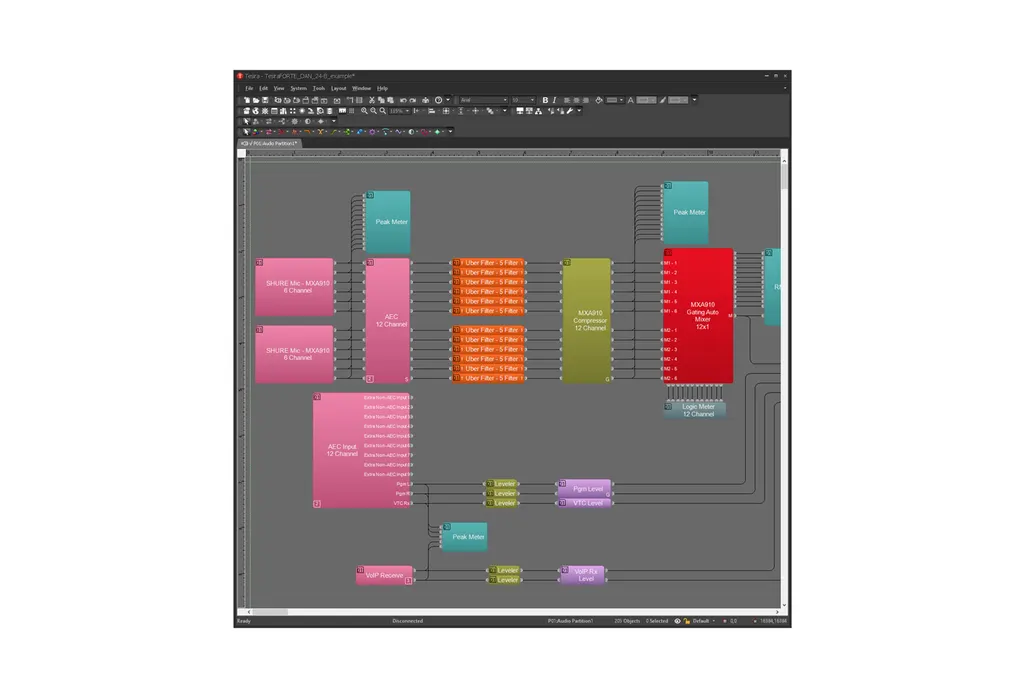
Tesira design software is the configuration tool used to build the processing and system design for Tesira installations. Designers place processing blocks and make audio and logic connections on a canvas, which keeps a complex room design readable from start to finish. The software also includes toolbars for processing, control and diagnostic elements, so the same project covers the audio path, the control logic and the checks an engineer runs during commissioning.
Connection lines can be displayed in several ways, which helps when a project has many inputs, outputs and control points. System tools handle device discovery and the upload of finished configurations, so a technician does not need to set up each unit by hand.
Partitions and multi-room projects
Partitions are the feature that matters most on larger jobs. Each partition keeps part of the design separate from the others, and audio connections can still be made between partitions when rooms need to link. Partitions compile on their own, so unchanged partitions stay online while another part of the project is edited, recompiled and reloaded.
A single partition can span several devices, and one device can host several partitions. Designers can therefore organise the project around rooms or functions rather than around hardware boxes. This is useful for a campus or venue where the same team manages a group of spaces.
Processing blocks and logic tools
- Advanced processing: Über Filters, FIR Filters, Gain Sharing Automixers, Automatic Gain Control (AGC) and AI Noise Reduction.
- Presets: presets can be created and edited by drag and drop.
- Logic Simulation: control logic can be checked in the design before it is loaded to hardware.
- Data point monitoring: included with the Enhanced Text Protocol to watch values in a running system.
The configuration engine checks the design and details the hardware requirements for the system, which helps confirm the device list before equipment is ordered.
Where it fits across Qatar
In a university lecture hall cluster in Education City, a technician can use partitions to program each hall separately, then update one hall during term breaks while the others remain in service. In a West Bay hotel, a ballroom that divides into function rooms can use separate partitions for each zone, with links made only when the rooms are joined. A government ministry in Msheireb that runs several meeting rooms from one central control point can use the presets and monitoring tools to keep settings consistent across the floor.
Planning your project and requesting a quote
Start with a list of rooms, sources, microphones, speakers and control points. Decide which spaces need their own partition and which must link together. Confirm the device count and network layout with your installer before commissioning. SmartRooms Qatar offers free site surveys, and a survey helps match the hardware plan to the actual rooms. Request a quote from SmartRooms Qatar with your room list, and the team will prepare a quotation, usually within one working day, covering supply, delivery to all 8 municipalities of Qatar and professional installation.
Highlights
- Drag-and-drop design of audio processing and system logic
- Partitions compile separately, so unchanged parts stay online
- A single partition can span multiple devices
- Über, FIR, automixer, AGC and AI noise reduction blocks
- Logic Simulation and data point monitoring included
- Device discovery and configuration upload tools
Room fit
Tell us the room size and platform (Teams, Zoom or BYOD) and we confirm the right combination with your quotation.
Estimated timeline
Quotation within 1 working day · delivery timing depends on stock availability, and we confirm it with your quotation.
Specifications
Source: manufacturer · checked Oct 2026
The full specification and datasheet for this model are available on request; we send them with your quotation.
Downloads
2 files from the manufacturerQuestions about Tesira Software
What is Biamp Tesira Software 900.0107 used for?
Biamp Tesira Software 900.0107 is the design software used to create the processing and system configuration for Tesira systems. Integrators build the audio design in a drag-and-drop interface, make audio and logic connections, and then upload the finished configuration to the devices. It suits AV integrators and technicians who program conference rooms, lecture halls and multi-room installations across Qatar.
Who is this software designed for?
It is aimed at AV integrators, systems programmers and in-house technicians who configure Tesira-based audio systems. A university AV team in Education City preparing several lecture halls, or a contractor delivering a ministry boardroom in Msheireb, would use it to build and maintain the design. Buyers who need a finished, installed room without programming should ask SmartRooms Qatar for a quotation that includes installation.
How do partitions help on a multi-room project?
Partitions keep parts of a design separate, so one room's processing can be changed without disturbing another. Each partition compiles on its own, and unchanged partitions keep running while others are recompiled and reloaded. Audio connections can still be made between partitions where rooms need to link. In a West Bay hotel ballroom that divides into function rooms, this means one zone can be updated during setup without taking the other zones offline.
Can one partition run across several devices?
Yes. A single partition can span multiple devices, and a single device can host multiple partitions. Designers can organise a project around rooms or functions rather than around the hardware boxes. Before ordering, confirm the device count and layout with your integrator, and ask SmartRooms Qatar to review the hardware requirements during the quotation stage.
Which advanced processing blocks are included?
The software includes Über Filters, FIR Filters, Gain Sharing Automixers, Automatic Gain Control (AGC) and AI Noise Reduction. Automixers suit meetings with several microphones, passing audio mainly from the active talkers. AGC helps keep levels steady for speakers at different distances from the microphone. Choose the blocks that match your room, and request a quote so the design can be reviewed against your layout.
Does the software check my design before I load it?
Yes. The configuration engine confirms the design and details the hardware requirements for the system. This helps you catch connection problems and confirm which devices a project needs before equipment is ordered or a site visit is booked. Pairing this with a free site survey from SmartRooms Qatar helps the hardware list match the actual rooms in your building.
Can control logic be tested before it goes to the room?
Yes, the software includes Logic Simulation. Designers can check control logic in the design itself before loading it to hardware, which reduces the time spent adjusting programs on site. This is useful for a government ministry or energy company that expects room controls to behave predictably from the first day of use.
What monitoring and diagnostic tools does it offer?
The Enhanced Text Protocol includes data point monitoring, which lets technicians watch values in a running system. Toolbars give access to processing, control and diagnostic elements, and connection lines can be displayed in several ways. Together these tools help support teams trace a fault in a live system without rebuilding the whole design.
Is the software suitable for central control of several rooms?
Its primary application is central control, so it suits facilities where one team manages several spaces, such as a hospital conference floor, a university campus or a shopping mall events hall. Presets can be created and edited by drag and drop, which makes it easier to recall settings for different types of meeting. Ask SmartRooms Qatar for a quotation covering both hardware and programming scope.
Can configurations be uploaded and devices found on the network?
Yes. The system tools allow device discovery and the upload of system configurations. Technicians can find the devices in a project and send the finished design to them, which saves manual setup on each unit. Confirm your network layout with your installer before the commissioning day so discovery works smoothly on site.
Is this a current model, and how do I order it?
Yes, model 900.0107 is a current product. SmartRooms Qatar supplies by quotation, with delivery to all 8 municipalities of Qatar. Quotations are usually issued within one working day. Payment can be made by bank transfer, cheque or purchase order, and purchase orders (LPOs) and government tenders are supported. Send your room count and requirements to receive a quotation.
Can a school or ministry order this under an LPO for several projects?
Yes. Schools, universities and government bodies can issue an LPO that covers the software and related hardware for several rooms. Tell SmartRooms Qatar how many rooms, sources and devices are involved, and the team will prepare a quotation after reviewing the scope. For a government tender, quote the tender reference in your request so the quotation matches the submission.
Similar models


Biamp
Workplace 1-Year Monitoring and Management Plus - White Tier
Biamp Workplace 1-Year Monitoring and Management Plus License, White Tier