





Biamp
MAX Connect Auditorium Mode License
Biamp MAX Connect Auditorium Mode License 900-10004 Software
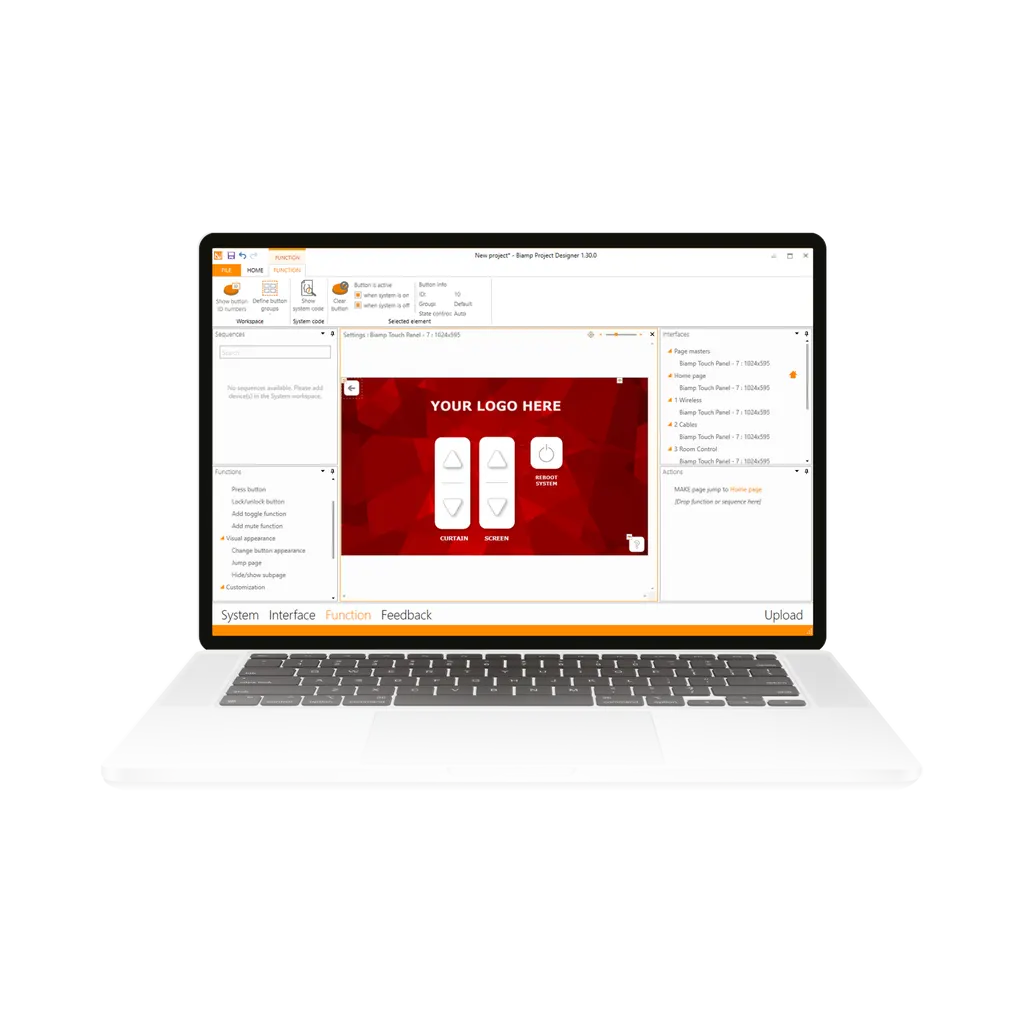
Project Designer
Biamp Project Designer 900.0128 Room Control Design Software
Priceon request
QuotationWithin 1 working day
DeliveryConfirmed with your quote, based on stock
Overview
Project Designer (900.0128) from Biamp is configuration software for designing and automating control of audio, video, climate and lighting in a room. Integrators build the control logic on screen without writing code. The package includes a device driver library, interface templates and automatic project documentation. It suits AV integrators and technicians in Qatar delivering boardrooms, lecture halls and meeting rooms. Request a quote today.
What Project Designer does for a room control project
Project Designer is Biamp's software for planning and automating the devices in a room. One project can bring audio, video, climate and lighting equipment under a single control design, so a touch panel can manage the whole space. The logic is assembled visually on screen, which means AV integrators and in-house technicians can deliver room control without a dedicated software developer on the team.
The facts that matter when you specify it
Four capabilities shape how a project is built and handed over:
- Visual construction: devices and functions are placed and linked by dragging them into position, so the control design is readable by the next technician.
- Device driver library: an extensive set of drivers lets you assemble the system that matches each client's equipment.
- Interface templates: carefully designed templates provide a user-friendly control interface that staff can operate without training sessions.
- Automatic documentation: project records are generated as part of the build, removing a manual task at the end of each job.
Because the design is built visually, a project can be reviewed and adjusted before it is deployed to the room. Your team can also reuse a proven layout for similar rooms, which shortens the time between design sign-off and handover.
Where it fits in Qatar
In an office tower in West Bay, a boardroom may need the display, camera, microphone system, blinds and air conditioning to respond to one interface. Project Designer lets the integrator set up that behaviour in a single project file, then test it before the executive meeting.
A university or training centre in Education City may have many lecture rooms with the same equipment mix. A standard template and a single control design can be adapted to each room, so lecturers see the same interface wherever they teach.
A government meeting facility in Msheireb working in Arabic and English side by side benefits from a consistent, clear control interface. Staff moving between rooms use the same layout, which reduces support calls after handover.
What to plan before you order
Successful projects start with a complete device list. Confirm that each device to be controlled has a suitable driver in the library before you commit to the design. Decide early which functions each user needs on the touch interface, because this determines the template and layout.
- List every audio, video, climate and lighting device in the room.
- Confirm drivers for each device against the library.
- Agree the control interface layout with the room's users.
- Include time for testing and handover documentation.
SmartRooms Qatar offers free site surveys across Qatar, including Doha, Lusail and The Pearl, to confirm the room layout and device positions. Quotations are usually issued within one working day, and we accept purchase orders (LPOs) and government tenders, including Monaqasat. Ask for a quotation that lists the Project Designer software together with the room devices it will control.
To scope your room control project, request a quote from SmartRooms Qatar and send your device list and room plan.
Highlights
- Controls audio, video, climate, lighting and other room devices
- Visual, drag-and-drop build with no code writing needed
- Extensive device driver library for varied room systems
- Carefully designed templates for user-friendly control interfaces
- Automatic project documentation generated during configuration
- Supplied as part number 900.0128 from Biamp
Room fit
Tell us the room size and platform (Teams, Zoom or BYOD) and we confirm the right combination with your quotation.
Estimated timeline
Quotation within 1 working day · delivery timing depends on stock availability, and we confirm it with your quotation.
Specifications
Source: manufacturer · checked Oct 2026
The full specification and datasheet for this model are available on request; we send them with your quotation.
Downloads
0 files from the manufacturerNo downloadable files are listed for this model yet. Ask us and we will send the datasheet.
Questions about Project Designer
What is Biamp Project Designer used for?
Project Designer is configuration software for designing and automating the control of the devices in a room. It brings audio, video, climate and lighting control into one project file, which is then deployed to the space. It suits AV integrators and in-house technicians in Doha, Lusail and Al Sadd who deliver meeting rooms, boardrooms and lecture halls and want a single design for each room.
Do I need programming skills to use it?
No. Project Designer is built so the control logic is assembled visually, with devices and functions placed and linked on screen rather than written as code. A trained AV technician can configure a project after learning the software. Teams that have relied on a programmer for every control job can keep that work in-house and shorten delivery for boardrooms and training rooms.
Which devices can it control?
The software covers audio, video, climate, lighting and other room devices, and includes an extensive device driver library. Before you commit, list every device in the room and confirm each one has a suitable driver in the library. SmartRooms Qatar can check the device list against the library during the quotation stage, so the design matches the equipment that will be installed.
Can I reuse one layout across several classrooms?
Yes. The software includes carefully designed templates for a user-friendly control interface. A private school in Al Wakrah fitting out new classrooms, or a training centre in Education City, can build one tested layout and adapt it for each room. Teachers then see the same touch interface in every classroom, which reduces training time and confusion.
Does it produce project documentation?
It generates automatic project documentation, which removes a manual step at the end of a job. For facilities managers and IT teams in Qatar, this record helps when handing a room to the client or when a different technician must maintain the system later. Ask for a quotation that covers both the control design and the room hardware it will run on.
Is it suitable for a large boardroom with many devices?
It suits rooms with several devices because one project can coordinate audio, video, climate and lighting together. A boardroom in West Bay with displays, a camera, a microphone system, blinds and air conditioning can be operated from one interface. Plan the design around the full device list early so every function the room needs is covered.
How does it fit with a video conferencing setup?
Project Designer works at the control layer. It manages the room's devices and defines how they respond to touch input, rather than replacing the conferencing hardware itself. Pair the software with the room's panels, cameras and microphones, and request a quote so SmartRooms Qatar can scope the hardware alongside the control design.
Is the software sold separately from the room hardware?
Yes. Project Designer is listed under Biamp part number 900.0128 and is a separate item from the devices it controls. Your quotation should list this software together with the audio, video, climate and lighting devices that will be configured in each room.
Does it need a site survey before design work starts?
A site survey is recommended because the control design depends on the room layout, device positions and user locations. SmartRooms Qatar offers free site surveys, so the team can confirm which devices must be controlled and where the touch interface should sit. The survey results can then be used in the design you request a quote for.
Can a government ministry order it through an LPO?
Yes. SmartRooms Qatar accepts purchase orders (LPOs) and supports government tenders, including Monaqasat. A ministry upgrading a meeting room could include the Project Designer software, the room devices and professional installation in one quotation. Payment can be made by bank transfer, cheque or purchase order.
What information should I send when requesting a quote?
Send the room type, a list of audio, video, climate and lighting devices, and a rough sketch of the room with the planned touch panel position. Note which functions users need, such as source selection, lighting scenes or temperature control. SmartRooms Qatar usually issues quotations within one working day and can arrange a site survey before final design.
Similar models


Biamp
Workplace 1-Year Monitoring and Management Plus - White Tier
Biamp Workplace 1-Year Monitoring and Management Plus License, White Tier