





Biamp
MAX Connect Auditorium Mode License
Biamp MAX Connect Auditorium Mode License 900-10004 Software
SageVue Asset Management Software
Biamp SageVue 900.0103 Asset Management Software
Priceon request
QuotationWithin 1 working day
DeliveryConfirmed with your quote, based on stock
Overview
The Biamp SageVue 900.0103 is browser-based software for monitoring and administering Tesira, Devio and Crowd Mics devices across a network. It shows device health clearly, supports remote firmware updates by group or single unit, and maps LDAP groups to user roles. Central control teams, integrators and facilities teams in Doha and Lusail can run multi-room systems from one screen. No license is required. Request a quote.
What SageVue does on a Biamp network
SageVue is browser-based software for monitoring and managing Biamp devices once they are connected to your network. Instead of opening each Tesira, Devio or Crowd Mics unit separately, technology managers and integrators can review the whole estate from one screen, and authorised end users can check system status and carry out routine administrative tasks. The result is faster fault-finding in buildings where audio and conferencing equipment is spread across many rooms.
Status, sorting and firmware updates
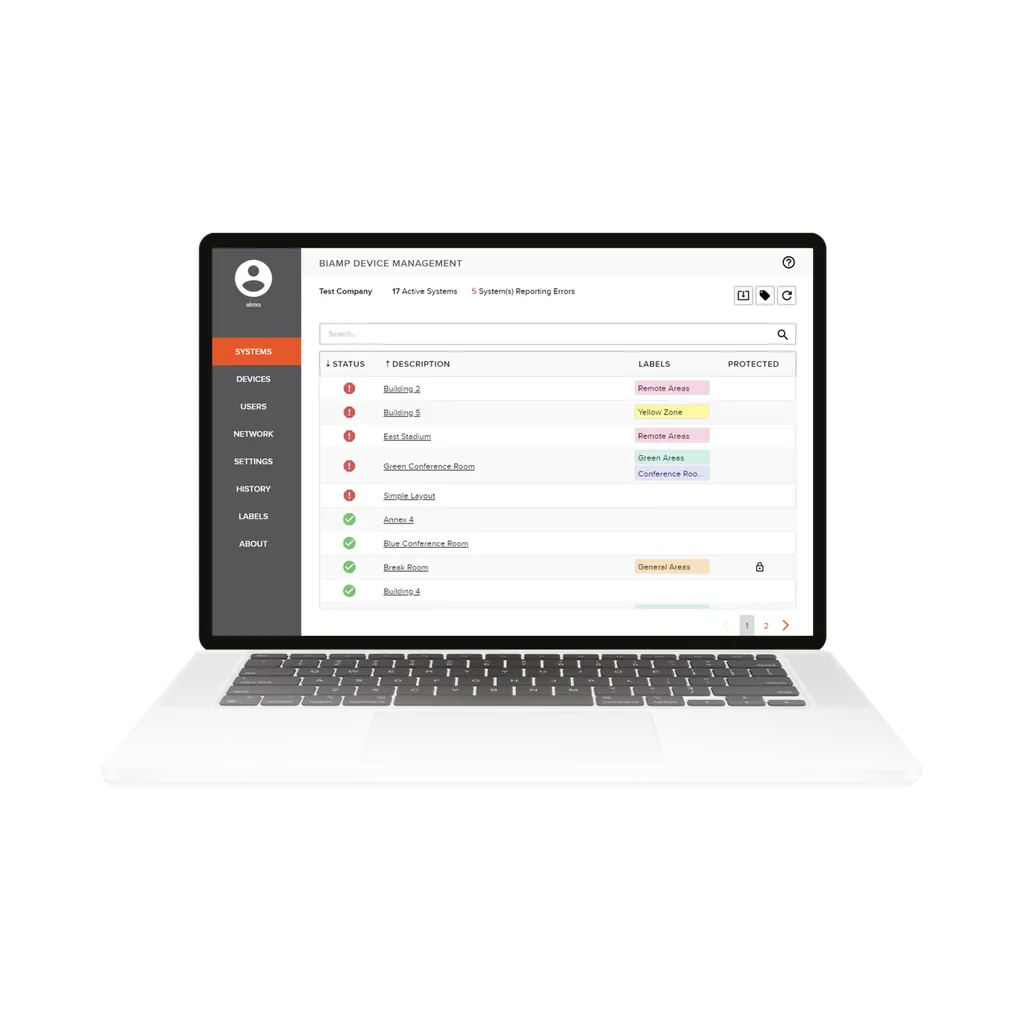
Each networked device is shown with immediate visual feedback on its health, so a problem stands out before a user reports it. Sorting and tagging tools let you organise the list and filter it down to the devices that need attention. Firmware can be updated remotely, either across a group of devices or one device at a time, and individual units can be rebooted from SageVue. Targeting updates by group means a facilities team can test a change on a small set of rooms before rolling it out further.
Network and VoIP configuration
For Tesira and Devio devices, SageVue lets administrators set network properties from the same tool, including IP addressing and 802.1X port management. Tesira devices with VoIP capability can be reached directly for their VoIP configuration, and the software comes pre-configured for proxy vendors Avaya, Cisco and ShoreTel. That is useful where conferencing endpoints have to fit an existing telephony environment rather than sit on a separate network.
Access control and Qatar scenarios
SageVue integrates with LDAP infrastructure. You map LDAP groups to user roles and assign granular privileges, so each person sees and changes only what their role allows. The following scenarios show where that matters:
- A private school in Al Wakrah fitting out new classrooms, where the IT office wants every room's device status from one login and teachers should not change network settings.
- A government ministry in Msheireb with several boardrooms, where device administration is restricted to named staff through directory groups.
- A hotel or serviced apartment complex in Lusail with multiple meeting rooms, where a small technical team needs to check and reboot devices without going room to room.
What to plan before you order
List the Biamp devices on your network and confirm which are Tesira, Devio or Crowd Mics models, because SageVue manages those families. Agree the LDAP group structure in advance so that roles are ready at handover. Network changes such as IP addressing and 802.1X settings affect device connectivity, so plan them with your network team. SageVue requires no license, so the main planning effort is device inventory, configuration and access design. If your project also includes new hardware in a building, SmartRooms Qatar offers a free site survey before a quotation.
Ready to bring your Biamp devices under one view? Request a quote from SmartRooms Qatar with your device count and site list, and we will respond with a quotation usually within one working day.
Highlights
- Single view of Tesira, Devio and Crowd Mics devices on the network
- Immediate visual feedback on device health and status
- Sorting and tagging tools to organise and filter device lists
- Remote firmware updates by group or individual device
- Network settings including IP addressing and 802.1X port management
- LDAP group mapping with granular access privileges
Room fit
Tell us the room size and platform (Teams, Zoom or BYOD) and we confirm the right combination with your quotation.
Estimated timeline
Quotation within 1 working day · delivery timing depends on stock availability, and we confirm it with your quotation.
Specifications
Source: manufacturer · checked Oct 2026
The full specification and datasheet for this model are available on request; we send them with your quotation.
Downloads
3 files from the manufacturerQuestions about SageVue Asset Management Software
What is Biamp SageVue 900.0103 used for?
SageVue is browser-based software for monitoring and managing Biamp devices connected to a network. Technology managers, integrators and authorised end users can review system status and carry out administrative tasks from one place. It suits Qatari organisations running several Tesira, Devio or Crowd Mics installations, such as school networks or government buildings, where checking each device by hand takes too long.
Which Biamp devices does SageVue manage?
SageVue works with Tesira, Devio and Crowd Mics devices connected to the network, and it presents them together in one view. If your environment mixes conferencing and audio hardware from these families, they will all appear in the same place. Check your device models before ordering, and confirm the network setup with the SmartRooms Qatar team when you request a quote.
Does SageVue require a separate license?
No. The manufacturer's data states that SageVue 900.0103 requires no license, so a rollout across several rooms or buildings adds no licensing step to plan. The practical planning work is the device inventory, network layout and user roles. Send those details when you request a quote, and expect a quotation usually within one working day.
How does firmware updating work?
Firmware can be updated remotely, either across a group of devices or one device at a time, and individual units can be rebooted from SageVue. A school in Doha with identical classrooms can update the group together, while a single room with different hardware can be handled on its own. This cuts technician visits to each room.
Can SageVue show device status clearly?
Yes. SageVue gives immediate visual feedback on the health of each networked Tesira, Devio and Crowd Mics device, so faults are easier to spot before they affect a meeting. Sorting and tagging tools help filter the list. At a hotel in Lusail with many meeting rooms, a technical team can review the estate before the morning's events begin.
Can SageVue connect to our LDAP directory?
Yes. SageVue integrates with LDAP infrastructure. You map LDAP groups to roles inside SageVue and assign granular access privileges, so an AV coordinator can change settings across a set of rooms while a visiting integrator sees only what they need. This suits a government ministry in Msheireb that restricts device administration to named staff.
Which network settings can I configure?
For Tesira and Devio devices, SageVue lets administrators configure network properties including IP addressing and 802.1X port management. Because these settings affect connectivity, agree the addressing plan and port authentication with your network team before changing devices. For a new building, SmartRooms Qatar offers a free site survey before the quotation is issued.
Does SageVue support VoIP configuration?
Yes. SageVue gives direct access to the VoIP configuration functions of Tesira VoIP-enabled devices and comes pre-configured with popular proxy vendors, including Avaya, Cisco and ShoreTel. A Doha organisation running one of those telephony platforms can align conferencing endpoints with its existing setup rather than building profiles from scratch.
Is SageVue suitable for a school with several classrooms?
Yes, provided the classrooms use Biamp Tesira, Devio or Crowd Mics equipment. A private school in Al Wakrah fitting out new rooms could manage them all from one login, group classrooms with tags, and roll out firmware in batches outside lesson times. Teachers can be kept away from network settings by limiting their roles through LDAP groups.
Is SageVue a hardware product?
No. SageVue is management software and does not replace the Biamp devices it monitors. A complete installation still needs the Tesira, Devio or Crowd Mics hardware, which SmartRooms Qatar can include in the same quotation. If you already own compatible devices, listing their models is the first step before compatibility is confirmed.
What does central control mean for this software?
The manufacturer lists central control as the primary application. One operator can oversee many devices across rooms or sites from a single desk, rather than walking between locations. They can check device status, sort and tag units, and reboot one that has stopped responding. This suits a multi-building university campus or an energy company with several sites in the Industrial Area.
How do I request a quote and what does supply include?
Send the SmartRooms Qatar team your device list and site count, and tell us if you need a purchase order or a government tender through Monaqasat. Quotations usually arrive within one working day. Supply covers delivery to all 8 municipalities of Qatar, professional installation, and free site surveys. Payment can be made by bank transfer, cheque or purchase order, and products are covered by the manufacturer's warranty.
Similar models
Biamp
Workplace 1-Year Monitoring and Management Plus - White Tier
Biamp Workplace 1-Year Monitoring and Management Plus License, White Tier