Biamp
MAX Connect Auditorium Mode License
Biamp MAX Connect Auditorium Mode License 900-10004 Software
XMS Virtual Edge
Barco XMS Virtual Edge Software Gateway for ClickShare
Priceon request
QuotationWithin 1 working day
DeliveryConfirmed with your quote, based on stock
Overview
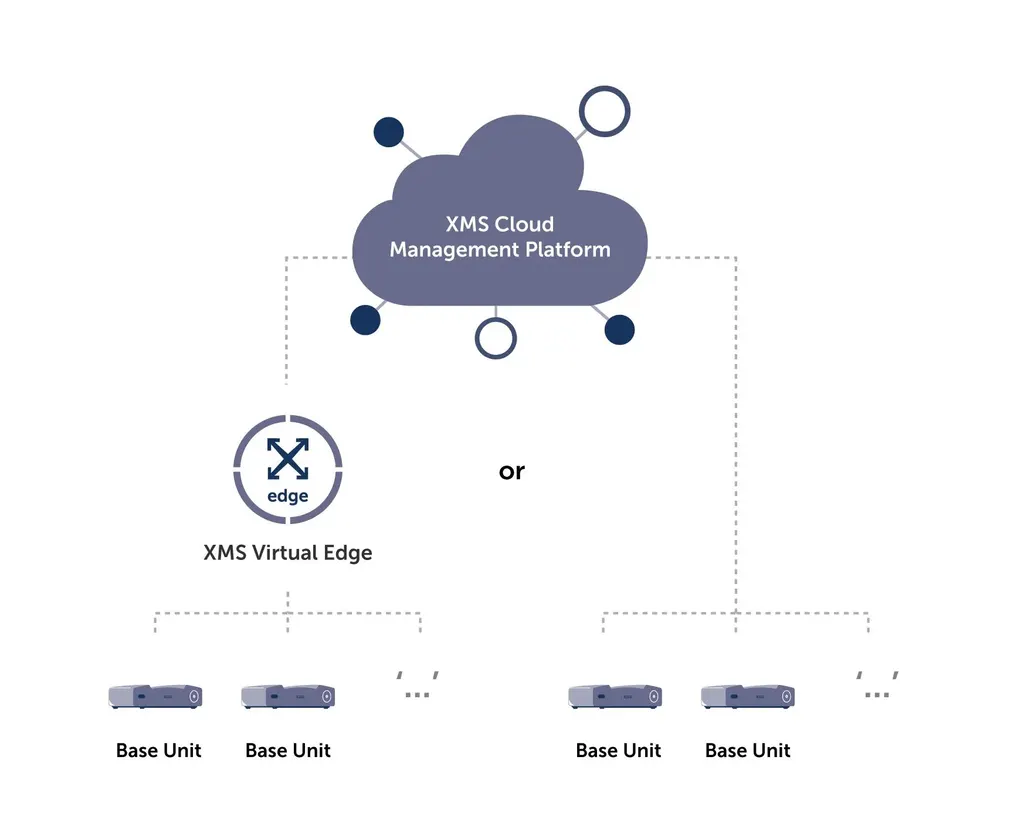
The Barco XMS Virtual Edge is a software gateway that connects a company's ClickShare units to the XMS Cloud Management Platform. It is supplied as a free software download and installed inside the IT network, giving IT teams one place to configure devices, check their health, schedule firmware updates and receive alerts. It suits Doha organisations that run many ClickShare units across several sites.
What the XMS Virtual Edge does
The Barco XMS Virtual Edge is a software gateway that links your ClickShare wireless collaboration units to the XMS Cloud Management Platform. Cloud management requires a gateway inside the company IT network, and this software fills that role. It is provided as a free software download in OVA file format and is installed within your own IT environment. It also covers wePresent units, so a mixed estate can be managed from one console.
Central control of every Base Unit
With the gateway in place, IT managers can securely access and configure Base Units, check their health status and apply the latest firmware with a few clicks. Units spread across several buildings or locations can be monitored without visiting each room. Because updates can be scheduled after office hours, the team can patch devices without interrupting meetings during the working day.
Notifications by email, text message and on the dashboard report device status as it changes. A fault can be investigated and fixed before the people in a meeting room notice it. Real-time information on every wireless collaboration device also gives IT a clearer view of the Digital Workplace, supported by analytics.
Where it fits in Qatar
Several kinds of organisation in Qatar run large ClickShare estates that are hard to manage room by room:
- Government ministries with meeting rooms across several towers in West Bay, where one IT team needs to keep every room current.
- Universities and training centres in Education City, with teaching spaces in multiple buildings that must stay available through the academic day.
- Hospital and clinic groups with sites in Doha and Al Rayyan, where early alerts help staff resolve a faulty device before a clinical or administrative meeting is affected.
What to plan before deployment
Because the gateway runs inside your network, agree the deployment with your network team before the quotation is approved. Decide where the OVA file will run, how the gateway will reach the XMS Cloud Management Platform, and which Base Units will be enrolled. The manufacturer describes the gateway as secure and designed for 24/7 operation, but confirm the technical requirements for your own site during the quotation. The gateway manages units; it does not replace the ClickShare hardware itself. SmartRooms Qatar offers a free site survey, which is a practical way to list the rooms and units involved.
Request a quote
If you manage ClickShare units across more than one site, send us the number of Base Units and their locations. SmartRooms Qatar usually responds to quotation requests within one working day. We supply the product, deliver to all eight municipalities of Qatar and can arrange professional installation. Government buyers can issue a purchase order (LPO) or work through a tender, and payment can be made by bank transfer, cheque or purchase order. Products are covered by the manufacturer's warranty. Request a quote today and our team will confirm the scope with you.
Highlights
- Software gateway to the XMS Cloud Management Platform
- Free software download, delivered as an OVA file
- Manages ClickShare and wePresent units from one place
- Remote configuration, health checks and firmware updates
- Firmware updates schedulable after office hours
- Email, text and dashboard notifications for device status
Room fit
Tell us the room size and platform (Teams, Zoom or BYOD) and we confirm the right combination with your quotation.
Estimated timeline
Quotation within 1 working day · delivery timing depends on stock availability, and we confirm it with your quotation.
Specifications
Source: manufacturer · checked Oct 2026
The full specification and datasheet for this model are available on request; we send them with your quotation.
Downloads
2 files from the manufacturerQuestions about XMS Virtual Edge
What is the Barco XMS Virtual Edge and who is it for?
The XMS Virtual Edge is a software gateway that connects ClickShare wireless collaboration units to the XMS Cloud Management Platform. It suits IT managers who look after a large installation of ClickShare Base Units spread across several buildings or sites. If your organisation has only a handful of meeting rooms in one building, cloud management may not justify a gateway, so review the size of your estate before you request a quote.
Is the XMS Virtual Edge a hardware device or software?
It is software. The manufacturer supplies the XMS Virtual Edge as a free software download in OVA file format, which is installed inside your IT network. It does not replace ClickShare Base Units, which remain the hardware in each meeting room. The gateway provides the route through which those Base Units are managed from the cloud platform, so the hardware and the gateway work together.
Is the gateway software free, and what else should the quotation cover?
The manufacturer offers the XMS Virtual Edge as a free software download. Its value depends on the ClickShare units it will manage, so the quotation should cover the Base Units, any hardware you need and professional installation. Ask the SmartRooms Qatar team to list each item clearly so your purchase order matches the scope agreed on site.
Which devices does the XMS Virtual Edge manage?
The gateway manages ClickShare units and wePresent units within your company network. Through it, IT managers can securely access and configure Base Units, check their health status and apply firmware updates from one place. Organisations with mixed estates, where both ClickShare and wePresent devices are in use, can keep these units under one management view.
How does the gateway connect my network to the cloud platform?
The XMS Cloud Management Platform needs a gateway installed in the company IT network, and the XMS Virtual Edge serves that purpose. Once it is in place, IT staff can reach all connected Base Units through the cloud platform. Before deployment, agree with your network team where the OVA file will run and how the gateway will reach the platform. Confirm these requirements during the quotation.
Can updates be scheduled so that office meetings are not interrupted?
Yes. Firmware updates can be scheduled to run after office hours, so meeting rooms are not taken out of use during the working day. For a Doha office team that works Sunday to Thursday, setting the update window for the evening after closing keeps rooms ready for the next morning's meetings. The most recent firmware can be applied to Base Units with a few clicks.
How will the IT team know when a device has a fault?
Alerts arrive by email, by text message or on the dashboard. This lets the team start troubleshooting early, sometimes before a meeting room user has reported a problem. At a training centre with several busy classrooms, for example, a fault in one room can be fixed before the next course session begins.
Is it suitable for a government ministry with meeting rooms in West Bay?
Yes, if the ClickShare units are spread across several towers or floors in West Bay. One IT team can monitor every Base Unit, receive alerts from each floor and schedule firmware updates after office hours. Spreading updates this way means technicians do not need to enter every room during official working hours.
How could a university in Education City use this gateway?
A university campus in Education City may have lecture halls, seminar rooms and research spaces in several buildings, each with ClickShare Base Units. The XMS Virtual Edge lets the IT team check the health of every unit from one place and schedule updates for after teaching hours. Alerts help the team fix faults before the next lecture or group meeting begins.
What should a hospital group in Doha or Al Rayyan plan before installing it?
Start with an inventory of the meeting and conference rooms that use ClickShare at each site. Then agree with the network team where the OVA file will be hosted and how the gateway will reach the XMS Cloud Management Platform. The manufacturer describes the gateway as secure and designed for 24/7 operation, but confirm the technical requirements for each site during a free site survey from SmartRooms Qatar.
Can SmartRooms Qatar supply this through a government tender or an LPO?
Yes. SmartRooms Qatar supplies government and public sector buyers through purchase orders (LPOs) and government tenders, including those published on Monaqasat. Payment can be made by bank transfer, cheque or purchase order. Because the gateway is a software download, your tender should list the ClickShare Base Units, installation and any other items separately so the award matches your needs.
Is it suitable for a school group with ClickShare units across several campuses?
Yes. A school group running ClickShare units across several campuses in Al Wakrah or Al Sadd can manage every room from one IT team. Updates can run after school hours, and notifications show when a unit in a classroom or hall needs attention. Ask for a free site survey to list each campus and its Base Units before you request a quote.