





Thursday, 22 October 2026 · 11 Jumada I 1448 AH Sun – Thu · 9:00 – 18:00
+971 56 914 9477 العربية
WhatsApp

VS20

BenQ InstaShow VS20 Wireless Presentation System for Hybrid Meetings

WhatsApp
Priceon request
QuotationWithin 1 working day
DeliveryConfirmed with your quote, based on stock
PDFDownload datasheet (VS20_UM_AR_240327093909.pdf)
Overview

BenQ InstaShow VS20 is a wireless presentation system for medium to large meeting rooms. It pairs a button microphone with a host unit so presenters can share native 4K content from laptops, phones and tablets, while up to 32 paired microphones pick up voices across the room. WPA2 and AES128 encryption keep its wireless network separate from the company intranet. It suits hybrid boardrooms and lecture halls in Doha.

What the VS20 does in a hybrid meeting room

The BenQ InstaShow VS20 is a wireless presentation system for medium to large rooms where some people sit at the table while others join from elsewhere. A host unit connects to the display and video bar, and button transmitters let each presenter share content and speak without running cables across the room. It is built for hybrid meetings rather than a single laptop-to-screen link.

Microphones that cover a long table

Each button microphone uses a four-way voice reception design and picks up voices clearly within a 1.5 m radius. The system supports up to 32 paired microphones, so the number you need depends on how people are seated. Transmission distance is rated up to 20 m. A Mute key on each button lets a presenter silence an individual microphone with a single press, which helps keep sessions focused.

Native 4K sharing for several presenters

Native 4K transmission keeps fine text, chart detail and video smooth on the display. Laptops, smartphones and tablets running Windows or iOS can connect, and BYOD sharing uses AirPlay on iOS and macOS or Miracast on Windows. Up to 32 simultaneous connections are supported, and split-screen mode lets up to four presenters share one screen. Touchback support lets the presenter at the display use its touchscreen without returning to the laptop.

Security and network planning

The VS20 uses WPA2 with AES128 encryption and router-level internal channel isolation. It creates a standalone wireless network with an embedded firewall, so presentation traffic does not need to join your company intranet. It operates on 2.4 GHz and 5 GHz using Wi-Fi 5, with a combined AC1200 rate of 300 Mbps on 2.4 GHz and 867 Mbps on 5 GHz. The high-encryption mode applies to wireless presentation only, not video conferencing, so IT teams should review the conferencing path during planning.

Where it fits in Qatar

  • Boardroom in West Bay or Lusail: some directors attend in the room while others join from branch offices, and presenters share papers from their own devices.
  • Lecture hall in Education City: lecturers and student presenters share slides from their laptops, while microphones pick up questions from nearby seats.
  • Training room in Msheireb: several departments present side by side in split-screen mode during a single session.

Planning the installation

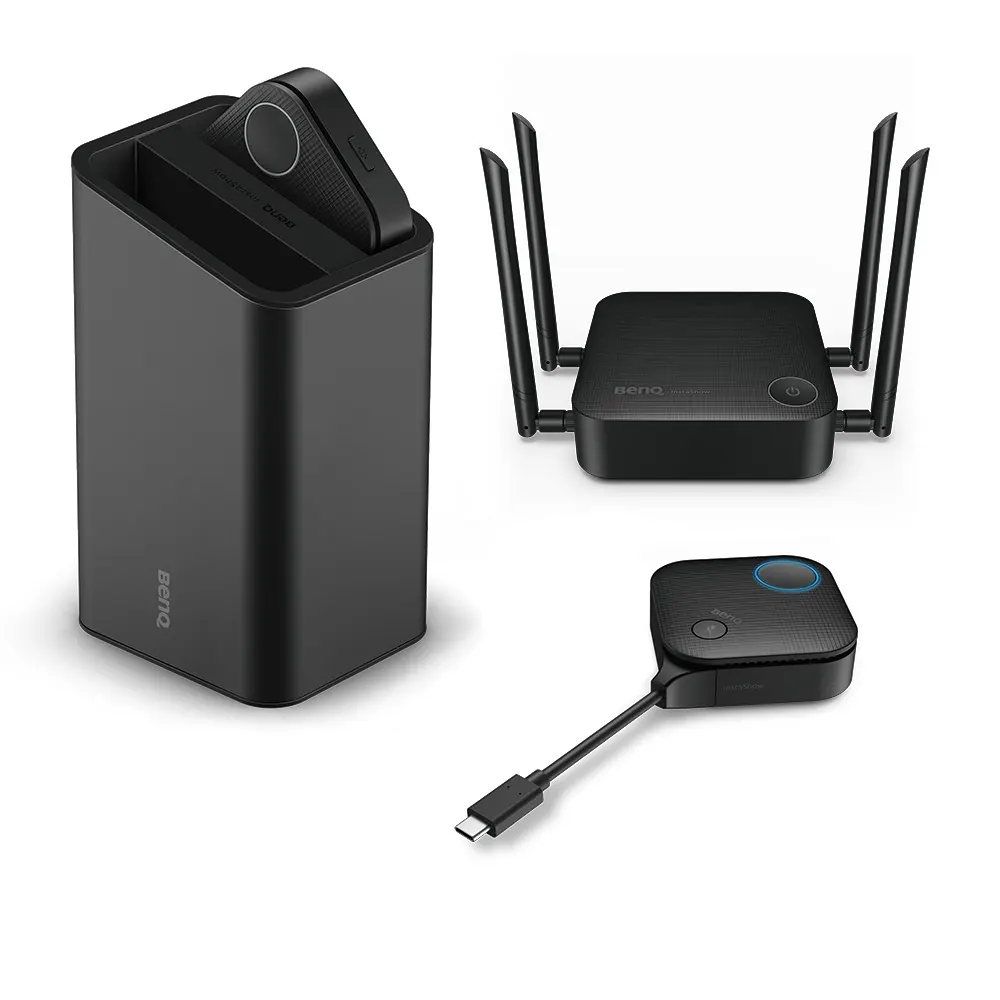
The host measures 145 x 145 x 46 mm without its antenna and weighs 348 g. The cradle measures 85 x 98 x 170 mm and weighs 630 g. The package includes two buttons, four 5 dBi MIMO antennas, a host, a cradle, an HDMI cable and a power adapter. The host runs on a 12 V DC supply rated at 3 A and draws 11 W in normal operation. The data provided does not include an operating temperature range, so confirm room conditions with the SmartRooms Qatar team and keep the host indoors, away from entrances and windows. A free site survey helps place antennas and microphones before the room is fitted out.

Request a quote from SmartRooms Qatar with your room size, seating layout and devices, and we will respond with a quotation usually within one working day. We supply and deliver to all eight municipalities of Qatar, arrange professional installation, and accept LPOs and government tenders. Products are covered by the manufacturer's warranty.

Highlights

  • Native 4K transmission for slides, infographics and video
  • Up to 32 paired button microphones, 1.5 m pickup per microphone
  • Transmission distance up to 20 m for medium to large rooms
  • WPA2 and AES128 encryption with router-level channel isolation
  • Connects laptops, smartphones and tablets running Windows or iOS
  • Split screen for up to four presenters, with touchback support

Room fit

Tell us the room size and platform (Teams, Zoom or BYOD) and we confirm the right combination with your quotation.

Estimated timeline

Quotation within 1 working day · delivery timing depends on stock availability, and we confirm it with your quotation.

Specifications

26 specifications · Source: manufacturer · checked Oct 2026
InstaShow Package7
Button (Transmitter)
(x2)
Antenna
(x4), 5dbi, MIMO
HDMI cable
(x1)
Cradle
(x1)
Safety Statement
(x1) 16L
Host (Receiver)
(x1)
Power Adapter
(x1)
InstaShow Button2
Button Connector Type
HDMI w/ USB Type A, USB Type C
Button Function Key
Microphone Key, Split Screen Key
InstaShow Host6
Host Power Supply
3A, DC 12V±10%
Host Normal Power Consumption
11W
LAN (RJ45)
(x1)
HDMI out
(x1)
Host Dimensions without antenna
145x145x46 mm
Host Weight
348 g
InstaShow Cradle2
Cradle Dimensions
85x98x170 mm
Cradle Weight
630 g
InstaShow Features9
Video Outputs
HDMI 2.0 (with HDCP)
Advanced Encryption Standard
AES128
Maximum Output Resolution (Receiver)
Up to 4K 60Hz
WiFi Standard
5
Wireless Frequency
2.4G + 5G
Wireless Data Rate (Maximum)
AC1200 (2.4G 300 Mbps + 5G 867 Mbps)
Simultaneous connections
32
Split Screens (Maximum)
4
WiFi Protected Access
WPA2

Downloads

9 files from the manufacturer

Questions about VS20

Is the BenQ InstaShow VS20 suited to a boardroom in West Bay or Lusail?
Yes, the VS20 is aimed at medium to large boardrooms where some attendees sit in the room and others join remotely. Presenters share native 4K content from a laptop, smartphone or tablet, and button microphones carry each speaker's voice into the video conferencing system through the video bar. Pair it with a display and video bar you already have, and confirm the room size with a free site survey before ordering.
Would the VS20 work in a lecture hall at a university in Education City?
It can, provided the hall is within the system's reach. Each button microphone picks up voices clearly within a 1.5 m radius, the system supports up to 32 paired microphones, and transmission is rated up to 20 m. In a tiered lecture hall, lecturers and student presenters can share slides from their own devices while the microphones pick up questions from seats nearby. Ask for a site survey to plan microphone positions.
How many microphones does one VS20 system support?
The VS20 supports up to 32 paired microphones. Each microphone has a four-way voice reception design and picks up voices clearly within a 1.5 m radius, so the number you need depends on seating rather than room size alone. Each button has a Mute key, letting a presenter silence an individual microphone with one press. Plan one microphone for each seating group, then request a quote for the number of buttons your room requires.
Can staff connect Android phones, or only iPhones and Windows laptops?
The product data lists laptops, smartphones and tablets running Windows or iOS, with AirPlay for iOS and macOS and Miracast for Windows. Android is not listed in that data, so do not assume support for Android devices. If your staff use Android phones or tablets, ask the SmartRooms Qatar team to confirm compatibility before you request a quote, so the system is chosen against the devices your people really use.
How secure is the wireless presentation network for confidential meetings?
The VS20 uses WPA2 with AES128 encryption and router-level internal channel isolation. It runs a standalone wireless network with an embedded firewall, so presentation traffic does not need to join the company intranet. The manufacturer notes that its high-encryption mode applies to wireless presentation only, not video conferencing, so IT teams should review the conferencing path during planning before using it for sensitive board papers.
How does the VS20 connect to a video bar and camera?
Connect the host to the display through its HDMI output, then connect the display and video bar to the host so the room's video conferencing system is integrated. The VS Assist app brings the video bar, camera and screen sharing onto the same network, so local attendees and remote participants both see shared content. The host also has one LAN port. Confirm your video conferencing platform with the SmartRooms Qatar team when you request a quote.
Can several presenters in a government training room share in one session?
Yes. Up to 32 simultaneous connections are supported, and split-screen mode lets up to four presenters share content on one screen. This suits a training session in a ministry office in Msheireb, where several departments present slides side by side or take turns. Touchback support lets the presenter at the display use its touchscreen without switching back to a laptop, which keeps the session moving.
What should we plan for when placing the host and antennas in a new meeting room?
The host measures 145 x 145 x 46 mm without its antenna and weighs 348 g. The cradle measures 85 x 98 x 170 mm and weighs 630 g. The package includes four 5 dBi MIMO antennas, so plan their position alongside the display and video bar, and keep them clear of metal obstructions. A free site survey from SmartRooms Qatar can confirm placement before the room is built out.
Will the VS20 cope with Qatar summer heat in a meeting room?
The product data provided does not include an operating temperature range, so we cannot state one for the VS20. Install it in an air-conditioned meeting room and ask the SmartRooms Qatar team to confirm the environment before you request a quote. Dust storms are a concern for equipment near windows or open lobbies, so keep the host indoors, away from entrances and windows.
Can a ministry or school buy the VS20 through an LPO or government tender?
Yes. SmartRooms Qatar accepts purchase orders (LPOs) and government tenders, including Monaqasat, and supplies to all eight municipalities of Qatar. Payment can be made by bank transfer, cheque or purchase order. Quotations are usually issued within one working day. Products are covered by the manufacturer's warranty. Request a quote with your room size and the number of microphones you need.

Similar models

Biamp MAX Connect Biamp MAX Connect 910-02278 Wireless Presentation System
CB
Clevertouch CleverCast Clevertouch CleverCast Wireless Presentation Device
Compatible
Clevertouch CleverHub 2 Clevertouch CleverHub 2 Wireless Presentation and Screen Sharing Device
Yes - CleverCast only NRCS
iiyama WP-D002C iiyama WP-D002C USB-C Wireless Presentation Dongle
Wireless presentation
iiyama WP-MEET03M iiyama WP-MEET03M Wireless Presentation Solution
Wireless presentation
Email Call




