





Thursday, 22 October 2026 · 11 Jumada I 1448 AH Sun – Thu · 9:00 – 18:00
+971 56 914 9477 العربية
WhatsApp

VS25

BenQ InstaShow® VS25 Driver-Free Wireless Conferencing System

WhatsApp
Priceon request
QuotationWithin 1 working day
DeliveryConfirmed with your quote, based on stock
PDFDownload datasheet (VS25_VS25 Data Sheet_V1.0_Others_260313084636.pdf)
Overview

The BenQ InstaShow VS25 is a driver-free wireless conferencing system. Presenters and guests share from a laptop with no apps or drivers to install. It outputs 4K at 60fps, reaches 40m between the button and receiver, and handles up to 64 simultaneous connections. BYOM support covers Zoom, Microsoft Teams and Google Meet. It suits Qatari meeting rooms running hybrid meetings with overseas teams.

How the VS25 connects a presenter to the room

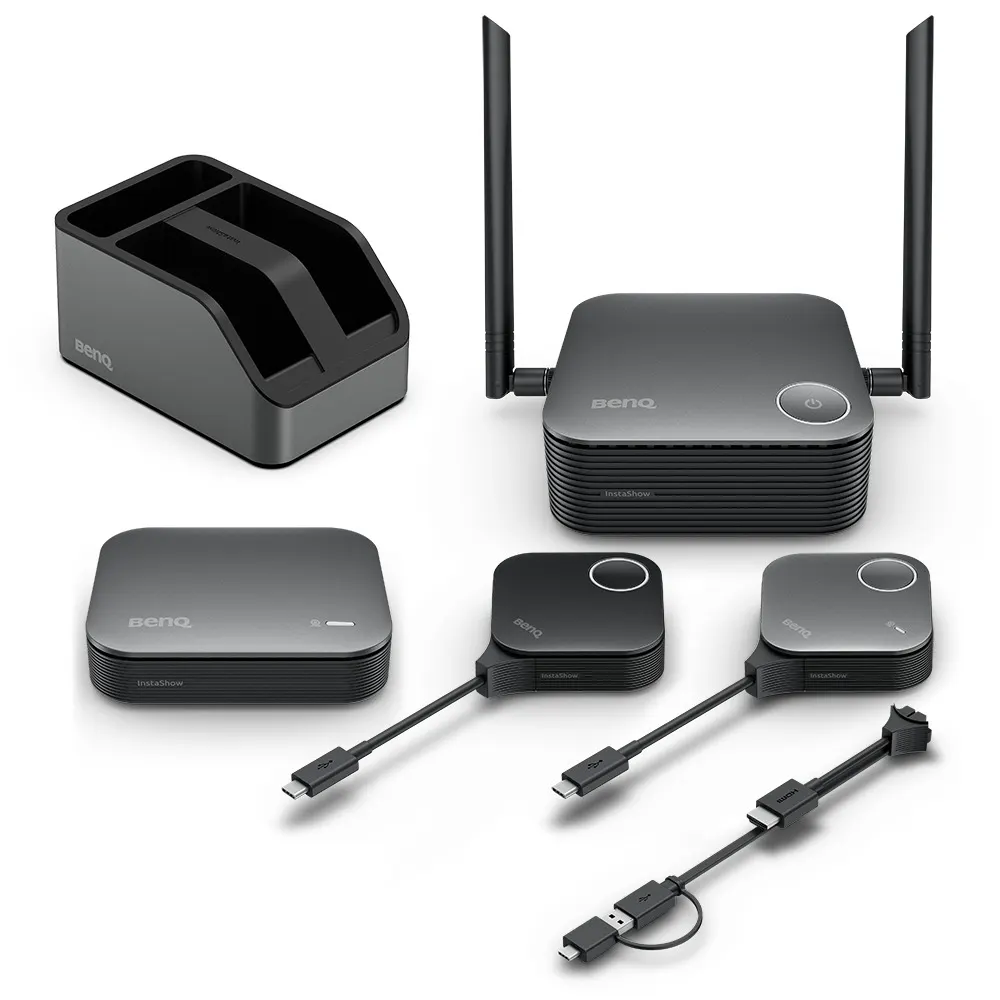
The BenQ InstaShow VS25 is built from three units: a Receiver that connects to the room display, a Button that a presenter plugs into a laptop, and a Multimedia Hub that links cameras, microphones, speakers or a video bar. The Receiver, Hub and Button pair automatically, so there is no network configuration or software to load on the laptop. Once paired, a presenter can share content and start a call on Zoom, Microsoft Teams or Google Meet from the laptop.

Guests can also present by connecting through HDMI or USB-C, with no app or login. Up to four presenters can share on one screen, and a split-screen key on the Button helps switch between them.

Specifications that matter when you plan a room

  • Output: up to 4K at 60fps, with input up to 4K at 30fps.
  • Range: up to 40m between the Button and the Receiver.
  • Capacity: up to 64 simultaneous connections.
  • Wireless: Wi-Fi 6 across 2.4G and 5G bands, with a listed maximum rate of AX3000.
  • Security: AES128 encryption and CVSS 4.0 certification.
  • Video outputs: HDMI 2.0 and DP 1.2, both with HDCP, plus Touchback control.
  • Management: Cloud DMS management is listed, and the manufacturer states remote management is available from Q3 2026.

Where the VS25 fits in Qatar

A government boardroom in Doha with an existing ceiling projector can keep the projector. The separate Receiver and Multimedia Hub connect to it without running extra cables, so the room can host hybrid meetings with colleagues abroad.

A university seminar room in Education City benefits from quick presenter switching. Visiting speakers plug in their own laptops and share without waiting for drivers from the IT team, which keeps sessions on schedule.

A hotel meeting room in West Bay hosting visiting delegates can use the guest-friendly HDMI or USB-C connection, so visitors share from their own laptops without logging in.

What to plan before you order

  • Measure the distance from the presenter's seat to the Receiver, and keep the 40m rating in mind.
  • Check your camera, microphone and speaker connections, since the Multimedia Hub uses USB-C and USB-A ports.
  • Confirm the power arrangement: the Host is rated 3A DC 12V ±10% and draws 15W in normal use.
  • The source data lists no operating temperature range, so confirm the install location with the SmartRooms Qatar team before mounting.
  • Book a free site survey so the kit list matches your room, including the two antennas and cradle in the package.

Request a quote from SmartRooms Qatar with your room sizes, display type and device list. Quotations are usually returned within one working day, and we accept purchase orders (LPOs) for government and school buyers.

Highlights

  • Output up to 4K at 60fps with touchback support
  • Driver-free, app-free setup for presenters and guests
  • Up to 40m between the Button and the Receiver
  • Up to 64 simultaneous connections and four-presenter split screen
  • Wi-Fi 6 dual-band with AES128 encryption and CVSS 4.0 certification
  • BYOM and BYOD support for Zoom, Teams and Google Meet

Room fit

Tell us the room size and platform (Teams, Zoom or BYOD) and we confirm the right combination with your quotation.

Estimated timeline

Quotation within 1 working day · delivery timing depends on stock availability, and we confirm it with your quotation.

Specifications

32 specifications · Source: manufacturer · checked Oct 2026
InstaShow Package9
Button (Transmitter)
(x1)
Antenna
(x2), 2dbi
Cradle
(x1)
Button HDMI cable
(x1)
Host (Receiver)
(x1)
Host Button (Transmitter)
(x1)
Multimedia Hub
(x1)
Power Adapter
(x2)
Cable: HDMI A(M) to A(M)
(x1)
InstaShow Button2
Button Connector Type
USB Type C
Button Function Key
Split Screen Key
InstaShow Host6
Host Power Supply
3A, DC 12V±10%
Host Normal Power Consumption
15W
LAN (RJ45)
(x1)
HDMI out
(x1)
Host Dimensions without antenna
123x123x49.9mm
Host Weight
300 g
InstaShow Cradle2
Cradle Dimensions
84.5x62.5x128mm
Cradle Weight
555 g
InstaShow Features13
Video Outputs
HDMI 2.0 (with HDCP), DP 1.2 (with HDCP)
Advanced Encryption Standard
AES128
Maximum Output Resolution (Receiver)
Up to 1080p 60Hz (USB-C), Up to 4K 60Hz (HDMI)
BYOD
Apple OS/Android/windows
WiFi Standard
6
BYOM
Driver-Free Video conference
Wireless Frequency
2.4G + 5G
Wireless Data Rate (Maximum)
AX3000 (2.4G 574 Mbps + 5G 2400 Mbps)
Simultaneous connections
64
WiFi Protected Access
WPA3 enterprise
TouchBack
Yes
Cloud DMS Management
Yes
U-magnet Bolt Design
Yes

Downloads

9 files from the manufacturer

Questions about VS25

What is the BenQ InstaShow VS25 used for?
The VS25 is a wireless presentation and conferencing system for hybrid meetings. A presenter plugs the Host Button into a laptop, shares content to the room display through the Receiver, and joins a call on Zoom, Microsoft Teams or Google Meet using the room's camera, microphone and speaker. It suits meeting rooms where people arrive with their own laptops and want to start quickly without cables or software installs.
Does the presenter's laptop need drivers or apps?
No. The VS25 is driver-free and app-free, so presenters do not install software before a meeting, and no network setup or IT help is needed. The manufacturer lists support for Windows, macOS, Linux and ChromeOS. Presenters plug in the Button, tap it to share, then select the room camera, microphone and speaker in their video app. Guests can connect over HDMI or USB-C without an app or login.
How far can a presenter sit from the Receiver in a large Lusail boardroom?
The listed transmission distance is up to 40m between the Host Button or Button and the Receiver. For a large Lusail boardroom or conference hall, measure the route from the presenter's seat to the wall where the Receiver will sit, then ask SmartRooms Qatar to check the layout during a free site survey. Walls and building materials can reduce real-world range, so plan with a margin rather than the maximum.
Can it connect to the projector and video bar we already have?
Yes. The source data says the separate Receiver and Multimedia Hub can connect to existing ceiling projectors and mounted video bars and cameras without running additional cables. A government meeting room in Doha that already has a ceiling projector can keep it, with the Receiver feeding the projector over HDMI. Confirm your video bar or camera model with the SmartRooms Qatar team, because compatibility depends on each device.
Which cameras, microphones and speakers work with the Multimedia Hub?
The Multimedia Hub has USB-C and USB-A ports for separate cameras, microphones, speakers or an integrated video bar. BenQ describes broad compatibility with most major brands of cameras, mics, speakers and video bars. Because compatibility is confirmed device by device, list your exact models when you request a quote so the configuration can be checked before ordering.
What resolution does the VS25 support?
The VS25 outputs up to 4K at 60fps and accepts input up to 4K at 30fps. It supports HDCP for protected HDMI content and Touchback control. In a school in Al Wakrah showing high-resolution lesson material on a large interactive display, 4K output keeps small text and diagrams sharp when projected or shown at full size.
How secure is the wireless connection?
The source data lists AES128 encryption and CVSS 4.0 certification for the VS25. Setup needs no network configuration, so IT teams do not have to change office network settings to add the system. For banks or government offices handling sensitive material, ask your IT team to review the setup alongside the manufacturer's security documentation before rolling it out across rooms.
How many people can connect at once?
The VS25 supports up to 64 simultaneous connections, and up to four presenters can share on one screen using the split-screen function. In a training centre workshop in Education City where groups work from their own laptops, this lets the trainer review several team outputs together. The Button has a split-screen key for switching between presenters. Confirm your group size with the SmartRooms Qatar team when planning the layout.
Does it work with Zoom, Microsoft Teams and Google Meet?
Yes. The VS25 hosts wireless videoconference meetings through Zoom, Microsoft Teams and Google Meet, and it supports both BYOM and BYOD workflows. In a Doha office that holds regular calls with teams abroad, staff can use the application they prefer on their laptops while the room camera and audio stay active for the rest of the room.
How does the VS25 compare with the WDC25 and WDC15?
Against the WDC25, both are listed with 40m transmission distance, 64 maximum devices and 4K output, but BYOM support is listed only for the VS25. Against the WDC15, the VS25 offers 40m instead of 15m, Wi-Fi 6 instead of Wi-Fi 5, and BYOD support where the WDC15 is listed as N/A. Choose the VS25 when you need BYOM support in a larger meeting room.
What power does the VS25 need, and does it suit Qatar's supply?
The Host is rated 3A DC 12V ±10%, draws 15W in normal use, and two power adapters are included. The source data does not list the adapter's mains input range, so it cannot confirm operation on Qatar's 240 V, 50 Hz supply with BS 1363 sockets. Ask the SmartRooms Qatar team to confirm the adapter specification before you place an order.
How do we order for a school or a government tender?
Send your room sizes, display type and device list, and SmartRooms Qatar will return a quotation usually within one working day. We supply against purchase orders (LPOs) and government tenders, including Monaqasat, and accept payment by bank transfer, cheque or purchase order. Installation can be arranged after the free site survey, and products are covered by the manufacturer's warranty.

Similar models

Biamp MAX Connect Biamp MAX Connect 910-02278 Wireless Presentation System
CB
Clevertouch CleverCast Clevertouch CleverCast Wireless Presentation Device
Compatible
Clevertouch CleverHub 2 Clevertouch CleverHub 2 Wireless Presentation and Screen Sharing Device
Yes - CleverCast only NRCS
iiyama WP-D002C iiyama WP-D002C USB-C Wireless Presentation Dongle
Wireless presentation
iiyama WP-MEET03M iiyama WP-MEET03M Wireless Presentation Solution
Wireless presentation
Email Call




