





Thursday, 22 October 2026 · 11 Jumada I 1448 AH Sun – Thu · 9:00 – 18:00
+971 56 914 9477 العربية
WhatsApp

WDC15

BenQ InstaShow WDC15 4K UHD Wireless Presentation System

WhatsApp
Priceon request
QuotationWithin 1 working day
DeliveryConfirmed with your quote, based on stock
PDFDownload datasheet (WDC15_WDC15 Datasheet_1_Others_251003133817.pdf)
Overview

The BenQ InstaShow WDC15 is a 4K UHD wireless presentation receiver for huddle rooms and small meeting spaces. Presenters plug a button into their laptop and share the screen without installing apps or drivers, and guests can join the same way. It supports 16 simultaneous connections, WPA3-protected pairing and TouchBack control, suiting offices and training rooms in Doha. Request a quote.

What the WDC15 does in a meeting room

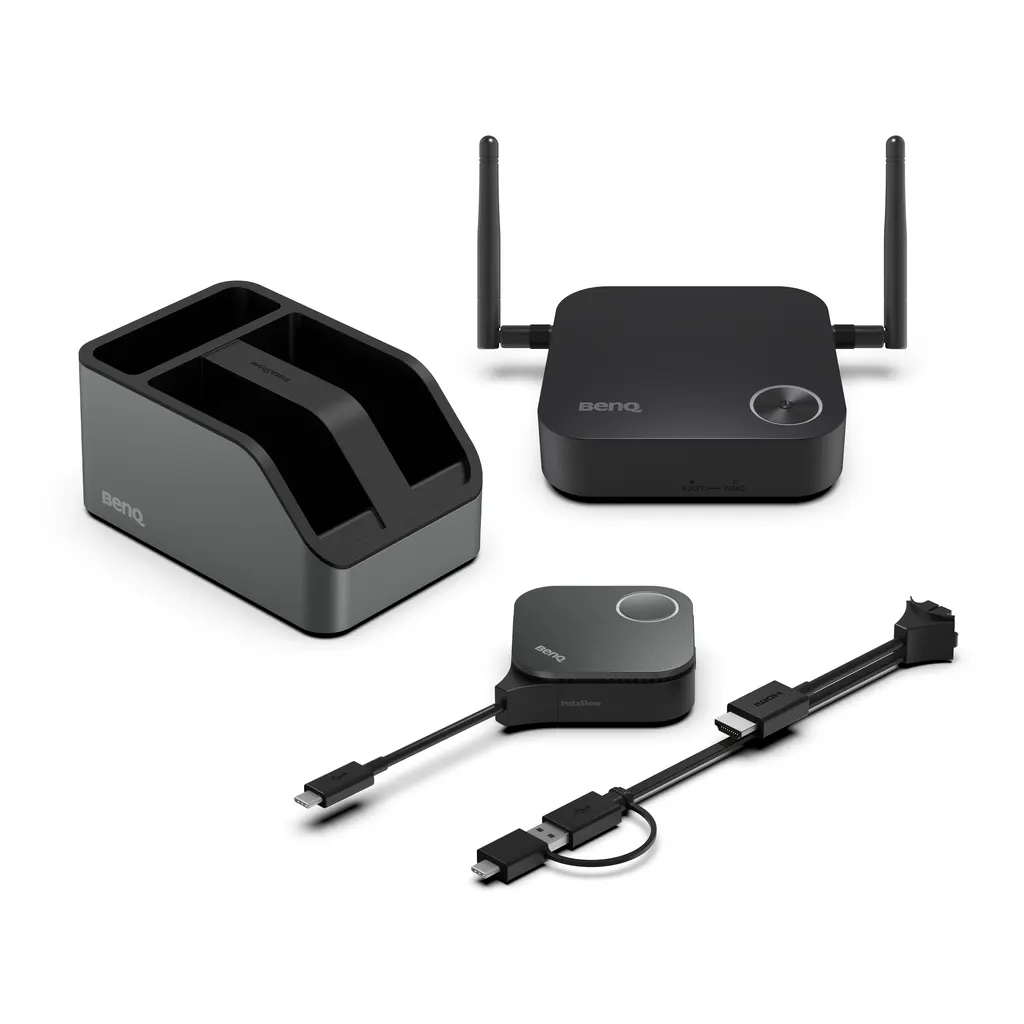
The BenQ InstaShow WDC15 is a wireless presentation kit that shows a laptop screen on a display in 4K UHD with no installation on the presenter's side. It has three parts: a receiver (host) that connects to the screen over HDMI, a button transmitter that plugs into the laptop over USB Type-C, and a cradle for the button. The receiver and button pair automatically, so the setup is a one-time job rather than a routine for every meeting.

The specifications that decide suitability

Check these figures against your room before you commit. The receiver's maximum output is 4K at 30Hz over HDMI 1.4 with HDCP, which suits slides, documents, spreadsheets and standard 4K video rather than fast-moving content. The system supports 16 simultaneous connections, uses WPA3 to protect the link between button and receiver, and applies AES128 encryption. Its wireless link runs on the 5 GHz band, with a Wi-Fi 5 (AC1200) maximum data rate of 867 Mbps on 5G.

  • Receiver: 110 x 110 x 29 mm without antenna, 205 g
  • Cradle: 84.5 x 62.5 x 128 mm, 568 g
  • Receiver power: 5V DC, 2A adapter, 10W normal consumption
  • Ports: one HDMI output and one RJ45 LAN port on the receiver

Where it fits across Qatar

The WDC15 suits rooms where people arrive with different laptops and need to share quickly. Three common cases are:

  • A government office in Msheireb or Doha's Industrial Area, where staff present bilingual documents from their own devices and IT does not install software on visitors' machines.
  • A university seminar room in Education City or a training centre in Al Sadd, where a changing group of presenters shares work in short sessions.
  • A hotel meeting room in West Bay or Lusail, where visiting delegations arrive with a MacBook or Chromebook and expect to present without a login.

What to plan before ordering

Three decisions shape a smooth installation. First, identify the display and its HDMI input, since the receiver connects to the screen by HDMI cable and the package includes HDMI cables. Second, confirm the power arrangement: the adapter's input rating is not listed in the source data, so check it against Qatar's 240 V, 50 Hz mains at quotation. Third, decide whether you need touch control from macOS laptops: the manufacturer notes that macOS TouchBack is a later-availability feature, so confirm its status before depending on it. The source data also gives no operating temperature range, so for lobby or window-facing positions, where summer heat above 45°C is common, confirm the environment with the SmartRooms Qatar team first. Mounting options are not listed either, so agree the receiver's position on a shelf or behind the display before installation. SmartRooms Qatar offers free site surveys, and quotations are usually issued within one working day. Organisations ordering several units can issue an LPO or quote a tender reference with the request.

Request a quote from SmartRooms Qatar for the WDC15, and we will confirm its fit with your display and room before you order.

Highlights

  • 4K UHD output up to 4K 30Hz via HDMI 1.4
  • No apps, drivers or network setup for presenters
  • Supports Windows, macOS, Linux and ChromeOS laptops
  • WPA3 pairing and AES128 encryption
  • 16 simultaneous connections
  • Button connects over USB Type-C; cradle and two antennas included

Room fit

Tell us the room size and platform (Teams, Zoom or BYOD) and we confirm the right combination with your quotation.

Estimated timeline

Quotation within 1 working day · delivery timing depends on stock availability, and we confirm it with your quotation.

Specifications

27 specifications · Source: manufacturer · checked Oct 2026
InstaShow Package8
Button (Transmitter)
(x1)
Antenna
(x2), 2dbi, MIMO
Cradle
(x1)
Safety Statement
(x1)
Button HDMI cable
(x1)
Host (Receiver)
(x1)
Power Adapter
(x1)
Cable: HDMI A(M) to A(M)
(x1)
InstaShow Button2
Button Connector Type
USB Type C
Button Function Key
Mode Key
InstaShow Host6
Host Power Supply
2A, DC 5V±10%
Host Normal Power Consumption
10W
LAN (RJ45)
(x1)
HDMI out
(x1)
Host Dimensions without antenna
110x110x29 mm
Host Weight
205 g
InstaShow Cradle2
Cradle Dimensions
84.5x62.5x128mm
Cradle Weight
568 g
InstaShow Features9
Video Outputs
HDMI 1.4 (with HDCP)
Advanced Encryption Standard
AES128
Maximum Output Resolution (Receiver)
Up to 4K 30Hz
WiFi Standard
5
Wireless Frequency
5G
Wireless Data Rate (Maximum)
AC1200 (5G 867 Mbps)
Simultaneous connections
16
WiFi Protected Access
WPA3
TouchBack
Yes

Downloads

8 files from the manufacturer

Questions about WDC15

What is the BenQ WDC15 used for?
The WDC15 lets people in a room share a laptop screen wirelessly on a display at up to 4K 30Hz. It is aimed at huddle rooms and small meeting spaces where a quick, secure share matters more than a full conferencing setup. The receiver connects to the screen over HDMI, and each presenter pairs a button with their laptop to start sharing.
Do presenters need to install software or drivers?
No. There is no app, driver or network configuration to install on the presenter's side. A presenter plugs the button into a laptop and shares the screen, and guests can do the same without logging in. Windows, macOS, Linux and ChromeOS are supported, and the button is noted as working with Windows, MacBook and Chromebook systems. Confirm your exact laptop models when you request a quote.
How many devices can connect at the same time?
The WDC15 lists 16 simultaneous connections, which suits a workshop or a meeting where several people contribute from their own laptops. Confirm with the SmartRooms Qatar team how you want sharing managed in your room, particularly if a session has more than one active presenter, so the setup matches how your team works.
How secure is the wireless connection?
The button-to-receiver link is protected with WPA3, the data uses AES128 encryption, and the system is certified to CVSS 4.0. Because it runs without software or network setup, presenters do not need access to your corporate network to share. That suits government and banking teams that want to keep sensitive documents off guest networks, though your IT team should review it against its own policies.
Will 4K content play smoothly?
The receiver outputs up to 4K at 30Hz over HDMI 1.4 and supports HDCP-encrypted HDMI content, so protected video from supported sources can be shown. It suits slides, documents, spreadsheets and standard 4K video. Because output is limited to 30Hz, test fast-moving or high-frame-rate material in your room before relying on it for that use.
Can presenters control content from the touch display?
The WDC15 supports TouchBack, so presenters can control content from a touch-enabled display. The manufacturer notes that macOS TouchBack is a later-availability feature, so confirm the current status for macOS laptops before relying on it. For a school or training room with an interactive panel, share the panel model with the team so they can confirm compatibility in the quotation.
Is it suitable for a lobby or a room with windows in Qatar's summer?
The source data gives no operating temperature range for this model, so suitability for hot or dusty spaces cannot be confirmed from its specifications. Summer temperatures above 45°C and dust storms are common across Qatar. Plan it for an air-conditioned meeting room, and ask SmartRooms Qatar to confirm the environment before you order for a lobby or a window-facing position.
Would it suit a government meeting room in Doha?
It suits a small or medium meeting room in a ministry or authority in Doha where staff present bilingual documents from their own devices. Visitors can share without logins, and IT does not need to install software on each visitor's laptop. Confirm the display's HDMI input location and the receiver's position before ordering, so the cabling is planned in advance.
Is it practical for a classroom in Al Rayyan?
It is practical for a classroom or seminar room in Al Rayyan where a teacher and students present from their own laptops during a lesson. A student can start sharing by plugging in the button, with no software to install beforehand. Choose the display size for your room's distance and layout, and confirm the receiver's position so cables reach the screen's HDMI input.
What about a hotel meeting room in West Bay?
It suits a hotel meeting room in West Bay where visiting delegations bring MacBook or Chromebook laptops and expect to present quickly. Guests can share over HDMI or USB-C without logging in, and hotel staff do not need to configure each device. Confirm which laptop types and display inputs your room uses, and request a quote for the receiver and button package.
How much space does the receiver and cradle need?
The receiver measures 110 x 110 x 29 mm without its antenna and weighs 205 g. The cradle measures 84.5 x 62.5 x 128 mm and weighs 568 g. The source data does not list mounting kits, so confirm how the receiver will be fixed, whether on a shelf or behind the display, with SmartRooms Qatar before installation. Free site surveys are available.
What power does it need and is an adapter included?
The host runs on a 5V DC, 2A power supply with ±10% tolerance and uses 10W in normal operation. A power adapter is included in the package. The source data does not state the adapter's input voltage range, so confirm it suits Qatar's 240 V, 50 Hz supply and BS 1363 sockets when you request your quote.

Similar models

Biamp MAX Connect Biamp MAX Connect 910-02278 Wireless Presentation System
CB
Clevertouch CleverCast Clevertouch CleverCast Wireless Presentation Device
Compatible
Clevertouch CleverHub 2 Clevertouch CleverHub 2 Wireless Presentation and Screen Sharing Device
Yes - CleverCast only NRCS
iiyama WP-D002C iiyama WP-D002C USB-C Wireless Presentation Dongle
Wireless presentation
iiyama WP-MEET03M iiyama WP-MEET03M Wireless Presentation Solution
Wireless presentation
Email Call




