





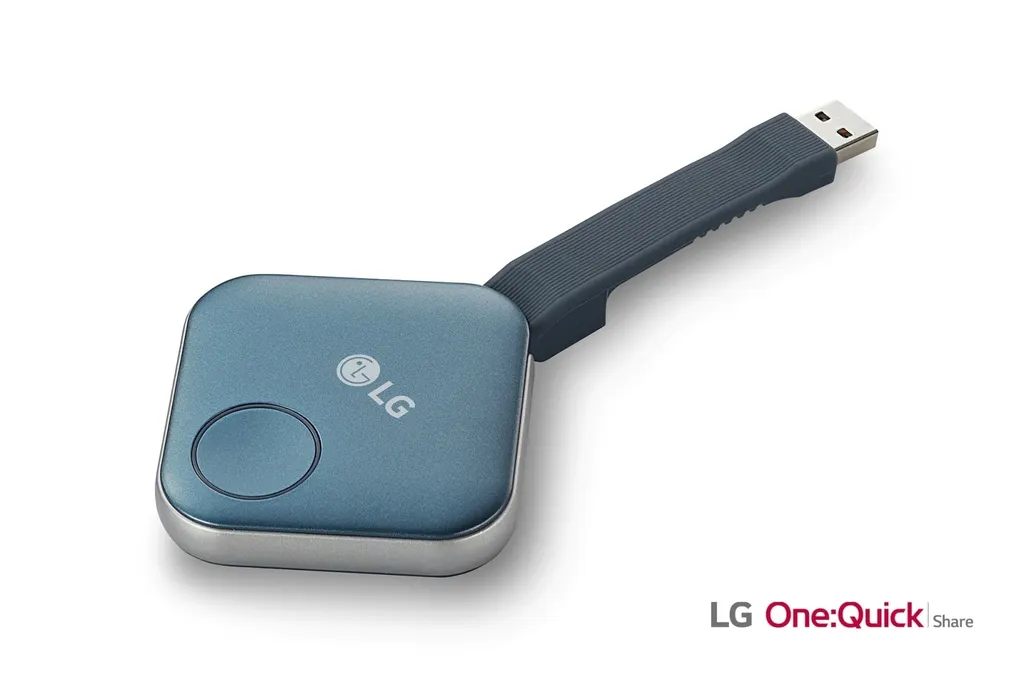
SC-00DA
LG One:Quick Share SC-00DA Wireless Screen Sharing USB Dongle
- Connectivity
- USB 2.0 Type A (1)
Plug the LG SC-00DA USB dongle into a Windows or macOS laptop and its screen appears on a compatible LG signage display, without cables. The One:Quick Share system pairs automatically, shows up to four PC screens at once and needs no separate transmitter. It suits meeting rooms, classrooms and offices in Doha and across Qatar that already run LG signage and want quick, cable-free presentations. Request a quote from SmartRooms Qatar.
What the LG SC-00DA does in a meeting room
The LG SC-00DA is a USB transmission unit for the One:Quick Share wireless presentation system. A presenter plugs it into a Windows or macOS PC and the screen appears on a compatible LG signage display, with no cables or separate transmitter. The link runs over the embedded Wi-Fi of the signage, which uses a SoftAP function, so the dongle and display connect directly.
The dongle carries an IEEE 802.11 a/b/g/n/ac Wi-Fi radio with a maximum range of 30 m, decodes H.264 video and uses a USB 2.0 Type A connector. Its body measures 63.8 × 63.8 × 13.5 mm and weighs 46 g, small enough to keep in a presenter's bag.
Pairing, sharing and display control
Pairing is automatic. Once the dongle is connected to a compatible signage display the two are ready to link, and removing the dongle ends the session. Presenters press the dongle button in different patterns to share their screen, hand over to another presenter or show up to four PC screens side by side on the same display.
Meeting organisers with admin privileges can change the order of split screens, stop a share or pick one screen among those connected. Without a remote control, the PC application can adjust signage defaults such as volume, picture mode and auto brightness, and can edit the agenda, notes and presentation settings shown in Office Meeting Mode.
Compatibility and PC requirements
The manufacturer's compatibility list is dated January 2021 and covers LG standard signage: UH7F at 65, 55 and 49 inches; UH5F (-H) at 65, 55, 49 and 43 inches; UM3DG at 65, 55, 49 and 43 inches; and UL3G at 86, 75, 65, 55, 50 and 43 inches. Because the list is older than many current installations, confirm your exact display with the SmartRooms Qatar team before ordering.
Presenters need a 64-bit PC running Windows 7 SP1, 8, 8.1 or 10, or 64-bit macOS 10.11 to 10.15. The recommended specification is 8 GB or more of memory and an Intel Sandy Bridge i3 or later, Skylake i3, i5 or i6 or later, or AMD Ryzen 1st generation or later processor. Sound sharing works on Windows only.
Where it fits in Qatar
- Government meeting rooms in Doha: several departments present their figures from their own laptops on one display, with the admin controlling the running order.
- Schools in Al Wakrah or Al Rayyan: teachers share lesson material and staff notes from classroom laptops to signage in staff rooms and training halls.
- Hotel and serviced apartment meeting rooms in West Bay or Lusail: visiting teams present from their own PCs without swapping cables during a break.
Planning the installation
The dongle is rated for operating temperatures from 0°C to 40°C and 0% to 85% humidity, with power consumption of 2.0 W typical and 2.5 W maximum. Qatar summers can push outdoor temperatures above 45°C, so keep the dongle in the air-conditioned room with the display, away from direct sunlight and hot cabinets. Confirm the room conditions with the SmartRooms Qatar team.
Measure the distance from the presenter's seat to the display, because the Wi-Fi link is rated to about 30 m. Our team offers a free site survey to check the display model, room layout, cable routing and laptop mix before installation. Quotations are usually issued within one working day, and we accept LPOs and government tenders, with payment by bank transfer, cheque or purchase order.
Request a quote for the LG SC-00DA and tell us your display model, number of rooms and the PC platforms your staff use, so we can confirm compatibility before you order.
Highlights
- Up to four PC screens shown together on one signage display
- Automatic pairing with compatible LG signage through a USB dongle
- Embedded Wi-Fi with SoftAP, no separate transceiver needed
- Admin mode lets the meeting organiser manage shared screens
- Supports Windows 7 SP1 to 10 and macOS 10.11 to 10.15, 64-bit
- Dongle operating range 0°C to 40°C, 0% to 85% humidity
Room fit
Tell us the room size and platform (Teams, Zoom or BYOD) and we confirm the right combination with your quotation.
Estimated timeline
Quotation within 1 working day · delivery timing depends on stock availability, and we confirm it with your quotation.
Specifications
COMPATIBLE MODEL LIST(AS OF JANUARY 2021)1
- Standard Signage
- 65”/ 55”/ 49” UH7F 65”/ 55”/ 49”/ 43” UH5F (-H) 65”/ 55”/ 49”/ 43” UM3DG 86”/ 75”/ 65”/ 55”/50”/ 43” UL3G
ONE:QUICK SHARE5
- User Switching
- Yes
- Split View
- Yes (Max. 4 Screen)
- Admin Mode
- Yes
- Signage Control
- Yes
- Sound
- Windows Only
USB DONGLE HW(SC-00DA)10
- Embedded OS
- Linux
- CPU
- Quad-core Cortex TM -A7
- Internal Memory
- eMMC (4 GB) , DDR3 (512 MB)
- Wi-Fi
- IEEE 802.11 a/b/g/n/ac (Max. 30 m available)
- Video
- H.264
- Connectivity
- USB 2.0 Type A (1)
- Size (W × H × D)
- 63.8 × 63.8 × 13.5 mm / USB cable (85.5 mm)
- Weight
- 46 g
- Power Consumption
- 2.0 W (Typ.), 2.5 W (Max.)
- Operating Temperature / Humidity
- 0℃ to 40℃ / 0% to 85%
RECOMMENDED PC SPECIFICATION3
- Operating System Support
- Windows 7 SP1 / 8 / 8.1 / 10 64 bit macOS 10.11 / 10.12 / 10.13 / 10.14 / 10.15 64 bit
- CPU
- Intel Sandy Bridge i3 (or Later Version) Skylake i3 / i5 / i6 (or Later Version) AMD Rygen 1st Generation (or Later Version)
- Memory
- 8 GB↑




