





Thursday, 22 October 2026 · 11 Jumada I 1448 AH Sun – Thu · 9:00 – 18:00
+971 56 914 9477 العربية
WhatsApp

Wireless Box WB05

MAXHUB Wireless Box WB05 Wireless Presentation Box

WhatsApp
Priceon request
QuotationWithin 1 working day
DeliveryConfirmed with your quote, based on stock
URLDownload datasheet (Wireless Box-WB05-Datasheet)
Overview

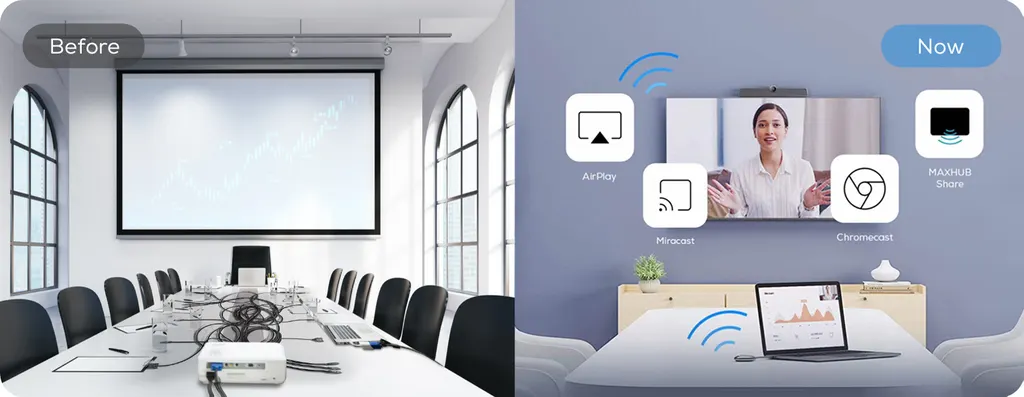
The MAXHUB Wireless Box WB05 turns an existing screen into a wireless meeting display. It outputs 4K Ultra HD at 60Hz with no installation or driver required, supports up to nine split-screen sources, and drives two screens through dual HDMI interfaces. Dual-band Wi-Fi with a 2T2R antenna keeps sharing responsive. It suits medium and large conference rooms, lecture halls and briefing rooms in Qatar that want to upgrade without replacing the display.

What the MAXHUB Wireless Box WB05 does in a meeting room

The MAXHUB Wireless Box WB05 is a wireless presentation box for rooms that already have a display. Connect it to an existing TV, projector or LED screen, and participants can share from laptops, phones or tablets without running cables to the table or installing drivers on the screen. It is built for organisations that want a shared screen working quickly rather than a full room system replacement.

Connection speed, picture quality and wireless performance

The rapid connection is rated at 0.15 seconds, and one click starts screen sharing. The box outputs 4K Ultra HD at a 60Hz frame rate and decodes H.264 video, so presentations and video clips keep their detail on large screens. A dual-frequency Wi-Fi module covering 2.4GHz and 5GHz, combined with a 2T2R high-gain antenna configuration, gives the box two data paths. The manufacturer rates this as twice the data output of single-antenna designs, and it allows internet access to stay active while mirroring.

Showing several sources at once

Nine-way split-screen lets one display show up to nine sources together, which helps when remote participants, slides and a working document all need to be visible. Dual HDMI interfaces support dual-screen output, so a room with a main display and a secondary screen can show different content. Extended screen mode keeps files on the large display while private windows such as email stay on the presenter's own device.

Where it fits in Qatar

  • Medium and large conference rooms in Msheireb or West Bay, where several departments share one boardroom screen and visitors arrive with their own laptops.
  • Lecture halls and training rooms at a university or training centre in Education City or Al Sadd, where lecturers move between laptop slides and tablet notes.
  • Briefing rooms at a ministry or energy company in Doha, where a Sunday to Thursday briefing needs a screen running within seconds and no staff member has to handle cables.

What to plan before ordering

Confirm the display in each room before you buy. The manufacturer lists compatibility with TVs, projectors, LED screens and video walls, but some features depend on the specific display, so send your model to the SmartRooms Qatar team for checking. The box is listed with a PoE power supply and clean wiring, so ask whether the switch in your comms room can power it, and plan the HDMI cable route to the display and the antenna position.

Managing several rooms from one place

For a school, hotel or property developer with several rooms, the centralised management system provides one back-end for content distribution, corporate messages and welcome screens across rooms and devices. Scheduled power on and off can switch displays off after hours, which supports energy-saving. Presenters can also run their preferred conferencing application on a laptop and control compatible BYOM-enabled room hardware wirelessly.

To plan a single room or a multi-room rollout, request a quote from SmartRooms Qatar. Our team can carry out a free site survey, check compatibility with your current display, and send a quotation, usually within one working day.

Highlights

  • Rapid wireless connection rated at 0.15 seconds
  • 4K Ultra HD output at 60Hz with H.264 decoding
  • Nine-way split-screen for showing several sources
  • Dual HDMI interfaces for dual-screen output
  • Dual-band 2.4GHz and 5GHz Wi-Fi with 2T2R antenna
  • Centralised management with scheduled power on and off

Room fit

Tell us the room size and platform (Teams, Zoom or BYOD) and we confirm the right combination with your quotation.

Estimated timeline

Quotation within 1 working day · delivery timing depends on stock availability, and we confirm it with your quotation.


Specifications

Source: manufacturer · checked Oct 2026
The full specification and datasheet for this model are available on request; we send them with your quotation.

Downloads

2 files from the manufacturer

Questions about Wireless Box WB05

What is the MAXHUB Wireless Box WB05 used for?
It is a wireless presentation box that turns an existing TV, projector or LED screen into a shared meeting display. Participants connect from a laptop, phone or tablet and share content without cables to the table. It suits medium and large conference rooms, lecture halls and briefing rooms in Qatar where a display is already installed.
Do users need to install software or drivers to share?
No installation or driver is required, according to the manufacturer's data. Screen sharing starts with one click, and the box supports multi-protocol connections, so laptops and mobile devices can connect. Mirroring from a phone or tablet works without copying files to a dedicated computer, which saves time when visiting teams arrive with different devices and short meeting slots.
How quickly does a connection come up?
The rapid connection is rated at 0.15 seconds. That speed matters in a briefing room where a presenter has only a few minutes before the next session. Combined with one-click screen sharing, the first slide appears without anyone plugging in a cable, which keeps the session moving.
Does it output 4K and how does it handle video?
Yes. The box outputs 4K Ultra HD with a 60Hz high frame rate display, and it uses H.264 decoding for smooth motion from one scene to the next. In a lecture hall in Education City or a boardroom in West Bay, presenters can play training clips or recorded lectures at high resolution while keeping the motion smooth.
Can one screen show several sources at once?
It supports nine-way split-screen, so one display can show up to nine sources in a single layout. This suits multi-party conferences where remote participants, slides and a document must be visible together. Dual HDMI interfaces also allow dual-screen output, so a room with a main display and a secondary screen can show different content.
Which displays is it compatible with?
The manufacturer lists compatibility with mainstream conference display devices, including TVs, projectors, LED screens and video walls. Some features depend on the specific display, so send your model to the SmartRooms Qatar team before ordering and we will check the setup against your room.
Will it work with our existing video conferencing software?
The WB05 is described as a BYOM processor. Presenters can use their own conferencing software on a laptop and control compatible in-room BYOM-enabled conferencing infrastructure wirelessly. This suits a Doha company whose meeting rooms already have a conferencing system but whose staff bring different laptops to each meeting. Confirm your room's system with our team before purchase.
Can a presenter show a report without exposing private emails?
Yes. Extended screen mode lets the large display show files while the presenter's own screen keeps private information such as emails out of view. Application window sharing also lets a presenter share a single window rather than the whole desktop, which is useful in a government briefing room in Doha where correspondence must stay private.
How would a multi-room site such as a hotel or developer manage several screens?
The centralised management system gives one back-end for multiple meeting rooms and displays, including content distribution and welcome screens. Scheduled power on and off can switch displays off in rooms that are not in use, supporting energy savings. A serviced apartment or sales gallery in Lusail with several rooms can keep settings consistent from a single point.
Does it need a separate power adaptor and how is it wired?
The manufacturer lists a PoE power supply and clean wiring among its features. This means the box may be powered over the network cable rather than a separate adaptor, provided your network switch supports PoE. Ask the SmartRooms Qatar team to confirm your comms room switch before ordering, and plan the HDMI cable run to the display.
How does the dual-band Wi-Fi help in a busy building?
The module supports 2.4GHz and 5GHz dual-frequency Wi-Fi with a 2T2R high-gain antenna configuration, which the manufacturer rates at twice the data output of single-antenna designs. Internet access can stay active while mirroring. In a busy office tower or a hotel near Hamad International Airport, where many devices share one network, that extra capacity helps keep sharing clear.
How do we order for several rooms with a purchase order?
Send your room list and display models to SmartRooms Qatar, and we will return a quotation, usually within one working day. Purchase orders (LPOs) and government tenders, including Monaqasat, are supported, and payment can be made by bank transfer, cheque or purchase order. Products are covered by the manufacturer's warranty, and a free site survey can be arranged before installation.

Similar models

Biamp MAX Connect Biamp MAX Connect 910-02278 Wireless Presentation System
CB
Clevertouch CleverCast Clevertouch CleverCast Wireless Presentation Device
Compatible
Clevertouch CleverHub 2 Clevertouch CleverHub 2 Wireless Presentation and Screen Sharing Device
Yes - CleverCast only NRCS
iiyama WP-D002C iiyama WP-D002C USB-C Wireless Presentation Dongle
Wireless presentation
iiyama WP-MEET03M iiyama WP-MEET03M Wireless Presentation Solution
Wireless presentation
Email Call


