





Thursday, 22 October 2026 · 11 Jumada I 1448 AH Sun – Thu · 9:00 – 18:00
+971 56 914 9477 العربية
WhatsApp

Wireless Dongle WT13

MAXHUB Wireless Dongle WT13 4K Wireless Screen Sharing Dongle

WhatsApp
Priceon request
QuotationWithin 1 working day
DeliveryConfirmed with your quote, based on stock
PDFDownload datasheet (Wireless Dongle-WT13M-Datasheet.pdf)
Overview

The MAXHUB Wireless Dongle WT13 is a plug-in screen sharing dongle for MAXHUB displays. It connects through a Type-C interface with DisplayPort output, supports 4K mirroring, and needs no drivers or cables to the screen. Up to eight wireless devices can connect at once, and NFC tap-to-share is built in. It suits meeting rooms and training areas in Doha and Lusail where presenters move between laptops, tablets and phones.

What the WT13 dongle does in a meeting room

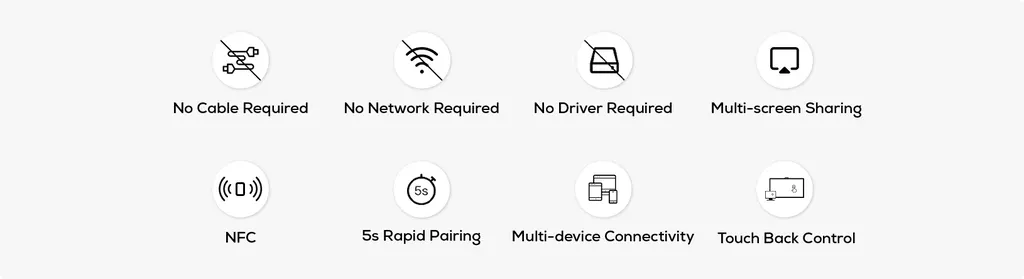
The MAXHUB Wireless Dongle WT13 is a compact screen sharing dongle built for MAXHUB display systems. A presenter plugs it into a laptop's Type-C port and mirrors the screen to a MAXHUB display in a single tap. There is no cable to the screen, no driver and no software installation, so rooms where people arrive with different devices can start sharing without delay.

Key facts that matter for buyers

The WT13 uses a full-featured Type-C interface with DisplayPort protocol for HD output, and it supports newly upgraded 4K screen mirroring. The manufacturer states that 4K mirroring provides 77% more pixel detail than traditional 1080P hardware encoding, which helps when presenters show spreadsheets, floor plans or design files where small text matters.

Wi-Fi 6 transmission supports higher bitrates for smoother playback during presentations. Channel Spatial Multiplexing is designed to keep the connection stable in busy wireless environments. Up to eight wireless screen mirroring devices can connect at the same time, and sessions can use mirroring, extended or application modes. Touch Back control and pen annotation let the room operator manage the flow of the discussion.

Ways to connect and share

  • NFC one-touch sharing: a presenter taps a phone on the designated NFC area and starts sharing without leaving their seat.
  • Five-second pairing: the manufacturer lists a rapid pair of 5 seconds.
  • BYOM connection: a personal computer can connect to a MAXHUB video conference device, so a visiting presenter can run the meeting from their own machine.

Where it fits in Qatar

In a government ministry meeting room in Msheireb, officials and visiting staff from other departments can share documents from their own laptops during Sunday to Thursday sessions, without technicians configuring each machine. At a university training room in Education City, lecturers and guest speakers can share from any device within seconds, which suits short workshops with changing presenters. In a hotel conference room in West Bay, event organisers can let several speakers share from phones and laptops during the same session.

What to plan before ordering

Confirm the MAXHUB display the dongle will pair with, since the WT13 is designed for MAXHUB displays. Note how many devices will share in a typical session, because the dongle supports up to eight simultaneous connections, and check the building's network arrangements with your IT team. SmartRooms Qatar offers a free site survey to review the room layout and the best positions for the display and connection points before installation. Quotations are usually issued within one working day. For several meeting rooms, we can work under a purchase order (LPO), and we support government tenders, including Monaqasat. Delivery covers all eight municipalities of Qatar, and payment can be made by bank transfer, cheque or purchase order. The product is covered by the manufacturer's warranty.

Request a quote

If you are planning wireless sharing for a meeting room, training room or boardroom in Qatar, request a quote from SmartRooms Qatar with the number of rooms and displays you have. We will confirm compatibility and the right setup for each space.

Highlights

  • 4K screen mirroring over a Type-C interface with DisplayPort protocol
  • No cable, driver or installation required for sharing
  • Up to eight simultaneous wireless screen mirroring devices
  • Wi-Fi 6 transmission with Channel Spatial Multiplexing
  • NFC one-touch sharing from a mobile device
  • Touch Back control and pen annotation supported

Room fit

Tell us the room size and platform (Teams, Zoom or BYOD) and we confirm the right combination with your quotation.

Estimated timeline

Quotation within 1 working day · delivery timing depends on stock availability, and we confirm it with your quotation.


Specifications

Source: manufacturer · checked Oct 2026
The full specification and datasheet for this model are available on request; we send them with your quotation.

Downloads

3 files from the manufacturer

Questions about Wireless Dongle WT13

Is the WT13 suited to a hybrid meeting room in Lusail?
Yes, for hybrid meetings where part of the team sits in Lusail and others join from Doha or abroad. A presenter in the room mirrors a laptop or phone to the MAXHUB display in one tap, and the dongle supports up to eight wireless devices, so several people can take turns sharing. The WT13 covers content sharing; cameras and microphones are separate products. Confirm your room's display and conferencing setup with the SmartRooms Qatar team before the quote is issued.
Does the WT13 need drivers, cables or software installation?
No. The manufacturer describes the WT13 as drive-free, with no device configuration or installation required. It plugs into a Type-C port on the presenter's device, and sharing starts with a single tap. There is no cable between the dongle and the MAXHUB display because the link is wireless. In a ministry or school, this means technicians spend less time preparing each room before a meeting.
How many devices can share to the WT13 at the same time?
The manufacturer states simultaneous connections with up to eight wireless screen mirroring devices. Sessions can use mirroring, extended or application modes, so a team can change the display mode during one meeting. Touch Back control and pen annotation are also supported, which lets the room operator manage who presents and how content is marked up. A boardroom with six senior staff bringing their own laptops sits comfortably within that limit.
Does the WT13 support 4K screen sharing?
Yes. The manufacturer describes newly upgraded 4K screen mirroring and states that it delivers 77% more pixel detail than traditional 1080P hardware encoding. In practice, text in spreadsheets and detail in design files appear sharper. The output runs over a Type-C interface using the DisplayPort protocol. Results depend on the presenter's computer and the MAXHUB display, so make sure both are set to 4K before the meeting.
Which ports does the dongle use, and does it work with Type-A computers?
The WT13 has a full-featured Type-C interface that supports HD output over DisplayPort protocol. The product listing includes a Type-A adapter for computers with USB Type-A ports, and the manufacturer marks USB Type-A compatibility with an asterisk, so the exact conditions should be confirmed before ordering. Tell the SmartRooms Qatar team which laptops in your fleet need the adapter, so the quotation covers every machine.
How does NFC one-touch sharing work in a meeting?
A presenter taps a mobile device on the designated NFC area to connect to the MAXHUB system and start sharing wirelessly. The manufacturer presents this as a way to avoid wasting meeting time and to share without leaving your seat. It suits a guest who wants to show a document quickly without walking to the front of the room. Confirm that the display you plan to use provides the NFC area before ordering.
Can the WT13 be used with displays from other brands?
The WT13 is designed to pair with MAXHUB displays, and the product data does not confirm compatibility with other brands. Do not assume it will work if a room has a screen from a different manufacturer. Ask the SmartRooms Qatar team to check the intended setup before purchase. Organisations that already run MAXHUB displays across several Doha offices may find it simpler to standardise on one ecosystem.
How does the WT13 protect our internal network?
The manufacturer states that the connection is secure and designed to protect internal network security. Pairing with a MAXHUB display creates an automatic networked connection, so presenters do not need to join a separate Wi-Fi network to share. Government and banking IT managers should still review the connection against their organisation's network and access policies before deployment, and SmartRooms Qatar can discuss the setup with your team.
Is the WT13 a good fit for a ministry meeting room in Msheireb?
It can be, for meetings where officials bring laptops or phones and need to share documents quickly. Pairing takes a single tap with no driver to install, which helps when visitors from other departments arrive with different devices. Up to eight devices can connect at once, and presenters can choose how content appears. Many government sessions run Sunday to Thursday, so set up and test the room before the first meeting of the week.
How could a university in Education City use the WT13 for workshops?
For short workshops where guest speakers change often, the WT13 removes the need to swap cables between sessions. Each presenter plugs the dongle into their laptop's Type-C port and mirrors in a single tap, and a Type-A adapter is included for computers with USB Type-A ports. Up to eight devices can share at once, which suits group sessions where several students present together. Confirm the setup for the specific display in the training room before ordering.
Would the WT13 suit a hotel conference room in West Bay?
Yes, for events where several visiting speakers present during the same session. Speakers can mirror from their own laptops and phones without the hotel's technical team configuring each device. Mirror, extended and application modes let organisers decide how content appears on the screen. We recommend that the hotel checks the room's network and display setup during the free site survey before the event.
What should a company in the Industrial Area plan before fitting WT13 in several training rooms?
Start with a list of rooms, the MAXHUB displays already installed or planned, and the number of people who will share in each session. SmartRooms Qatar offers a free site survey to check room layout and the positions of the display and connection points. Quotations are usually issued within one working day. For several rooms, we can work under a purchase order (LPO), and we support government tenders, including Monaqasat. Delivery covers all eight municipalities of Qatar.

Similar models

Biamp MAX Connect Biamp MAX Connect 910-02278 Wireless Presentation System
CB
Clevertouch CleverCast Clevertouch CleverCast Wireless Presentation Device
Compatible
Clevertouch CleverHub 2 Clevertouch CleverHub 2 Wireless Presentation and Screen Sharing Device
Yes - CleverCast only NRCS
iiyama WP-D002C iiyama WP-D002C USB-C Wireless Presentation Dongle
Wireless presentation
iiyama WP-MEET03M iiyama WP-MEET03M Wireless Presentation Solution
Wireless presentation
Email Call


