





TY-WPS1
Panasonic TY-WPS1 PressIT Wireless Presentation System
- Connectivity
- Basic set: Receiver (Board)x 1…
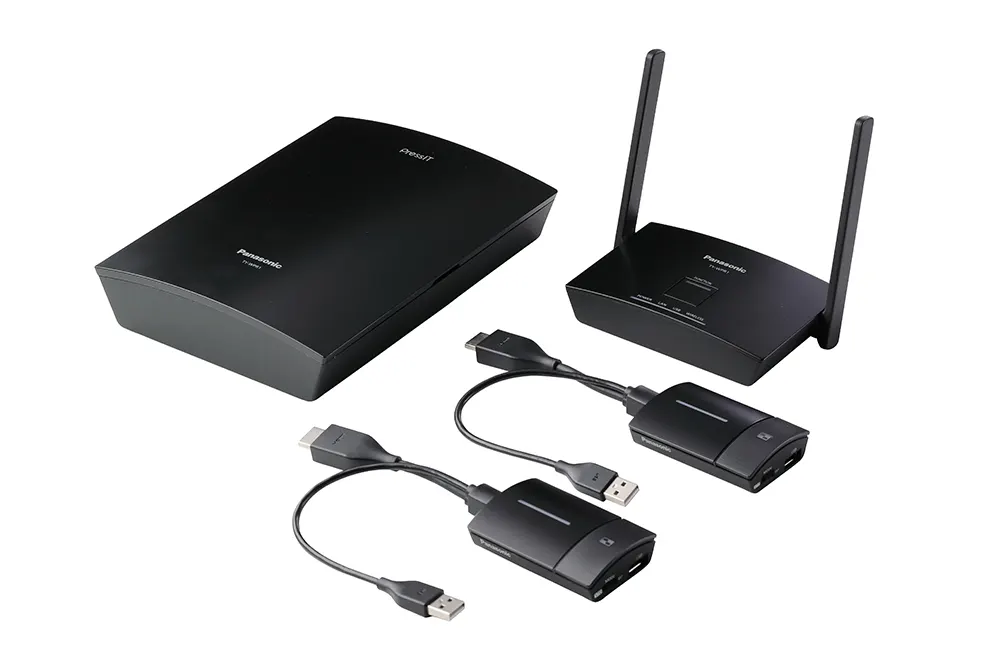
The Panasonic TY-WPS1 PressIT basic set lets presenters share laptop, tablet or phone screens to a display or projector with a single button press, without installing software or drivers. The set includes one receiver box, two HDMI/USB transmitters and a transmitter case. It shows up to four sources on one screen at Full HD and links up to 32 transmitters. Suited to classrooms and meeting rooms across Doha.
What the TY-WPS1 basic set does
The Panasonic TY-WPS1 is a wireless presentation kit from the PressIT range. A receiver box connects to a display or projector, and transmitters travel with the presenters. Once paired, a presenter sends their screen to the room with one press of a button on the transmitter. No software or driver has to be installed, and no network settings need configuring, which keeps set-up short in rooms that change layout or presenter often.
The basic set contains one receiver box, two HDMI/USB transmitters and a transmitter case. Pairing is completed by inserting a USB memory stick or by connecting a transmitter directly to the receiver.
The specifications that matter for your purchase
- Resolution: the receiver box outputs up to 1920 x 1080 at 60p and up to 3840 x 2160 at 30p.
- Sharing: up to four sources on one screen at a time, and up to 32 transmitters connected to one receiver.
- Wireless: 5 GHz band from 5,150 to 5,250 MHz on channels 36, 40, 44 and 48, with up to 867 Mbps at the receiver and 433 Mbps at the transmitters.
- Range and security: up to 30 m between transmitter and receiver with good line of sight, and WPA/WPA2 encryption.
- Power: the receiver box runs on DC 5V/2A, and the HDMI/USB transmitter on DC 5V/0.9A.
Where it fits in Qatar
In a lecture theatre or seminar room at a campus in Education City, the receiver shows the lecturer's slides while student groups share work from their own laptops. Lock Mode, activated by holding the main button for several seconds, keeps the screen from being interrupted during a presentation.
In a boardroom in West Bay or Lusail, the set removes the cable swap at the start of every meeting. Staff connect from phones and laptops, and HDMI-CEC compatibility allows linked control with compatible displays. Wireless Display works directly from Windows PCs and Android devices that support Miracast, but Wireless Display and Multicast cannot be used at the same time.
In a classroom in Al Wakrah or a training room in Doha, the basic set of two transmitters suits small groups. Add transmitters as the number of presenters rises.
What to plan before you order
- Count presenters per room and add transmitters to match, since the basic set includes two.
- Choose a receiver location in air-conditioned space, because its rated operating range is 0 to 35 °C.
- Check that your display or projector supplies 5V 2A USB power, or plan a separate supply.
- Decide whether users need mobile apps, Wireless Display or Multicast, because the last two cannot run together.
The receiver box measures 120 x 26 x 81 mm excluding antenna and weighs about 181 g. The HDMI/USB transmitter measures 51 x 21 x 73 mm excluding cable and weighs about 110 g, with a magnet on its back for easy placement. The set is designed for mounting on a display wall or a projector ceiling mount.
Getting a quote from SmartRooms Qatar
A free site survey confirms cable routes, receiver placement and wireless coverage for your rooms before anything is fixed to a wall. Installation is available, and we deliver to all eight municipalities of Qatar. Universities, schools and government bodies can order by purchase order or LPO, or through Monaqasat tenders. Send us your room list and the number of presenters in each, and request a quote for the TY-WPS1 today.
Highlights
- Single button press shares a presenter's screen to the display
- Shares up to four sources on one screen simultaneously
- Full HD 1920 x 1080 at 60p, with 4K output at 30p
- Up to 32 transmitters connect to one receiver
- 5 GHz 802.11ac wireless, up to 867 Mbps at the receiver
- WPA/WPA2 encrypted wireless transmission, range up to 30 m
Room fit
Tell us the room size and platform (Teams, Zoom or BYOD) and we confirm the right combination with your quotation.
Estimated timeline
Quotation within 1 working day · delivery timing depends on stock availability, and we confirm it with your quotation.
Specifications
General18
- Model No. — TY-WPS1 — TY-WPSC1 — TY-WPR1
- Basic set: TY-SB01WP | Receiver (Box): TY-WP2B1 | Receiver (Board): TY-WPB1 | Transmitter (HDMI/USB): TY-WP2BC1 | Transmitter (USB-C): TY-WPBC1
- Product details — Receiver; (Box) x 1 Transmitter (HDMI/USB) x 2 Transmitter case x 1 — Receiver (Box)x 1 Transmitter (USB-C) x 2 Transmitter case x 1 — Receiver; (Box) x 1
- Basic set: Receiver (Board)x 1 | Receiver (Box): Transmitter (HDMI/USB) x 2 Transmitter case x 1 | Receiver (Board): Transmitter (HDMI/USB) x 1 | Transmitter (HDMI/USB): Transmitter (USB-C) x 2 Transmitter case x 1 | Transmitter (USB-C): Transmitter (USB-C) x 1
- Max. resolution/ Framerate
- Receiver (Box) [TY-WPR1]: 1920 x 1080/60p (max.), 3840 x 2160/30p (max.) | Receiver(Board) [ TY-SB01WP ]: 1920 x 1080/60p (max.), 3840 x 2160/30p (max.) | Transmitter(HDMI/USB) [ TY-WPB1 ]: 1920 x 1080/60p (max.) | Transmitter(USB-C) [ TY-WPBC1 ]: 1920 x 1080/60p (max.)
- Number of simultaneous connections
- Receiver (Box) [TY-WPR1]: 32 | Receiver(Board) [ TY-SB01WP ]: 32 | Transmitter(HDMI/USB) [ TY-WPB1 ]: - | Transmitter(USB-C) [ TY-WPBC1 ]: -
- Number of sources simultaneous on screen
- Receiver (Box) [TY-WPR1]: 4 | Receiver(Board) [ TY-SB01WP ]: 4 | Transmitter(HDMI/USB) [ TY-WPB1 ]: - | Transmitter(USB-C) [ TY-WPBC1 ]: -
- Data Rate — Wired
- Receiver (Box) [TY-WPR1]: 10/100/1000 (Mbps) | Receiver(Board) [ TY-SB01WP ]: 10/100/1000 (Mbps) | Transmitter(HDMI/USB) [ TY-WPB1 ]: - | Transmitter(USB-C) [ TY-WPBC1 ]: -
- Data Rate — Wireless
- Receiver (Box) [TY-WPR1]: 867 Mbps (max.) | Receiver(Board) [ TY-SB01WP ]: 433 Mbps (max.) | Transmitter(HDMI/USB) [ TY-WPB1 ]: 433 Mbps (max.) | Transmitter(USB-C) [ TY-WPBC1 ]: 433 Mbps (max.)
- Frequency band
- 5 GHz band 5,150 MHz - 5,250 MHz 36 40 44 48 Channel
- Wireless Communication Standard
- Receiver (Box) [TY-WPR1]: IEEE802.11/a/n/ac | Receiver(Board) [ TY-SB01WP ]: IEEE802.11/a/n/ac | Transmitter(HDMI/USB) [ TY-WPB1 ]: IEEE802.11ac | Transmitter(USB-C) [ TY-WPBC1 ]: IEEE802.11ac
- Security
- WPA/WPA2
- Reachable distance (Max distance between transmitter and receiver)
- 30m (When the line of sight/wave conditions are good)
- Connection terminal
- Receiver (Box) [TY-WPR1]: HDMI/USB-A (female)/RJ45 (LAN) | Receiver(Board) [ TY-SB01WP ]: HDMI/USB-A (female)/RJ45 (LAN) | Transmitter(HDMI/USB) [ TY-WPB1 ]: HDMI/USB-A (female)/USB-A (male) | Transmitter(USB-C) [ TY-WPBC1 ]: USB-A(female)/USB-C(male)
- Power
- Receiver (Box) [TY-WPR1]: DC 5V/2A | Receiver(Board) [ TY-SB01WP ]: 12V/0.9 A (Display power supply) | Transmitter(HDMI/USB) [ TY-WPB1 ]: DC 5V/0.9A | Transmitter(USB-C) [ TY-WPBC1 ]: DC 5V/0.9A
- Power consumption (During image display)
- Receiver (Box) [TY-WPR1]: 10W | Receiver(Board) [ TY-SB01WP ]: 10W | Transmitter(HDMI/USB) [ TY-WPB1 ]: 4.5W | Transmitter(USB-C) [ TY-WPBC1 ]: 4.5W
- Environment — Operating
- Receiver (Box) [TY-WPR1]: Temperature: 0 °C to 35 °C (32 °F to 95 °F)/ Humidity: 20% to 80% (No condensation) | Receiver(Board) [ TY-SB01WP ]: Temperature: 0 °C to 55 °C (32 °F to 131 °F)/ Humidity: 20% to 80% (No condensation) | Transmitter(HDMI/USB) [ TY-WPB1 ]: Temperature: 0 °C to 35 °C (32 °F to 95 °F)/ Humidity: 20% to 80% (No condensation) | Transmitter(USB-C) [ TY-WPBC1 ]: Temperature: 0 °C to 35 °C (32 °F to 95 °F)/ Humidity: 20% to 80% (No condensation)
- Environment — Storage
- Temperature: -20 °C to 60 °C (-4 °F to 140 °F)/ Humidity: 20% to 80% (No condensation)
- Dimensions (W x H x D)
- Receiver (Box) [TY-WPR1]: 120 x 26 x 81 mm (4.71" x 1.03" x 3.19")(Excluding antenna) | Receiver(Board) [ TY-SB01WP ]: 82 x 25 x 122 mm (3.22" x 0.99" x 4.78") (Excluding antennna) | Transmitter(HDMI/USB) [ TY-WPB1 ]: 51 x 21 x 73 mm (2.0" x 0.8" x 2.86") (Excluding cable) | Transmitter(USB-C) [ TY-WPBC1 ]: 51 x 26 x 73 mm (2.0" x 1.0" x 2.86") (Excluding cable)
- Weight
- Receiver (Box) [TY-WPR1]: Approx. 181 g / 0.4 lbs | Receiver(Board) [ TY-SB01WP ]: Approx. 125 g / 0.3 lbs | Transmitter(HDMI/USB) [ TY-WPB1 ]: Approx. 110 g / 0.3 lbs | Transmitter(USB-C) [ TY-WPBC1 ]: Approx. 110 g / 0.3 lbs




