





Thursday, 22 October 2026 · 11 Jumada I 1448 AH Sun – Thu · 9:00 – 18:00
+971 56 914 9477 العربية
WhatsApp

TY-WPS2

Panasonic TY-WPS2 PressIT Wireless Presentation System, WPS2 Series

WhatsApp
Priceon request
QuotationWithin 1 working day
DeliveryConfirmed with your quote, based on stock
PDFDownload datasheet (TY-WPB2_spec_en.pdf)
Overview

The Panasonic TY-WPS2 PressIT is a wireless presentation kit that mirrors a laptop or mobile screen to a display or projector, with 4K video at up to 30 frames per second from the transmitter. One receiver accepts up to 32 transmitters, and its 6GHz link helps keep nearby rooms from interfering. Suited to classrooms, boardrooms and training rooms across Qatar. Request a quote from SmartRooms Qatar.

What the TY-WPS2 kit includes

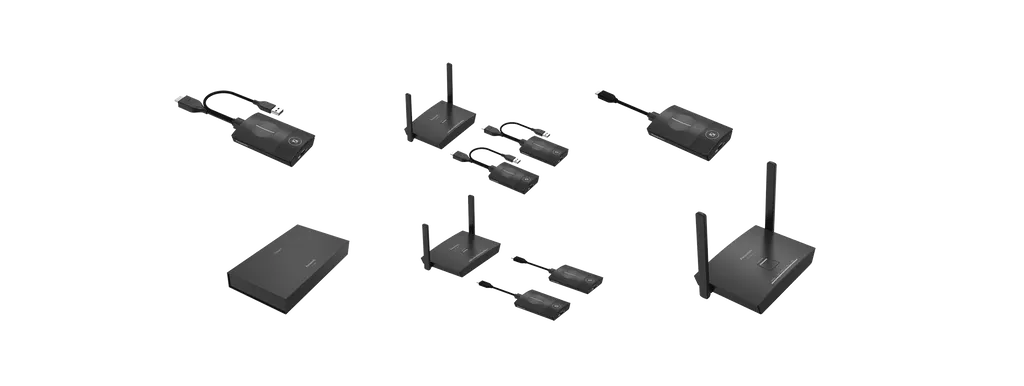
The Panasonic TY-WPS2 is a wireless presentation kit built around a receiver that connects to your display or projector, plus small transmitters that travel with presenters. The basic set contains one box-type receiver, two transmitters with HDMI and USB-A connectors, and one transmitter case. The receiver provides an HDMI output, two USB-A ports and an RJ45 LAN port rated at 10/100 Mbps, and it runs on DC 5 V/2 A. Each transmitter plugs into a laptop and draws DC 5 V/0.9 A.

A board-type receiver is also available for displays and projectors with an Intel SDM specification slot, and a USB-C transmitter version is sold as a separate set. Choosing between these depends on the display you already own or plan to buy.

Wireless performance worth planning around

One receiver accepts up to 32 transmitters at the same time, so each presenter can share without moving seats or running new cables. The system can use 24 channels on the 6GHz band, which helps neighbouring receivers on the same floor avoid interfering with each other. The manufacturer still notes that other radio sources can affect performance and that the product cannot eliminate every interference effect.

The rated reach is 30 m on the 5GHz link with a clear line of sight. The 6GHz figure differs between the manufacturer's documents, so have the SmartRooms Qatar team confirm it against your room layout. Transmitters send 4K video and still images at up to 3840 x 2160 at 30 frames per second, and the receiver outputs up to 3840 x 2160 at 60 frames per second.

  • Shows split-screen images from up to four sources on one display.
  • Multicasts video and audio from one transmitter to up to three receivers without a router.
  • Lock Mode keeps the screen steady during lectures and presentations.
  • HDMI-CEC links display power and input switching when the display supports it.

Where it fits in Qatar

A private school in Al Wakrah fitting out new classrooms can use the TY-WPS2 where teachers move between rooms and need to present from their own laptops or tablets without reconnecting cables. In a boardroom in West Bay or Msheireb, the Teams option sends the PC screen to the room display and to the Teams screen at the same time, which helps hybrid meetings with colleagues abroad. A training centre in the Industrial Area running a 30-person induction can have several trainers share in turn, with Lock Mode preventing interruptions during demonstrations.

What to plan before installation

  • Confirm that your display or projector supports HDMI-CEC if you want automatic power and input switching.
  • Choose the box-type receiver for a desktop or ceiling projector, or the board-type receiver for a compatible display slot.
  • Check the receiver's RJ45 port and network plan with your IT team before mounting.
  • Confirm the operating environment with SmartRooms Qatar, because the specifications provided do not list an operating temperature range.

Teams integration needs a Teams Rooms terminal prepared and pre-configured separately, and it is not part of the kit. Multi-room projects can request a free site survey before the quotation, so receiver positions, display compatibility and cable routes are confirmed in advance.

Send SmartRooms Qatar your room count, display models and Teams requirements, and request a quote for the TY-WPS2 kit that matches your rooms.

Highlights

  • Up to 32 transmitters connect to one receiver at the same time
  • 4K transmit at up to 3840 x 2160, 30 frames per second
  • Multicast to up to three receivers without a router
  • 6GHz band wireless LAN with 24 usable channels
  • Split-screen view of up to four sources on one display
  • HDMI-CEC support for linked power and input switching

Room fit

Tell us the room size and platform (Teams, Zoom or BYOD) and we confirm the right combination with your quotation.

Estimated timeline

Quotation within 1 working day · delivery timing depends on stock availability, and we confirm it with your quotation.

Specifications

19 specifications · Source: manufacturer · checked Oct 2026
General11
Max. resolution/ Framerate
Receiver(TY-WPR2): 1920 x 1080/60p, 3840 x 2160/60pTransmitter(TY-WPB2/WPBC2): 1920 x 1080/60p, 3840 x 2160/30p
Number of simultaneous connections
Receiver(TY-WPR2): 32
Number of sources simultaneous on screen
Receiver(TY-WPR2): 4
Frequency band
2.4GHz band2,401 MHz to 2,483 MHz1/2/3/4/5/6/7/8/9/10/11/12/13 Channel5GHz band5,150 MHz to 5,250 MHz36/40/44/48 Channel6GHz band5,945 MHz to 6,425 MHz1/5/9/13/17/21/25/33/37/41/45/49/53/57/61/65/69/73/77/81/85/89/93 Channel5GHz band5,150 MHz to 5,250 MHz36/40/44/48 Channel6GHz band5,945 MHz to 6,425 MHz1/5/9/13/17/21/25/33/37/41/45/49/53/57/61/65/69/73/77/81/85/89/93 Channel
Wireless Transmission standards
Receiver(TY-WPR2): IEEE802.11 b/a/g/n/ac/axTransmitter(TY-WPB2/WPBC2): IEEE802.11 ac/ax
Security
WPA2/WPA3
Reachable distance (Max distance between transmitter and receiver)
30 m (5GHz)/15 m (6GHz) (When the line of sight/wave connections are good)
Connection terminal - > HDMI™ IN
Receiver(TY-WPR2): HDMITMTransmitter(TY-WPB2): HDMITM
Power
Receiver(TY-WPR2): DC 5 V/2 ATransmitter(TY-WPB2): DC 5 V/0.9 ATransmitter(TY-WPBC2): DC 5 V/0.9 A
Power consumption (During image display)
Receiver(TY-WPR2): 10WTransmitter(TY-WPB2): 4.5WTransmitter(TY-WPBC2): 4.5W
Weight [kg]
TBD
Data Rate2
Wired
Receiver(TY-WPR2): 10/100 (Mbps)
Wireless
Receiver(TY-WPR2): Max. 2.4GbpsTransmitter(TY-WPB2/WPBC2): Max. 1.2Gbps
Connection terminal3
USB TYPE A
Receiver(TY-WPR2): USB-A(female)Transmitter(TY-WPB2): USB-A(male)
USB TYPE C
Transmitter(TY-WPBC2): USB-C(male)
LAN
Receiver(TY-WPR2): RJ45
Mechanical3
Dimension(W)
Receiver(TY-WPR2): 156 mmTransmitter(TY-WPB2): 61.3 mmTransmitter(TY-WPBC2): 61.3 mm
Dimension(H)
Receiver(TY-WPR2): 26 mmTransmitter(TY-WPB2): 19.8 mmTransmitter(TY-WPBC2): 19.8 mm
Dimension(D)
Receiver(TY-WPR2): 97.5 mm (Excluding antenna)Transmitter(TY-WPB2): 87.3 mm (Excluding cable), 297.3 mm (Including cable)Transmitter(TY-WPBC2): 87.3 mm (Excluding cable), 192.3 mm (Including cable)


Downloads

11 files from the manufacturer

Questions about TY-WPS2

Which settings suit the TY-WPS2 best?
The TY-WPS2 suits rooms where many different people present from their own laptops, such as a secondary classroom in Al Wakrah where teachers rotate, or a training room in the Industrial Area where a safety induction has several trainers. Because one receiver accepts up to 32 transmitters, the room does not need new cables for each presenter. It is less suited to a single presenter who always uses the same PC, where a cabled connection may be simpler.
What comes in the standard TY-WPS2 kit?
The TY-WPS2 basic set includes one box-type receiver, two transmitters with HDMI and USB-A connectors, and one transmitter case. The receiver offers HDMI output, two USB-A ports and an RJ45 LAN port rated at 10/100 Mbps, and runs on DC 5 V/2 A. Each transmitter draws DC 5 V/0.9 A. A USB-C transmitter variant is sold as a separate set. Confirm the exact contents and any extra transmitters with SmartRooms Qatar when you request a quote.
Do presenters need to install drivers or software?
No special driver is needed on the presenter's PC, according to the manufacturer. You connect the transmitter and press its button to show the screen on the display. Mobile users need the dedicated PressIT app, available for Android devices and for iOS or iPadOS devices through Google Play and the App Store, to mirror a phone or tablet. Your IT team should approve the app on managed devices before the day of the meeting.
How many presenters and screens can one receiver handle?
One receiver accepts up to 32 transmitters connected at the same time, so a training room of 30 trainees can have several presenters sharing without swapping cables. The receiver can show split-screen images from up to four sources on one display, which helps when a trainer wants to compare two documents side by side. Lock Mode, activated by holding the main button for several seconds, stops the screen being interrupted during a lecture.
Can one presenter's screen go to more than one display?
Yes. Multicast lets one transmitter send video and audio to up to three receivers without a router, which suits a conference hall in West Bay with a main panel and two overflow screens. A router is not required for this, although the system can also run through a commercially available router. Confirm the layout and cable routes with the SmartRooms Qatar team before you buy the extra receivers.
What resolution does it support?
The receiver outputs up to 3840 x 2160 at 60 frames per second, and each transmitter sends 4K video and still images at up to 3840 x 2160 at 30 frames per second. That is enough for 4K slides, video clips and high-definition text on a large display in a boardroom. Image quality also depends on the laptop output and the display, so test a sample source before placing a large order.
Will it switch our display on and select the input automatically?
It can, through HDMI-CEC. When the display or projector supports HDMI-CEC, the TY-WPS2 can link its power on and off and its input switching, so presenters often do not need the display remote. The manufacturer notes that an HDMI-CEC compatible display is required and that control of every device is not guaranteed. Test the specific panel model you own before relying on this feature across several rooms.
How does it work with Microsoft Teams in a meeting room?
When the presenter presses the main button, the PC screen goes to the room display and also appears on the Teams screen, so remote colleagues see the same content. This needs a Teams Rooms terminal prepared separately and pre-configured, which is not included in the TY-WPS2 kit. For hybrid meetings linking teams in Doha with colleagues abroad, plan the Teams Rooms setup with your IT team before installation day.
How secure is the wireless connection?
The manufacturer states that the link is WPA2/WPA3 compliant and that communication between paired transmitters and receivers is encrypted. The transmitter's USB port is used for power only and is not recognised as a storage or external device, which reduces risk when visitors use computers with strict security settings. Your IT security team should still review the network design, because these are manufacturer statements rather than a certification of your environment.
How far can a transmitter be from the receiver?
The datasheets rate reach at 30 m on the 5GHz link with a clear line of sight or good wave connection. The 6GHz rating differs between the manufacturer's documents and is shorter than the 5GHz figure, so do not plan a large hall on 30 m alone. Walls, furniture and other radio sources reduce range. For a lecture hall in Education City, ask SmartRooms Qatar to check the room layout during a free site survey before fixing the receiver.
Which receiver type should we choose?
The box-type receiver is compact and suits a desktop or a ceiling-mounted projector. It can be powered from a USB supply rated 5V/2A or from the display or projector itself. The board-type receiver fits into an Intel SDM specification slot on a compatible display or projector and communicates over the 5GHz band only. Check your display for that slot and consult the compatible model list before choosing.
How should we order for several rooms, for example in a school?
SmartRooms Qatar supplies TY-WPS2 kits with delivery to all eight municipalities of Qatar and professional installation. Schools and government bodies can issue a purchase order (LPO), and government tenders can be handled through Monaqasat. A free site survey confirms receiver positions, display compatibility and cable routes before the quotation, which is usually issued within one working day. Send the number of rooms and display models to receive a quote.

Similar models

Biamp MAX Connect Biamp MAX Connect 910-02278 Wireless Presentation System
CB
Clevertouch CleverCast Clevertouch CleverCast Wireless Presentation Device
Compatible
Clevertouch CleverHub 2 Clevertouch CleverHub 2 Wireless Presentation and Screen Sharing Device
Yes - CleverCast only NRCS
iiyama WP-D002C iiyama WP-D002C USB-C Wireless Presentation Dongle
Wireless presentation
iiyama WP-MEET03M iiyama WP-MEET03M Wireless Presentation Solution
Wireless presentation
Email Call


