





Thursday, 22 October 2026 · 11 Jumada I 1448 AH Sun – Thu · 9:00 – 18:00
+971 56 914 9477 العربية
WhatsApp

eHub Pro

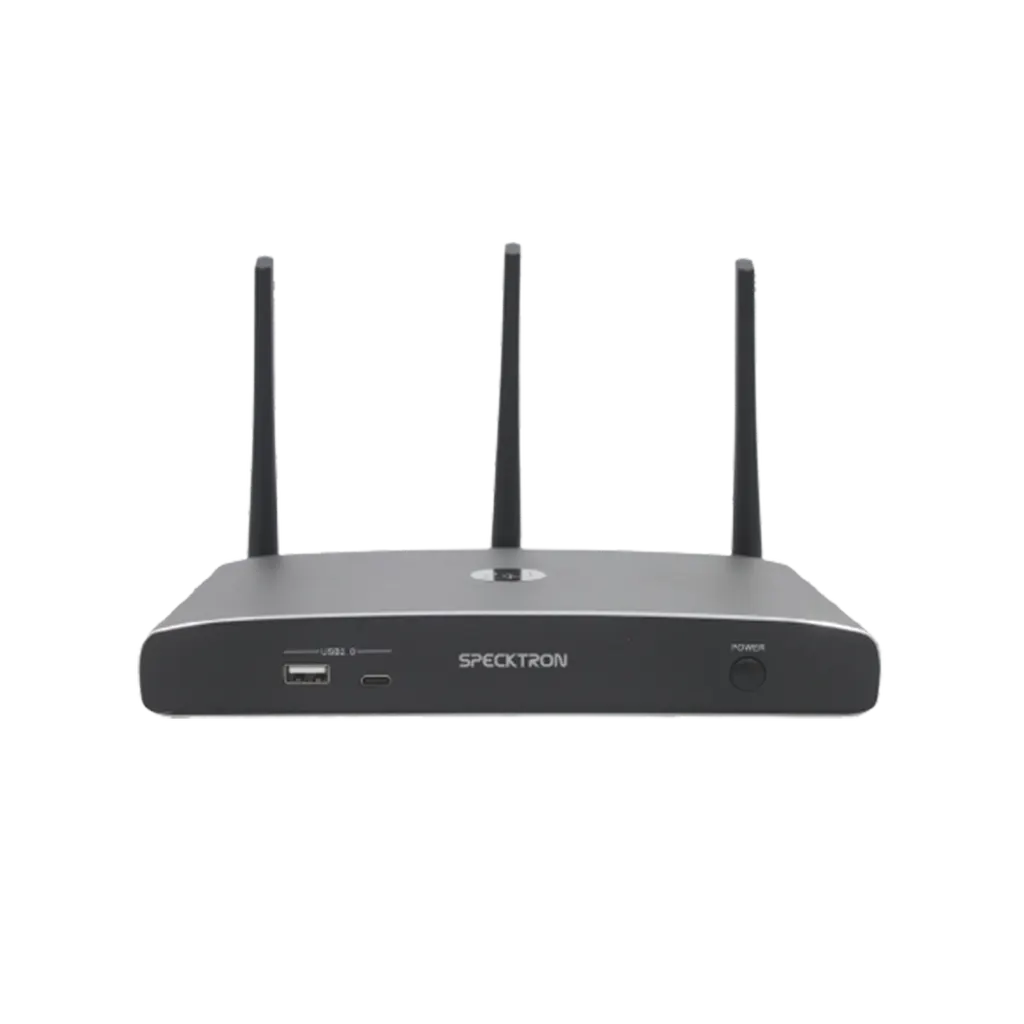
Specktron eHub Pro Wireless Presentation and Video Conferencing Hub

Connectivity
USB 3.0 ×3
WhatsApp
Priceon request
QuotationWithin 1 working day
DeliveryConfirmed with your quote, based on stock
PDFDownload datasheet (eHub Pro Brochure.pdf)
Overview

The Specktron eHub Pro is a wireless presentation and video conferencing hub for meeting rooms. It drives one HDMI display at up to 3840 × 2160 at 60Hz, takes screen sharing from AirPlay, Miracast and Chromecast devices, and allows up to 4 simultaneous presenters. Two RJ45 ports and PoE support suit boardrooms in West Bay and Lusail that run Teams, Zoom or Webex calls.

A wireless hub for meeting rooms that also runs video calls

The Specktron eHub Pro brings wireless screen sharing and room video conferencing into one unit. Presenters send content from laptops, tablets and smartphones to the display without a cable, and the same hub can link room cameras, microphones and speakers to Microsoft Teams, Zoom or Webex. A single HDMI output drives the screen at up to 3840 × 2160 at 60Hz.

The specifications that shape the purchase

  • Sharing capacity: up to 4 simultaneous presenters and 16 connected devices, with a layout of 4 main windows and 14 thumbnails.
  • Wireless performance: Wi-Fi 802.11 a/g/n/ac on 2.4 GHz and 5 GHz, a data rate up to 1200 Mbps, and latency under 100 ms.
  • Connectivity: two RJ45 LAN ports at 1000/100 Mbps, three USB 3.0 ports, one USB 2.0 port, two USB Type-C ports, and a 3.5mm audio jack.
  • Control and power: RS232 and a 3.5mm Phoenix terminal for control, with power from 12V DC or PoE (IEEE 802.3af) at 10W maximum.

Where it fits in Qatar

In a boardroom in West Bay, executives can host a Teams call with colleagues abroad while visiting staff share slides from their own devices onto the same screen. In a training centre in the Industrial Area, an instructor can switch between a local presenter and a remote Zoom session without changing cables. In a government meeting room in Msheireb, up to four departments can take turns presenting within the same session.

What to plan before installation

The hub measures 220 × 120 × 41 mm and weighs 1.0 kg, and it rises to 145 mm with the antenna attached, so allow clearance in the cabinet or behind the display. Decide early whether each room will use a DC adapter or a PoE switch port, because that changes cable routing. The rated operating range runs from -20°C to 60°C with 20% to 90% non-condensing humidity, which covers the heat of a Doha summer, but keep ventilation clear and avoid direct sun on the unit. SmartRooms Qatar offers a free site survey, and a multi-room rollout can be ordered through a purchase order or a government tender.

Request a quote

Tell us the number of rooms, the displays you use and the video platform you run, then request a quote from SmartRooms Qatar. Quotations are usually issued within one working day.

Highlights

  • Wireless screen sharing from laptops, tablets and smartphones
  • Up to 4 simultaneous presenters and 16 connected devices
  • Teams, Zoom and Webex integration with room peripherals
  • Single HDMI output up to 3840 × 2160 at 60Hz
  • Two RJ45 LAN ports and 12V DC or PoE power at 10W maximum

Room fit

Tell us the room size and platform (Teams, Zoom or BYOD) and we confirm the right combination with your quotation.

Estimated timeline

Quotation within 1 working day · delivery timing depends on stock availability, and we confirm it with your quotation.

Specifications

22 specifications · Source: manufacturer · checked Oct 2026
Specifications22
HDMI Output
1 × HDMI 19-pin Female Connector
Video Output Resolution
3840 × 2160 @ 60Hz, 3840 × 2160 @ 30Hz, 1920 × 1080 @ 60Hz, 1280 × 720 @ 60Hz
Format Compliance
HDMI 1.4 / HDMI 2.0
Wireless Video Capacity
1080p @ 60Hz (AirPlay, WirelessMedia App, Show-Me Button)
HDCP
HDCP 1.4 / HDCP 2.2
Audio Output
1 × 3.5mm Audio Jack
LAN Ports
2 × RJ45 (1000 Mbps / 100 Mbps)
USB Interface
USB 3.0 ×3, USB 2.0 ×1, USB Type-C ×2
Audio Input Support
AirPlay, Miracast, DLNA, Windows/Mac, USB/BT Speakerphone
Control Interface
3.5mm Phoenix Terminal, RS232 Interface
On-Screen Layout
4 Main Windows + 14 Thumbnail Windows
Simultaneous Connections
Up to 16 Devices
Frame Rate
20–60 FPS
Wireless Standard
Wi-Fi IEEE 802.11 a/g/n/ac
Frequency Band
2.4 GHz & 5 GHz
Data Rate
Up to 1200 Mbps
Dimensions
220 × 120 × 41 mm (220 × 120 × 145 mm with antenna)
Weight
1.0 kg (2.20 lbs)
Operating Temperature
-20°C to 60°C
Humidity
20% – 90% (Non-condensing)
Power Supply
12V DC / PoE (IEEE 802.3af)
Power Consumption
10W (Max)

Downloads

2 files from the manufacturer

Questions about eHub Pro

What is the Specktron eHub Pro used for?
It is a wireless presentation and video conferencing hub built for meeting rooms. Participants share screens from laptops, tablets and smartphones, and the same unit connects room cameras, microphones and speakers for calls on Microsoft Teams, Zoom or Webex. It suits boardrooms and training rooms where people present and join calls within the same session.
How many people can present at the same time?
Up to 4 presenters can share simultaneously, and the hub accepts up to 16 connected devices. The on-screen layout shows 4 main windows and 14 thumbnail windows, so a meeting with several sources, such as a ministry review pulling slides from different departments, stays organised on one display.
Which wireless sharing protocols does it support?
The unit supports AirPlay, Miracast, Chromecast and DLNA, plus sharing from Windows and Mac devices. It also offers a WirelessMedia app and a Show-Me button for 1080p wireless video at 60Hz. Presenters using compatible devices can share to the room display without a cable.
What is the highest resolution the HDMI output supports?
The single HDMI output supports 3840 × 2160 at 60Hz and 30Hz, plus 1920 × 1080 at 60Hz and 1280 × 720 at 60Hz. It complies with HDMI 1.4 and HDMI 2.0 and supports HDCP 1.4 and HDCP 2.2. Check the HDMI version and HDCP support of your display before ordering so that protected content plays correctly.
Does it work with Microsoft Teams, Zoom and Webex?
Yes. The manufacturer states full compatibility with Microsoft Teams, Zoom and Webex. The hub connects wirelessly to room cameras, microphones and speakers, so a boardroom in West Bay can join a Teams call with colleagues abroad without running USB cables between the table and the room equipment. Confirm your platform version with the SmartRooms Qatar team before installation.
Do I need a separate adapter, or can it run on PoE?
It runs on 12V DC or over PoE under IEEE 802.3af, with a maximum draw of 10W. Decide early whether each room will use a DC adapter or a PoE switch port, because that determines cable routing and the layout of the network cabinet. The SmartRooms Qatar team can advise during the free site survey.
How does it cope with Qatar's summer heat?
The rated operating range is -20°C to 60°C, with 20% to 90% humidity, non-condensing. That exceeds the 45°C-plus afternoons common in Doha summers, but good placement still matters. Keep the unit out of direct sunlight from windows, and leave rear ventilation clear if you place it inside a credenza or AV cabinet.
How secure is the wireless connection?
The manufacturer describes a dual-network architecture with advanced encryption for secure communication and stable performance. Wi-Fi runs on 802.11 a/g/n/ac across 2.4 GHz and 5 GHz, and the two RJ45 ports operate at 1000/100 Mbps. Ask your IT team to choose the network the hub joins, and keep guest networks separate from staff networks.
Is it suitable for a school ordering several units?
Yes, particularly for classrooms and lecture spaces where a teacher moves between a local presenter and a remote session. A private school in Al Wakrah fitting out several rooms can issue one purchase order (LPO) for matching units, and SmartRooms Qatar delivers to all eight municipalities of Qatar. Agree one wiring plan and room setup before ordering so every unit behaves the same way.
Can a room control system manage the unit?
The unit has an RS232 interface and a 3.5mm Phoenix terminal, so a room control system can be wired to it. The data sheet does not describe the command protocol, so confirm the command set with your integrator before specifying a control processor. Sharing your room plan with SmartRooms Qatar early helps check compatibility before purchase.
What are the dimensions, and where should it be mounted?
The hub measures 220 × 120 × 41 mm and weighs 1.0 kg, and it rises to 145 mm with the antenna attached. Allow room for the antenna and cable bends inside a cabinet or bracket. In a boardroom in Msheireb or Lusail, the unit can sit out of sight behind the display, with the antenna kept clear of metal enclosures. A free site survey helps confirm the position.
Can we buy it through a purchase order or a government tender?
Yes. SmartRooms Qatar accepts purchase orders (LPOs) and supports government tenders, including those on Monaqasat. Payment can be made by bank transfer, cheque or purchase order. When you request a quote, include the number of rooms and the video platform you use, and quotations are usually issued within one working day.

Similar models

Biamp MAX Connect Biamp MAX Connect 910-02278 Wireless Presentation System
CB
Clevertouch CleverCast Clevertouch CleverCast Wireless Presentation Device
Compatible
Clevertouch CleverHub 2 Clevertouch CleverHub 2 Wireless Presentation and Screen Sharing Device
Yes - CleverCast only NRCS
iiyama WP-D002C iiyama WP-D002C USB-C Wireless Presentation Dongle
Wireless presentation
iiyama WP-MEET03M iiyama WP-MEET03M Wireless Presentation Solution
Wireless presentation
Email Call




