





Thursday, 22 October 2026 · 11 Jumada I 1448 AH Sun – Thu · 9:00 – 18:00
+971 56 914 9477 العربية
WhatsApp

VB-WPS-001

ViewSonic ViewBoard Cast Button VB-WPS-001 USB-C Screen Sharing Button

WhatsApp
Priceon request
QuotationWithin 1 working day
DeliveryConfirmed with your quote, based on stock
PDFDownload datasheet (VB-WPS-001_Datasheet.pdf)
Overview

The ViewSonic VB-WPS-001 ViewBoard Cast Button is a USB-C button that casts a laptop screen to a ViewBoard or wireless presentation display with one click. No extra software is needed on Windows, macOS, Chrome OS or Linux, and WPA2-PSK encryption protects each session. It suits meeting rooms and classrooms in Doha and Lusail where presenters switch between laptops and need a quick start.

What the VB-WPS-001 does on the meeting table

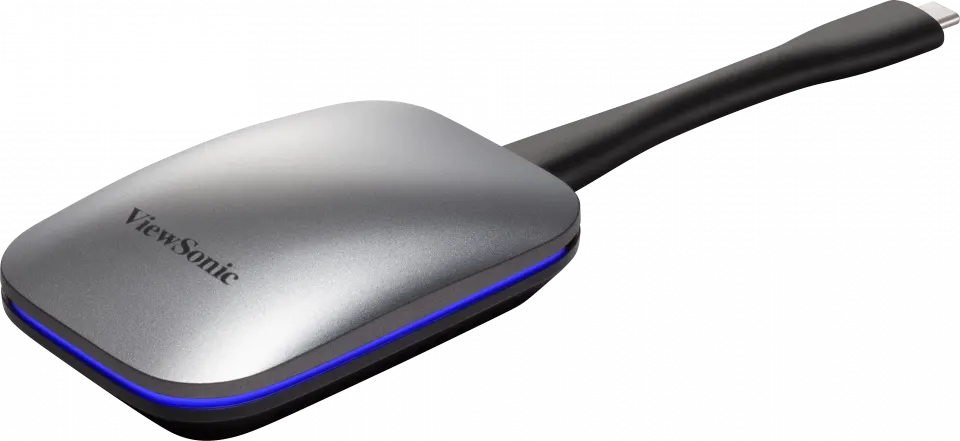
The ViewSonic VB-WPS-001 ViewBoard Cast Button is a small USB-C button for sharing a laptop screen with a ViewBoard or wireless presentation display. Connect it to the laptop, press it, and the screen appears on the display. Nothing has to be installed on the laptop first, which helps when a visiting presenter arrives with a machine the room has never seen.

At 203.8 x 61.8 x 25.5 mm and 103 g net, the button sits beside a laptop on a boardroom table or in a training room without taking space needed for papers and water glasses.

Connection, compatibility and capacity

  • Connector: USB3.1 Type-C, with a USB-C to USB Type-A adapter included for pairing.
  • Host requirement: a full-featured USB-C port with DisplayPort and Power Delivery support.
  • Wireless: dual-band 2.4GHz and 5GHz/5.8GHz, 802.11 a/b/g/n/ac.
  • Video: FHD at 30 fps, with extended desktop available.
  • Sources: unlimited simultaneous connections; four sources on screen with the ViewBoard Cast receiver, sixteen with the ViewBoard Cast Pro receiver.

Security and day-to-day use

Casting sessions are protected with WPA2-PSK encryption, which matters when staff share financial figures, internal files or student records in a room that also hosts visitors. Supported systems are Windows 7, Windows 8.1, Windows 10 or later, macOS 10.10 or later, Chrome OS and Linux. A light on the button shows its state: flashing blue while connecting, static blue when connected and ready to cast, and static white while casting.

Where it fits in Qatar

In a boardroom in West Bay, a senior team can present from its own laptops at the start of a meeting that links Doha with colleagues abroad, without swapping cables. In a private school in Al Wakrah fitting out new classrooms, the button lets teachers share lesson material from a staff laptop quickly. In a conference room near Hamad International Airport, event staff can bring each speaker's screen up in the few minutes before a session begins.

What to plan before you order

  • Check that every laptop has a full-featured USB-C port with DisplayPort and Power Delivery.
  • Decide how many sources must appear on screen together, and choose the Cast or Cast Pro receiver to match.
  • The operating range is 0 to 40 degrees Celsius at 20 to 90 percent humidity, non-condensing, so keep the button in air-conditioned rooms away from direct sun.
  • Doha summer temperatures can exceed 45 degrees Celsius, so never leave the button in a closed cabinet or near a sunlit window.

Send the SmartRooms Qatar team your room layout and laptop types, and we will reply with a quotation, usually within one working day. Request a quote for the VB-WPS-001 today.

Highlights

  • USB-C connector for laptops with DisplayPort and Power Delivery
  • FHD at 30 fps with extended desktop available
  • Dual-band 2.4GHz and 5GHz/5.8GHz Wi-Fi, 802.11 a/b/g/n/ac
  • WPA2-PSK encryption with unlimited simultaneous connections
  • Four sources on screen with Cast, sixteen with Cast Pro
  • Supports Windows, macOS, Chrome OS and Linux

Room fit

Tell us the room size and platform (Teams, Zoom or BYOD) and we confirm the right combination with your quotation.

Estimated timeline

Quotation within 1 working day · delivery timing depends on stock availability, and we confirm it with your quotation.

Specifications

21 specifications · Source: manufacturer · checked Oct 2026
Operation System1
Value
Windows® 7, Windows 8.1, Windows 10 or later; MacOS™ 10.10 or later; Chrome OS; Linux
System Requirement1
Value
Full-featured USB-C (DP & Power delivery)
WiFi Frequency/Authentication Protocol1
Value
2.4GHz & 5GHz/5.8GHz dual band802.11 a/b/g/n/AC ; WPA2-PSK
Resolution/Frame Rate1
Value
FHD/30 fps
Extended Desktop1
Value
Available
Simultaneous Connections1
Value
Unlimited
Number Of Sources Simultaneous On Screen1
Value
4(ViewBoard Cast receiver);16(ViewBoard Cast Pro receiver)
Touch Control Back1
Value
Support 10 points
Power1
Voltage
5V 650mA
Connector1
USB
USB3.1 Type-C
Operating Condition2
Temperature (º C)
32°F to 104°F (0°C to 40°C)
Humidity
20% ~ 90% non-condensing
Storage Condition2
Temperature (º C)
-10°C to 60°C
Humidity
20% ~ 90% non-condensing
Dimensions (W X H X D)2
Physical
203.8 x 61.8 x 25.5 mm (8.0*2.4*1.0 inch)
Packaging
260.5 x 42 x 103.5 mm (10.2*1.7*4.1 inch)
Weight2
Physical (Net)
103 g (0.23 lb)
Packaging (Gross)
331 g (0.73 lb)
Regulations1
Value
FCC, FCC ID, ICID, CE, RED, RCM, WPC
Quick Start Guide1
Language
English, Danish, Dutch, Finnish, French, German, Italian, Norwegian, Polish, Russian, Spanish, Swedish, Turkish, Indonesian, Vietnamese, Traditional Chinese, Simplified Chinese, Arabic
Package Contents1
Value
1. VB-WPS-0012. Quick Start Guide3. USB-C to USB Type-A adapter for pairing purpose

Downloads

4 files from the manufacturer

Questions about VB-WPS-001

What is the ViewSonic VB-WPS-001 used for?
It is a USB-C button that casts a laptop screen to a ViewBoard or wireless presentation display with a single press, so presenters can start without changing cables. It suits meeting rooms, classrooms and training rooms where presenters rotate. At 203.8 x 61.8 x 25.5 mm, it can stay on the table beside the laptop.
Does the laptop need software installed before casting?
No. The button is designed to cast without installing or downloading extra software on the laptop. Supported systems are Windows 7, Windows 8.1, Windows 10 or later, macOS 10.10 or later, Chrome OS and Linux. Pairing uses the USB-C to USB Type-A adapter included in the box. Ask your IT team to confirm USB-C ports are enabled on managed laptops.
Which laptop ports are required?
The manufacturer lists a full-featured USB-C port with DisplayPort and Power Delivery as the system requirement. Before ordering a batch for a school or office, check the USB-C specifications of each laptop model in use. SmartRooms Qatar can help you review your device list as part of the quotation process.
How many presenters can share at the same time?
Simultaneous connections are unlimited, but the number of sources shown on screen depends on the receiver. The ViewBoard Cast receiver shows up to four sources at once, while the ViewBoard Cast Pro receiver shows up to sixteen. For a lecture hall where several presenters share content together, choose the receiver that matches the number of sources you expect on screen.
Is the wireless connection secure?
Casting sessions use WPA2-PSK encryption, which helps protect shared content when visitors or external contractors are in the room. The button works over dual-band Wi-Fi at 2.4GHz and 5GHz/5.8GHz using 802.11 a/b/g/n/ac. Ask your IT team to review the network settings and passphrase policy before deployment, so the protection matches your internal security rules.
What resolution and frame rate does it cast at?
The VB-WPS-001 casts at FHD resolution with a frame rate of 30 fps, which suits slides, documents and most meeting video. Extended desktop mode is available, so a presenter can use a second screen for notes while the room sees the main content. If your presentations include fast motion or video, test them in the room before the event.
What do the light states mean?
A flashing blue light means the button is connecting to your device. A static blue light means it is connected and ready to cast. A static white light means casting is active. In a busy room, these states let a presenter see at a glance whether the screen is shared, without calling a technician during the session.
Can a boardroom in West Bay use it with a ViewBoard display?
The product is designed to cast to a ViewBoard or wireless presentation display, so a boardroom in West Bay with that type of display can use it. Directors can share their laptops at the start of a meeting without swapping cables. Before ordering, confirm the display model and room network with the SmartRooms Qatar team to choose the right setup.
Is it suitable for a classroom in Al Wakrah?
Yes, for classrooms where teachers and students move between devices. A teacher in Al Wakrah can cast lesson material from a staff laptop to the classroom display with one press. The button operates from 0 to 40 degrees Celsius, so it should be installed in air-conditioned classrooms. Schools fitting out several rooms can send their room list with the purchase order.
Can it stay near a window or in a hot room during Doha summers?
No, it should not. The operating range is 0 to 40 degrees Celsius with 20 to 90 percent non-condensing humidity, while Doha summer temperatures can exceed 45 degrees Celsius. Keep the button in an air-conditioned meeting room, away from direct sunlight on windows and out of closed cabinets. The storage range is wider, but operating conditions matter during use.
What comes in the box?
The package contains the VB-WPS-001 button, a Quick Start Guide and a USB-C to USB Type-A adapter for pairing. The Quick Start Guide is available in 18 languages, including Arabic and English. Confirm the quantity in your quotation so the number of buttons matches the number of rooms you plan to equip.
Can a government ministry order it through an LPO?
Yes. SmartRooms Qatar accepts purchase orders (LPOs) and government tenders, including Monaqasat, and accepts payment by bank transfer, cheque or purchase order. A ministry equipping several meeting rooms can send its room list and the required quantity of VB-WPS-001 buttons with the LPO request. The team usually returns a quotation within one working day.

Similar models

Biamp MAX Connect Biamp MAX Connect 910-02278 Wireless Presentation System
CB
Clevertouch CleverCast Clevertouch CleverCast Wireless Presentation Device
Compatible
Clevertouch CleverHub 2 Clevertouch CleverHub 2 Wireless Presentation and Screen Sharing Device
Yes - CleverCast only NRCS
iiyama WP-D002C iiyama WP-D002C USB-C Wireless Presentation Dongle
Wireless presentation
iiyama WP-MEET03M iiyama WP-MEET03M Wireless Presentation Solution
Wireless presentation
Email Call



