Thursday, 22 October 2026 · 11 Jumada I 1448 AH Sun – Thu · 9:00 – 18:00
+971 56 914 9477 العربية
WhatsApp
This model is discontinuedThe manufacturer no longer makes it. Request a quote and we will propose the closest current replacement.
Suggested replacements ↓

CP960

Yealink CP960 Microsoft Teams Edition Conference Phone (Discontinued)

WhatsApp
Priceon request
QuotationWithin 1 working day
DeliveryConfirmed with your quote, based on stock
PDFDownload datasheet (Yealink CP960 Datasheet.pdf)
Overview

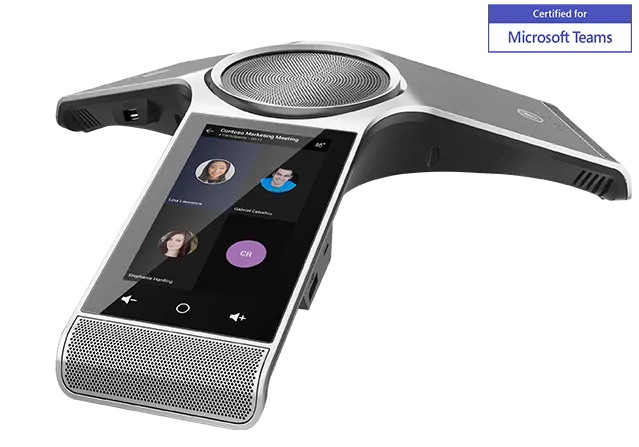
The Yealink CP960 Microsoft Teams Edition is a Teams conference phone for huddle rooms and mid-to-large meeting rooms. It has a 5-inch touchscreen, a 3-microphone array covering 360° with 6 m pickup, and optional wireless expansion mics reaching 20 m. The manufacturer has discontinued this model; request a quote for the CP965 Microsoft Teams Edition or another current equivalent for your Qatar meeting rooms.

What the CP960 Microsoft Teams Edition is for

The Yealink CP960 is a Microsoft Teams conference phone built for huddle rooms and mid-sized to large meeting rooms. Its Android-based system presents Teams features on a 5-inch multi-touch screen with 720x1280 resolution, so people can place Teams calls, join meetings and check Outlook calendar entries from the phone itself. The body measures 338 mm by 338 mm and stands 74 mm high, a footprint designed for a conference table.

Audio pickup, expansion and recording

A three-microphone array gives the CP960 a 6-metre, 360-degree pickup range, enough for participants seated around one table. For larger rooms, two CP Wireless Expansion Mic CPW90 units extend the capture radius to up to 20 metres without extra wiring. Full-duplex speakerphone operation, echo cancellation with a tail length of up to 320 ms, Yealink Noise Proof Technology and smart noise filtering keep voices clear when people talk at the same time.

The built-in 10 W speaker has a 56 mm diameter. For a training room, a 3.5 mm audio-out port connects an external loudspeaker. The phone records calls locally or through USB, with local recording time of up to 100 hours.

Connectivity and multi-unit setups

  • Network: one RJ45 10/100M Ethernet port, with Power over Ethernet to IEEE 802.3af class 3 and an optional YLPOE30 PoE adapter.
  • Wireless: built-in dual-band Wi-Fi on 2.4GHz and 5GHz (802.11a/b/g/n/ac) plus Bluetooth 4.0 for pairing a smartphone or PC.
  • Ports: two wired microphone ports, two USB 2.0 ports, a USB 2.0 Micro-B device port and a 3.5 mm audio-out port.
  • Multi-unit: one master CP960 can link up to three slave units in a star connection, and each slave works as an extra speaker and microphone.

Where it fits in Qatar

A consultancy office in Msheireb with a Teams-based project team can set the phone at the centre of its table, and use the expansion microphones when colleagues dial in from other cities. A training centre in Education City refitting a room for group courses can add an external loudspeaker and record sessions for review under its own recording policy. A hotel team in West Bay refitting a boardroom can run the phone from a single Ethernet point, which keeps cabling tidy at the table.

Planning for heat, power and a discontinued model

The operating range is -10 to +45 °C at 10 to 90 percent humidity, while storage is rated from -30 to +70 °C. Summer temperatures in Qatar often exceed 45 °C, so keep the phone inside air-conditioned rooms, away from sunlit windows and hot equipment cabinets, and confirm the room conditions with the SmartRooms Qatar team before installation. The package includes a 7.5 m CAT5E Ethernet cable, and PoE power consumption is 3.9 to 9.18 W.

Yealink's end-of-sale notice gives 30 September 2022 as the discontinuation date and names the CP965 Microsoft Teams Edition as the recommended replacement. Under Yealink's end-of-life policy, new features are not added after end of life, and hardware spares depend on local distributors and stock. If you are extending an existing CP960 deployment, ask about the current firmware and parts position as part of your quotation.

Request a quote from SmartRooms Qatar for the CP965 Microsoft Teams Edition or another current equivalent. Our team will confirm the room layout, network and accessories before you commit, and quotations are usually issued within one working day.

Highlights

  • 5-inch 720x1280 multi-touch screen
  • 3-microphone array with 6 m, 360-degree pickup
  • Two CPW90 wireless mics extend pickup to 20 m
  • Dual-band Wi-Fi (2.4GHz/5GHz) and Bluetooth 4.0
  • Power over Ethernet (IEEE 802.3af, class 3)
  • Up to four units in a master-and-slave star connection

Room fit

Tell us the room size and platform (Teams, Zoom or BYOD) and we confirm the right combination with your quotation.

Estimated timeline

Quotation within 1 working day · delivery timing depends on stock availability, and we confirm it with your quotation.
Specifications

Source: manufacturer · checked Oct 2026
The full specification and datasheet for this model are available on request; we send them with your quotation.

Downloads

42 files from the manufacturer
PDF Datasheets Yealink CP960 Datasheet.pdf 9.5 MB Yealink CP960 datasheets (PDF, 9.5 MB) PDF Manuals & guides Yealink_CP960_Quick_Start_Guide_V84_1.pdf 7.1 MB Yealink CP960 manuals & guides (PDF, 7.1 MB) PDF Manuals & guides · Opens on manufacturer site Administrator’s Guide for VP59 & SIP-T58 & CP96X IP Phones V86.11.pdf Yealink CP960 manuals & guides (PDF) URL Manuals & guides · Opens on manufacturer site Configuration Reference Guide Yealink CP960 manuals & guides (URL) URL Manuals & guides · Opens on manufacturer site Configuration Reference Guide Yealink CP960 manuals & guides (URL) PDF Manuals & guides · Opens on manufacturer site Instructions on Yealink's SDK for Yealink Android Phones_V1.4.pdf Yealink CP960 manuals & guides (PDF) PDF Manuals & guides · Opens on manufacturer site Yealink CP960 Quick Start Guide V84.10 (DE, ES, FR).pdf Yealink CP960 manuals & guides (PDF) PDF Manuals & guides · Opens on manufacturer site Yealink CP960 Quick Start Guide V84.10 (IT).pdf Yealink CP960 manuals & guides (PDF) PDF Manuals & guides · Opens on manufacturer site Yealink CP960 User Guide V85.1.pdf Yealink CP960 manuals & guides (PDF) PDF Manuals & guides · Opens on manufacturer site Yealink Configuration Encryption Tool User Guide V1.2.pdf Yealink CP960 manuals & guides (PDF) PDF Manuals & guides · Opens on manufacturer site Yealink Configuration Generator Tool User Guide V86.pdf Yealink CP960 manuals & guides (PDF) PDF Manuals & guides · Opens on manufacturer site Yealink IP Phone Features Integrated with BroadSoft UC-One User Guide V1.3.pdf Yealink CP960 manuals & guides (PDF) PDF Manuals & guides · Opens on manufacturer site Yealink IP Phones Deployment Guide for BroadSoft UC-One Environment V1.6.pdf Yealink CP960 manuals & guides (PDF) PDF Manuals & guides · Opens on manufacturer site Yealink SIP IP Phones Auto Provisioning Guide V1.0.pdf Yealink CP960 manuals & guides (PDF) PDF Manuals & guides · Opens on manufacturer site Yealink SIP IP Phones Auto Provisioning Guide V1.0.pdf Yealink CP960 manuals & guides (PDF) URL Manuals & guides · Opens on manufacturer site Yealink SIP IP Phones Configuration Guide for User Access Level Yealink CP960 manuals & guides (URL) URL Manuals & guides · Opens on manufacturer site Yealink SIP IP Phones Configuration Guide for User Access Level Yealink CP960 manuals & guides (URL) PDF Manuals & guides · Opens on manufacturer site Yealink SIP IP Phones XML Browser Developer's Guide V1.0.pdf Yealink CP960 manuals & guides (PDF) ZIP Manuals & guides · Opens on manufacturer site Yealink SIP Phones AutoProvisioning Template V85.5.zip Yealink CP960 manuals & guides (ZIP) PDF Manuals & guides · Opens on manufacturer site Yealink SIP Phones Integrated with Metaswitch CommPortal Phone Applications User Guide V1.6.pdf Yealink CP960 manuals & guides (PDF) PDF Manuals & guides · Opens on manufacturer site Yealink SIP Phones Integrated with Metaswitch Configuring Guide V1.5.pdf Yealink CP960 manuals & guides (PDF) ZIP Manuals & guides · Opens on manufacturer site Yealink_SIP_Phones_AutoProvisioning_Template_V85.5.zip Yealink CP960 manuals & guides (ZIP) PDF Certificates & compliance · Opens on manufacturer site Using Security Certificates on Yealink IP Phones V1.0.pdf Yealink CP960 certificates & compliance (PDF) 30 - Software & firmware · Opens on manufacturer site CP960 73.20.0.30 - Firmware & Release Note Yealink CP960 software & firmware (30 - FIRMWARE & RELEASE NOTE) 160 Software & firmware · Opens on manufacturer site CP960 73.86.0.160 - Firmware & Release Note Yealink CP960 software & firmware (160 - FIRMWARE & RELEASE NOTE) PDF Other documents · Opens on manufacturer site Calling and Connected Line Identification Presentation on Yealink IP Phones.pdf Yealink CP960 other documents (PDF) PDF Other documents · Opens on manufacturer site LDAP Directory on Yealink IP Phones.pdf Yealink CP960 other documents (PDF) PDF Other documents · Opens on manufacturer site OpenVPN Feature on Yealink IP Phones V1.0.pdf Yealink CP960 other documents (PDF) URL Other documents · Opens on manufacturer site PBX Partner Yealink CP960 other documents (URL) URL Other documents · Opens on manufacturer site PBX Partner Yealink CP960 other documents (URL) PDF Other documents · Opens on manufacturer site Recovery Mode on Yealink IP Phones V86.pdf Yealink CP960 other documents (PDF) PDF Other documents · Opens on manufacturer site Server Redundancy on Yealink IP Phones.pdf Yealink CP960 other documents (PDF) PDF Other documents · Opens on manufacturer site Using Enhanced DSS Keys on Yealink IP Phones V1.0.pdf Yealink CP960 other documents (PDF) PDF Other documents · Opens on manufacturer site Using Ribbon Features on Yealink IP Phones V1.0.pdf Yealink CP960 other documents (PDF) PDF Other documents · Opens on manufacturer site VLAN Feature on Yealink IP Phones.pdf Yealink CP960 other documents (PDF) PDF Other documents · Opens on manufacturer site Yealink 802.1X Authentication.pdf Yealink CP960 other documents (PDF) PDF Other documents · Opens on manufacturer site Yealink Limited Warranty for the European Union and UK .pdf Yealink CP960 other documents (PDF) PDF Other documents · Opens on manufacturer site Yealink Limited Warranty.pdf Yealink CP960 other documents (PDF) PDF Other documents · Opens on manufacturer site Yealink Regulatory Notice V1.2.pdf Yealink CP960 other documents (PDF) PDF Other documents · Opens on manufacturer site Yealink Regulatory Notice V1.2.pdf Yealink CP960 other documents (PDF) URL Other documents · Opens on manufacturer site Yealink SIP Phones Language Packs Yealink CP960 other documents (URL) URL Other documents · Opens on manufacturer site Yealink SIP Phones Language Packs Yealink CP960 other documents (URL)

Questions about CP960

Is the Yealink CP960 Microsoft Teams Edition still in production?
No. Yealink discontinued the CP960 Microsoft Teams Edition with an end-of-sale date of 30 September 2022, and the manufacturer no longer accepts new orders for it. The recommended replacement is the CP965 Microsoft Teams Edition. SmartRooms Qatar can quote a current equivalent or a compatible replacement, so send your room size, network setup and whether you need wireless expansion microphones.
What is the CP960 designed for?
It is a conference phone for huddle rooms and mid-sized to large meeting rooms, built around Microsoft Teams. It provides Teams calling, meeting functions and Outlook calendar access on a 5-inch touchscreen, with a three-microphone array for voice pickup. It suits organisations already running Teams that want a dedicated phone in a meeting room rather than a laptop-based speakerphone.
How large a room does the CP960 cover?
The built-in array picks up voices within 6 metres across 360 degrees, which typically covers a table of participants in a medium meeting room. Adding the two CPW90 wireless expansion microphones extends capture to a radius of up to 20 metres. For a boardroom in Doha where some participants sit at the far end of the table, plan microphone positions with a site survey before ordering.
Can I add wireless or wired microphones?
Yes. Two CP Wireless Expansion Mic CPW90 units are the add-on microphones designed for the CP960, and the wired CPE90 microphone is an optional accessory. The phone also has two wired MIC ports. The package includes the phone and a 7.5 m CAT5E Ethernet cable, while the microphones and the YLPOE30 PoE adapter are optional extras to confirm in your quotation.
Will the CP960 cope with Qatar's summer heat?
Its operating temperature range is -10 to +45 °C at 10 to 90 percent humidity, and storage is rated from -30 to +70 °C. Summer temperatures in Qatar often exceed 45 °C, so keep the phone in air-conditioned rooms, away from sunlit windows and hot equipment cabinets. If a room is not reliably air-conditioned, confirm the conditions with the SmartRooms Qatar team before installation.
How is the CP960 powered?
It is powered over Ethernet to IEEE 802.3af class 3, with power consumption of 3.9 to 9.18 W on PoE. If the network port does not supply PoE, the optional Yealink YLPOE30 PoE adapter is available. Plan one RJ45 network point per unit, and check that the switch or injector supports PoE before you order.
What network connections does it need?
The CP960 has one RJ45 10/100M Ethernet port and built-in dual-band Wi-Fi supporting 802.11 a/b/g/n/ac on 2.4GHz and 5GHz. It supports SIP v1 and v2, SIP server redundancy, IPv4 and IPv6, and VLAN QoS tagging. Ask your IT team to place the phone on a voice VLAN, since the phone supports 802.1p/Q tagging and Layer 3 ToS for call quality.
Can it connect to an external speaker for a training room?
Yes, through its 3.5 mm audio-out port, which extends the phone's audio into a larger training room. The built-in speaker has a 56 mm diameter and 10 W output, and the phone uses full-duplex speakerphone operation with echo cancellation. A training centre in Education City should test the external loudspeaker in the actual room before purchase.
Can the CP960 record calls and meetings?
It supports local and USB call recording, with local recording time of up to 100 hours. This can help a government office or training provider review internal calls. Recording must follow your organisation's own consent and retention policy, so agree those rules with staff before the phone is rolled out.
How many units can work together in one room?
Up to four CP960 units can link in a star connection, with one master and three slave units. Slave units work as extra speakers and microphones, which helps in a large room or a school hall. A school ordering several units can raise a purchase order (LPO), and SmartRooms Qatar will quote the full set together.
How are multiple CP960 phones managed across sites?
The phone supports auto-provisioning for deployment and configuration, and works with the Microsoft, Yealink and Unify Square device management platforms. Administrators can deploy and update phones centrally, which suits an organisation managing meeting rooms across Doha, Lusail and Al Khor. The local phonebook holds up to 1000 entries.
What should I plan before installing the CP960?
Choose a table position where the microphone array has clear pickup, away from loud equipment, and count one network point and power source per unit. The phone measures 338 x 338 x 74 mm and is finished in Space Silver. SmartRooms Qatar offers a free site survey, which is useful before ordering several units or deciding where wireless microphones should sit.

Suggested replacements

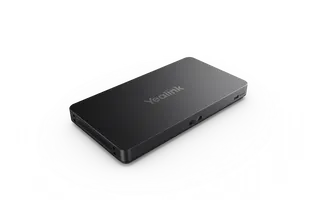
Yealink AVHub Yealink AVHub Meeting Audio & Video Processor
Accessories & cables
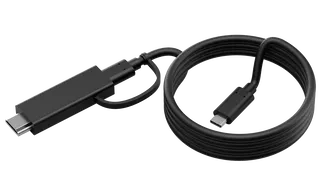
Yealink CB-MTOUCH-USBC Yealink CB-MTOUCH-USBC USB-C Cable with HDMI Adapter
Accessories & cables
Yealink ContentCamMount-USB Yealink ContentCamMount-USB Adjustable Mount for UVC30 Content Camera
Accessories & cables
Yealink CP925 Yealink CP925 HD IP Conference Phone
Accessories & cables
Yealink CP935W Yealink CP935W Wireless Touch-Sensitive HD Conference Phone
Accessories & cables

Similar models

Barco ClickShare Power Supply 100W Barco ClickShare Power Supply 100W, 100-Watt Video Conferencing Accessory
Accessories & cables
Biamp EasyConnect USB3-15-CC Biamp EasyConnect USB3-15-CC 5 m USB-C to USB-C Cable
Accessories & cables
Biamp EasyConnect USB3-3-AB Biamp EasyConnect USB3-3-AB USB 3.2 Gen 1 Type A to Type B Cable
Accessories & cables
Biamp EasyConnect USB3-3-AC Biamp EasyConnect USB3-3-AC USB 3.2 Gen 2 Type A to Type C Cable
Accessories & cables
Biamp EasyConnect USB3-3-BC Biamp EasyConnect USB3-3-BC USB 3.2 Gen 1 Type B to Type C Cable
Accessories & cables
Email Call