





Thursday, 22 October 2026 · 11 Jumada I 1448 AH Sun – Thu · 9:00 – 18:00
+971 56 914 9477 العربية
WhatsApp

DE300

Yealink DE300 4K AVoIP Decoder

WhatsApp
Priceon request
QuotationWithin 1 working day
DeliveryConfirmed with your quote, based on stock
PDFDownload datasheet (Yealink DE300 Datasheet.pdf)
Overview

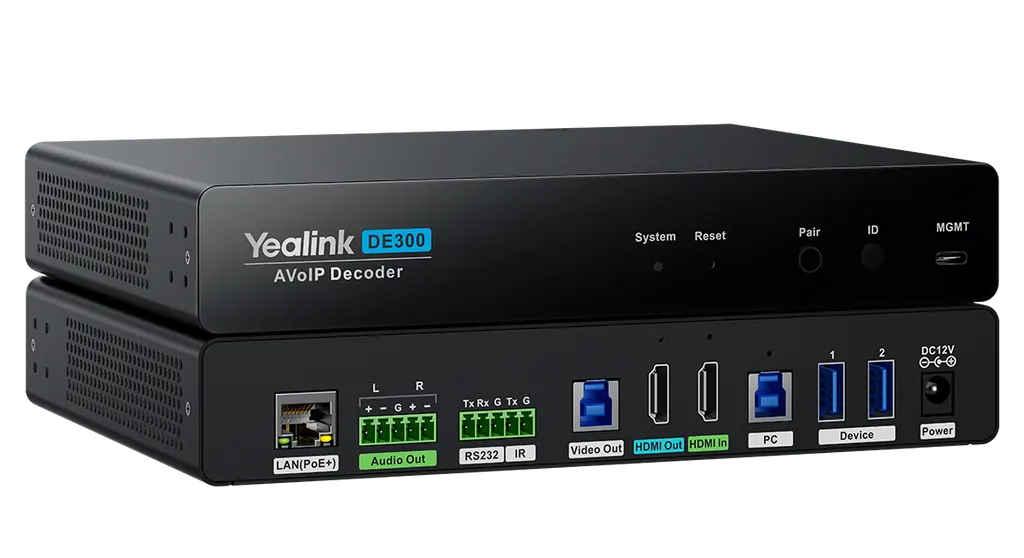
The Yealink DE300 is an AV over IP decoder that receives 4K@60Hz 4:4:4 video over standard Gigabit networks with about 16ms latency. It offers a 2×2 video matrix, a USB 3.0 capture output for streaming and RS232, CEC and IR display control. Supplied with a 12V adapter and PoE+ support, it suits boardrooms, lecture halls and control rooms in Doha and beyond. Request a quote from SmartRooms Qatar.

What the Yealink DE300 does in a room

The Yealink DE300 is an AV over IP decoder. It receives a video signal that has been sent across an Ethernet network and passes it to a display, recorder or PC at the far end. Instead of running long HDMI cables between floors or buildings, you carry the signal over structured network cabling. This suits multi-storey schools, government offices and campuses in Doha, where the source equipment and the screen are often in different rooms.

Picture quality and latency

The decoder handles up to 4K@60Hz with 4:4:4 chroma sampling and 8-bit colour depth, so fine text, charts and graphics stay crisp on large screens. Latency is less than one frame, which the product overview quotes as 16ms. Advanced HDR appears in its specifications. For live presentations between a Doha office and colleagues abroad, that low delay keeps the picture close to real time.

Switching, capture and control

  • 2×2 video matrix: flexible switching between sources and outputs for a dynamic setup.
  • USB 3.0 capture output: sends audio and video to a PC, or to an MTR Core room system as a secondary stream.
  • Display control: RS232, IR and CEC for power and volume on TVs and other devices.
  • USB ports: two USB 3.0 Type-A ports for local keyboard and mouse, plus USB over IP for remote device control.

HDCP 2.3 support allows encrypted UHD content to pass securely, which matters when protected media is shown in a government or corporate meeting room.

Network, power and environment

The DE300 is built for Gigabit networks and reaches 100 meters over CAT5e and above. It can be powered over PoE+ (802.3at, class 4) or with the supplied 12V/2A adapter. Average consumption is 8 W, with 8.5 W peak and 5.4 W in standby. When the encoder and decoder share the same local network, they discover and pair automatically, which keeps commissioning simple.

Operating temperature is -10 to +45°C at 10 to 95% humidity. Qatar summers can push ambient and enclosed cabinet temperatures past that range, so plan an air-conditioned comms room or a ventilated rack, and confirm the location with the SmartRooms Qatar team before fixing.

Where it fits in Qatar

  • A government ministry in West Bay linking a boardroom on one floor to a presentation source in a control room on another floor, with the decoder racked in the comms cabinet.
  • A university lecture hall in Education City that switches its display between the lecture source and a PC capture feed for recording.
  • A corporate office in Lusail connecting a central meeting room to a screen in the reception area, with CEC handling display power.

Planning your installation

The package includes a 1.8 m HDMI cable, two 2.5 m USB 3.0 Type-B to Type-A cables, a 1.0 m USB-C to Type-A management cable, an infrared emitter, Phoenix connectors, a mounting kit, three cable lockers, a 12V/2A power adapter and a quick start guide. Mounting options are rack, under-desk or flat. The unit measures 216 × 160 × 36 mm and weighs 1.24 kg. Plan the rack space or shelf, check that switch ports support gigabit PoE+ if you use it, and map the RS232 or IR cable route to each display.

Ready to add the DE300 to your project? Request a quote from SmartRooms Qatar. We offer a free site survey to check cable runs and network ports, quotations usually within one working day, and delivery to all eight municipalities of Qatar. We accept purchase orders and government tenders, so ministries, schools and companies can order through the route they already use.

Highlights

  • 4K@60Hz 4:4:4 video with 8-bit colour depth
  • Latency of less than one frame, quoted as 16ms
  • 2×2 video matrix with integrated video capture
  • RS232, CEC and IR display control
  • PoE+ (802.3at, class 4) or 12V/2A adapter power
  • Rack, under-desk or flat installation options

Room fit

Tell us the room size and platform (Teams, Zoom or BYOD) and we confirm the right combination with your quotation.

Estimated timeline

Quotation within 1 working day · delivery timing depends on stock availability, and we confirm it with your quotation.


Specifications

Source: manufacturer · checked Oct 2026
The full specification and datasheet for this model are available on request; we send them with your quotation.

Downloads

19 files from the manufacturer
PDF Datasheets Yealink DE300 Datasheet.pdf 270 KB Yealink DE300 datasheets (PDF, 270 KB) PDF Manuals & guides Quick Setup.pdf 15 KB Yealink DE300 manuals & guides (PDF, 15 KB) PDF Manuals & guides Yealink DE300 Quick Start Guide (EN, DE, FR, ES) V1.1.pdf 2.1 MB Yealink DE300 manuals & guides (PDF, 2.1 MB) URL Manuals & guides · Opens on manufacturer site Advanced Yealink DE300 manuals & guides (URL) URL Manuals & guides · Opens on manufacturer site Audio Yealink DE300 manuals & guides (URL) URL Manuals & guides · Opens on manufacturer site Basic Settings Yealink DE300 manuals & guides (URL) URL Manuals & guides · Opens on manufacturer site Video Yealink DE300 manuals & guides (URL) URL Manuals & guides · Opens on manufacturer site Yealink AVoIP Planning Guide Yealink DE300 manuals & guides (URL) DXF Drawings & CAD · Opens on manufacturer site DE300 CAD Drawings.dxf Yealink DE300 drawings & cad (DXF) STP Drawings & CAD · Opens on manufacturer site DE300 CAD Drawings.stp Yealink DE300 drawings & cad (STP) 35 - Software & firmware · Opens on manufacturer site DE300 316.435.0.35 - Firmware & Release Note Yealink DE300 software & firmware (35 - FIRMWARE & RELEASE NOTE) 50 - Software & firmware · Opens on manufacturer site DE300 316.435.0.50 - Firmware & Release Note Yealink DE300 software & firmware (50 - FIRMWARE & RELEASE NOTE) PDF Other documents Yealink Regulatory Notice V1.2.pdf 1.0 MB Yealink DE300 other documents (PDF, 1.0 MB) URL Other documents · Opens on manufacturer site AV Switch Compatibility Lists Yealink DE300 other documents (URL) URL Other documents · Opens on manufacturer site Network Best Practices Yealink DE300 other documents (URL) MP4 Other documents · Opens on manufacturer site Yealink AVoIP & Device Navigator Unboxing V1.0.mp4 Yealink DE300 other documents (MP4) URL Other documents · Opens on manufacturer site Yealink AVoIP White Paper Yealink DE300 other documents (URL) URL Other documents · Opens on manufacturer site Yealink CT200&CT300 HTTPS Control API Yealink DE300 other documents (URL) URL Other documents · Opens on manufacturer site Yealink CT200&CT300 Socket Control API Yealink DE300 other documents (URL)

Questions about DE300

What is the Yealink DE300 used for?
The DE300 is an AV over IP decoder that receives video sent across a Gigabit network and outputs it to a display, recorder or PC. It suits a school or office where the source sits in one room and the screen is in another, so long HDMI runs are avoided. It handles 4K@60Hz 4:4:4 video with latency of less than one frame, quoted as 16ms.
Does the DE300 support 4K at 60Hz with full colour?
Yes. It decodes up to 4K@60Hz with 4:4:4 chroma sampling and 8-bit colour depth, which keeps fine text and graphics sharp on large displays. Advanced HDR is also listed in its specifications. Before ordering, confirm that your source and display support the same resolution and format.
How many video inputs and outputs does it have?
It has one HDMI input and one IP input, plus one HDMI output and one video capture output. Audio is taken from a digital input de-embedded from the HDMI signal and leaves through a stereo analog output that can be balanced or unbalanced. A typical setup sends HDMI to a boardroom display and the capture output to a recording or streaming device.
Can the DE300 control a display's power and volume?
Yes. It offers RS232, IR and CEC control, covering operations such as power on and off and volume up and down on TVs and other devices. The IR output uses a carrier frequency of 34kHz to 42kHz, and the RS232 port supports up to 115200 baud. The package includes an infrared emitter and Phoenix connectors for control wiring. Check your display's control protocol before installation.
Can it send content to an MTR Core meeting room system?
Yes. The USB 3.0 Type-B capture output can send audio and video from the DE300 to a PC, or output it directly to an MTR Core as a secondary stream input. This lets a meeting room add a second content source, such as a lecture or presentation feed, without changing the main room system.
How does the decoder connect to the network?
The DE300 uses Gigabit Ethernet and supports multicast, DHCP, IPv4 and HTTPS. It transmits over distances of up to 100 meters on CAT5e and above. It can be powered by PoE+ (802.3at, class 4) or the supplied 12V/2A adapter. When the encoder and decoder share the same local network, they identify and pair automatically.
How much power does the DE300 draw?
Average consumption is 8 W, peak is 8.5 W and standby is 5.4 W. These figures help when you plan the load on a comms room UPS or check whether a PoE+ switch port can supply the unit. Confirm your switch port budget during the site survey.
Where can the DE300 be installed?
It supports rack, under-desk and flat installation, and the mounting kit includes mounting ears, a rack connection piece and screws. A typical Doha setup places it in a rack inside a government office comms room, away from the displays. The unit measures 216 × 160 × 36 mm and weighs 1.24 kg.
Can it be used in Qatar's hot summer conditions?
Its operating temperature range is -10 to +45°C with 10 to 95% humidity, and storage is rated from -30 to 70°C. Summer ambient and enclosed cabinet temperatures in Qatar can exceed 45°C, so install it in an air-conditioned room or a ventilated rack. Confirm the location with SmartRooms Qatar before fixing the unit.
We are fitting a new lecture hall at a university in Education City. What do we need to plan?
Plan one decoder per display path, with an HDMI feed from the source, an IP link across the network switch, HDMI to the display and control wiring via RS232, IR or CEC. The package includes a 1.8 m HDMI cable and USB 3.0 cables. Request a quote, and SmartRooms Qatar can run a free site survey to check cable routes and switch ports.
Can I connect a keyboard and mouse at the display end?
Yes. Two USB 3.0 Type-A ports support local KVM devices such as a keyboard and mouse, and USB over IP enables remote control of connected devices. This is useful for a presenter who needs to operate a remote PC from the lectern or boardroom table.
Our company is buying units for several Doha offices. Can we order with an LPO?
Yes. SmartRooms Qatar accepts purchase orders (LPOs), government tenders and payment by bank transfer, cheque or purchase order. Each display path needs its own decoder paired with an encoder on the same local network. Request a quote listing each office, and we will confirm the quantities and delivery to all eight municipalities of Qatar.

Similar models

Biamp MAX Connect Biamp MAX Connect 910-02278 Wireless Presentation System
CB
Clevertouch CleverCast Clevertouch CleverCast Wireless Presentation Device
Compatible
Clevertouch CleverHub 2 Clevertouch CleverHub 2 Wireless Presentation and Screen Sharing Device
Yes - CleverCast only NRCS
iiyama WP-D002C iiyama WP-D002C USB-C Wireless Presentation Dongle
Wireless presentation
iiyama WP-MEET03M iiyama WP-MEET03M Wireless Presentation Solution
Wireless presentation
Email Call


