





Thursday, 22 October 2026 · 11 Jumada I 1448 AH Sun – Thu · 9:00 – 18:00
+971 56 914 9477 العربية
WhatsApp

EN300

Yealink EN300 AV-over-IP Encoder for 4K Video

WhatsApp
Priceon request
QuotationWithin 1 working day
DeliveryConfirmed with your quote, based on stock
PDFDownload datasheet (Yealink EN300 Datasheet.pdf)
Overview

The Yealink EN300 is an AVoIP encoder that sends 4K@60Hz 4:4:4 video over Gigabit Ethernet with latency of 16 ms. It offers native Dante AV-A, automatic switching between sources and a USB Type-C port that charges a laptop at up to 60W. It suits Doha boardrooms and lecture rooms that route presentations across a network.

What the Yealink EN300 does in a meeting room

The Yealink EN300 is an AV-over-IP encoder. It takes a source such as a laptop connected to its USB Type-C port, or a device on one of its HDMI inputs, converts it into a network stream and sends that stream to decoders elsewhere in the building. A presentation can then appear on a display in another room without long HDMI cables running through walls and ceilings.

Video is encoded at up to 4K@60Hz with 4:4:4 chroma sampling and 8-bit colour depth. The datasheet describes latency as less than one frame, and the product page quotes 16 ms. Bit rate stays below 1Gbps, and the unit is designed for Gigabit networks.

Inputs, outputs and automatic switching

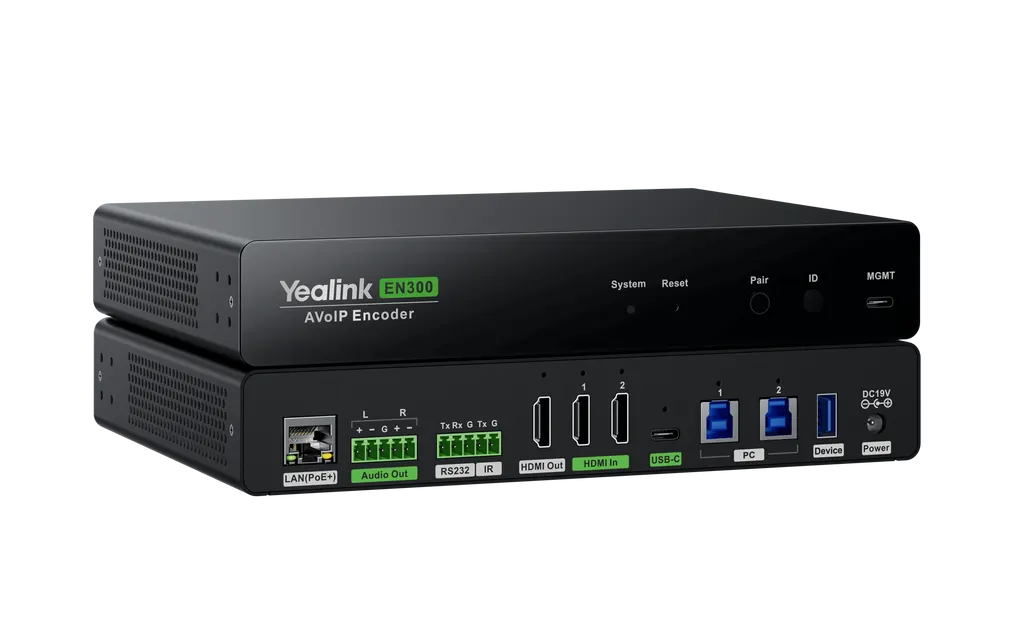
The unit offers two HDMI inputs and a full-featured USB Type-C port. Its outputs include an IP stream to the network, an HDMI output with CEC support, and a stereo analog audio output that can be balanced or unbalanced. When more than one source is connected, the EN300 switches between them automatically, so the presenter does not have to choose an input before each meeting.

  • Video: up to 4K@60Hz with 4:4:4 chroma and HDCP 2.3 support.
  • Audio: LPCM, AES67 and Dante formats, with native Dante AV-A support.
  • Control: RS232 at up to 115200 baud and an IR output for displays.
  • USB: USB Type-C for BYOM and content sharing, two USB 3.0 Type-B ports and one USB 3.0 Type-A port.

Dante, USB-C and remote control

Dante AV-A is built in, but Dante Ready features are switched on as needed, and the product page notes that the Dante AV function requires an extra license. Confirm the licence scope when you request a quote if your audio runs over a Dante network.

The USB-C port can supply up to 60W to a laptop while the laptop shares its screen, so a presenter needs only one cable. Multiple USB interfaces let a local keyboard and mouse control a connected computer, and USB over IP supports remote device control across the network.

Power, mounting and Qatar conditions

The EN300 accepts PoE+ (802.3at, class 4) or its 19V/4.74A power adapter. Average consumption is 11 W and standby draw is 4.5 W. It can be installed in a rack, under a desk, on a desktop, or on a wall or flat surface using the included mounting kit. At 216 x 160 x 36 mm and 1.24 kg, it is compact enough for a credenza.

The operating range is -10 to +45°C with 10 to 95% humidity. Summer temperatures in Doha regularly rise above 45°C, so avoid unventilated cabinets near windows or heat-producing equipment. An air-conditioned comms room or a ventilated AV rack is the safer choice.

Where it fits in Qatar

  • Boardrooms in West Bay or Msheireb: presenters connect at the table, and the stream reaches a display in an adjacent meeting room.
  • Lecture theatres in Education City: the lectern laptop feeds overflow rooms across the campus network.
  • Hotel conference floors in Lusail: one encoder per room, with control from a room panel over RS232 or IR.

Planning a Yealink EN300 installation

Before ordering, check that the switch ports are Gigabit and that cable runs use CAT5e or higher, up to 100 metres. Decide whether the encoder will be powered by PoE+ or by its adapter, and confirm where the supplied 1.8 m HDMI and USB-C cables will reach. Ask your network team to confirm that multicast and DHCP are permitted on the segment.

SmartRooms Qatar offers a free site survey to check cable routes, rack space and an air-conditioned location before installation. Quotations are usually issued within one working day, and we accept purchase orders (LPOs) and government tenders. Request a quote for the EN300 and include your room layout so the quotation reflects the cabling and power you need.

Highlights

  • 4K@60Hz 4:4:4 video with 16 ms latency
  • Native Dante AV-A; Dante Ready needs an extra license
  • Automatic multi-source switching across HDMI and USB-C
  • USB Type-C with up to 60W laptop charging
  • PoE+ (802.3at, class 4) or 19V/4.74A power adapter
  • Operating range -10 to +45°C, humidity 10 to 95%

Room fit

Tell us the room size and platform (Teams, Zoom or BYOD) and we confirm the right combination with your quotation.

Estimated timeline

Quotation within 1 working day · delivery timing depends on stock availability, and we confirm it with your quotation.


Specifications

Source: manufacturer · checked Oct 2026
The full specification and datasheet for this model are available on request; we send them with your quotation.

Downloads

18 files from the manufacturer
PDF Datasheets Yealink EN300 Datasheet.pdf 340 KB Yealink EN300 datasheets (PDF, 340 KB) PDF Manuals & guides Quick Setup.pdf 15 KB Yealink EN300 manuals & guides (PDF, 15 KB) PDF Manuals & guides Yealink EN300 Quick Start Guide (EN, DE, FR, ES) V1.2.pdf 2.3 MB Yealink EN300 manuals & guides (PDF, 2.3 MB) URL Manuals & guides · Opens on manufacturer site Advanced Yealink EN300 manuals & guides (URL) URL Manuals & guides · Opens on manufacturer site Audio Yealink EN300 manuals & guides (URL) URL Manuals & guides · Opens on manufacturer site Video Yealink EN300 manuals & guides (URL) URL Manuals & guides · Opens on manufacturer site Yealink AVoIP Planning Guide Yealink EN300 manuals & guides (URL) DXF Drawings & CAD · Opens on manufacturer site EN300 CAD Drawings.dxf Yealink EN300 drawings & cad (DXF) STP Drawings & CAD · Opens on manufacturer site EN300 CAD Drawings.stp Yealink EN300 drawings & cad (STP) 35 - Software & firmware · Opens on manufacturer site EN300 316.435.0.35 - Firmware & Release Note Yealink EN300 software & firmware (35 - FIRMWARE & RELEASE NOTE) 50 - Software & firmware · Opens on manufacturer site EN300 316.435.0.50 - Firmware & Release Note Yealink EN300 software & firmware (50 - FIRMWARE & RELEASE NOTE) PDF Other documents Yealink Regulatory Notice V1.2.pdf 1.0 MB Yealink EN300 other documents (PDF, 1.0 MB) URL Other documents · Opens on manufacturer site AV Switch Compatibility Lists Yealink EN300 other documents (URL) URL Other documents · Opens on manufacturer site Network Best Practices Yealink EN300 other documents (URL) MP4 Other documents · Opens on manufacturer site Yealink AVoIP & Device Navigator Unboxing V1.0.mp4 Yealink EN300 other documents (MP4) URL Other documents · Opens on manufacturer site Yealink AVoIP White Paper Yealink EN300 other documents (URL) URL Other documents · Opens on manufacturer site Yealink CT200&CT300 HTTPS Control API Yealink EN300 other documents (URL) URL Other documents · Opens on manufacturer site Yealink CT200&CT300 Socket Control API Yealink EN300 other documents (URL)

Questions about EN300

Who is the Yealink EN300 designed for?
The EN300 suits AV integrators and IT teams that need to move presentations from a source in one room to a display in another over an existing Ethernet network. In Qatar that typically means a boardroom in West Bay or a training room in a government building, where cable runs would be long or disruptive. It is an encoder, so it works alongside a display and a decoder rather than replacing them.
Does the EN300 support 4K at 60Hz with 4:4:4 colour?
Yes. The EN300 encodes video at up to 4K@60Hz with 4:4:4 chroma sampling and 8-bit colour depth. The datasheet describes latency as less than one frame, and the product page quotes 16 ms. Bit rate stays below 1Gbps, and the unit is designed for Gigabit networks. Check that the display and decoder at the receiving end also support the resolution you plan to send before you specify the system.
Do I need a license to use Dante with the EN300?
The EN300 has native Dante AV-A support, and Dante Ready features are activated on demand. The product page notes that the Dante AV function requires an extra license. SmartRooms Qatar can confirm the licence scope as part of your quotation, which matters most in conference halls or auditoriums where audio is routed over a Dante network. Audio also outputs as LPCM and AES67, with a stereo analog output available.
How does the USB-C port work for laptops in a meeting room?
The full-featured USB Type-C port supports 4K content sharing and wired BYOM connections, and it can supply up to 60W to a laptop. A presenter can share the screen and charge the laptop through one cable, which keeps setup at the start of each meeting simple and tidy.
Can the EN300 be powered over Ethernet?
Yes. The EN300 supports PoE+ under 802.3at, class 4, through its PoE port. If PoE is not available where the unit is installed, it can run from its 19V/4.74A power adapter, which is included. Average consumption is 11 W, with a peak of 11.5 W and standby draw of 4.5 W. Confirm that the switch port provides PoE+ before ordering so the power source is settled in the quotation.
What inputs and outputs does the EN300 have?
The hardware includes two HDMI inputs and one full-featured USB Type-C port for input. Outputs include an IP stream to the network, an HDMI output with CEC support, and a stereo analog audio output. It also has two USB 3.0 Type-B ports, one USB 3.0 Type-A port, an RS232 port, an IR output, a management port and a PoE port. List the connections each room needs before choosing the layout.
Can a touch panel control the EN300 in a hotel conference room in Lusail?
Yes, through the RS232 port, which is bi-directional and supports up to 115200 baud. The IR output has a carrier frequency of 34 kHz to 42 kHz and suits displays that respond only to infrared. Use RS232 if your control system supports serial commands. USB over IP also allows remote control of connected USB devices across the network.
How would the EN300 be used in a lecture theatre at Education City?
A lecturer connects a laptop to the USB Type-C port at the lectern, which charges the laptop and sends the presentation to the encoder. The encoder streams the picture across the campus network to displays in an overflow room or a review room. The 4K@60Hz output keeps slide text clear for students at the back of a large hall, and the unit switches between connected sources automatically, so no technician is needed during the session.
Can the EN300 be installed in a comms room in Doha during summer?
The operating range is -10 to +45°C with 10 to 95% humidity, and those are the limits to plan around. Summer temperatures in Doha can rise above 45°C, so an unventilated cabinet without cooling may exceed the range. Install the unit in an air-conditioned room or a ventilated rack, and confirm the cabinet temperature with SmartRooms Qatar before choosing the location.
Where can the EN300 be mounted in a boardroom?
The unit can sit on a desk, be installed under it, or be rack mounted, and the mounting kit covers wall, flat surface and rack fixing. At 216 x 160 x 36 mm and 1.24 kg, it fits a credenza or the space under a table in a boardroom in West Bay or Msheireb. The supplied cables are 1.8 m long, so place the encoder close to the table or lectern and use the six cable lockers to keep connections tidy.
What network does the EN300 need?
The EN300 is designed for Gigabit networks and supports Multicast, DHCP, IPv4 and HTTPS. Transmission distance is up to 100 metres over CAT5e and higher cabling. When the encoder and decoder sit on the same local network, they identify and pair automatically, so the system works plug and play once both are connected. Ask your network team to confirm that multicast traffic is allowed across the switches.
Can SmartRooms Qatar supply the EN300 on an LPO or government tender?
Yes. SmartRooms Qatar supplies the EN300 by quotation and accepts purchase orders (LPOs) and government tenders, including Monaqasat. Payment can be made by bank transfer, cheque or purchase order. Quotations are usually issued within one working day, and a free site survey can confirm cable routes and mounting before you place the order. The unit is covered by the manufacturer's warranty.

Similar models

Biamp MAX Connect Biamp MAX Connect 910-02278 Wireless Presentation System
CB
Clevertouch CleverCast Clevertouch CleverCast Wireless Presentation Device
Compatible
Clevertouch CleverHub 2 Clevertouch CleverHub 2 Wireless Presentation and Screen Sharing Device
Yes - CleverCast only NRCS
iiyama WP-D002C iiyama WP-D002C USB-C Wireless Presentation Dongle
Wireless presentation
iiyama WP-MEET03M iiyama WP-MEET03M Wireless Presentation Solution
Wireless presentation
Email Call


